The Tool Desk
Outbyte PC Repair FREERepair Windows errors before they cause bigger problemsFix Now →Outbyte Driver Updater FREEScan for outdated or missing drivers - takes under a minuteDriver Scan →Yes—PPSSPP can run PSP games such as God of War: Ghost of Sparta on modern PCs, phones, tablets, and other supported devices. Install PPSSPP separately, provide a compatible ISO or CSO file that you legally possess or are entitled to use, then launch it from the Games tab. Start with the default graphics settings, use Vulkan when available, and adjust one option at a time if performance or graphics are not right.
What you need before starting
- A device that can run PPSSPP: Windows, macOS, Linux, Android, or iOS.
- The PPSSPP emulator installed from its official distribution route.
- A PSP game file, usually an
.ISOor compressed.CSO, that you legally possess or are otherwise entitled to use. - Optional: a physical game controller, especially for action games such as God of War: Ghost of Sparta.
PPSSPP recreates the PlayStation Portable environment in software. It does not include commercial PSP games. You install PPSSPP separately, then open a compatible game file that you have obtained lawfully.
God of War: Ghost of Sparta is the relevant PSP example here—not every God of War game is a PSP title. PPSSPP’s compatibility reports list multiple versions of Ghost of Sparta as Perfect, although results can still vary with your device, operating system, graphics driver, and emulator settings.
As an Amazon Associate I earn from qualifying purchases.
Is using PPSSPP legal?
PPSSPP itself is an emulator for Sony PSP software. The legal issue generally concerns the game files and how they were obtained. Use your own PSP games or files you are legally entitled to use, and follow the copyright and format-shifting rules that apply in your country or region.
PSP games were distributed on UMD discs and as downloaded PSP content. For emulator use, the relevant data is commonly represented as an ISO or CSO file. A game downloaded to a real PSP can also be copied from that PSP and used with PPSSPP, subject to the laws and rights applicable to you.
#1 Best Overall

- ✅5-in-1 Accessories Kit for Sony PSP Series: This full protection bundle is universally compatible with Sony PSP 1000/2000/3000 handheld game consoles. The 5-piece set includes: 1 hard EVA carrying storage case, 1 crystal clear hard case, and 2-pack HD screen protectors, all of which fit Sony PSP 2000 & PSP 3000, and 1 Micro SD adapter compatible with Sony Memory Stick Pro Duo. One purchase covers all your needs for device storage, daily protection and storage expansion, no need to buy accessories separately.
- ✅Rugged Hard Carrying Case for 360° Shock & Drop Protection: Crafted from premium hard EVA material, this travel carrying case for Sony PSP 3000/2000/1000 delivers excellent pressure resistance, shock absorption and scratch resistance, effectively safeguarding your console from accidental drops, bumps and scratches during travel or daily storage. The soft flocked inner lining prevents abrasions to the device surface, and the built-in mesh pocket securely holds small accessories like charging cables and memory cards. It comes with a heavy-duty carabiner for easy attachment to backpacks, perfect for gaming on the go.
- ✅Crystal Clear Hard Case with Ergonomic Anti-Slip Grip Design: Custom-designed for Sony PSP 2000 and PSP 3000, the transparent PC hard case fully shields your device from dust, fingerprints and minor impacts while preserving the original classic look of your console. The handle areas adopt textured anti-slip grain design, which provides a firm and comfortable grip even with sweaty hands in summer, significantly reducing slipping risks and greatly improving gaming control accuracy. It also features a built-in kickstand for hands-free gaming and video playback.Please note that it is not compatible with L-shaped PSP plugs.
- ✅2-Pack HD Clear Screen Protector Films: Safeguard your Sony PSP 2000/3000 display from daily scratches, smudges and scuffs with our premium HD clear screen protector films. Featuring ultra-high light transmittance, they preserve the original screen clarity and vibrant color reproduction with no visual distortion, delivering a native gaming viewing experience. The pack includes 2 protectors and auxiliary installation tools for easy bubble-free application, offering double long-lasting protection for your screen.
- ✅Micro SD to Sony Memory Stick Pro Duo Storage Expansion Adapter: This converter works with Micro SD, Micro SDHC and Micro SDXC cards (supports up to 128GB, card NOT included) for Sony Memory Stick Pro Duo card slots. It fits perfectly with Sony PSP 1000/2000/3000, Sony digital cameras and camcorders. Please format your memory card on your device before first use to achieve optimal performance.
- Obtain the game through a lawful source or use a copy you own.
- Create or obtain a compatible PSP game file in a manner permitted where you live.
- Do not download commercial ISO or ROM files from unverified or unauthorized websites.
- Keep your original games and backup files organized.
Buying a used UMD does not automatically mean that downloading a separate ISO from an unrelated website is authorized. If you are uncertain about the rules in your jurisdiction, consult an appropriate local legal or copyright resource.
Install PPSSPP on your device
Android
Install PPSSPP using its official Android distribution route, then open the app and complete its storage setup.
Quick wins for a faster PC:
Repair Windows errors before they cause bigger problemsFix Now →Scan for outdated or missing drivers - takes under a minuteDriver Scan →Clear out junk files and repair common Windows errorsFree Scan →Android 11 and later restrict unrestricted access to external storage. PPSSPP therefore asks you to choose or create a folder that it can use. A practical arrangement is to create a folder named PSP at the root of accessible storage and grant PPSSPP permission to use it.
Your game ISO or CSO does not have to be inside the PPSSPP data folder. You can store games elsewhere, or in multiple locations, and select those locations from the Games tab. For example, you could transfer a file from a computer over USB into a memorable folder such as PSP ISO, then browse to that folder inside PPSSPP.
Windows
Install PPSSPP with the traditional Windows installer, or use the portable package if you prefer not to install it in the usual way. Start PPSSPP after setup. The Games tab can scan or browse to your game folder, and File > Load can be used to open an ISO or CSO directly.
macOS
Open the PPSSPP DMG and move the application to the Applications folder. Launch it, then use the Games tab or File > Load to select your legally obtained ISO or CSO file.
Free tools Windows power users keep installed
One-click scans. No signup required.
Linux
PPSSPP documents Linux installation options including Flatpak and AppImage. After installation, the launch process is the same: browse to the folder containing the PSP game file from the Games tab or file browser.
How to add and launch a PSP game in PPSSPP
- Start PPSSPP.
- Open the Games tab or PPSSPP’s file browser.
- Browse to the folder containing your legally obtained
.ISOor.CSOfile. - Select the game.
- Wait for the PSP startup sequence and game menu to appear.
- When possible, create a normal in-game save before relying on save states.
If you are using Android and the game is on a computer, connect the phone or tablet by USB, copy the file to a folder you can recognize, safely disconnect the device, and navigate to that folder from PPSSPP. If the game does not appear, use the app’s file browser to open the exact location instead of assuming that every storage folder is scanned automatically.
Rank #2

- Type:Joystick Stick Cap.
- Color:Black .
- Note:Not Compatible With PSP 1000 Console.
- If your joystick works ok but the thumbstick cover is missing -- Here are two replacements for you.
- Package:1Set of 2 PCS Joystick Caps for PSP 2000 3000 2004 3004.
Best PPSSPP settings for God of War: Ghost of Sparta
Begin with the default settings. PPSSPP’s graphics documentation indicates that most options are suitable at their defaults, and changing several performance options at once makes problems harder to diagnose.
Choose a graphics backend
Use Vulkan when it is available and stable on your device. OpenGL is the Android compatibility option and is worth trying if Vulkan causes crashes, rendering errors, or other problems.
Do these 3 things before closing this tab:
1Repair Windows errors before they cause bigger problems2Scan for outdated or missing drivers - takes under a minute3Clear out junk files and repair common Windows errorsAdjust rendering resolution gradually
- Start at the default rendering resolution.
- Play for several minutes and check that the game remains at full speed.
- If performance is stable, try a higher multiplier such as 2x or 3x.
- If the frame rate drops, return to 1x or the last stable setting.
Higher rendering resolutions can make 3D games look sharper, but they require more graphics power. Some PSP games were designed and tested at the PSP’s native 480×272 resolution. At higher resolutions, thin lines can sometimes appear in menus or HUD elements. A higher multiplier is therefore not automatically a better setting.
Do not begin with speed hacks
Leave speed hacks and frameskipping disabled while establishing a baseline. If the game is slow, reduce the rendering resolution first. Frameskipping can improve speed on some devices, but it reduces visual smoothness and may cause flickering. Speed hacks can also produce missing effects, black screens, or other rendering problems.
Change one option at a time, test the game, and note the previous value. That gives you a reliable way to undo a change that made the problem worse.
Set up controls
PPSSPP supports several input methods:
- On-screen touch controls on phones and tablets.
- A keyboard on desktop computers.
- USB or Bluetooth game controllers.
Open PPSSPP’s control settings and use Control Mapping to assign the PSP face buttons, shoulder buttons, D-pad, and analog stick. You can remap controls to match your preferred layout.
Touch controls are sufficient for testing and for short sessions, but the virtual buttons can feel cramped during an action game. If touchscreen buttons feel uncomfortable during combat, consider a Bluetooth game controller for Android. PPSSPP’s official hardware guidance supports Bluetooth controllers on Android, and a physical analog stick can make movement and camera control more comfortable. No particular brand or model is required for PPSSPP.
On a desktop, make sure the PPSSPP window has focus if button presses appear to do nothing. On a phone or tablet, pair the Bluetooth controller with the operating system first and confirm that PPSSPP recognizes it before changing the button assignments.
Save progress safely
PPSSPP provides both normal in-game saves and emulator save states. They are useful for different reasons.
Rank #3

- Type:Joystick Stick Cap.
- Color:Colorful.
- Note:Not Compatible With PSP-2000, PSP-3000 Series.
- If your joystick works ok but the thumbstick cover is missing -- Here are 7PCS replacements for you!
- Package:7 PCS of Colorful Joystick Cap for PSP-1001 PSP-1000.
| Save method | Best use | Important limitation |
|---|---|---|
| In-game save | Long-term progress and reliable backups | You must reach the game’s normal save point. |
| Save state | Quick retries and snapshots before difficult sections | Can have version-specific compatibility problems. |
| Rewind snapshot | Recovering from a recent mistake when enabled | Designed for short-term convenience, not as your only backup. |
Use an in-game save whenever possible, then use save states for convenience. PPSSPP supports configurable save-state slots, so keep more than one state when experimenting with a difficult section.
Regular in-game saves are compatible in both directions when changing PPSSPP versions, but save states created in a newer version may not work after downgrading. Before updating, changing installation methods, or reverting to an older build:
- Make a normal in-game save.
- Close the game cleanly.
- Back up the PPSSPP
PSPor Memory Stick data folder. - Keep the backup until you have confirmed that the new installation loads your progress.
Troubleshooting God of War in PPSSPP
The game is slow or does not run at full speed
- Reduce the rendering resolution, returning to 1x if necessary.
- Try the other graphics backend: Vulkan if OpenGL is active, or OpenGL if Vulkan is causing trouble.
- Turn off texture scaling.
- Disable speed hacks and test again.
- Use frameskipping only as a last resort, because it can make motion less smooth and may introduce flickering.
Performance is device-specific. A compatibility result for one Android GPU or operating-system version does not guarantee the same result on another phone, tablet, driver, or PPSSPP build.
The screen is black, effects are missing, or graphics flicker
Check that Buffered Rendering is enabled. Non-buffered modes and some speed-hack settings can cause incorrect graphics, black screens, missing effects, or flickering. Turn off speed hacks, test again, and reset PPSSPP settings if the problem continues.
Thin lines or visual glitches appear
Return temporarily to the default or 1x rendering resolution. Some games were designed around the PSP’s native 480×272 output, so higher internal resolutions can expose lines in menus and HUD elements. If the issue remains, disable speed hacks and test with the default graphics configuration.
What’s actually slowing this PC down?
Pick the symptom - the matching free tool is one click away.
The controller does not respond correctly
- Open Control Mapping and rebind the affected PSP buttons.
- Check analog-stick calibration.
- On desktop, click the PPSSPP window so it has focus.
- On mobile, confirm that the Bluetooth controller is paired and recognized by the operating system.
- Test one button at a time before changing the entire layout.
Android cannot access the PSP folder
Return to Settings > System > PSP Memory Stick. Choose or create the recommended PSP folder and grant PPSSPP permission to use it. This step is particularly important on Android 11 and later because Android’s storage restrictions prevent the app from simply accessing all external storage.
A save state fails after an update or downgrade
Try a normal in-game save instead of the affected state. Save states can depend on the PPSSPP version that created them, and a state made in a newer release may fail after a downgrade. Restore the backed-up PSP data folder if necessary, but do not overwrite your only copy before checking which files contain your most recent progress.
Independent reader supportYour contribution helps us test, update, and keep practical guides available for everyone.What compatibility should you expect?
God of War: Ghost of Sparta is a strong PPSSPP candidate: official compatibility reports identify multiple versions as Perfect. Treat that label as a useful compatibility indication, not a promise that every device will perform identically. The report includes differing results across Android GPUs and versions.
Rank #4
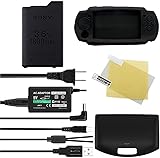
- 【Main Feature】Voltage: 3.6V, Capacity: 1800mAh;Rechargeable and no memory effect. Environmental Protection Rechargeable and no memory effect.Save money and protect the environment by using the rechargeable battery.
- 【User Tips】Battery need to be charged before first use.Fits right in the battery slot, and you cover it with the PSP battery cover. Recharges your PSP battery quickly, Best replacement for original PSP travel charger
- 【Perfect Kits Gadgets Bundle】Package included 1Pcs Replacement psp-110 battery, 5V 2A wall charger. As gift with package: 1 * PSP clear screen protector, PSP Data & Power USB Cable, PSP silicone protector case.
- 【Compatible Model】PSP-1000 Series PSP-1000, PSP-1001, PSP-1002, PSP-1003, PSP-1004, PSP-1005, PSP-1006, PSP-1007, PSP-1008, PSP-1009, PSP-1010, PSP-1000K, PSP-1000G1, PSP-1000G1CW, PSP-1000KCW. TFSeven Products is a Registered Trademark.
- 【Buy it Risk-Free】Comes with 24 months quality warranty and 30 days money back.We will do everything we can to ensure you are COMPLETELY satisfied with your purchase. Refunds , exchanges and all. You are Guaranteed to be happy. If you meet any issues, please let us know. We are always available to help you.
The safest starting point is:
- Default PPSSPP graphics settings.
- Vulkan when available and stable.
- OpenGL if Vulkan produces problems.
- Buffered rendering enabled.
- 1x rendering resolution until full-speed gameplay is confirmed.
- No speed hacks until you have a specific performance problem to solve.
In short: install PPSSPP, open a PSP game file you are legally entitled to use, start with defaults, and adjust only one setting at a time. Ghost of Sparta is broadly compatible, but your exact result depends on the device and graphics backend.
Frequently Asked Questions
Does PPSSPP come with PSP games?
No. PPSSPP emulates Sony PSP software and does not include commercial PSP games. You must provide a compatible ISO or CSO file that you legally possess or are otherwise entitled to use.
Which God of War game works with PPSSPP?
God of War: Ghost of Sparta is the PSP God of War example. Other God of War releases were made for different platforms and should not be assumed to work as PSP games in PPSSPP.
What are the best PPSSPP settings for God of War?
Start with default settings and use Vulkan when available. If performance is poor, reduce rendering resolution first. Try OpenGL on Android if Vulkan causes graphical problems or instability.
Can I use a controller with PPSSPP?
Yes. PPSSPP supports on-screen controls, keyboards, USB controllers, and Bluetooth controllers. A physical Bluetooth controller is optional but can be more comfortable for an action game.
Recommended Free Tools
Are PPSSPP save states safe?
Use the game’s normal save system for important progress. Save states are convenient for quick retries, but they can be affected by PPSSPP version changes and should not be your only backup.
The Bottom Line
PPSSPP can run PSP games such as God of War: Ghost of Sparta without supplying the games itself. Use a lawfully obtained ISO or CSO, configure Android storage permissions when required, begin with default graphics settings, and rely on normal in-game saves alongside—rather than instead of—save states.
Quick Recap
Product prices and availability are accurate as of the date/time indicated and are subject to change. Any price and availability information displayed on Amazon at the time of purchase will apply.




