What’s actually slowing this PC down?
Pick the symptom - the matching free tool is one click away.
ir50_lcs.dll is a legacy 32-bit component of Intel Indeo Video 5.0 LC, usually needed by an older game or multimedia application. The safest fix is to repair or reinstall the specific program that requested it, not to download a replacement DLL and copy it into a Windows system folder.
What ir50_lcs.dll is
ir50_lcs.dll belongs to the Intel Indeo video 5.0 LC codec family. Indeo was used by older CD-ROM software, games, training applications and AVI playback programs. Intel originally developed the technology, which was later distributed by Ligos.
It is not:
- A normal Windows 10 or Windows 11 system component
- A Visual C++ runtime
- A DirectX file
- A graphics-driver DLL
- A file that should normally be copied into
System32orSysWOW64 - A general-purpose COM component that should be registered with
regsvr32
The file is associated with a private application installation. For example, some legacy games include ir50_lcs.dll in their own redist folder alongside other Indeo files. That means the correct copy depends on the parent program and its codec package.
Reported file details
| Item | Reported information |
|---|---|
| File | ir50_lcs.dll |
| Description | Intel Indeo video 5.0 LC |
| Architecture | Win32, or 32-bit |
| Reported version | 5.0.63.38 |
| Reported size | 27,648 bytes, approximately 27 KiB |
| Historical copyright | Intel, 1994–1997 |
These are reported metadata values, not a universal specification. Another legitimate redistribution may contain a different build. Do not reject an original installer simply because its file size or version differs.
#1 Best Overall

- Tinier appearance with Transparent Case. For, compatible with Windows Laptops/PCs/Desktops, Apple Macs Laptops/PCs/Desktops , Android Smartphones / Tablets / etc. INCLUDES ($9.99 value) : Type A to Type C Adapter AND Type A to Micro USB Adapter, so that you can use with Type A, Type C or Micro USB devices.
- DIGITAL multi-streaming Bluetooth stereo splitter transmitter with switchable aptX / Low-Latency aptX / FastStream / SBC codecs, transmits to 2 (Two) Bluetooth Stereo Headsets / Receivers / Speakers. Works well wirelessly dual-streaming to, compatible with 2 (Two) sets (each set = 1 left + 1 right) Apple AirPods (or 2 sets different brand/models Bluetooth Headphones/Speakers, etc) for 2 persons.
- USB_Splitter_Pro enables user to easily toggle (using button) between classic aptX , low-latency aptX , FastStream or standard SBC codecs, to select the preferred codec (quality , latency) according to use case and the codecs supported by headset/receiver/speaker.
- Implements A2DP and AVRCP profiles, with remote controls for Next/Previous/Play/Pause. Bonus Feature allows user to add/remove (with button presses) VOIP for voice, eg with Skype. NOTE : VOIP can only be used for single person calling with 1 set headset. In one extremely tiny size and light-weight package at 16mm X 14mm X 7 mm and 2g (0.63” X 0.55” X 0.28” and 0.07oz) with high performance and unique features.
- Plug and Play : Put your 1st device in pairing mode, plug USB_Splitter into PC/laptop/Android Smartphone, USB_Splitter auto pairs and connects to your 1st stereo headset/receiver/speaker. Put 2nd device in pairing mode, press button on USB_Splitter to pair, connect to 2nd device. USB_Splitter streams to both 1st and 2nd devices.
Why the error appears
Typical messages include:
- “This application failed to start because ir50_lcs.dll was not found.”
- “The program can’t start because ir50_lcs.dll is missing from your computer.”
- “The file ir50_lcs.dll is missing or corrupted.”
- “Error loading ir50_lcs.dll. The specified module could not be found.”
- “The file is not designed to run on Windows.”
The causes are usually straightforward:
- The game or application was incompletely installed.
- The program was moved without its
redistor codec files. - Antivirus software quarantined the file.
- A disk cleanup removed part of an old installation.
- A 32-bit program is missing its private 32-bit codec.
- The file exists, but another codec dependency is missing.
- The old codec cannot operate correctly on the current Windows version.
Start with the application, not with Windows system folders.
Fix 1: Identify the program that needs the file
Before changing anything, identify the executable producing the error.
- Close the error message.
- Note the name of the game or application in the window title, shortcut, Start menu entry or launcher.
- Right-click the shortcut and select Properties.
- On the Shortcut tab, inspect Target.
- Select Open File Location if that button is available.
- Look for folders named
redist,codec,video,mediaor similar.
If the program is installed through Steam or another launcher, open its library entry and use the installed-files or local-files option to reach the installation directory.
Do not assume that the first program you recently opened is responsible if several old applications are installed. The error may identify the executable or application name more clearly than the DLL message does.
Fix 2: Verify or repair the original application
This is the most likely solution when the error began after installing, updating, moving or restoring an old game.
For a Steam game
- Open Steam.
- Open Library.
- Right-click the affected game.
- Select Properties.
- Select Installed Files.
- Choose Verify integrity of game files.
- Wait for the process to finish.
- Start the game again from Steam.
Verification should restore files that belong to the game’s official installation, including private redistributable files when they are part of the depot.
If verification reports no problem but the game still fails:
- Open the game’s installation folder.
- Look for a
redistor installer folder. - Run the supplied installer if present.
- If the problem continues, uninstall the game from Steam.
- Restart Windows.
- Install the game again to its normal library location.
- Launch it once before applying compatibility settings or unofficial patches.
For a desktop application
- Press Windows key, type Control Panel, and open it.
- Select Programs.
- Select Programs and Features.
- Select the affected application.
- Choose Repair or Change if available.
- Follow the installer prompts.
- Restart the application.
On Windows 11, some supported applications also expose repair controls here:
The Tool Desk
Outbyte Driver Updater FREEScan for outdated or missing drivers - takes under a minuteDriver Scan →Outbyte PC Repair FREERepair Windows errors before they cause bigger problemsFix Now →- Open Settings.
- Select Apps.
- Select Installed apps.
- Find the application.
- Select the three-dot menu.
- Choose Advanced options.
- Select Repair.
On Windows 10, use Settings > Apps > Apps & features, select the application, choose Advanced options, and select Repair when available.
If there is no repair option, uninstall the application and reinstall it from the original vendor installer, original disc media or official store library. Keep the complete installer rather than copying a single DLL from another computer.
How to tell whether this worked
The repair worked if:
- The program starts without the
ir50_lcs.dllmessage. - Its video or introductory sequences play normally.
- No additional Indeo file is reported as missing.
- The launcher does not immediately reacquire the same file.
If a new file is requested, do not download that file separately. The application may need the complete Indeo codec set, including related files such as ir50_32.dll, ir50_qc.dll or ir50_qcx.dll.
Fix 3: Check Windows Security quarantine
Antivirus software can remove an old codec because legacy binaries may have poor reputation, outdated signing information or exploitable behavior. Age alone does not prove that a file is malicious, but you should not restore a quarantined file automatically.
Quick wins for a faster PC:
Repair Windows errors before they cause bigger problemsFix Now →Fix the driver behind crashes, sound loss and screen glitchesFind Drivers →Clear out junk files and repair common Windows errorsFree Scan →- Open Start.
- Type Windows Security.
- Open it.
- Select Virus & threat protection.
- Select Protection history.
- Review entries related to the affected game or application.
- Expand an entry to inspect its path and detection details.
Restore or allow the file only when all of the following are true:
- It came from the original application installer or an authenticated vendor package.
- Its path is inside the expected application directory.
- You have confirmed that the game or application genuinely requires it.
- A current security scan does not identify the complete installation as unsafe.
If the quarantined file came from an unofficial DLL archive, leave it quarantined and remove the downloaded package. Reinstall the parent program from its legitimate source instead.
If malware cleanup removed files from the application directory, scan the entire installation and reinstall the program. Restoring one file may leave other unwanted or damaged files behind.
Rank #2
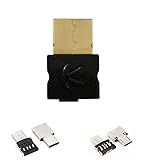
- For Windows Laptops/PCs/Desktops, Apple Macs Laptops/PCs/Desktops , Android Smartphones / Tablets / etc. INCLUDES ($9.99 value) : Type A to Type C Adapter AND Type A to Micro USB Adapter, so that you can use with Type A, Type C or Micro USB devices.
- DIGITAL multi-streaming Bluetooth stereo splitter transmitter with switchable aptX / Low-Latency aptX / FastStream / SBC codecs, transmits to 2 (Two) Bluetooth Stereo Headsets / Receivers / Speakers. Works well wirelessly dual-streaming to 2 (Two) sets (each set = 1 left + 1 right), compatible with Apple AirPods (or 2 sets, compatible with Bose Bluetooth Headphones/Speakers, or 2 sets different brand/models Bluetooth Headphones/Speakers, etc) for 2 persons.
- USB_Splitter_Pro enables user to easily toggle (using button) between classic aptX , low-latency aptX , FastStream or standard SBC codecs, to select the preferred codec (quality , latency) according to use case and the codecs supported by headset/receiver/speaker.
- Implements A2DP and AVRCP profiles, with remote controls for Next/Previous/Play/Pause. Bonus Feature allows user to add/remove (with button presses) VOIP for voice, eg with Skype. NOTE : VOIP can only be used for single person calling with 1 set headset. In one extremely tiny size and light-weight package at 16mm X 14mm X 7 mm and 2g (0.63” X 0.55” X 0.28” and 0.07oz) with high performance and unique features.
- Plug and Play : Put your 1st device in pairing mode, plug USB_Splitter into PC/laptop/Android Smartphone, USB_Splitter auto pairs and connects to your 1st stereo headset/receiver/speaker. Put 2nd device in pairing mode, press button on USB_Splitter to pair, connect to 2nd device. USB_Splitter streams to both 1st and 2nd devices.
Fix 4: Keep the 32-bit codec with the 32-bit application
ir50_lcs.dll is a 32-bit component. A 32-bit game can require a private 32-bit codec even when Windows itself is 64-bit.
This does not mean you should copy the file into both Windows system directories. The correct location is normally the application’s own directory, and only when the file came from that application’s installer.
To check the location:
- Right-click the game or application shortcut.
- Select Properties.
- Select Open File Location.
- Find the executable that launches the program.
- Confirm whether the supplied Indeo files are beside it or in an application subfolder such as
redist.
If the original installer places ir50_lcs.dll beside the executable, leave it there. If it uses a subfolder, preserve the installer’s layout. Do not mix files from different Indeo packages.
On 64-bit Windows, System32 conventionally contains 64-bit system binaries and SysWOW64 contains 32-bit system binaries. Those names are confusing, but neither directory is a general storage location for third-party legacy codec files.
Windows often searches the executable’s directory before other locations. That is why placing a legitimate application-specific DLL beside the correct executable can work, while placing an arbitrary copy in a system directory can cause conflicts or security problems.
PC Slower Than It Used to Be?
A free scan shows the junk files, broken settings and background clutter dragging Windows down - then fixes them in one click.Free scan · Windows 10 & 11Outdated Drivers Are Slowing You Down
One free scan finds every outdated or missing driver and matches the right update for your exact hardware.Free scan · exact hardware matchFix 5: Do not use regsvr32 for this file
regsvr32 registers DLLs that expose registration entry points such as DllRegisterServer. It is intended for applicable self-registering components, not as a universal missing-DLL repair command.
There is no verified basis for registering ir50_lcs.dll. Do not run commands such as:
regsvr32 ir50_lcs.dll
regsvr32 /u ir50_lcs.dll
They will not recreate missing codec dependencies, repair an incomplete game installation or make an incompatible 32-bit codec work on a current system.
If the error says “specified module could not be found” even though ir50_lcs.dll is visible, the missing item may be a dependency. Reinstall the complete application codec package instead of trying to register individual files.
Fix 6: Repair Windows components only when Windows itself is damaged
Windows system repair is a secondary step. It is useful when Windows shows broader corruption, but it normally will not restore a third-party DLL that was never a protected Windows component.
Use an elevated Command Prompt:
- Open Start.
- Type Command Prompt.
- Right-click Command Prompt.
- Select Run as administrator.
- Select Yes at the User Account Control prompt.
- Run:
DISM /Online /Cleanup-Image /RestoreHealth
- Wait for DISM to complete.
- Then run:
sfc /scannow
- Wait until the scan reaches 100 percent.
- Restart Windows.
- Test the affected application again.
Run DISM before SFC. DISM repairs the Windows component store that SFC uses as a source.
These commands are relevant if Windows has other symptoms, such as damaged built-in applications, repeated system-file errors or a failed Windows update. If only one old game reports ir50_lcs.dll, return to that game’s installer rather than repeating SFC and DISM.
When manually hunting through Windows components and repeating scans makes it difficult to see what changed, Outbyte PC Repair can provide a free scan showing reported issues, while repair is handled by the full version. It is optional, and reinstalling the affected game or application remains the definitive fix for this private codec file.
Free tools Windows power users keep installed
One-click scans. No signup required.
Fix 7: Check drivers only for a separate graphics problem
A graphics-driver update is not a logical first-line fix for ir50_lcs.dll. This is a legacy video codec file, not a modern display-driver component. Update drivers only if the application also reports display failures, crashes after the video begins or a separate Device Manager problem.
To check Device Manager:
- Right-click Start.
- Select Device Manager.
- Expand Display adapters.
- Right-click the listed graphics adapter.
- Select Properties.
- Open the Driver tab.
- Check the provider and driver status.
- If an update is needed, select Update Driver.
- Choose Search automatically for drivers, or use the graphics hardware manufacturer’s official support package.
- Restart Windows.
Do not remove the display adapter or install a random driver simply because the codec error names Intel. The historical Intel reference in ir50_lcs.dll does not identify your current graphics hardware.
When checking several devices manually becomes repetitive, Outbyte Driver Updater can scan for reported driver issues, while driver installation is handled by the full version. It is optional and should not replace reinstalling the application that owns ir50_lcs.dll.
Fix 8: Do not expect Windows Features to install Indeo
Windows Features does not provide a reliable current standalone installation for ir50_lcs.dll.
Rank #3

- Size: 5" - Engineered from premium, heavy-duty vinyl that is 100% waterproof and weatherproof—built to survive everything from coffee spills to the great outdoors.
- Perfectly sized for maximum visibility on PC cases, laptop lids, and tablets without crowding your hardware.
- Multi-Surface Compatibility: High-tack adhesive designed to stick to notebooks, water bottles, and any flat or slightly curved tech gear with zero peeling.
- Indoor & Outdoor Ready: UV-resistant ink ensures these stickers won’t fade, whether they’re on your rig in the office or the bumper of your car.
- American Craftsmanship: Proudly designed and manufactured in the USA, ensuring high-fidelity colors and precision-cut edges for a professional look. A must-have collection for gamers, coders, and science lovers looking to personalize their workspace with high-end decals.
You can inspect optional Windows components without changing them:
- Open Start.
- Type Windows Features.
- Select Turn Windows features on or off.
- Review the available entries.
- Do not enable unrelated features in the hope that they will recreate the missing application codec.
- Select Cancel if no relevant feature is clearly identified.
Installing media features, .NET, DirectX or Visual C++ packages may be appropriate for another error from the same application, but none should be treated as a substitute for the original Indeo package unless the application’s official installer specifically requires it.
Fix 9: Handle “not designed to run on Windows”
This message usually means the loader rejected the file or one of its dependencies. Possible causes include:
- A damaged or truncated DLL
- A 32-bit and 64-bit architecture mismatch
- Files mixed from unrelated Indeo packages
- An incomplete extraction
- An incompatible legacy codec on the current Windows version
- A malicious replacement from an untrusted source
The correct response is to remove the questionable application files and reinstall the complete program from its original source. Do not solve the message by downloading another copy of the same-named DLL.
Do these 3 things before closing this tab:
1Clear out junk files and repair common Windows errors2Scan for outdated or missing drivers - takes under a minute3Repair Windows errors before they cause bigger problemsIf the official installer itself cannot run:
- Right-click the installer.
- Select Properties.
- Open the Compatibility tab.
- Select Run this program in compatibility mode for.
- Choose an older Windows version only if the application vendor recommends it.
- Select Apply, then OK.
- Run the installer as administrator.
Compatibility mode can help an old installer, but it cannot manufacture a missing DLL or guarantee that Indeo will work. If the program still depends on obsolete codec behavior, use an appropriate older Windows environment or a supported virtual machine. An official remastered or updated edition is preferable when available.
What not to do
Avoid these common responses:
- Do not download
ir50_lcs.dllfrom a random DLL website. - Do not copy an unverified file into
System32. - Do not copy it into
SysWOW64merely because the application is 32-bit. - Do not mix Indeo files from different games or installers.
- Do not run
regsvr32as a generic repair step. - Do not assume that one reported version works for every application.
- Do not restore an antivirus quarantine item without checking its original source.
- Do not expect SFC to restore a third-party application file.
- Do not install graphics drivers, DirectX or Visual C++ packages solely because this filename appears.
- Do not label the file malware only because it is old or appears in a legacy game folder.
The safe sources are the affected program’s original installer, its authenticated store or launcher files, the application vendor’s support package and legitimate installation media.
Frequently asked questions
Is ir50_lcs.dll part of Windows 11 or Windows 10?
It is not a current ordinary Windows component. It is a legacy Intel Indeo application file and should be restored through the program that needs it.
Which game installed ir50_lcs.dll?
The filename is not unique to one program. Some older games ship it in a private redist directory, while other legacy multimedia applications may use their own Indeo package. Identify the executable and inspect its installation folder.
Recommended Free Tools
Should I copy it next to the game executable?
Only if that is how the original installer supplied it. A legitimate application-specific copy belongs in the layout created by the application installer. Do not copy an arbitrary download into the folder.
Why does the error remain when the file is present?
The program may be missing another Indeo dependency, may be loading an incompatible architecture or may be unable to run the obsolete codec on the current Windows version. Reinstall the complete package rather than replacing one file.
Does a 64-bit Windows installation need a 64-bit version?
No. A 32-bit application normally needs the 32-bit codec build supplied with that application. Installing 64-bit Windows does not make a 64-bit replacement appropriate.
Can I fix it with regsvr32?
Not as a general repair. regsvr32 is for DLLs designed to register themselves, and there is no verified basis for treating ir50_lcs.dll as such a component.
Is a standalone download safe?
There is no current official standalone Microsoft download identified for this file. A random copy may contain malware, use the wrong build or architecture, and still leave the parent application incomplete. Restore it from the original application package.
Is Intel Indeo supported on current Windows versions?
Indeo is obsolete, and historical documentation records limited support on newer Windows versions. Even with the correct files, an old program may require compatibility settings or an older supported environment.
What if reinstalling the program still fails?
Check antivirus history, confirm that all redist and codec files were installed, and look for a separate dependency message. Then try compatibility settings or an older supported environment. If the application has an official updated edition, use that instead of assembling legacy DLLs manually.
Quick Recap
Product prices and availability are accurate as of the date/time indicated and are subject to change. Any price and availability information displayed on Amazon at the time of purchase will apply.



