Free tools Windows power users keep installed
One-click scans. No signup required.
Yes—but only from console Bedrock to PC Bedrock through Minecraft Realms. Upload the world from the console to a Realm, sign in to Minecraft Bedrock Edition on Windows with the same Microsoft account, and download the world to the PC’s local Worlds list. This is not a direct conversion to Java Edition.
Yes—but only through the supported Bedrock-to-Bedrock route. To move a Minecraft world from an Xbox, PlayStation, or Nintendo Switch to a Windows PC, upload the console world to Minecraft Realms, then sign in to Minecraft Bedrock Edition on the PC with the same Microsoft account and download the world.
As an Amazon Associate I earn from qualifying purchases.
This does not directly convert a console world into Minecraft: Java Edition. The destination needs to be the Windows Bedrock edition if you want to open the world as the same console-compatible save.
What you need before transferring the world
- A console copy of Minecraft that uses Bedrock Edition. Modern Minecraft versions on Xbox, PlayStation, and Nintendo Switch use Bedrock.
- Minecraft Bedrock Edition for Windows installed on the PC. Windows PC access does not automatically mean that every Minecraft edition or platform license transfers.
- The same Microsoft account signed in to Minecraft on the console and PC.
- An active Minecraft Realms trial or subscription. Realms is the official cloud-based route described by Minecraft for this transfer.
- The latest available version of Minecraft installed on both devices.
- Any console online-service subscription required by your platform. Depending on the console, that can include PlayStation Plus, Nintendo Switch Online, or the applicable Xbox online service.
How to transfer a console Bedrock world to PC
1. Update and check the console world
- Update Minecraft on the console.
- Launch the game and confirm that the world you want to move opens normally.
- Sign in with the Microsoft account that you will use on the Windows PC.
- Update Minecraft on the PC as well before downloading the world.
Updating both copies first reduces the chance of an incompatible-version error. It is also sensible to make sure you have selected the correct world before uploading it, because the Realm slot will contain the uploaded copy used for the PC download.
#1 Best Overall

- Attention: Compatible with PS5/PS5 Slim/PS5 Pro.
- 【Multifunctional Design for PS5/PS5 Slim/PS5 Pro】This PS5 stand comes with an efficient 3‑speed PS5 cooling fan, a PS5 controller charging station, 3 extra USB ports, LED charge indicators, a headset holder, slots for an external hard drive and a remote control, plus storage for 14 game discs. It keeps all your PS5 accessories clean and neatly organized.
- 【Excellent Storage & Easy Operation】This PS5 vertical stand with a 3‑speed PlayStation 5 fan integrates multiple functions into one unit. It saves a lot of space by storing your PS5 console, PS5 controllers, headset, remote control, and 14 games all together. You can keep so many PS5 accessories in one place, which avoids having to search for items during use. Everything can be stored safely in a vertical position.
- 【Efficient 3‑Speed Cooling】Because the base of the PS5 console has an air outlet, the suction cooling system helps dissipate heat from your PS5 console, preventing overheating after long gaming sessions. It offers low noise and faster cooling for your PS5. There are three different speed settings ranging from 3100 to 3500 RPM; the PS5 fan can be adjusted or turned off via the touch switch on the side of the PS5 holder according to your needs.
- 【Fast Charging & Indicators】This PS5/PS5 Slim/PS5 Pro cooling stand charger can charge two PlayStation 5 controllers simultaneously within 2.5 hours. On the bottom of the PS5 charging station, there is a light that shows the charging status: a breathing light means the PS5 controllers are still charging, while a blue light indicates they are fully charged or in standby mode. You can also check the charging status via the LED indicator next to it: red means charging, green means fully charged/standby.
2. Upload the world to a Realm
- Open Minecraft on the console and select Play.
- Open the Realms tab.
- Select the Realm you want to use.
- Open the Realm’s Settings.
- Select the Realm world slot.
- Choose Edit World.
- In Game Settings, scroll to the bottom.
- Select Upload World if the slot is empty. If the slot already contains a world, select Replace World.
- Confirm the upload and wait for it to finish.
Be careful with Replace World. Replacing a Realm world can overwrite the progress currently stored in that slot. If you need to preserve the existing Realm world, download it before replacing it. Realm backups are not retained indefinitely, so do not treat the Realm as a permanent backup of every version of your world.
3. Download the world on the Windows PC
- Launch Minecraft Bedrock Edition for Windows.
- Sign in with the same Microsoft account used on the console.
- Select Play, then open the Realms tab.
- Select the Realm containing the uploaded world.
- Open the Realm’s Settings.
- Select the correct Realm world slot and choose Edit World.
- Scroll to the bottom of Game Settings.
- Select Download World.
- Wait for the download to complete, then open the local Worlds list.
Minecraft normally saves the downloaded copy with the name “World name – Copy”. Use the pencil or edit control beside the world if you want to rename it. After downloading, the world is stored in the PC’s local Worlds list and can be played locally, including offline.
Does this work with Minecraft Java Edition?
Not as a direct, officially documented transfer. A console world is a Bedrock world, while Java Edition uses a different edition and save format. The Realms procedure transfers a Bedrock world to another Bedrock device; it does not turn the save into a Java world.
Minecraft’s Java transfer instructions describe copying Java save folders between computers. Those instructions do not establish a supported method for importing a console Bedrock save directly into Java Edition. If your goal is to continue the console world unchanged, install and launch Minecraft Bedrock Edition for Windows, not Java Edition.
Rank #2

- MODERNIZED DESIGN — Experience the modernized design of the XBOX Wireless Controller with sculpted surfaces and updated geometry that enhances comfort and control during long gaming sessions.
- PRECISION PERFORMANCE — Stay on target with a hybrid D-pad and textured grips on triggers, bumpers, and back case for improved accuracy and handling.
- SHARE BUTTON: Seamlessly capture and share content such as screenshots, recordings, and more with the new Share button.
- VERSATILE CONNECTIVITY — Connect via USB-C for plug-and-play on console and PC, or quickly pair and switch between supported devices with XBOX Wireless and Bluetooth support.
- BUILT-IN AUDIO SUPPORT — Plug in compatible headsets using the 3.5mm audio jack for direct voice chat and immersive in-game sound.
Can you transfer the world with a USB drive?
Do not assume that copying files to a USB drive will work. Console save data is managed differently by each platform, and Minecraft’s general new-device guidance discusses cloud, physical-storage, and Realms options depending on the device. The specific documented console-to-Windows Bedrock procedure is the Realms upload-and-download workflow—not a universal USB export.
A USB drive may be useful for ordinary PC file backups, but it is not established here as a direct way to extract a console Minecraft world and make it appear in Windows Bedrock. Platform-specific unofficial tools or conversion methods may also introduce compatibility, corruption, or account risks and are outside this supported procedure.
Realms, accounts, and game purchases
Minecraft Realms is the official cloud-transfer service used in these steps. It requires an active subscription or an eligible trial, and the exact price, trial availability, and subscription options can change. Check the current in-game Realms screen or official store listing before starting.
Using the same Microsoft account is essential: that account is what allows the PC copy of Minecraft to access the Realm containing the uploaded world. If the Realm does not appear on the PC, account mismatch is one of the first things to check.
Rank #3

- MODERNIZED DESIGN — Experience the modernized design of the XBOX Wireless Controller with sculpted surfaces and updated geometry that enhances comfort and control during long gaming sessions.
- PRECISION PERFORMANCE — Stay on target with a hybrid D-pad and textured grips on triggers, bumpers, and back case for improved accuracy and handling.
- SHARE BUTTON: Seamlessly capture and share content such as screenshots, recordings, and more with the new Share button.
- VERSATILE CONNECTIVITY — Connect via USB-C for plug-and-play on console and PC, or quickly pair and switch between supported devices with XBOX Wireless and Bluetooth support.
- BUILT-IN AUDIO SUPPORT — Plug in compatible headsets using the 3.5mm audio jack for direct voice chat and immersive in-game sound.
However, owning Minecraft on a console does not necessarily give you a free PC license. Console purchases and computer purchases are handled through their respective platforms. You may need to obtain the Windows version separately, even though the world is associated with the same Microsoft account.
Console online-service requirements can apply when accessing Realms. The applicable requirement depends on the platform and region, so verify the current console account and online-service rules before subscribing or beginning the upload.
What happens to the original console world?
The Realms process uploads a copy of the console world to the selected Realm. The downloaded PC world then appears as a separate local copy, usually labeled “World name – Copy”. The original console world is not automatically transformed into a PC save or removed simply because you downloaded a copy.
If you continue playing on both devices afterward, remember that the local PC copy and the console copy can develop different progress. To move the latest version again, upload the desired version to the Realm and download it on the other device. Before using Replace World, preserve any Realm progress you may need.
Rank #4
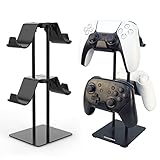
- 1: The problem: I have different controllers for all kinds of game machines, such as PS4, PS5, SWITCH, XBOX and pc games. Nowhere to settle them. The Solution: Set up a home for them, a universal controller holder which has 2 tier 4 places.
- 2: Easy to mount? Absolutely Yes. Follow the description of our manual, one screwdriver two steps 3 minutes and you get 4 places.
- 3: Space Saving: This bracket makes good use of the upward space, allowing the handles to be placed in two layers, Space saved and much more tidier.
- 4: Simple but Stable: The weighted base design makes the stand more stable, and it is not easy to fall over during the handling of the handles.
- 5: Careful and Reliable: The handle hook is made of plastic, make sure the handles will not be scratched. The base is padded to prevent scratches on the desktop.
Troubleshooting
The Realm is missing on the PC
- Check that both devices are signed in to the exact same Microsoft account.
- Confirm that the PC is running Minecraft Bedrock Edition for Windows.
- Close and relaunch Minecraft after signing in.
- Check whether the Realm subscription or trial is still active.
The world will not upload
- Update Minecraft on both the console and PC.
- Confirm that the source world is a Bedrock world.
- Make sure you selected the intended Realm slot.
- Check the console’s internet connection and required online-service subscription.
- Try opening the world locally first to confirm that the source save is not already failing to load.
The PC opens Java instead of Bedrock
Launch the Bedrock component of the Windows Minecraft installation. A console world should not be expected to appear as a Java save. If the launcher presents multiple editions, select the Windows Bedrock version for this transfer.
The downloaded world has a different name
Look in the local Worlds list for the original name followed by “- Copy”. This is the expected name for the downloaded local version. Use the pencil/edit control to rename it.
Existing Realm progress might be overwritten
Stop before selecting Replace World if the Realm slot already contains important progress. Download the current Realm world first if you need to keep it. Realm backups are limited in how long they remain available.
Realms or multiplayer access is blocked on the console
Check the platform’s online-service requirement, the Microsoft account’s privacy and multiplayer settings, and any parental controls. These account restrictions can prevent Realm access even when Minecraft itself launches normally.
Best Value

- Multi-Port Charging Stand: KDD headphone and controller stand with 2 Type-C ports and 1 USB port, powering smartphones, tablets, headphones, e-reader, power banks, and more. This gaming headset stand is the cool things for gaming desk organizer. Note: The iPhone is not compatible with the USB port and the Type-C port.
- RGB Lighting Memory: The rgb headset stand features 9 lighting effects: 7 single-color fast flashing, 7 single-color breathing, and single colors (red, green, blue, purple, cyan, yellow, white). This desk controller holder includes a memory function that recalls the last mode before turning on. Cool headphones stand lights up your gaming room decor. Note: 7 solid colors cycle one by one ---not a rainbow gradient.
- Versatile Storage Setup: This controller and headset stand holds 1 headphone and 2 controllers, or 4 controllers. Fits most headset sizes and suit for use as a controller rack for most of controllers. Rotates 360° with a cable organizer to keep cords tidy. Ideal for gaming desks and teen rooms, keeping your desk set up organized.
- Quick Assembly Protection: Assemble 5 parts in just 30 seconds for a gaming headphone stand. The controller and headphone stand includes 4 anti-slip rubber bases for excellent stability and durability. Soft protective rubber on this multi controller holder prevents scratches or damage to your devices.
- Durable Gift Choice: KDD video game controller holder plastic shell is built to last. Suitable for any room desktop organization, it's a great choice for upgrading your gaming stuff and room decor. Also a thoughtful gift for boys of all ages, gamers, girls, friends, teen, and boyfriends.
Quick decision guide
| What you want to do | Supported answer |
|---|---|
| Move an Xbox, PlayStation, or Switch world to Windows Bedrock | Yes. Upload it to Realms, then download it on the PC. |
| Open a console Bedrock world directly in Java Edition | Not through the documented Realms transfer. Java and Bedrock are separate editions. |
| Use a generic USB drive as a universal console export | Do not rely on this. The documented cross-device route is Realms. |
| Use a console Minecraft purchase to obtain the PC game automatically | Not necessarily. Platform licenses and purchases are handled separately. |
| Play the downloaded copy offline on Windows | Yes. Once downloaded from the Realm, it appears in the local Worlds list. |
Before you start: final checklist
- Both devices are updated.
- The console world opens normally.
- The PC has Minecraft Bedrock Edition for Windows.
- The same Microsoft account is used on both devices.
- Realms access is active or an eligible trial is available.
- The required console online service is active, if applicable.
- You have checked the Realm slot before uploading.
- You have downloaded any existing Realm world that must be preserved before choosing Replace World.
In short, the reliable supported path is console Bedrock world → Minecraft Realms → Windows Bedrock local world. It is a cross-device Bedrock transfer, not a direct console-to-Java conversion or a guaranteed USB file copy.
Recommended Free Tools
Frequently Asked Questions
Can I transfer a Minecraft world from console to PC?
Yes, if the console world is Bedrock Edition. Upload the world to Minecraft Realms on the console, then sign in to Minecraft Bedrock Edition for Windows with the same Microsoft account and download the world from the Realm.
Can I transfer a console Minecraft world to Java Edition?
Not through the documented Realms workflow. Console worlds use Bedrock Edition, while Java Edition uses a different edition and save format. Use Minecraft Bedrock Edition on Windows to continue the world as the same console-compatible save.
Can I use a USB drive to move my console Minecraft world?
A universal USB transfer should not be assumed. Console save data is platform-managed, and the specifically documented console-to-PC Bedrock method uses Realms rather than a generic USB export.
Do I get the PC version of Minecraft if I own it on console?
Not necessarily. A Minecraft purchase on a console does not automatically transfer the game license to Windows. You may need to obtain the PC version separately, while continuing to use the same Microsoft account for Realm access.
The Tool Desk
Outbyte Driver Updater FREEScan for outdated or missing drivers - takes under a minuteDriver Scan →Outbyte PC Repair FREEClear out junk files and repair common Windows errorsFree Scan →The Bottom Line
Yes. Transfer the console’s Bedrock world through Minecraft Realms, then download it in Minecraft Bedrock Edition on Windows using the same Microsoft account. Java Edition and a generic USB transfer are not part of this officially documented workflow.
Quick Recap
Product prices and availability are accurate as of the date/time indicated and are subject to change. Any price and availability information displayed on Amazon at the time of purchase will apply.




