Usually, yes—if Kazuha is a regular Elemental Mastery and Swirl support on your team. Level 90 is a worthwhile long-term investment for that role, but it is not an urgent requirement when other characters, weapons, artifacts, or talents would improve your teams more.
Why level 90 can matter for Kazuha
Kazuha is a five-star Anemo sword character, and Elemental Mastery is his ascension stat. His Anemo kit makes Swirl reactions an important part of his support role, so the case for taking him to level 90 is strongest when your build and team regularly trigger Swirl. HoYoWiki’s Kazuha character profile lists 115 Elemental Mastery after the level-80 ascension and at level 90. That means the final ten levels do not add another listed ascension-stat increase; the final ascension step is where the profile’s listed increase from 86 to 115 occurs.

Level 90 is therefore a role-based investment, not a requirement for every Kazuha build. If you use him mainly for direct talent damage rather than reaction-focused support, prioritize the parts of his build that better serve that plan before committing scarce character XP and Mora to the cap. HoYoverse’s official Kazuha introduction provides character and kit context.
When to prioritize the last levels
Take him to 90 sooner if
- Kazuha is a regular member of your teams.
- Your build emphasizes Elemental Mastery and he frequently triggers Swirl.
- Your other urgent team needs—such as underleveled characters or key weapon, artifact, and talent improvements—are already in reasonable shape.
Postpone it if
- You are still bringing other frequently used characters up to a useful level.
- Improving a weapon, artifacts, or talents would better support your current team plan.
- Kazuha is rarely used, or your build places less emphasis on Swirl reactions.
For talent-upgrade materials, HoYoverse’s Help Center guide describes rotating Domain of Mastery availability, boss materials for higher talent levels, crafting conversions, and Mora sources. These are talent-upgrade instructions, not a complete bill for leveling Kazuha to 90; the official guidance cited here does not establish an exact total of character XP materials or Mora for that journey.
What not to assume about the damage increase
The official character references cited here do not provide a verified percentage for how much Swirl damage increases specifically between levels 80 and 90. Avoid using a precise level-to-level percentage as the deciding point unless you have a separately verified calculation with stated assumptions. The practical recommendation is clearer: level 90 is most compelling when Kazuha is a frequently used, reaction-focused support, while account priorities can make the final levels sensible to delay.
Quick Recap
Best Value

- Wide Compatibility: Get one Megadream iPhone controller to meet your different need on multiple devices; This game controller connect to iOS 13.0+ iPhone, iPhone 17 series, iPhone 16 series, iPhone 15 series, iPad, Android 6.0+ phone, Galaxy S24/S23/S22 series, tablet, PC, NS-Switch 2 (No ‘C’ key function), NS-Switch device by wireless connection directly
- Play Any Game That Supports Controllers: The wireless Android controller can directly play hundreds of controller-enabled games on iPhone/Android/PC/NS-Switch, such as Call of Duty, Roblox, Minecraft, Genshin Impact, Diablo Immortal and more; Supports virtually all cloud-based gaming services including GeForce Now, Netflix, Xbox Cloud Gaming, Luna, MFi A-pple Arcade and Delta Emulator
- Hall Effect Joysticks/Hall Trigger: Megadream PC controller with Hall Effect Sensor joystick, providing seamless 360° precision control, delivering the accuracy and durability mobile gamers demand; Hall-effect analog triggers provide unrivaled smoothness and responsiveness, giving you a competitive edge in any game
- Dual Vibration & 6-Axis Gyro: This Switch game controller features dual haptic feedback with 3 adjustable vibration intensity levels (100% - 70% - 0%), plus a highly responsive 6-axis gyro sensor for an immersive gaming experience
Rank #4

- WIDE SCREEN COMPATIBILITY — PHONE TO TABLET: X5 Lite is a versatile phone controller that stretches up to 213mm to fit iPhone 15/16, most Android phones, iPad mini 6/7, and compatible Android tablets. Secure Type-C connection keeps gameplay stable and responsive.
- MOBILE, CLOUD & REMOTE GAMING: Play supported mobile games like Zenless Zone Zero, or stream console and PC games through Xbox Game Pass, Steam Link, Moonlight, and remote play. Enjoy physical controls wherever you play.
- HALL EFFECT STICKS — PRECISE CONTROL: GameSir Hall Effect sensing sticks deliver smooth 360° control for accurate aiming, movement, and camera adjustments. Built for fast-paced mobile games and streamed console or PC titles.
- LIGHTWEIGHT & ERGONOMIC — 135.4G: At just 135.4g, X5 Lite stays lightweight during extended gaming. Ergonomic, laser-engraved textured grips provide a secure, comfortable hold at home or on the go.
- CUSHIONED MEMBRANE CONTROLS — COMFORTABLE & QUIETER: Cushioned membrane buttons and triggers provide comfortable feedback for repeated inputs while keeping operation quieter. Ideal for extended sessions or gaming in shared spaces.
Rank #3
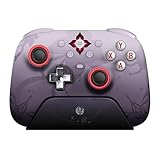
- Officially licensed by Honkai: Star Rail
- Compatible with Windows PC, Apple, Steam, and Android devices – 2.4G and wired connection for Windows, and Bluetooth for SteamOS, Apple and Android.
- TMR Joysticks - Delivers higher sensitivity, precision, and durability, featuring an RGB Fire Ring and wear-resistant joystick rings.
- Integrated charging dock keeps your controller always charged and ready, with auto-reconnection. Features customizable 6-Axis motion control, turbo, and rumble. Supports 8BitDo Ultimate Software V2.
- 1000Hz polling rate (for 2.4G and wired connection) & 8Speed Wireless Technology.
Product prices and availability are accurate as of the date/time indicated and are subject to change. Any price and availability information displayed on Amazon at the time of purchase will apply.
Independent reader supportYour contribution helps us test, update, and keep practical guides available for everyone.



