If you mean patched against the original Fusée Gelée RCM bootROM exploit, the answer depends mainly on your Switch’s hardware—not its current system update. Switch Lite and OLED models launched with revised hardware for this exploit; original Switch consoles can be either early or revised units. A serial checker can estimate an original console’s status, but results near the hardware transition may remain uncertain.
What “patched” means for a Nintendo Switch
Here, “patched” means the console has revised hardware that addresses Fusée Gelée, a vulnerability in the original Switch’s Tegra X1 bootROM. The checker Is My Switch Patched? explains that Nintendo addressed the issue by revising the bootROM during manufacturing. That makes this a hardware distinction: a routine system software update does not change the bootROM revision.
This answer is specific to the original RCM bootROM exploit. “Patched” can mean something different when discussing other security issues or software-based methods, which may depend on firmware.
Identify your Switch model family first
- Switch Lite: Launched with revised hardware for this exploit.
- Switch OLED: Also launched with revised hardware for this exploit.
- Original Switch (HAC-001): Could be early hardware or a later revised unit. The model name alone does not settle its status.
- Revised original Switch: Later original units use revised hardware and are patched against this bootROM exploit.
The checker describes these hardware distinctions in its explanation of how its status checker works. Check the console’s label or system information to establish its family before interpreting a serial result.
Recommended Free Tools
#1 Best Overall

- ♔【Compatibility】----- The slide rail is for Nintendo Switch Console left and right slide rail replacement(Not for Nintendo Switch OLED and Switch Lite). The left and right slide rail only for Nintendo Switch Console, not for Joy-Con Controller.Please make sure your model and type before purchasing.
- ✨【Application】----- The replacement for Nintendo Switch left and right slide rail are apply to the problem of the slide rail not touch sensitive, slide rail too loose, or slide rail was damaged or long time use, etc. The NS Switch slide rail Replacement will better help to solve that problem and help to Joy-Con to restore the connect with console.
- ⛄【Quality Guarantee】----- Our product are test before shipment.The product for Nintendo Switch right left slide rail replacement are made of good quality, it is the newest version, the design and material was updated than before, , make the NS left slide rail replacement use more sturdy and durable, and has longer working life. Restore the formerly feeling.
- ⏰【Console Screws and Tools】----- Comes with whole set screw for Nintendo Switch console, it need to disassemble the console before replace the NS slide rail, the 17 screws could help to replace the old screws or lost screws. And it also comes with set tools, professional repair tools helps to disassemble and replace the NS Switch slide rail more convenient.
- ✽【Suggestion & Customer Service】----- If you do not have any installation experience for Nintendo Switch left and right slide rail replacing, we suggest to replace by professional. If you have any problem about the NS slide rail or need installation video, please contact us, we will reply you within 24 hours, and we provide 6 Months Free Exchange for non-human damages.
Check an original Switch by serial number
- Find the console’s serial number. Use the number on the console’s hardware label or in its system information.
- Enter it in a serial checker. Compare the result with the checker’s status categories and read its methodology. Is My Switch Patched? reports usable ranges for eight serial prefixes; it says those ranges come from community-collected reports, not an official Nintendo list.
- Interpret the result cautiously. A serial outside a transition band can provide a useful estimate. A “possibly patched” result means the checker cannot determine which hardware revision your particular console has from its serial alone.
Do not treat serial thresholds as official Nintendo specifications or reproduce a boundary from memory. The checker’s ranges may be revised, and its own explanation identifies transition areas where patched and unpatched units can be mixed.
What to do if the result says “possibly patched”
For an uncertain original-model console, the technical guides describe testing whether the bootROM accepts a payload. This is a stronger check than the serial estimate, but it involves a separate procedure; see the Sekin guide to checking whether a Switch is moddable for its discussion of confirmation.
Rank #2
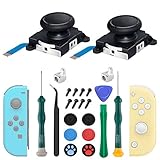
- New Version 3D Analog Joycon Thumbsticks: Our upgrade anti-drift joycon joysticks are compatible with Switch, Switch Lite and Switch OLED, just replace your broken, worn-out or drifting joysticks by yourself, and bring your controller back to life
- Metal Latch Buckles: Alloy slider lock buckles is sturdy and durable, you can replace the damaged original plastic buckle to reduce the frequency of replacement and replacement costs; The metal buckle will firmly fix the metal track to the controller
- Screwdrivers & Spare Screws: The kit is equipped with a magnetic Y1.5 Tri-Wing screwdriver and a magnetic +2.0 Phillips screwdriver, you can switch them as needed at any time; In addition, we also provide you with some spare screws
- Thumb Grip Caps: The included joystick cover caps are compatible with Nintendo Switch, made of safe, soft and comfortable silicone with a good tactile feel, effectively protect your joycon joysticks from scratches, corrosion and other damage
- After-Sale Service: We suggest that you watch tutorials on YouTube or other websites before replacing, and calibrate the joystick after installation is completed; For any product quality issues, please contact us for unconditional after-sales service
Entering RCM is not proof that the console is unpatched. A patched console can still enter RCM; the distinction is whether the bootROM accepts the payload. If you choose to perform the guide’s confirmation test, it identifies an RCM jig and warns against using an improvised paperclip. A jig by itself does not establish the console’s status.
Why your system update does not answer this question
The exploit status discussed here comes from the bootROM revision installed in the hardware. A normal system update does not convert an unpatched bootROM into a patched one. Firmware can affect other software-based exploit paths, but that is a separate question from whether the console is vulnerable to the original Fusée Gelée bootROM exploit. The Sekin guide distinguishes these hardware and software considerations.
Rank #3

- 【Easy to Repair Joy-Con by Yourself】It come with complete repair kit,you can repair it by yourself in a few minutes. Bring your Joycon back to life. No need to go to the After-sales Center, No need to buy a new Joy-Con.
- 【68 pcs】Contains almost all the easily damaged parts of joycon and Professional Repair Toolkit,4 x joystick,5 x Flex cable,2 x Alloy Slider Lock Buckles,1 x Full Screw Set with Spring(43pcs),1 x Professional Repair Toolkit,6 x Thumbstick Caps.
- 【Highest Quality】All our parts replacement will be inspected before packaging to ensure that the goods you receive are in good condition.
- 【24-hour quick reply】We provide 24-hour quick reply,If you are not 100% satisfied with our product,please fell free to contact us via Amazon and will be our pleasure to serve you.
- 【12 months warranty】360 days guarantee for None human caused damage,Have any questions, please feel free contact us.
How to compare two consoles
| Evidence to compare | What it tells you |
|---|---|
| Hardware family | Lite and OLED launched with revised hardware; an original HAC-001 may be early or revised. |
| Serial estimate | Useful for many original consoles, but inconclusive in a transition band. The checker attributes its ranges for eight prefixes to community reports. |
| Payload acceptance | For an uncertain original unit, the guides describe this as confirmation; successful RCM entry alone is not confirmation. |
| System firmware | Does not establish the bootROM revision. Consider it only when evaluating a separate firmware-dependent method. |
What can and cannot be concluded
Model family often resolves the question for Lite and OLED consoles. For an original Switch, a serial checker can narrow the answer, but a result in its transition range is not a verdict. The exact status of an individual console cannot be determined without its model and serial information or, where needed, confirmation through payload acceptance.
Quick Recap
Best Value

- 【4 × 3D Joysticks + 14 × Thumb stick Caps】This set includes 4 precision-crafted analog joystick replacements, designed to perfectly fit both left and right Switch Joycon controllers. Whether you're dealing with drift, wear, or damage, these replacements will bring your controllers back to peak performance, ensuring smooth, responsive gameplay like the day you first used them.
- 【2025 Version Metal Latch Buckles】Crafted from high-strength alloy, these metal latch buckles provide a secure and reliable connection between the controller and rail. The upgraded design ensures a firm grip, preventing slippage or detachment during intense gameplay, offering long-lasting performance and superior durability compared to plastic alternatives.
- 【Magnetic Screwdrivers and Spare Screws】This set includes a magnetic Y1.5 Tri-Wing and +1.5 screwdriver, designed specifically for repairing your controllers with ease. The magnetic tips hold screws securely, preventing drops or loss during repairs. Plus, 10 spare screws are included, so you’ll never have to worry about losing or damaging screws, ensuring a smooth and stress-free repair process.
- 【Complete Repair Kit】This comprehensive kit comes with everything you need to restore your controllers to perfect condition, including 4 replacement joysticks, 4 durable metal lock buckles, 10 screws, 10 springs, 2 magnetic screwdrivers, a precision tweezer, 14 thumb stick caps, a triangle paddle, a cleaning brush, and a pry tool. Whether you're dealing with joystick drift, loose parts, or cosmetic wear, this kit provides all the essential tools for easy and efficient repairs, saving you time and money.
Rank #4
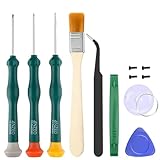
- Professional Repair Tool for Joy Con -- The tool repair kit set is suitable for Jon Con. Unscrew the screws with sdcrewdrivers. Pry the screen with suction cup, triangle plates and pry bars. Clean the device interior with a brush. Turely makes your repairment easier.
- Safe & Customized -- Triwing Screwdrivers are made of industrial grade quality steel which is much more durable and harder. Precise and accurate to fit and remove your screws with no hassle and strip.
- Application -- Use for joy con for battery change and repairment. Perfect for DIY work. This is a good repair tool for technicians, amateurs, students in everywhere.
- What's Included -- There are 8 pcs. 1* "Y"2.0 screwdriver, 1* "Y"1.5 screwdriver, 1* "+"2.0screwdriver, 1*tweezers, 1* brush, 1*pry bar,1*pry opening repair tool,1*suction cup.
- Risk-free Shopping Experience -- We provide ★30 DAYS FREE RETURN & REPLACEMENT. If there are any problems with quality, lifetime customer service ensures that an ideal solution will be given to bring your smile back.
Product prices and availability are accurate as of the date/time indicated and are subject to change. Any price and availability information displayed on Amazon at the time of purchase will apply.



