Yes—but only partially. The PlayStation 3 can still connect to the internet, sign in to PlayStation Network with a Device Setup Password, download system and game updates, synchronize supported trophies, and play multiplayer in games whose online services remain active. However, the PS3’s digital storefront is being closed by region, many game servers have already shut down, and Sony describes continued redownload access only as lasting “for the foreseeable future.”
For US owners, Sony’s announced PS3 PlayStation Store closure is scheduled for July 2027. That is a Store-purchasing deadline, not a universal PS3 multiplayer shutdown.
As an Amazon Associate I earn from qualifying purchases.
What “going online” means on PS3
Several different services are often grouped together as “PS3 online,” but they do not share one on/off switch:
- Connecting the console to your home network and the internet.
- Signing in to PlayStation Network.
- Using friends, messages, trophies, and account functions.
- Downloading system software and game patches.
- Redownloading purchased games and DLC.
- Buying new content from the PlayStation Store.
- Playing online multiplayer.
- Using game-specific matchmaking, leaderboards, user-generated content, publisher accounts, or online passes.
- Using legacy streaming apps and web services, many of which are no longer supported.
A PS3 can still perform some of these functions while others are unavailable. Sony’s PS3 documentation still describes network features, but individual game services remain subject to the publisher’s servers and availability.
#1 Best Overall

- 【Sata Interface Adapter for PS2】Special Design For PS2 console. It is cmpatible for all versions of the for Playstation 2 models.
- 【High Interference Resistant】With HASL technology, it raises its capability of anti-jamming and reduce the interference to other devices.
- 【Quicker Gaming Experience】Play the games you own with quick loading times - using fast SATA interface HDD improves loading times by 10X times.
- 【Professional SATA HDD Connector Plug Socket】It supports up to 2TB SATA HDD (2.5"/3.5")
What still works on PS3 in 2026?
| Function | Status | Qualification |
|---|---|---|
| Internet connection | Available | Depends on the console, router, and compatible network settings. |
| PSN sign-in | Available | Use a Device Setup Password and current system software. |
| Online multiplayer | Game-dependent | The publisher’s matchmaking or game servers must still operate. |
| Trophies | Generally available | Synchronization requires PSN access and may vary by game. |
| Friends and messaging | Limited and changing | Sony directs users toward the PlayStation App for continued messaging. |
| Game patches | Often available | Patch servers are specific to each game. |
| Purchased-content redownloads | Available for the foreseeable future | Sony does not promise permanent access. |
| New digital purchases | Region-dependent | The PS3 Store is closing in stages. |
| Digital video purchases and rentals | Discontinued | Do not treat the PS3 as a current video storefront. |
| Streaming apps | Inconsistent | Each app must be checked separately. |
PS3 PlayStation Store closure dates
Sony announced that the PS3 PlayStation Store will close for new purchases in stages:
| Region | Announced timing |
|---|---|
| Mexico, Honduras, and Nicaragua | Beginning August 2026 |
| Additional Latin American and Middle Eastern countries | Late 2026 |
| Other countries, including the United States | July 2027 |
These are regional windows rather than one universal shutdown moment. Check Sony’s announcement and local PlayStation support pages for your account region.
Store closure is not the same as shutting down all PSN functions. Sony says previously purchased content will remain downloadable for the foreseeable future, subject to service availability. That wording is important: it is not a permanent, DRM-free ownership guarantee, and a publisher can remove a game or DLC before the general Store closure.
Windows Errors? Fix Them Before They Spread
Repair common Windows errors and clear accumulated junk for a smoother, more stable PC - no reinstall needed.Free scan · no reinstallOutdated Drivers Are Slowing You Down
One free scan finds every outdated or missing driver and matches the right update for your exact hardware.Free scan · exact hardware matchHow to sign in to PSN on a PS3
The PS3 cannot use your ordinary PlayStation account password in its legacy sign-in flow. Generate a Device Setup Password in a web browser instead.
- On a phone or computer, open Sony’s Device Setup Password page or PlayStation Account Management.
- Sign in with the account connected to the PS3.
- Choose Generate New Password in the Device Setup Password section.
- Copy or record the generated password.
- On the PS3, open the PlayStation Network sign-in screen.
- Enter the account’s email address as the sign-in ID.
- Enter the generated Device Setup Password instead of the normal account password.
- Enable automatic sign-in only if you are comfortable doing so on that console.
The device password can be revoked and regenerated through Account Management. Treat it as a console-specific credential, not as a replacement for your normal account password.
Rank #2

- Ultra-Fast, Rock-Solid: The UGREEN usb to ethernet adapter is engineered for ultra-fast 1000Mbps network speeds. It delivers rock-solid stability and security, helping you boost productivity, unleash smooth gameplay, and browse seamlessly
- Seamless Compatibility with Nintendo Switch: The ethernet to usb adapter is fully compatible with Nintendo Switch and Switch OLED, just connect it to the dock’s ethernet port and dive into ultra-smooth, lag-free gaming
- Plug and Play: The ethernet adapter is driver-free for Windows 11/10/8.1/8, macOS, Chrome OS, and Android. It requires installing the driver on Windows XP/7/Vista and Linux, which you can easily install with our instructions
- Wide Compatibility: The usb to ethernet is compatible with most laptops and desktops featuring USB 3.0 ports, including MacBook Air/Pro, Dell XPS, Surface Book, and more
- Crafted to Last, Designed to Impress: Built with a sturdy aluminum shell for efficient heat dissipation and enhanced durability, the ethernet to usb is designed to last. The cable connection point features reinforced construction for extra strength and reliability. A yellow-green LED indicator keeps you instantly informed of its working status
If PSN sign-in fails
- Normal password rejected: Generate and use a Device Setup Password.
- Old firmware: Update the PS3 to the latest version shown on Sony’s support page; the version documented in this research is 4.93.
- Wrong sign-in ID: Confirm the account’s current email address in Account Management.
- Password revoked: Generate a new device password.
- Account creation unavailable: Create or manage the account in a phone or computer browser rather than on the PS3.
- Clock or certificate errors: Correct the console’s date and time, then update the system software.
- Suspended account: Test the account through current PlayStation Account Management or contact PlayStation Support.
How to update PS3 system software
Internet update
- Open Settings.
- Select System Update.
- Select Update via Internet.
- Follow the on-screen instructions.
Sony recommends the latest software for security improvements and Blu-ray encryption-key renewal. The current version listed in the supplied Sony documentation is 4.93.
USB update
If the internet update fails, use Sony’s official offline method:
The Tool Desk
Outbyte Driver Updater FREEFix the driver behind crashes, sound loss and screen glitchesFind Drivers →Outbyte PC Repair FREEClear out junk files and repair common Windows errorsFree Scan →- Use a PC or Mac to download the update file from Sony’s PS3 system-software page.
- Format a USB drive as FAT32 and leave at least 200 MB free.
- Create a folder named
PS3at the drive’s root. - Inside it, create a folder named
UPDATE. - Place Sony’s official update file inside
PS3/UPDATE. - Connect the drive to the PS3 and select the USB update option under Settings > System Update.
Use the exact file name and download link supplied by Sony rather than an unofficial mirror. Do not disconnect power during installation. If the console cannot find the update, check capitalization and the exact folder hierarchy: PS3/UPDATE. A corrupted-data message usually warrants redownloading the official file and reformatting the USB drive.
Can you still play PS3 games online?
Sometimes. There is no single universal PS3 multiplayer shutdown date. Online play is normally controlled by the individual game’s publisher and infrastructure.
A PS3 game may fail online because:
- Its matchmaking or login servers were retired.
- The game requires a patch that is no longer available.
- An online pass, DLC package, or publisher account is unavailable.
- The game’s authentication service no longer accepts PSN credentials.
- The remaining player population is too small to find matches.
- Your router, NAT type, or firewall blocks matchmaking.
To check a specific game, look first at the publisher’s support page and current service notices. Recent player reports can help, but they are secondary evidence and may differ by region, disc edition, or platform. Also distinguish dedicated-server games from peer-to-peer games: they can fail for different reasons.
Rank #3
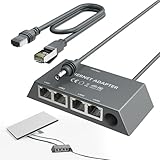
- Designed for the Starlink Standard Gen3/Mini: The unique design of the starlink ethernet adapter gen 3 fits Starlink Mini and Gen3 perfectly—matching size and interface for easy installation. Custom contours, snug button arcs, and aligned load points secure the original device tightly, with no loosening or deformation. Both models install quickly, replacing "universal" forced fits with safe, worry-free use.
- Equipped with 5e Network Cable: The Cat 5e cable included in the starlink mini ethernet adapter ensures a speed of 1gbps - fast, stable and with low signal loss. Reliable connections in all scenarios enhance your experience with consistent high-quality transmission.
- Connect Up to Four Devices Simultaneously: The starlink gen 3 ethernet adapter has 4 gigabit ports—connect multiple devices at once, each hitting 1000 Mbps. No wiring hassle, rock-solid connection. LED indicators show status at a glance, perfect for streaming, gaming, and high-speed needs.
- Reliable Performance with Stable Transmission: The starlink internet kit satellite connects Starlink antennas to home mesh systems or satellite setups via a wired Ethernet connection, reducing interference for uninterrupted internet. It is built with excellent craftsmanship and undergoes 72-hour full-load testing to ensure consistent, fast data transfer under any conditions, guaranteeing a steady, reliable online experience.
- Plug and Play: The starlink ethernet adapter is plug-and-play, so there's no need for drivers or a complex setup. No technical skills are needed; simply connect it to your Starlink Kit and devices. Dual-color LEDs indicate port status and automatically optimize connections for quick, hassle-free use.Includes instruction manual, easy to install.
PSN sign-in, trophy synchronization, and multiplayer are separate tests. A game may still synchronize trophies even after its matchmaking has disappeared.
Do these 3 things before closing this tab:
1Scan for outdated or missing drivers - takes under a minute2Clear out junk files and repair common Windows errors3Fix the driver behind crashes, sound loss and screen glitchesDoes PS3 require PlayStation Plus for multiplayer?
Do not automatically apply the current PS4 and PS5 subscription model to PS3. The PS3 predates the modern PlayStation Plus multiplayer gate. In practice, the decisive question is usually whether the game’s own online service still works, although individual titles may have separate publisher requirements or online passes.
Sony’s PS3 documentation describes online gaming as a PSN-era console function without presenting the current PS4/PS5 rule as a universal PS3 requirement.
Can you still buy PS3 games digitally?
Only while the PS3 Store remains available for your account region and the specific title has not been delisted. In regions outside the first closure markets—including the United States under Sony’s announcement—new PS3 Store purchases are scheduled to end in July 2027.
Sony’s support guidance may require you to add funds to your PlayStation Store wallet before purchasing PS3 or Vita content rather than entering payment-card details directly on the legacy console. See the current PlayStation Store support page.
What’s actually slowing this PC down?
Pick the symptom - the matching free tool is one click away.
Rank #4

- Connect your game console to a high-performance wireless n network
- Play online or connect multiple consoles to play head-to-head
- Works with Nintendo Wii , Xbox , Xbox 360 and PlayStation 2 and 3
- One-touch Wi-Fi Protected Setup (WPS)
- 3-Year limited warranty
If a digital-only game or DLC matters to you, buy it before the applicable regional closure and verify that it appears in your download history. Do not assume every title is still purchasable, or that a purchase made in one region will work with a different-region disc.
What happens to purchased games and DLC?
- Purchased but uninstalled games: Sony says previously purchased content remains downloadable for the foreseeable future.
- Already-installed games: They should remain playable subject to licensing, activation, and the game’s own requirements.
- Purchased DLC: It should fall under the same redownload policy, but indefinite access is not guaranteed.
- Delisted content: A publisher can remove a game or DLC before the general Store closure.
- Physical games: The disc is generally the most durable way to retain the base game, but patches, DLC, activation, and multiplayer can still depend on servers.
- Backups: PS3 digital content is not DRM-free. Preserve account access and understand activation requirements before replacing hardware or changing account settings.
Sony’s activation documentation explains the account relationship between PS3 content and console activation.
Independent reader supportYour contribution helps us test, update, and keep practical guides available for everyone.Connecting a PS3 to a modern home network
Ethernet is the simplest and most reliable first test. It removes many variables from legacy Wi-Fi, especially when a modern router uses security modes, bands, or settings the PS3 does not handle well.
If Wi-Fi fails, check signal strength, router security, and whether a compatible 2.4 GHz configuration is available for your particular PS3 model. Do not permanently weaken your entire home network just to accommodate an old console; where possible, use a guest network or another isolated arrangement. A network failure does not prove that PSN has shut down.
Trophies, friends, messages, and the PlayStation App
PS3 manuals still list friends, messages, voice and video chat, trophies, online gaming, and Store functions. In practice, legacy features can change independently. Sony’s current notices direct users toward the PlayStation App for continued messaging, so the console should not be treated as the primary modern messaging device.
Best Value

- Exploring the New Era of 2.5Gb: The UGREEN usb to ethernet adapter supports a internet speed of up to 2.5Gb and enables your devices to run at full speed. Enjoy unbelievably fast downloads with NAS, fluent streaming, immersive gaming
- Faster, Smoother, Cooler Realtek Chip: The ethernet to usb is equipped with an updated RTL8156BG chip, ensure the network always at peak run. When running 2.5Gb at full speed, it consumes low power, reduce heat dissipation and provide stable performance
- Flexibiliy Upgrade 1Gb to 2.5Gb: Immediately upgrade your 1Gb network, just pair it with 2.5Gb-capable devices like switches and routers to give your aged devices new life! This flexibility is an advantage for you transitioning to higher-speed network
- Instantly Add a 2.5Gb Ethernet Connection: Designed for modern USB laptops that no longer include an Ethernet port. Get fast, stable wired internet whenever Wi-Fi or Gigabit isn't enough
- Sleek, Strong, Stunning: The ethernet adapter for laptop adopts high-quality aluminum. The ports are resistant to plugging and unplugging and the reinforced design makes it very durable for use. Indicator lights make transmission status clear at a glance
Test trophy syncing separately from messaging and multiplayer. These services may have different dependencies.
What to do before your regional Store closure
- Sign in successfully using a Device Setup Password.
- Update the console firmware.
- Review your download history and transaction history.
- Download important digital-only games and DLC while the Store is available.
- Install required patches and launch essential games.
- Test multiplayer titles now rather than assuming their servers will remain online.
- Confirm that you can access the account email address.
- Keep the Device Setup Password procedure available for future sign-ins.
- Avoid unnecessary deactivation, account changes, or hardware replacement without checking activation requirements.
- Buy physical versions where practical, while remembering that physical media does not preserve online services.
PS3 online troubleshooting decision tree
- Can the PS3 connect to the router? Try Ethernet first. If Ethernet works, investigate Wi-Fi compatibility.
- Is the system software current? Install the latest Sony release, currently documented as 4.93.
- Can the account sign in? Generate a new Device Setup Password and verify the email address.
- Is the Store available in your region? Check Sony’s current regional notice and closure schedule.
- Does the specific game reach its server? Check the publisher’s service status, not just PSN.
- Does another game work online? If yes, the first game’s servers, patch, account, or DLC are the likely cause.
- Are matches failing after login? Investigate NAT, router restrictions, and the remaining player population.
Is a PS3 worth buying for online play in 2026?
A PS3 still makes sense for a specific purpose: a physical library, a particular multiplayer game whose servers you have verified, local multiplayer, Blu-ray playback, trophy collecting, or preserving digital purchases before the regional Store deadline.
It is a poor choice as a general-purpose modern online console. The sign-in process is legacy, Store purchases are being retired, streaming support is inconsistent, game servers vary title by title, and aging hard drives, disc drives, controllers, and power supplies can fail.
Recommended Free Tools
If buying used, test HDMI output, the disc drive, controller pairing, storage, account sign-in, and at least one relevant game. A return policy matters more than a promise that the console is “fully online.”




