Free tools Windows power users keep installed
One-click scans. No signup required.
If the Jagex Launcher keeps returning to its “Are You a Robot?” check, test your connection and browser environment before changing your account settings. Temporarily turn off a VPN or proxy, check that JavaScript is enabled, disable extensions such as ad blockers, and try a private window or another network. These steps can help isolate the problem, but no single fix is confirmed for this specific Launcher loop.
What the repeating verification prompt means
A challenge that reappears after you complete it is a recognized kind of browser-verification loop. Cloudflare says possible causes include network problems, browser settings or extensions blocking challenge scripts, unsupported browsers, disabled JavaScript, or detection errors. That is general troubleshooting guidance—not confirmation that Cloudflare is responsible for a particular Jagex Launcher loop. Cloudflare’s challenge troubleshooting guide was last updated September 8, 2026.
Jagex’s published guidance covers connection-level access blocks and other login problems, but does not document this exact “Are You a Robot?” loop as a known issue. The cause of an individual case, and whether there is a Jagex-wide incident, therefore cannot be determined from the prompt alone.
Try these checks in order
-
Temporarily disable VPN, proxy, or hosting-server routing
Disconnect from a VPN or proxy, or stop routing through a hosting server, then retry the Launcher. Jagex says these connections can interfere with access to its services and cause login problems. Treat this as a diagnostic test, not proof that the VPN caused the verification loop. See Jagex’s access-block guidance.
Special offer. See more information about Outbyte and uninstall instructions. Please review EULA and Privacy policy.#1 Best Overall
Sale Logitech G502 Hero Wired Gaming Mouse - Black
- HERO Gaming Sensor: Next generation HERO mouse sensor delivers precision tracking up to 25600 DPI with zero smoothing, filtering or acceleration
- 11 programmable buttons and dual mode hyper-fast scroll wheel: The Logitech wired gaming mouse gives you fully customizable control over your gameplay
- Adjustable weights: Match your playing style. Arrange up to five 3.6 g weights for a personalized weight and balance configuration
- LIGHTSYNC technology: Logitech G LIGHTSYNC technology provides fully customizable RGB lighting that can also synchronize with your gaming (requires Logitech Gaming Software)
- Mechanical Switch Button Tensioning: A metal spring tensioning system and metal pivot hinges are built into left and right computer gaming mouse buttons for a crisp, clean click feel with rapid click feedback
-
Check JavaScript, software, and extensions
Make sure JavaScript is enabled in the browser environment handling the verification, and update your browser or relevant client software. Temporarily turn off extensions such as ad blockers, which can interfere with challenge scripts. Jagex recommends checking JavaScript, extensions, and software for access problems; Cloudflare also lists blocked scripts and browser configuration among possible loop causes. These are general checks, not a Launcher-specific confirmed fix.
-
Test a clean browser session, device, or network
Try a private or incognito window, another browser, or another device. If possible, also retry using a different network. Change one thing at a time and note whether the prompt stops returning; comparing a clean session with your usual setup can help narrow down whether the issue follows the browser environment, device, or connection. These comparisons do not by themselves establish the root cause.
Rank #2
Sale Logitech G305 Lightspeed Wireless Gaming Mouse - Black
- The next-generation optical HERO sensor delivers incredible performance and up to 10x the power efficiency over previous generations, with 400 IPS precision and up to 12,000 DPI sensitivity
- Ultra-fast LIGHTSPEED wireless technology gives you a lag-free gaming experience, delivering incredible responsiveness and reliability with 1 ms report rate for competition-level performance
- G305 wireless mouse boasts an incredible 250 hours of continuous gameplay on just 1 AA battery; switch to Endurance mode via Logitech G HUB software and extend battery life up to 9 months
- Wireless does not have to mean heavy, G305 lightweight mouse provides high maneuverability coming in at only 3.4 oz thanks to efficient lightweight mechanical design and ultra-efficient battery usage
- The durable, compact design with built-in nano receiver storage makes G305 not just a great portable desktop mouse, but also a great laptop travel companion, use with a gaming laptop and play anywhere
-
Check your device’s time zone
Jagex’s general access-block guidance recommends setting the device time zone to match your current location, with automatic updates enabled if available. This is a general connection check, not a documented CAPTCHA-loop-specific remedy.
When to contact Jagex
If the checks do not resolve the loop, report the persistent access problem to Jagex Support and include the Ray-ID displayed with the error. Jagex says a connection-level access block does not mean your account was blocked or locked: “it is your connection that hasn’t been allowed.” The Ray-ID helps identify the request associated with the error. Jagex’s access-block page asks users reporting persistent blocks to provide it.
Do these 3 things before closing this tab:
1Repair Windows errors before they cause bigger problems2Scan for outdated or missing drivers - takes under a minute3Clear out junk files and repair common Windows errorsRank #3

- HERO 25K Sensor: our most advanced, with 1:1 tracking, 400+ IPS, and 100-25,600 max DPI sensitivity — plus zero smoothing, filtering, or acceleration, and 10x power efficiency of previous gen
- LIGHTSPEED Wireless: pro-level responsiveness and connectivity for long lasting, high performance gameplay — with a weight of 95 g and battery life for up to 35 hours of continuous play with default LIGHTSYNC RGB lighting
- POWERPLAY wireless charging: Never worry about your battery life again. Add the POWERPLAY wireless charging system to keep G703 and other compatible G mice charged while at rest and at play* *POWERPLAY Wireless Charging System sold separately
- Supreme Comfort and Quality: brings together comfort, durability, and performance with comfortable design, rubber side grips, 10 g optional weight, and 6 programmable buttons for a customizable gaming experience
- Advanced Button Technology: metal-spring button tensioning keeps primary left and right buttons poised to trigger with less force, for exceptional button feel, response, and consistency every time
For a persistent challenge loop, Cloudflare recommends collecting a HAR file while reproducing the problem and exporting the browser console log, then providing the error code and Ray-ID when contacting the site administrator. These files can contain details about browsing activity, so review them for sensitive information before sharing. Follow the relevant support team’s instructions for submitting diagnostic files. See Cloudflare’s troubleshooting steps.
Independent reader supportYour contribution helps us test, update, and keep practical guides available for everyone.Keep similar Jagex errors separate
Jagex’s known-issues page associates VPN use with the separate “Could not authenticate” error and recommends disabling a VPN for that issue. It does not identify that error as the cause or fix for an “Are You a Robot?” loop. If you see a different error message, follow guidance for that exact message rather than assuming the symptoms have the same cause. Jagex’s known-issues page.
Quick Recap
Best Value
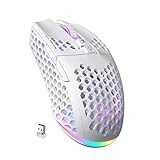
- 3 Mode Connection.SM600 wireless gaming mouse adopts tri-mode connection,2.4G wireless /2 BT5.1/Type-C Wired connection.Users can save 4 devices same time,support PC, laptop, tablet, mobile phone, etc. Switch convenientand connection quick!
- Customized &Macro Proqram.SM600 gaming mouse with 7 programmable buttons. Users through the software to set the mouse buttons, DPl, mode, lighting effects, etc.SM600 Custom mouse greatly meets the DIY needs of game enthusiasts!
- Adjustable DPI & Rechargeable Battery.SM600 wireless mouse can be adjusted within 6 levels dpi(13200-5400-3400-1800-1400-800).Rate of return up to 1000Hz,even in intense games, achieve zero latency and no frame skipping! Built-in 600 mA lithium battery,with USB-C charqing cable,Low battery indicator will remind user to charge it with flashing redlight.it also supported recharged while charging!
- Lightweight & Honeycomb Shell.SM600 honeycomb mouse made of high quality.ABS material and designed with ergonomic hollow shell,Ergonomic Design reduce the weight and make the mouse more flexible and easier to be used for a long time without fatigue,and also enhance the heat dissipation features very comfortable to use.
- 14 RGB Rainbow Backlight.SM600 has beautiful RGB rainbow backlight. This wireless mouse is equipped with RGB lighting effects. Press the top button to switch light modes (rainbow light/Monochrome light/light off)!! Very cool lights especially when useing in the dark!
Rank #4

- 47g ULTRA LIGHTWEIGHT DESIGN — with weight optimizations and a smooth-touch finish to deliver faster, tighter movement,DIY with rubber no-slip sticker
- Special for Gaming Design,Dynamic accuracy with 24k DPI/650 IPS (16.5m/s) optical sensor,8000W Switches Capable of high-intensity use.
- Tri-Mode 2.4G/USB-C/Bluetooth 5.0 wireless mouse for wide range of applications, wroking ,gaming,designing etc.
- 6 programmable buttons including side DPI button,more free for your personal usage,LED indicator easy shows for power charging and DPI Sensitivity adjustment.
- For extended battery life, enjoy up to 120 hours of high performance gameplay.
Product prices and availability are accurate as of the date/time indicated and are subject to change. Any price and availability information displayed on Amazon at the time of purchase will apply.




