PlayStation Move gives Killzone 3 a credible alternative to DualShock 3 controls: a contemporary review praised its quick, precise aiming, especially with the Navigation controller. The Sharp Shooter adds a rifle-like grip, but that same reviewer found it tiring over longer sessions and said it took practice. Move is most appealing if you enjoy direct pointing and are willing to tune the controls—not as a universal upgrade.
What PlayStation Move changes in Killzone 3
Killzone 3 was announced for PlayStation 3 by Sony on February 22, 2011. Guerrilla Games developed the game, which supports PlayStation Move and is rated Mature by the ESRB. Sony’s release-era materials presented Move and the Sharp Shooter as options available at launch, alongside the conventional DualShock 3 approach. Sony’s announcement describes the game and its launch-era context.
| # | Preview | Product | Price | |
|---|---|---|---|---|
| 1 |
|
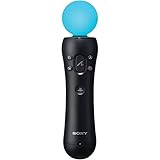
Sony PlayStation 3 Move Motion Controller (Bulk Packaging) (Renewed) | $24.62 | Buy on Amazon |
| 2 |

|
PlayStation Move Motion Controllers - Two Pack | $129.99 | Buy on Amazon |
| 3 |

|
PlayStation 4 Move Motion Controller (Renewed) | $30.26 | Buy on Amazon |
| 4 |

|
Playstation Move Navigation Controller (Renewed) | $27.54 | Buy on Amazon |
| 5 |

|
Playstation Move Twin Pack (PS4) (Renewed) | $74.27 | Buy on Amazon |
Move separates pointing from movement: the motion controller aims while a Navigation controller handles movement. The Sharp Shooter is an attachment for those controllers, not a standalone controller. The practical choice is between direct pointing, a more physical rifle-shaped grip, and familiar two-stick controls.
How the three control options compare
| Control option | Aiming and movement | Comfort and learning | What you need |
|---|---|---|---|
| Move with Navigation controller | Push Square praised the pointing as quick, effortless, and precise; the two controllers split aiming and movement. | Push Square preferred this setup overall. Its impressions are one reviewer’s experience, not a controlled comparison. | Compatible Move equipment and a PlayStation Eye camera setup. |
| Move with Sharp Shooter | Retains Move aiming in a rifle-shaped grip; Push Square said shots felt pinpoint. | The reviewer liked the gun-like feel but reported arm fatigue and a learning curve. | Sharp Shooter attachment plus both the motion controller and Navigation controller, sold separately from the attachment. |
| DualShock 3 | Uses the familiar two-stick gamepad scheme. Push Square found it sluggish compared with Move, while Guerrilla’s design team said a player using a 2D screen and DualShock could still play just as well in multiplayer. | No rifle-shaped attachment is involved. The cited sources do not establish a universal comfort advantage. | A DualShock 3 controller. |
These are period impressions, not performance measurements. The most defensible takeaway is conditional: choose Move if direct pointing appeals to you; consider the Sharp Shooter for the physical rifle feel if you accept extra bulk; or stay with DualShock 3 if you prefer a conventional gamepad.
#1 Best Overall
- This Certified Refurbished product is tested and certified to look and work like new. The refurbishing process includes functionality testing, basic cleaning, inspection, and repackaging. The product ships with all relevant accessories, a minimum 90-day warranty, and may arrive in a generic box. Only select sellers who maintain a high performance bar may offer Certified Refurbished products on Amazon.com
- Sony PlayStation 3 Move Motion Controller
What the Sharp Shooter adds—and what it requires
Sony’s December 2010 PlayStation Blog feature describes the Navigation controller fitting into the Sharp Shooter’s foregrip and the Move motion controller into its barrel. The accessory has a retractable stock, firing-mode selector, reload button, and pump-action grip. Sony also says buttons can be remapped to the gun body through the motion controller’s extension connector, with key buttons duplicated for right- and left-handed players. These are descriptions of the accessory’s design, not a claim that every feature changes how the game behaves.
The setup has an important dependency: Sony’s manual says both the motion controller and Navigation controller must be inserted, that they are sold separately, and that the attachment cannot be used alone. If buying a used Sharp Shooter, check the exact listing contents and condition; the attachment itself does not supply those controllers. Sony’s Sharp Shooter manual specifies the requirement.
Rank #2
- Advanced motion sensing and light tracking technology
- Easily accessible trigger and face buttons
- Immersive vibration feedback
- Rechargeable batteries provide long hours of play
Tuning the controls
Move aiming and character turning both depend on pointing, so the game must interpret crosshair position and controller movement without making either turning or stopping feel unmanageable. Guerrilla managing director Hermen Hulst said the game’s defaults were intended to be accessible, with additional adjustment available: “We made sure that the default settings are very accessible, but for more advanced users, we made sure that deadzones and sensitivity settings are customizable.” Sony’s PlayStation Blog feature discusses the accessory and those settings.
A dead zone determines how much crosshair movement is treated as free aiming before it turns the character. Ars Technica’s interview with Guerrilla’s Michiel van der Leeuw also describes optional camera-lock and crosshair-lock assistance. It reports that a wrist twist can reload while tracking a target, with a button option for players who do not want to use the gesture. These options give players ways to adjust the feel rather than requiring one fixed interpretation of the pointing motion. Ars Technica’s interview provides the design context.
Rank #3
- This Certified Refurbished product is tested and certified to look and work like new. The refurbishing process includes functionality testing, basic cleaning, inspection, and repackaging. The product ships with all relevant accessories, a minimum 90-day warranty, and may arrive in a generic box. Only select sellers who maintain a high performance bar may offer Certified Refurbished products on Amazon.com
- Charge the controller and automatically pair with the PS3 system via a USB cable
- 1 Move Controller and 1 USB Cable
- Start with the default Move settings and see whether aiming and turning feel distinct enough.
- Adjust sensitivity and dead zones if you need faster turning or more controlled stopping.
- Try the lock assistance or button-based reload options if the camera behavior or wrist gesture does not suit you.
What the contemporary review found
In its February 2011 review, Push Square described Move aiming as quick and effortless, praised its precision, and preferred Move with the Navigation controller overall. The reviewer said the Sharp Shooter made the game feel more like shooting a real gun, but warned that its weight could tire the arms and that the setup could feel daunting before practice. Those are that reviewer’s subjective impressions, not a consensus or a guarantee about every player’s experience. Read Push Square’s review.
The review also found the jetpack controls too sensitive for that reviewer. Its report that the campaign was roughly 6–8 hours reflects complaints it had heard at the time, not a guaranteed playtime for every player or play style.
Rank #4
- Provides easy character control in compatible games
- Wireless control untethered from PlayStation Move motion controller
- Vibration feedback is felt during specific actions
- charge the controller and automatically pair with the PS3 system via a USB cable
- Charge the controller and automatically pair it with the PS3 system via a USB cable (Type A - Mini-B)
Who should use Move?
- Try Move with Navigation if you value direct pointing and want to adjust aiming and movement independently.
- Consider the Sharp Shooter if the rifle-like physical feel is important to you and you are comfortable with a heavier setup that may take practice.
- Use DualShock 3 if you prefer familiar two-stick controls or do not want to assemble a Move setup.
Killzone 3 was built to accommodate both motion controls and a standard gamepad. Move makes the game feel different in a way the contemporary review found compelling, but the Sharp Shooter’s physicality comes with a comfort tradeoff, and the best fit depends on what you want from the controls.
Quick Recap
Best Value
- Ergonomic, intuitive design thanks to a lightweight design, built-in vibration function and sphere that's tracked by the PlayStationCamera as you move, the controller acts and feels like an extension of your own hand, allowing you to intuitively interact with a game's virtual environment
Product prices and availability are accurate as of the date/time indicated and are subject to change. Any price and availability information displayed on Amazon at the time of purchase will apply.
The Tool Desk
Outbyte Driver Updater FREEScan for outdated or missing drivers - takes under a minuteDriver Scan →Outbyte PC Repair FREERepair Windows errors before they cause bigger problemsFix Now →



