Lenovo expanded the original Legion Go ecosystem in 2024 with a USB-C dock, a controller Charging Connector, interchangeable joystick caps, a carry case, and a compact Bluetooth keyboard. These are quality-of-life upgrades—not performance upgrades: they do not increase the handheld’s CPU, GPU, memory, display resolution, or battery capacity.
The reported U.S. launch prices were $64.99 for the dock, $49.99 for the Charging Connector, and from $9.99 for the joystick caps. Those are historical 2024 launch prices, not verified current prices. For most owners, the dock is the most useful addition—but only if the Legion Go is also used as a desktop or living-room PC.
As an Amazon Associate I earn from qualifying purchases.
The quick verdict
- Best overall utility: Legion Go USB-C Dock, for monitor, Ethernet, keyboard, mouse, storage, and charging connections.
- Best for controller comfort: Charging Connector, if you prefer one conventional gamepad shape over two separate controller halves.
- Cheapest customization: Joystick Caps, if the stock thumbsticks do not suit your grip.
- Best for travel: Carry Case, particularly if you carry the charger, FPS-mode puck, and cables.
- Best for Windows use: Mini Keyboard, although a full-size keyboard remains better for sustained typing.
- Best choice for handheld-only players: potentially nothing. The accessories add convenience, not extra gaming performance.
What Lenovo actually upgraded
The September 2024 announcement concerned the original Windows 11 Legion Go and its accessory ecosystem. It did not introduce a faster processor, a new graphics chip, more RAM, a higher-resolution screen, or a larger battery. Instead, Lenovo addressed several practical limitations of a large Windows handheld:
Recommended Free Tools
- Its built-in ports are less convenient than a desktop PC’s collection of connections.
- The detachable controllers do not naturally form a standard unified gamepad.
- Thumbstick shape and grip preferences vary between players and genres.
- Travelers need room for the charger and FPS-mode accessories, not just the handheld.
- Windows is awkward to use without a physical keyboard.
Lenovo had already positioned the original Legion Go as a flexible PC with detachable TrueStrike controllers, USB-C connectivity, and Hall-effect joysticks. The new products make those existing capabilities easier to use; they do not change the underlying hardware.
#1 Best Overall

- Fully Functional USB-C: Harness the speed and reliability of USB-C. This dock amps up your data transfer rates, charging capabilities, and display options, ensuring your gaming rig runs at peak efficiency with zero lag. OS requirements - Windows 11
- All-In-One Connectivity: Amplify your gaming setup with an array of port options. From connecting extra screens to maintaining a stable Ethernet connection, this dock eliminates cable chaos and offers unparalleled performance with seamless port expansion
- Crystal-Clear 4K Visuals: Step into visually stunning worlds with 4K support at 60Hz. Experience every game with extraordinary clarity and sharpness, making your on-screen adventures more lifelike and engaging
- Legion Go Gaming Accessory: This dock transforms your Legion Go console, delivering a seamless and exhilarating gaming experience. Whether you’re powering up your console, sharing epic gameplay in ultra-high-definition, or ensuring stutter-free performance with reliable Ethernet, this dock has got your back
- Space-Saving Elegance: In addition to its outstanding functionality, our 6-in-1 portable docking station boasts a slim and stylish design. It takes up minimal space so you can set up and play wherever you go
Legion Go USB-C Dock: the most useful accessory for desk setups
The official dock is the strongest upgrade for anyone who wants the Legion Go to replace—or supplement—a small desktop PC. It provides a single connection for an external display, wired networking, USB peripherals, and power.
| Feature | Reported specification |
|---|---|
| Power input | USB-C, up to 100W maximum |
| Video | HDMI 2.0, up to 4K at 60Hz or 2K at 120Hz |
| Networking | Gigabit Ethernet |
| USB | One full-function USB-C port and two USB-A 3.0 ports |
| Connection | Integrated USB-C cable |
| Size and weight | Approximately 160 × 73.4 × 30.7 mm; 234.2 g |
Lenovo’s support specification adds an important qualification: passthrough to the Legion Go is listed as up to 45W when using a 65W adapter, or up to 65W with a 90W-or-higher adapter. The dock’s headline 100W figure describes its maximum power input, not necessarily the wattage delivered to the handheld.
What the dock is good for
With the dock on a desk, you can connect a monitor, wired Ethernet, keyboard, mouse, external storage, and other USB devices without repeatedly plugging each one into the handheld. It is also useful in a living-room setup where the Legion Go stays near a television or monitor and is controlled with external peripherals.
The original Legion Go has two USB-C ports supporting USB4, DisplayPort 1.4, and Power Delivery 3.0, which makes this type of dock appropriate. The dock can output up to 4K at 60Hz or 2K at 120Hz, but those are connection limits—not promises that demanding games will render smoothly at those settings. The handheld’s game performance, selected power mode, game settings, and display all still matter.
Rank #2

- Specifically designed for Lenovo Legion Go (2023).
- Ultra-clear High Definition with 99.9% transparency to allow an natural viewing experience.
- Ultra thin-0.3mm thickness is reliable and resilient, and promises full compatibility with touchscreen sensitivity.
- Highly durable, and scratch resistant - surface hardness 9H and topped with oleophobic coating to reduce fingerprints.
- 2x amFilm Screen Protector, Microfiber Cloth, Cleaning Wipes, Easy Installation Manual.
Dock limitations and alternatives
- One external monitor: Lenovo’s support information lists a maximum configuration of one external display.
- HDMI 2.0: It cannot provide every high-resolution and high-refresh-rate combination supported by newer HDMI standards.
- Charger matters: A 65W adapter and a 90W-or-higher adapter do not provide the same passthrough ceiling.
- Cables matter: A USB-C cable that supports charging but not DisplayPort or sufficient data can prevent video or peripheral operation.
- Generic hubs may be enough: A third-party USB-C hub could offer more ports or cost less, but may lack a fitted cradle, Legion-specific support, or predictable power behavior.
Buy the official dock when a tidy, fixed setup matters and you want a Lenovo-supported accessory. Skip it if you play almost exclusively handheld, need multiple displays, or already own a reliable USB-C hub with the ports and charging behavior you need.
Legion Go Charging Connector: turning two controller halves into one
The Charging Connector mechanically joins the two detachable Legion Go TrueStrike controllers into a conventional controller-shaped unit. Lenovo also said the connector contains a battery that can provide a full charge for both controllers, while the connector itself recharges through USB-C.
This is most useful for couch and tabletop play, or for owners who regularly use the Legion Go with a monitor. It gives the split controllers a unified grip and lets them remain assembled while charging.
It is less compelling if you prefer detached controllers, use the original FPS-mode setup, or already own a comfortable wireless gamepad. The assembled Legion controllers also remain relatively wide and feature-heavy compared with a conventional controller. The connector does not change the underlying controller electronics, and the announcement does not establish that it functions as an independent wireless Xbox-style controller with its own receiver.
Rank #3
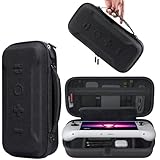
- Universal Compatibility: This case is fully compatible with Legion Go / Go S / Go 2, ensuring a secure and precise fit for all three models. Your device stays well-protected and stable during travel.
- Substantial Capacity: With a roomy interior and smart layout, this case keeps all your items organized and protected—handheld console, charging cables, wired earphones, and more, all in one secure place.
- Comprehensive Protection: The outer shell is made of durable Oxford fabric, offering water resistance and scratch protection. Inside, the EVA material provides excellent shock absorption and guards your device against drops, bumps, and pressure. A built-in screen protector layer shields the display from scratches—delivering full-body protection for your gear.
- Portable Design: Equipped with a comfortable handle and adjustable shoulder strap, this case adapts to various carrying styles—handheld, over-the-shoulder, or hung on other gear—making transport effortless in any situation.
- Secure Storage: The interior features a Velcro strap that keeps your device firmly in place without shifting during travel. Dual zipper design allows for quick and easy access to your accessories whenever you need them.
The reported U.S. launch price was $49.99, with availability expected in October 2024. Treat that figure and timing as historical launch information; current price and stock were not verified here.
Joystick Caps: inexpensive grip customization
Lenovo’s replacement joystick tops were offered in several shapes, including concave, textured spherical, and more traditional cylindrical designs. The goal is to let players adjust thumb position and grip for genres such as racing games and first-person shooters.
- Concave: gives the thumb a recessed resting surface.
- Textured or spherical: may suit players who want a more pronounced grip.
- Cylindrical: provides a more traditional-looking thumbstick profile.
These caps change the interface between your thumb and the existing stick. They are not replacement joystick modules, do not increase frame rates, and do not eliminate drift or change dead zones. The original Legion Go’s Hall-effect joystick hardware remains underneath. A taller or differently shaped cap may change perceived leverage and control, but Lenovo’s announcement did not provide measured accuracy improvements.
PC Slower Than It Used to Be?
A free scan shows the junk files, broken settings and background clutter dragging Windows down - then fixes them in one click.Free scan · Windows 10 & 11Outdated Drivers Are Slowing You Down
One free scan finds every outdated or missing driver and matches the right update for your exact hardware.Free scan · exact hardware matchThe reported U.S. starting price was $9.99, with availability expected in November 2024. They are worth considering when the stock caps feel slippery or uncomfortable and you already know what shape you prefer. They are an easy skip if the original controls feel fine or you expect a measurable hardware upgrade.
Rank #4

- Unmatched charging: Harness a full 65 watts of charging power—matching your Legion Go’s stock adapter. That means rapid recharging, so you’re back in the fight faster than your opponents can blink.
- Locked and loaded: Magnetically snap the power bank onto the rear of your Legion Go using the in-box iron plate, charging through the integrated USB-C cable. Clean, compact, and battle-ready—no cable clutter holding you back.
- Superior control: Instantly create a stand that props your Legion Go at the perfect angle for intense battles. Play without limits, stay focused, and own every moment.
- What’s in the Box: Lenovo Legion Go 65W 12800 Power Bank 1.5 m USB-C to USB-C Cable Iron Plate Quick-Start Guide Warranty
Carry Case and Mini Keyboard
Legion Go Carry Case
Lenovo described a hard-shell, dual-zip case with a protective screen flap, internal zip storage, and room for items such as a USB cable, flash drive, portable keyboard, and earphones. It also includes space for the power adapter and FPS-mode controller puck.
This is a practical purchase for travelers who carry the Go as a portable Windows computer rather than only as a game console. It is less attractive if you already have a better-fitting case with more storage or usually travel with only the handheld.
The announcement listed expected EMEA availability from January 2025 at €29.99. That regional launch price is not a current U.S. price, and case fit should be checked carefully before buying for a different Legion model.
Do these 3 things before closing this tab:
1Scan for outdated or missing drivers - takes under a minute2Clear out junk files and repair common Windows errors3Fix the driver behind crashes, sound loss and screen glitchesLenovo Multi-Device Bluetooth Mini Keyboard
The announced keyboard uses a 75% layout, weighs approximately 180 g, measures about 5.6 mm thick, and can switch among up to three devices. Lenovo listed compatibility with Windows, Android, and iPadOS.
Best Value

- Only for Legion Go Gen 2 (8.8″): This screen protector is designed exclusively for Lenovo Legion Go Gen 2 (8.8″). NOT compatible with any other model
- Easy, Bubble-Free Installation Kit Included: Apply in seconds with the included alignment frame and tool kit. The result is smooth, accurate, and bubble-free. Make sure the frame is firmly in place before starting. Package includes: 2× Screen Protectors, 2× Toolkit Sets, 1× Guiding Frame, 1× Removal Card
- Ultra HD Clarity: Enjoy stunning visuals with 99.9% light transmittance. This ultra-clear tempered glass screen protector preserves brightness, contrast and color accuracy. Perfect for immersive gameplay
- Smooth Touch & Fully Responsive: Only 0.33 mm thick, this tempered glass protector keeps your touchscreen fast and accurate, with smooth response to every gesture
- 9H Hardness & 8.8" Full-Screen Protection: Made from 9H tempered glass, this screen protector provides edge-to-edge coverage for the 8.8-inch display. It defends against scratches and daily wear. The oleophobic coating helps resist fingerprints and smudges, keeping your screen clean and clear
Its value is portability: it makes Windows searches, setup, browsing, and light productivity much less frustrating than using the touchscreen. A full-size keyboard is still likely the better choice for sustained work. Lenovo’s announcement does not establish key feel, key travel, battery life, or gaming suitability, so those should not be treated as proven advantages.
The listed EMEA starting price was €39.99, with availability expected in November 2024. Current U.S. stock and pricing were not verified.
Compatibility warning: original Legion Go versus newer models
This accessory expansion was for the original Legion Go. Do not assume that every case, controller accessory, dock fitting, or protective shell also fits the Legion Go S or Legion Go Gen 2.
Quick wins for a faster PC:
Scan for outdated or missing drivers - takes under a minuteDriver Scan →Clear out junk files and repair common Windows errorsFree Scan →Lenovo’s current U.S. Gen 2 page describes a different handheld with an 8.8-inch 144Hz OLED display, a 74Wh battery, and detachable TrueStrike controllers. Those specifications should not be merged into coverage of the original 2023 Legion Go or used as evidence of a 2024 upgrade. Check the exact model and Lenovo’s compatibility information before purchasing an accessory.
Historical launch prices and availability
The following figures are included to explain the 2024 announcement, not to represent prices in September 2026:
| Accessory | Region | Launch price | Timing reported |
|---|---|---|---|
| USB-C Dock | U.S. | $64.99 | 2024 launch period |
| Charging Connector | U.S. | $49.99 | Expected October 2024 |
| Joystick Caps | U.S. | From $9.99 | Expected November 2024 |
| Carry Case | EMEA | €29.99 | Expected January 2025 |
| Multi-Device Bluetooth Mini Keyboard | EMEA | €39.99 | Expected November 2024 |
Availability and prices can vary by country, retailer, and model year. Lenovo’s ecosystem announcement and the dock support page are the appropriate starting points for model and regional checks.
Which accessory should you buy first?
- Choose the dock if the Legion Go is part of a desk setup or you want Ethernet, a monitor, and full-size peripherals through one cable.
- Choose the Charging Connector if the split-controller design is the main thing you dislike and you often play detached from the screen.
- Choose the case if you travel with the charger, FPS puck, cables, and small peripherals.
- Choose joystick caps only when you have a specific grip problem or ergonomic preference.
- Choose the keyboard when Windows use is important and portability matters more than long-session typing comfort.
For a handheld-only owner, none of these accessories is a performance upgrade. For a Legion Go used as both a portable console and a compact PC, the dock is the clearest improvement, followed by the case or Charging Connector according to whether travel or controller comfort is the bigger problem.
What’s actually slowing this PC down?
Pick the symptom - the matching free tool is one click away.
Quick Recap
Product prices and availability are accurate as of the date/time indicated and are subject to change. Any price and availability information displayed on Amazon at the time of purchase will apply.




