Recommended Free Tools
Marvel Rivals launched worldwide at 00:00 UTC on December 6, 2024—which was 7 p.m. EST and 4 p.m. PST on December 5. These were different local dates for the same simultaneous launch, not separate regional release times. [Marvel Rivals]
Marvel Rivals launch time by time zone
| Time zone | Launch time |
|---|---|
| UTC | 00:00 on December 6, 2024 |
| Eastern Standard Time (EST) | 7 p.m. on December 5, 2024 |
| Pacific Standard Time (PST) | 4 p.m. on December 5, 2024 |
The official announcement gave the UTC time and its EST and PST equivalents. If you are checking another location, convert from 00:00 UTC on December 6; the date can differ depending on your time zone. [Marvel Rivals global launch announcement]
Why the release date was December 5 or December 6
The game had one global launch instant. It was already evening on December 5 in the cited North American time zones when the clock reached midnight UTC on December 6. So both dates are correct when paired with their respective time zones.
Where players could download Marvel Rivals
The December 2024 global launch announcement named Steam, PlayStation, Xbox, the Epic Games Store, and the official website as release routes. That list reflects the historical announcement; it does not verify current storefront listings. [Marvel Rivals global launch announcement]
The Tool Desk
Outbyte Driver Updater FREEFix the driver behind crashes, sound loss and screen glitchesFind Drivers →Outbyte PC Repair FREERepair Windows errors before they cause bigger problemsFix Now →#1 Best Overall

- DOMINATE YOUR GAME: Take your gaming sessions to the next level with Custom Controllerzz Galaxy Custom Wireless Controller, the ultimate compliment for your PS5 or PC setup.
- AUTHENTICITY: Custom Controllerzz proudly uses only new authentic controllers when creating our signature custom controllers. Additionally, Custom Controllerzz offer industry leading customer service for any questions you may have once you receive your personalized custom controller.
- EFFORTLESS SETUP: Our custom controllers are designed for convenience, arriving ready to use straight out of the box. Simply sync the controller with your console, and in moments, you'll be equipped with the best-designed custom controller.
- IMMERSIVE CONTROLLER FEATURES: Experience gaming like never before with our custom controller, featuring haptic feedback, adaptive triggers, and a built-in microphone and headset jack for seamless communication with friends and fellow gamers.
- RELIABLE WARRANTY: With over ten years of expertise in the controller modification industry, Custom Controllerzz ensures customer satisfaction. Each controller comes with a standard ninety-day warranty, covering everything except accidental or physical damage to the controller itself. Trust in our commitment to quality and service.
Marvel described the game as free-to-play and said all heroes would be unlocked and free to play at launch and beyond. [Marvel] NetEase likewise described it as a free-to-play superhero team-based PvP shooter at launch. [NetEase Games]
Independent reader supportYour contribution helps us test, update, and keep practical guides available for everyone.Could PC players use their beta installation?
No. The official PC pre-download FAQ said the server would open at 00:00 UTC on December 6, 2024, and that beta-test builds were incompatible with the official launch build. Having the beta installed was not a substitute for downloading the launch version. [PC pre-download announcement] [Official release FAQ]
Quick Recap
Rank #4
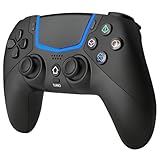
- Multi-Platform Compatibility: The Bluetooth 5.3 wireless controller is designed to be compatible with PS-5/Pro/Slim, PC(Windows 8/10/11) and so on. No matter which device you prefer for gaming, the controller provides seamless connectivity and smooth gameplay across multiple platforms, ensuring versatility and convenience
- 2 Connection Modes: Connect to the PS-5 console via Bluetooth 5.3 or Wired. Warm Tips: When using the gaming controller in Bluetooth 5.3 mode for the first time, it needs to be connected to the PS-5 console via a USB-C cable(the data cable included in the package or the original data cable), and then press the "HOME" button to connect with the console
- Hall Effect Joysticks: The BETMI Hall Effect Joysticks deliver a durable lifespan of up to 5 million cycles, precise and responsive feedback, allowing for smoother and more accurate movement in games
- Unparalleled Linear Triggers: Whether you're doing throttle acceleration through virtual worlds or performing actions like shooting, our sensitive triggers ensures a seamless gaming experience
- 6-Axis Motion Sensing: The controller is equipped with a 6-axis gyroscope that allows players to perform in-game actions such as controlling character direction, attacking, dodging, and more with slight hand movements or shaking, enhancing the sensory experience and realism of the game
Rank #3

- 【Connection & Wake-up】When using the gamepad for the first time, it needs to be connected to the PS5 console via a USB-C cable(It must be the data cable included in the package or the original data cable), and then press the Home button to activate it. After completing the first connection, you only need to press the HOME button to turn on the PS5 console. The gamepad is compatible with PS5 series consoles and Windows PCs, and it is not compatible with PS4.
- 【Controller with Sound】The controller is capable of producing sound, providing an immersive gaming experience. Please note that the controller is only equipped with a speaker and has no microphone. If you want to use the microphone function, please use an external headset. It is equipped with a 3.5mm TRRS headphone jack(not compatible with Apple headphones.)
- 【Customizable Colors】Press the Lighting button to switch colors and light effect modes with one click. It features a color memory function, ensuring that the next time you use it, it will still be the color you prefer.
- 【High - Precision Joysticks】Equipped with upgraded joysticks, these effectively reduce the joystick dead zone and extend the controller's service life.
- 【Multiple Functions】10 times/second Turbo function can be set, supporting up to 16 keys programming, making your gaming experience even better.
Rank #2

- Design for gamers – Based on official controllers with a custom design made for tactical eSports performance.
- Mappable Back Buttons – Two rear buttons support instant remapping of 15 buttons (X, O, Triangle, Square, Up, Down, Left, Right, L1, L2, R1, R2, L3, R3, Touchpad).
- Next-Gen Precision – Hall Effect joysticks and mouse-click triggers deliver smooth, responsive, and reliable control.
- Customizable Comfort – Includes 8 swappable thumbsticks in two heights and three styles (domed, concave, concave widened).
- Package Included – RIVAL Controller, 8 thumbsticks, and user manual. Cable and other accessories not included. Not compatible with official charging dock.
Product prices and availability are accurate as of the date/time indicated and are subject to change. Any price and availability information displayed on Amazon at the time of purchase will apply.




