What’s actually slowing this PC down?
Pick the symptom - the matching free tool is one click away.
Microsoft has confirmed a Windows 11 version 24H2 audio bug that can unexpectedly raise volume to 100 percent on some gaming PCs using external USB DAC systems. The Creative Sound BlasterX G6 is specifically named, with sleep/wake transitions and rapid USB attach-and-detach actions among the documented triggers.
This is not evidence that Windows 11 24H2 has broken game audio for everyone. The confirmed problem is a narrower Windows audio-stack issue involving sudden maximum volume, rather than a universal failure affecting every game, headset, Bluetooth device, or onboard audio system.
As an Amazon Associate I earn from qualifying purchases.
What Microsoft confirmed
Microsoft documented the issue on November 18, 2024, in support entry KB5049177. It applies to Windows 11 version 24H2, all editions, and concerns external USB digital-to-analog converter (DAC) audio systems used with gaming PCs.
The documented symptom is straightforward but potentially alarming: audio volume suddenly increases to 100 percent. Microsoft says the behavior can occur without an error message or another identifying indicator.
#1 Best Overall

- USB DAC Audio Converter:Computer or Game machine Audio Signal Through The USB Port .Covert Audio to Digital Optical, Coaxial or Analog Stereo RCA L/R,3.5mm Headphone Jack .Can Also Be Used As An External Sound Card
- USB to Optical Coaxial Converter:Support convert the Audio signal for the USB port to the digital optical spdif or coaxial.Work well with the sound bar and optical bluetooth headphone (5.1channel is incompatible,please set the audio output to PCM or LPCM)
- USB to Analog RCA L/R and 3.5mm headphone Converter:Support convert the Audio signal for the USB port to Analog RCA L/R and 3.5mm headphone.Support all the 3.5MM headphone and the2.0ch speaker
- Plug and Play:No driver required, plug-and-play for instant audio playing and compliant with all mainstream operating systems. no external power required.(Windows or ios system need to choose the right sound card
- Good Compatibility:Compatible with both Windows XP and Mac OS-X, For best playback in Windows. Compatible with PS3, PS4, PS5,which can be connected your headphones by USB DAC for playing games
Microsoft attributes the problem to a timing issue in the Windows AudioEndpointBuilder service, part of the operating system’s audio infrastructure. The public disclosure does not describe the precise race condition or establish that a particular game engine, storefront, or game is responsible. The game may simply be playing audio when Windows handles a USB audio endpoint transition incorrectly.
Which devices are affected?
Microsoft specifically names the Creative Sound BlasterX G6 USB digital audio converter. However, the support entry describes the broader category as external USB DAC sound systems, so the wording does not establish that the G6 is the only affected device.
It also does not show that every Creative product, USB headset, external sound card, or compatible Windows 11 device is affected. A current driver or firmware version likewise does not prove that a device is immune, because Microsoft’s stated cause is a timing problem in a Windows audio service rather than confirmed hardware failure.
Recommended Free Tools
When can the sudden-volume bug happen?
Microsoft lists several conditions associated with the problem:
Rank #2

- Versatile Entry-Level: The Fosi Audio Q4 is an entry-level DAC and headphone amp, featuring USB, Optical, and Coaxial inputs, plus RCA and 3.5mm outputs. It drives headphones from 16Ω to 200Ω, enhances audio quality, and connects to speakers or amplifiers
- Plug-and-Play Convenience: Instant HiFi audio with no driver installation. Connect to TVs, computers, speaker systems, or DVD players. Compact design fits anywhere, offering ultimate audio freedom
- Bass and Treble Controls: Adjustable bass and treble knobs for fine-tuning sound. Natural feel with smooth volume adjustment. High-quality metal knobs for a premium experience. Optimize audio for any source
- Compact and High-Quality: Compact DAC converter with full metallic shell. Supports 24-bit/192kHz HD audio with low jitter. Includes output protection circuit for system safety
- Complete Accessories: Includes USB charging cable, optical cable, and PC-USB to Type-B cable. Ensures hassle-free setup and immediate use. Seamless connectivity for various devices. (Note: No microphone input.)
- The PC is running Windows 11 version 24H2.
- The system uses an external USB DAC or sound system, including the named Sound BlasterX G6.
- The PC is manually put to sleep and then manually awakened.
- An external sound system is attached and immediately detached.
- The external device’s volume is changed and the device is immediately disconnected.
The exact timing matters. Avoiding a rapid disconnect after changing the volume may reduce exposure, but Microsoft has not published this as a guaranteed workaround.
How to tell whether this is your problem
You are a strong match for Microsoft’s confirmed issue if most of these details line up:
- You have Windows 11 24H2 installed.
- You route game audio through an external USB DAC or sound system.
- The volume jumps to maximum without an error message.
- The event follows sleep and wake, USB reconnection, or rapid device removal.
- You use a Creative Sound BlasterX G6.
The diagnosis is weaker if your main symptom is no audio, crackling, popping, Bluetooth audio problems, persistent delay, a game crash after headset removal, a blue screen, or a system freeze. Those symptoms may involve separate driver, endpoint-selection, Bluetooth, application, or hardware problems.
Do these 3 things before closing this tab:
1Scan for outdated or missing drivers - takes under a minute2Repair Windows errors before they cause bigger problems3Fix the driver behind crashes, sound loss and screen glitchesThe issue could theoretically be encountered outside a game because AudioEndpointBuilder handles Windows audio endpoints generally, but that broader connection is an inference. Microsoft’s documented description centers on gaming systems and does not state that every application is affected.
Rank #3

- The upgraded version of Fosi Audio Q4 adds microphone function, K5 Pro headphone DAC amp combo, next-generation audio converter with unrivaled internals, more outstanding performance, and richer audio details. Born for Gaming. K5 Pro stereo DAC headphone amplifier is perfect for your home gaming system, equivalent to an external sound card, suitable for PS5/Computers/PC/MAC/active speakers, etc
- K5 Pro USB DAC converts USB Type C/Optical/Coaxial signals to 3.5MM AUX and RCA signals with low distortion and great dynamic range. Unique design: 2-in-1 USB Type C interface charging port and audio input means K5 Pro is compatible with your phones(Note: Your audio source must be connected to the USB-A/C port.). RCA output can be connected to an amplifier or powered speakers on your desktop. 3.5 MM AUX and microphone interface can drive 16 Ohm to 300 Ohm headphones
- K5 Pro headphone DAC adopts the Texas Instruments NE5532 op-amp chip. The circuit design implementing this DAC has been optimized for a low-noise floor and clean sound. K5 Pro has noticeably improved on overall sound quality, so you can get immersed in your music even more easily. Volume button and on button are combined into one, long press to switch on
- Product Specifications: K5 Pro with master volume/bass/treble control and input mode switch. USB Type C rate: up to 24 bit/96 kHz, Optical/Coaxial sampling rate: up to 24 bit/192 kHz, THD ≤0.003%, SNR ≥110dB. Output power: 1000mw@16Ω, 500mw@32Ω, 300mw@64Ω, 150mw@128Ω, 80mw@300Ω
- What You Get: K5 Pro DAC amp x1, 3.5MM headphone splitter x1, 2-in-1 USB Type A/C to Type C cable x1, User Manual x1, Optical Cable x1
Practical precautions while Microsoft investigates
The official support page reviewed for this report does not list a definitive workaround. The following steps are therefore risk-reduction measures or troubleshooting options, not confirmed fixes:
- Lower the physical volume first. Reduce the DAC, amplifier, or headphone volume before manually waking the PC. This can limit the impact if Windows restores the endpoint at maximum volume.
- Do not rapidly hot-swap the DAC. Avoid immediately unplugging and reconnecting the external audio device around sleep/wake transitions.
- Pause after changing volume. If you adjust the external device’s volume, allow a moment before disconnecting it.
- Install current updates. Check Settings > Windows Update and install available Windows updates. Also check the computer maker’s support page and the vendor’s official support resources for current audio, chipset, firmware, and device software updates. Do not assume a particular update resolves KB5049177 unless Microsoft explicitly says so.
- Use another output temporarily. Motherboard audio, analog output, or another USB audio device can help you continue playing and can indicate whether the behavior is tied to one endpoint transition. This is a diagnostic workaround, not proof that another device is permanently unaffected.
For the G6, Creative’s official product-support page provides vendor software, firmware, and support information. Its G6 FAQ is another appropriate place to check device-specific guidance.
Is it dangerous?
The immediate practical risk is sudden exposure to very loud sound, especially when headphones or a powerful amplifier are connected. It can cause discomfort, startle the listener, and potentially pose a hearing risk. Lowering the physical output before sleep or reconnection is sensible protection.
The Tool Desk
Outbyte Driver Updater FREEFix the driver behind crashes, sound loss and screen glitchesFind Drivers →Outbyte PC Repair FREEClear out junk files and repair common Windows errorsFree Scan →Microsoft has not documented permanent hearing damage or hardware damage in the support entry. The G6 should not be treated as defective solely because it is named in the known issue, and replacing it immediately is not justified by the available evidence.
Rank #4
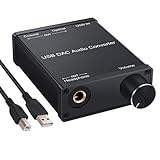
- USB DAC:Output to an amplifier,integrated sound card as a computer upgrade that can be connected to a decoder that will send back the best possible sound quality level.(5.1 channel is NOT compatible,please set the audio output to PCM or LPCM)
- HiFi Headphone Amplifier:Support most high impedance 16-300Ω headphones, SNR>100Db, THD+N=0.0003%, fully filter noise, enjoy high quality audio
- Plug and Play:No need power supply, easy to use. With a safe and reliable USB Type B port, you can enjoy the music on your computer conveniently
- Widely Compatible:Compatible with Windows XP and Mac OS-X system.The headphone amp is suitable for PS4, PS3, and you can connect your headset to the converter for gaming
- What You Get:USB DAC Audio Converter*1, 1.5m USB Cable*1, 6.35mm to 3.5mm Audio Adapter*1, User's Manual*1
Other Windows 11 24H2 audio problems are separate
Windows 11 24H2 has had other audio compatibility issues, but they should not be folded into the USB-DAC volume bug.
Dirac Audio and cridspapo.dll
Microsoft separately documented a problem affecting devices with Dirac Audio and the cridspapo.dll component. Integrated speakers, Bluetooth speakers, and Bluetooth headsets could stop working. Microsoft said that issue was resolved through a driver update and removed its safeguard hold on September 11, 2025. That is a missing-audio compatibility problem, not the sudden-100-percent-volume behavior described here.
Intel Smart Sound Technology drivers
Another earlier 24H2 compatibility issue involved certain Intel Smart Sound Technology drivers on systems with 11th-generation Intel Core processors. The affected versions were 10.29.0.5152 and 10.30.0.5152. Microsoft said newer versions, including 10.30.00.5714 and later or 10.29.00.5714 and later, resolved that issue. It was associated with blue screens and update safeguards, not an external DAC suddenly switching to maximum volume.
Outdated Drivers Are Slowing You Down
One free scan finds every outdated or missing driver and matches the right update for your exact hardware.Free scan · exact hardware matchWindows Errors? Fix Them Before They Spread
Repair common Windows errors and clear accumulated junk for a smoother, more stable PC - no reinstall needed.Free scan · no reinstallMicrosoft’s Windows 11 24H2 resolved-issues page is the appropriate reference for those separate cases.
Best Value

- Distortion-Free HiFi Audio: Dual U.S. Chips for Studio-Grade Sound,Equipped with premium U.S.-made CX31993 and MAX97220 dual DAC chips, this USB-C to 3.5mm adapter delivers distortion-free audio with stunning clarity. The advanced DAC technology converts digital signals to analog with zero loss, preserving every detail of your original audio—from crisp highs to deep bass. Experience true-to-source sound, just like the artist intended.
- Improvement on Sound Quality:The usbc to headphone jack adapter adopts 8-Strand 4N high-purity single-crystal copper-silver plated wire cores,The fusion of single-crystal copper-silver plated wire fully leverages the advantages of copper and silver metals: Copper provides powerful low-frequency and cohesive mid-frequency, while silver enhances the high-frequency performance details, making the audio more vivid.
- Hi-Res Certified:BZINK usbc adapter is certified, and Obtained Hi Res Gold Label certification. This is not only the first choice for audiophiles but also for those who have special requirements for sound quality.This usb to 3.5mm headphone jack adapter adopted an advance DAC Chip, it is low power consumption, excellent and stable decoding performance, and maximum support for 32bit/384KHz audio sampling rate,offer high-definition audio, powerful noise reduction., you can get higher fidelity sound from it.
- More Everlasting Durability: 8-Strand 4N Single Crystal Copper Silver-Plated Upgraded Cable, in ear monitor Amplifier Adapter is robust in build quality. Aviation grade aluminum alloy casing material prevents scratches and rust, higher quality. Slim and portable, easy to carry around.
- Broad Compatibility with USB-A: This usb c to 3.5 mm adapter included a USB-A interface for maximum versatility. Works seamlessly with iPhones (USB C interface version), iPads, MacBooks, Android phones, laptops, desktops, and car stereos. Great for music, calls, livestreams, and content creation.
Has Microsoft released a fix?
The Microsoft support entry says the company was working on a resolution and would provide more information when available. The page reviewed for this article does not list a specific Windows KB update, driver version, registry change, or official repair procedure for the USB-DAC volume issue.
That status means users should not assume that updating Windows, installing a particular Creative driver, disabling audio enhancements, or changing a registry value definitely fixes this problem. Updates and vendor firmware remain reasonable maintenance steps, but they should be described as troubleshooting rather than a documented resolution.
Likewise, uninstalling security updates is not an appropriate first-line response. Nor is replacing the G6: Microsoft described a Windows audio-service timing problem, and the documented behavior is conditional rather than constant.
What to report if the problem continues
Record the Windows edition and version, audio device model, driver and firmware versions, whether the PC had just resumed from sleep, the exact attach/detach sequence, and whether the volume changed in Windows, on the device, or in a game. This information can help distinguish the known endpoint-transition symptom from unrelated audio failures when contacting Microsoft, the PC maker, or the device vendor.
Most importantly, stop playback and reduce the physical output immediately if the volume jumps. Do not keep testing the trigger at a high headphone or amplifier setting.
Quick Recap
Product prices and availability are accurate as of the date/time indicated and are subject to change. Any price and availability information displayed on Amazon at the time of purchase will apply.




