Do these 3 things before closing this tab:
1Repair Windows errors before they cause bigger problems2Scan for outdated or missing drivers - takes under a minute3Clear out junk files and repair common Windows errorsGaming Copilot is real, but it did not first arrive on Windows 11 PCs in August 2026. Microsoft began testing the Xbox gaming assistant with Xbox Insiders on August 6, 2025, then started a gradual rollout to PC players aged 18 and over through Xbox Game Bar on September 18, 2025.
Gaming Copilot is a beta feature inside Xbox Game Bar, not the standard Microsoft Copilot app. It can answer questions about games, provide tips, surface achievements and play-history information, recommend games, and support voice interaction. Availability can still depend on your account, region, age, app versions, and Microsoft’s staged rollout.
As an Amazon Associate I earn from qualifying purchases.
What is Gaming Copilot?
Gaming Copilot is Microsoft’s Xbox-focused gaming assistant for Windows PCs. It appears inside the Xbox Game Bar overlay, allowing players to ask questions without fully leaving their game.
Recommended Free Tools
That makes it different from the ordinary Microsoft Copilot app for Windows. Gaming Copilot is designed around Xbox-related gaming information, including the game you are playing, achievements, recommendations, and Xbox activity. Microsoft introduced it as a beta experience rather than an autonomous game-playing agent.
#1 Best Overall

- 【Enhanced Your Experience】The KAIGERR 2025 newest laptop is equipped with the powerful AMD Ryzen 7 processor (8C/16T, up to 4.3GHz), delivering superior performance and responsiveness. This upgraded hardware ensures smooth browse, fast loading times, and high-quality visuals. It provides an immersive, lag-free creative experience that brings your favorite titles to life.
- 【15.6" High-Definition IPS Screen】With its wide color gamut and high refresh rate, this laptop delivers smoother visuals and sharper detail, offering a more vivid and accurate representation than standard displays. This enhanced clarity brings a stunning and immersive visual experience, making every scene more dynamic.
- 【Upgradeable Storage Capacity】This ryzen laptop computer comes with 16GB of DDR4 RAM and a 512GB M.2 NVMe SSD, ensuring faster response times and ample storage for your files. The dual-channel DDR4 memory can be upgraded to 64GB (2x32GB), while the NVMe/NGFF SSD supports expansion up to 2TB. With this level of upgradeability, you'll have more than enough space to store all your favorite videos/files and handle even the most demanding tasks with ease.
- 【Extensive & Premium Connectivity】Designed for ultra-fast running, KAIGERR AMD Ryzen 7 Laptop is equipped with webcam × 1, USB 3.2 × 2, HDMI × 1, Type_C (full function) × 1, 3.5mm audio/microphone × 1, TF card holder × 1, Type_C DC jack × 1. Enjoy higher speeds with Wi-Fi 6, compatible with the 802.11ax standard and up to 3x faster than Wi-Fi 5.
- 【KAIGERR: Quality Laptops, Exceptional Support.】Enjoy peace of mind with unlimited technical support and 12 months of repair for all customers, with our team always ready to help. If you have any questions or concerns, feel free to reach out to us—we’re here to help.
Microsoft’s initial announcement described capabilities such as help with difficult sections, recommendations, achievement questions, and “proactive coaching” as part of the feature’s development. That should not be interpreted as a guarantee that Gaming Copilot continuously understands every game or actively coaches every player in real time.
Microsoft’s Xbox Wire announcement says the assistant can use gameplay screenshots for additional context. This means screenshot-aware assistance, not necessarily continuous video analysis of everything on your screen.
When did Gaming Copilot launch on Windows?
| Date | What happened |
|---|---|
| August 6, 2025 | Gaming Copilot Beta began rolling out to Xbox Insiders enrolled in the PC Gaming Preview. |
| September 18, 2025 | Microsoft announced a gradual rollout to PC players aged 18 and older through Game Bar. |
| September 29, 2025 | Xbox described the feature as expanding to Windows PC players in its September update. |
| October 16, 2025 | The Windows Experience Blog described Gaming Copilot Beta as integrated into Game Bar on Windows PCs. |
These dates distinguish the original Insider preview from the broader PC rollout. Microsoft’s latest official rollout materials cited here do not establish a separate August 2026 launch, a new Windows 11-specific version requirement, or guaranteed availability on every Windows 11 computer.
What can Gaming Copilot do?
Answer questions about a game
You can ask for tips about the game you are playing, help with a difficult boss or section, or guidance when you are unsure what to do next. As with any AI-generated advice, verify important information: answers can be incomplete, incorrect, outdated, or based on the wrong game version.
Provide recommendations
Gaming Copilot can recommend games and answer Xbox-related discovery questions. Its recommendations are likely to be most useful to players already using the Xbox ecosystem, particularly those whose activity and library information are connected to their Xbox account.
Show achievements and play history
The assistant can answer questions about achievements and Xbox play history. This account-aware functionality is one reason Gaming Copilot is more relevant to Xbox users than to someone who uses Windows only as a neutral launcher for Steam, Epic Games Store, GOG, or other platforms.
Rank #2

- 【Enhanced Your Experience】The KAIGERR 2026 LX15PRO newest laptop is equipped with the powerful AMD Ryzen 7 5825U processor (8C/16T, up to 4.5GHz), delivering superior performance and responsiveness.
- 【15.6" High-Definition IPS Screen】With its wide color gamut and high refresh rate, this laptop delivers smoother visuals and sharper detail, offering a more vivid and accurate representation than standard displays.
- 【1TB Large Capacity】This ryzen laptop computer comes with 16GB of DDR4 RAM and a 1TB M.2 NVMe SSD, ensuring faster response times and ample storage for your files. The dual-channel DDR4 memory can be upgraded to 64GB (2x32GB), while the NVMe/NGFF SSD supports expansion up to 2TB.
- 【Extensive & Premium Connectivity】Designed for ultra-fast running, KAIGERR AMD Ryzen 7 Laptop is equipped with webcam × 1, USB 3.2 × 2, HDMI × 1, Type_C (full function) × 1, 3.5mm audio/microphone × 1, TF card holder × 1, Type_C DC jack × 1. Enjoy higher speeds with Wi-Fi 6, compatible with the 802.11ax standard and up to 3x faster than Wi-Fi 5.
- 【KAIGERR: Quality Laptops, Exceptional Support.】Enjoy peace of mind with unlimited technical support and 12 months of repair for all customers, with our team always ready to help. If you have any questions or concerns, feel free to reach out to us—we’re here to help.
Use text or voice
Text chat is available through the Gaming Copilot widget. Voice Mode lets you speak to the assistant while playing. You can pin the widget, return to the game, and continue interacting with it through the overlay.
Free tools Windows power users keep installed
One-click scans. No signup required.
Use gameplay screenshots for context
Microsoft says Gaming Copilot can use screenshots in Voice Mode to make responses more relevant. Screenshot context may help when describing a visible puzzle, menu, enemy, or objective would otherwise take several sentences.
However, a screenshot cannot reveal everything about a game. It may not show hidden objectives, previous actions, multiplayer coordination, mod-specific behavior, or information outside the captured frame.
How to launch Gaming Copilot on Windows
- Install or update the Xbox PC app. Microsoft’s documented setup path starts with the Xbox app for PC.
- Start a game, or remain on the Windows desktop while checking whether the feature is available.
- Press Windows key + G to open Xbox Game Bar.
- Look for the Gaming Copilot icon in the Game Bar Home Bar.
- Open the widget and sign in with your Xbox account if prompted.
- For spoken interaction, select the microphone control to enter Voice Mode.
- Pin the widget if you want to keep it accessible while returning to the game.
The Xbox PC app lists Windows 10 and Windows 11 version 22H2 or later as its baseline. That does not mean Gaming Copilot is guaranteed on every installation meeting that requirement. The feature’s own rollout, account, age, region, and beta conditions remain separate.
Who can use Gaming Copilot?
Microsoft’s September 2025 PC rollout announcement specified that players must be 18 or older. It described availability in supported regions except mainland China. Earlier Insider testing was limited to English-language testing in the United States, Australia, New Zealand, Japan, Singapore, and other listed regions.
Those are the restrictions documented in the rollout announcements. The official materials cited here do not confirm whether Microsoft has changed the age, language, or regional rules since then. Windows 11 alone is therefore not proof of eligibility.
Rank #3
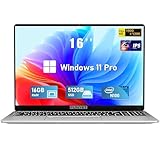
- Smooth Power for Work & Play: Tackle tasks smoothly with the 12th Gen Intel Celeron N100 processor (up to 3.4 GHz), which handles your daily work and entertainment without lag.
- Vibrant 16" FHD Display: See more on the vibrant 16 inch FHD (1920x1200) IPS screen, featuring ultra-narrow bezels and a 90% screen-to-body ratio for an engaging viewing experience.
- Multitask & Store It All: Switch between apps easily with 16GB of RAM and save everything fast on the 1TB SSD, from large files to your favorite software.
- Backlit Keyboard & Fingerprint Unlocking: The backlit keyboard allows for accurate typing in any lighting, while fingerprint unlock provides quick and secure access to your device with just one touch.
- Windows 11 Pro and Office 365: Benefit from the business-grade security and efficiency of Windows 11 Pro, with Office 365(life time) pre-installed to jumpstart your productivity right away.
Does Gaming Copilot require a Copilot+ PC?
Microsoft did not identify Copilot+ hardware as a requirement in the Gaming Copilot rollout announcement. The feature is described as running through Xbox Game Bar on a Windows PC, while the Xbox PC app lists Windows 10 and Windows 11 version 22H2 or later as its general baseline.
That is not a universal compatibility guarantee. It is simply a distinction between the documented software requirements and Copilot+ branding. You do not need to buy a Copilot+ computer solely because you want to check whether Gaming Copilot is available.
What if the Gaming Copilot icon is missing?
A missing icon does not automatically mean that Windows is broken. Microsoft described the feature as rolling out gradually, so availability may be controlled on the account or server side.
Crashes, No Sound, or Screen Glitches?
Random freezes, missing sound and display glitches usually trace back to one bad driver. Find and replace yours safely.Free scan · under a minuteWindows Errors? Fix Them Before They Spread
Repair common Windows errors and clear accumulated junk for a smoother, more stable PC - no reinstall needed.Free scan · no reinstall- Update the Xbox PC app through the Microsoft Store.
- Update Xbox Game Bar through the Microsoft Store as well.
- Sign in with the Xbox account you intend to use for gaming.
- Restart Game Bar by closing and reopening it with Windows + G.
- Check that your PC is running Windows 11 and that Game Bar has not been disabled by a workplace, school, family, or organization policy.
- Confirm that you meet the documented age and regional requirements.
- If you are an Xbox Insider, verify that the correct Xbox account is enrolled in the PC Gaming Preview.
- Do not reinstall the ordinary Microsoft Copilot app expecting it to add Gaming Copilot. They are separate experiences.
If the icon remains absent after updates and sign-in, the likely explanations are staged availability, account or region restrictions, outdated Xbox components, or a change in Microsoft’s rollout—not necessarily a faulty Windows installation.
Independent reader supportYour contribution helps us test, update, and keep practical guides available for everyone.Is Gaming Copilot useful?
It is most appealing when you need a quick answer without opening a browser or leaving the game. Voice Mode may be convenient when your hands are occupied, and screenshot context could reduce the effort required to explain what is happening on screen.
It also fits naturally into the Xbox ecosystem. Achievement questions, play-history information, and game recommendations are more useful when your Xbox account already contains relevant activity.
Rank #4

- EFFICIENT PERFORMANCE: KAIGERR light gaming laptop featuring the latest AMD Ryzen R2544 Processor (boasting 3.7GHz high-frequency). Outperforming the Celeron N5095/N100/N97/N95, it delivers robust multitasking capabilities. The laptop computer has an integrated UHD graphics card clocked at up to 1200MHz for stronger graphics processing performance. KAIGERR laptop is designed to elevate your computing experience
- POWERFUL CONFIGURATION: Featuring 16GB of DDR4 RAM and a speedy 512GB M.2 SSD, this light gaming offers a 50% performance boost compared to DDR3-equipped machines and ensures seamless system operation while accommodating your personal files. Support expand your storage with a 128GB TF card, and enjoy the convenience of a pre-installed operating system. The 512 GB SSD can be replaced with a maximum SSD of 2TB to provide you with ample space to record and store your files
- 16.0 INCH VISUAL TREAT: Immerse yourself in a traditional laptop computer experience with an innovative thin-bezel display, offering more screen real estate for immersive viewing. The colors of the 16 inch traditional light gaming are fuller, more vivid, and concise, the details on the screen are clearer, and the viewing angle is wide. It will create extraordinary visual effects for you
- LONG BATTERY LIFE: Take KAIGERR light gaming laptops with you anywhere without bringing the power adaptor. Its 54.72Wh long battery life gives you the flexibility to work or play anywhere for long time. The long battery life and reliable performance make your life and work more secure
- QUALITY SUPPORT: Enjoy peace of mind with unlimited technical support and 12 months of repair for all customers, with our team always ready to help. Close other background programs before running games to ensure smoother performance
Traditional guides, official wikis, developer support pages, and game-specific communities can still be better for accuracy. Human-written sources often provide patch-specific details, exact item locations, known bugs, and explanations that are easier to verify. Multiplayer players may also prefer Discord or an established game community for coordination and advice.
The Tool Desk
Outbyte Driver Updater FREEFix the driver behind crashes, sound loss and screen glitchesFind Drivers →Outbyte PC Repair FREEClear out junk files and repair common Windows errorsFree Scan →Limitations to keep in mind
- Accuracy: AI-generated tips can be wrong, incomplete, or based on outdated game information.
- Game context: A screenshot may not reveal hidden state, previous choices, mods, or multiplayer events.
- Latency: Voice and screenshot-based responses depend on network access and Microsoft’s servers.
- Privacy: Review screenshot settings in the Gaming Copilot widget if you do not want gameplay images used for assistance.
- Distraction: Frequent hints can reduce the satisfaction of solving a difficult section independently.
- Beta status: The interface, supported regions, behavior, and available capabilities may change.
- Account dependence: Players who do not use Xbox services may get less value from achievement, history, and recommendation features.
Microsoft’s announcement describes screenshot settings that can be managed from the Gaming Copilot widget. Check those controls before using screenshot-aware assistance, especially on shared or streamed gameplay.
Is Gaming Copilot free?
The rollout announcements do not identify a separate Gaming Copilot subscription or add-on fee. Microsoft presents it as part of the Xbox and Game Bar software experience. However, the full experience requires an Xbox account, and some broader Xbox services—such as Game Pass catalogs or cloud gaming—have their own eligibility and subscription terms.
You do not need PC Game Pass merely to test whether the Gaming Copilot widget appears. Game Pass is relevant only if you also want its game catalog or other included Xbox benefits.
Bottom line
Gaming Copilot is an Xbox gaming assistant integrated into Windows Game Bar, and Microsoft’s Windows PC rollout began in 2025—not as a new August 2026 launch. Press Windows + G and look for the Gaming Copilot widget after updating the Xbox PC app and Game Bar.
Quick wins for a faster PC:
Repair Windows errors before they cause bigger problemsFix Now →Fix the driver behind crashes, sound loss and screen glitchesFind Drivers →Clear out junk files and repair common Windows errorsFree Scan →It can be useful for quick tips, voice questions, recommendations, achievements, and play-history information. It is not a guaranteed real-time coach or autonomous game-playing agent, and its availability may still vary by account, age, region, software version, and staged rollout.
Quick Recap
Product prices and availability are accurate as of the date/time indicated and are subject to change. Any price and availability information displayed on Amazon at the time of purchase will apply.




