Quick wins for a faster PC:
Scan for outdated or missing drivers - takes under a minuteDriver Scan →Clear out junk files and repair common Windows errorsFree Scan →Fix the driver behind crashes, sound loss and screen glitchesFind Drivers →Minecraft has three command block types: impulse runs once per activation, chain runs when a command block pointing to it executes, and repeating runs once per game tick while activated. To obtain one, use Creative mode and the appropriate command permissions; command blocks are not available in Survival.
What the three command block types do
The type selector in the command block interface changes how a block executes. Color is an interface cue; the important difference is what triggers execution and how the block fits into a command sequence. Minecraft’s explainer describes the three types as having been available since version 1.9, though it does not establish current edition-specific differences.
| Type | Color | Execution behavior | Typical role |
|---|---|---|---|
| Impulse | Orange | Executes once each time it is activated. | A single command triggered by redstone or another activation. |
| Chain | Green | Executes when a command block pointing to it executes. | A later command in a sequence; its orientation matters because the preceding block must point toward it. |
| Repeating | Purple | Executes once per game tick while activated. | A command that should keep running while its activation condition remains in effect. |
The colors and behaviors are described in Minecraft’s command block explainer, by Duncan Geere, published April 27, 2018. Geere summarized impulse behavior as: “The impulse one is orange, and executes once every time it’s activated.”
Conditional, unconditional, redstone, and always active
Type is only one part of a command block’s behavior. The interface also lets you choose whether execution depends on the command block physically behind it, and whether the block needs redstone activation.
#1 Best Overall

- Bring the world of Minecraft to life with the kid-sized Minecraft Transforming Diamond Sword and Pickaxe!
- The dynamic 2-in-1 tool transforms from pickaxe to sword with one swift motion -- just push or pull to switch!
- The large-scale toy feels great in kids' hands when mining blocks or fending off zombies -- the perfect accessory for any video gamer!
- Fans will love the excitement of playing out Minecraft scenarios in the real world -- mine for ore, fight mobs, then go back to mining!
- Makes a cool gift or costume accessory for video game players and fans ages 6 years and older who love exploration, creativity and survival -- the Minecraft way!
- Conditional: the block executes only if the command block physically behind it successfully executes its command. In a chain, this lets a later step depend on the preceding block’s success.
- Unconditional: the block runs whenever it is triggered, without requiring the block behind it to succeed.
- Needs redstone: the block waits for redstone activation.
- Always active: the block does not require a redstone signal to be activated.
These are separate settings from impulse, chain, and repeating: choose the type for the execution pattern, then set the condition and activation behavior to suit the build.
How to get a command block
Command blocks are a Creative-mode and mapmaking feature, not an item available through ordinary Survival play. You also need command access: the exact steps depend on the edition and whether the world is singleplayer or multiplayer.
Rank #2
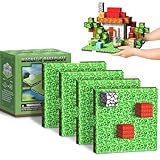
- 【Powerful Magnetic Baseplate】:Featuring iron components on the bottom, magnetic blocks baseplate offers a strong magnetic grip to securely hold your creations. Made from high-quality plastic with smooth edges, it’s durable, lightweight, and perfect for endless building fun.
- 【Flexible Setup for Limitless Creativity】:Each baseplate holds up to 25 magnetic blocks (4x4 inches), offering ample space for kids to build and expand their designs. The set includes 4 baseplates that easily connect with buckle, allowing kids to set up their own creative space independently.
- 【Boosts Creativity & Developmental Skills】:The magnetic building blocks baseplates encourage open-ended play, helping children develop creativity, coordination, spatial awareness, and problem-solving skills, while supporting STEM learning through hands-on building.
- 【Fun for All Ages】:Designed for kids ages 3-7 4-8 8-12, these magnetic baseplates are an ideal accessory for building blocks. They provide a stable foundation for endless creativity, helping to improve focus, patience, and fine motor skills.
- 【Perfect Addition to Magnetic Building Sets】:Great for classroom activities, family play, or as a thoughtful gift for birthdays, Christmas, and other special occasions, they enhance creative building and elevate playtime.
Bedrock singleplayer
- Open the world’s Game settings.
- Turn on Allow Cheats.
- Use an available command with the appropriate permissions. The official guide documents the general form
/give <player> <item> [amount], but the reviewed guide does not give a command-block-specific item example. Use the game’s autocomplete or current documentation for the exact syntax in your version.
There is an important trade-off: Minecraft warns that “enabling cheats will permanently stop players from unlocking achievements in that world – even if you turn them off again later.” See the official How to Use Commands in Minecraft guide, published September 22, 2023.
Java singleplayer
Enable Allow Commands when creating the world, or turn it on later in World Options. Then use a permitted command, checking the game’s autocomplete or current edition documentation for the command-block item syntax; the official guide gives general /give syntax but does not establish a command-block-specific example.
What’s actually slowing this PC down?
Pick the symptom - the matching free tool is one click away.
Rank #3

- The product is a 4-piece set made of EVA material, safe for gamers of all ages.
- Perfect for imaginative play, enhance your role-play experience with our toy weapon set including sword, axe, pickaxe and shovel.
- Realistic toy weapons are suitable for a variety of role play accessories to complete your costume,also great for room decoration and theme parties.
- These toys are perfect gifts for kids on Halloween,Christmas, birthdays or any occasion,providing endless fun and entertainment.It will make their costumes stand out from the crowd.
- If you are a game fan like me,you will love receiving these toys as gifts. If you have any questions,please contact us.Customer service will handle it for you within 24 hours.We are very happy to help you!
Multiplayer
You need sufficient command permissions on the server. If it is someone else’s server, ask its owner or operator; having access to a command block in Creative mode does not by itself grant permission to run commands.
Independent reader supportYour contribution helps us test, update, and keep practical guides available for everyone.Choosing settings for a simple sequence
- Use an impulse block for the first command when it should run once per activation.
- Place a chain block after it and orient the preceding block so it points toward the chain block.
- Set the chain block to conditional if it should run only after the previous block succeeds; use unconditional if it should run regardless of that success.
- Use repeating instead when the command should execute every game tick while active, and choose redstone or always active according to how the build should be switched on.
The official descriptions above explain the mechanics, but do not specify current item identifiers or establish that one command syntax works across all current Java and Bedrock versions. Check the in-game autocomplete for the version you are playing.
Quick Recap
Rank #4

- Designed in an easy-to-collect size, the Minecraft Sticky Piston Trap set brings the video game action in-home with an action figure, accessories and a "Redstone Charged" trap with motion feature!
- Kids can use the "Redstone Charged" trap to stick on the included figure, then push the button and watch it slide forward!
- The 3.25 inch-scale action figure is squishy and sticky so it holds to the piston for a powerful punch!
- There are also 2 smaller that fit inside the larger block for added play and display of a favorite video game moment!
- With so much action packed in, this collectible Minecraft set makes a fun, themed gift for video-game players and fans ages 6 years old and up!
Product prices and availability are accurate as of the date/time indicated and are subject to change. Any price and availability information displayed on Amazon at the time of purchase will apply.




