This guide covers Minecraft Java and Bedrock commands, but there is no single maximum-effectiveness command that works across both editions and every version. For Java, the command format changes in 1.20.5; “maximum” can mean the normal survival limit, a command-accepted level, or the best practical setup for a particular task.
What does “maximum effectiveness” mean?
Choose what you mean by maximum before building a command. The highest numeric enchantment level is not necessarily balanced or useful for ordinary play, and a useful gear set depends on its purpose.
- Survival-legal: Use enchantment levels normally available through gameplay for your edition and version.
- Command-accepted: Use levels the target game accepts through commands. MinecraftMaps’ undated generator page reports a Java enchantment ceiling of 255 and uses Sharpness 255 as an example; treat that as the generator’s claim, not a universal guarantee, and verify behavior in your target version. It says Bedrock is stricter. MinecraftMaps command generator
- Best for a task: Select a combination for the job—such as combat, mining, or utility—rather than maximizing every number. No universally best loadout is established.
Keep Java and Bedrock commands separate
Command generators document different customization support by edition. Mcgic offers separate Java and Bedrock modes; its listed Java fields include enchantments, attributes, display names, lore, HideFlags, and NBT output, while its Bedrock mode omits Java-only NBT fields. Check its edition selector and available fields before copying a result. Mcgic give command generator
MinecraftMaps likewise describes fewer customization fields in Bedrock and says Bedrock enchantments are added with separate /enchant lines. Its generator lets users select a version for syntax. These are tool descriptions, so confirm any generated command in the game and version you intend to use. MinecraftMaps command generator
Windows Errors? Fix Them Before They Spread
Repair common Windows errors and clear accumulated junk for a smoother, more stable PC - no reinstall needed.Free scan · no reinstallCrashes, No Sound, or Screen Glitches?
Random freezes, missing sound and display glitches usually trace back to one bad driver. Find and replace yours safely.Free scan · under a minute#1 Best Overall

- Bring the world of Minecraft to life with the kid-sized Minecraft Transforming Diamond Sword and Pickaxe!
- The dynamic 2-in-1 tool transforms from pickaxe to sword with one swift motion -- just push or pull to switch!
- The large-scale toy feels great in kids' hands when mining blocks or fending off zombies -- the perfect accessory for any video gamer!
- Fans will love the excitement of playing out Minecraft scenarios in the real world -- mine for ore, fight mobs, then go back to mining!
- Makes a cool gift or costume accessory for video game players and fans ages 6 years and older who love exploration, creativity and survival -- the Minecraft way!
Choose how to build the command
| Approach | What it provides | Check before using it |
|---|---|---|
| Visual generator | Select an item and configure supported enchantments or other item data, then copy the generated command. | Edition and version selection, supported fields, and whether the output matches what you want. |
| Prebuilt kit | A ready-made loadout with an item breakdown and a command. | Target version, intended use such as PvP or utility, and the kit’s contents. |
| Handwritten command | Direct control over target, item, count, and supported components. | Exact version syntax, component compatibility, and command permissions in your environment. |
Use a visual generator for customization
Mcgic and MinecraftMaps document generators with edition or version distinctions. Pick the mode that matches your game, configure only fields it supports for that edition, and inspect the generated output before running it. Mcgic · MinecraftMaps
Use a kit when you want a ready-made loadout
The Minecraft Kits GitHub repository provides text-file loadouts with descriptions, item contents, and a single /give command. At access, it listed 131 kits across Java versions 1.20.1, 1.21.1, 1.21.5, 1.21.11, and 26.2. That count and version list describe the repository at that time and may change; check the selected file’s version and contents. Minecraft Kits repository
Rank #2

- The product is a 4-piece set made of EVA material, safe for gamers of all ages.
- Perfect for imaginative play, enhance your role-play experience with our toy weapon set including sword, axe, pickaxe and shovel.
- Realistic toy weapons are suitable for a variety of role play accessories to complete your costume,also great for room decoration and theme parties.
- These toys are perfect gifts for kids on Halloween,Christmas, birthdays or any occasion,providing endless fun and entertainment.It will make their costumes stand out from the crowd.
- If you are a game fan like me,you will love receiving these toys as gifts. If you have any questions,please contact us.Customer service will handle it for you within 24 hours.We are very happy to help you!
Write a command yourself when version syntax matters
For Java 1.20.5 and later, MinecraftMaps documents the pattern /give <target> <item_id>[<components>] <count>. The page says the item namespace prefix may be omitted and the target can be a player selector or player name. This is that page’s documented format; older Java formats differ, so select the exact version in a generator or consult version-matched documentation before adapting a command. MinecraftMaps command generator
Quick Recap
Best Value

- 【Size】:About 17.7 Inch(45 cm).A life-size double-sided foam sword,It's an ideal tool for gamers of all ages.Hold it, as if entering the game world, so you and a friend can create your own play scenes.
- 【Safe And Durable】:Made from non-toxic and environmentally friendly materials,full of durable, heavy EVA foam, Give you better skin touch feeling and no sticks are used inside.
- 【Suitable for Various Occasions】:This pixel sword is perfect for use as a prop in school plays, or for internet themed parties, birthday parties, Halloween and costume parties.
- 【Great Sword Toys】:These foam swords are very suitable for children to use and play, and are completely safe for children.Also ideal as rewards, prizes, and giveaways.
Rank #4

- The Minecraft Player Survival Pack provides everything a new player needs to get started
- Includes a workbench, wood pickaxe, wood sword, bed, chest and fully-articulated Steve action figure
- It's part of the Minecraft Series 1 collection and features detailed designs that are true to the game
- Begin your adventure with the Minecraft Player Survival Pack
- Collect all Series 1 Minecraft action figures!
Rank #3
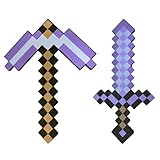
- [EVA Foam & Non-Toxic Safety] Crafted with premium heavy EVA foam, these soft-edged toys feature a better skin touch feeling than rigid plastic. non-toxic materials ensure safe dueling for kids aged 3 and above during indoor/outdoor play.
- 【Size】About 17.7 Inch( Sword for Immersive PlayTrue-to-game dimensions with contoured grip design let kids wield like real video game warriors. Lightweight yet durable structure prevents fatigue during extended role-play battles.
- 【 Multi-Scene Entertainment Tool] From school play props to themed birthday parties, these foam swords ignite creativity at Halloween costume contests, cosplay events, or family game nights.
- [Child-Friendly Design & Easy Storage] Rounded tip protection no loose parts. Includes dual pickaxe/sword combos for group play. perfect for small bedrooms or playrooms.
- [Quick-Clean & Parent-Approved] Wipe surface with damp cloth after use (hand wash recommended).If you have any questions, please contact us promptly.
Build and check a gear command
- Identify edition and version. Confirm whether the world is Java or Bedrock and note its game version. Do not carry Java-only fields into Bedrock.
- Set the target and item. Use the appropriate player name or selector, item identifier, and count for the command format you are using.
- Add only supported customizations. Choose enchantments and any supported attributes, name, lore, or other item data in a matching generator—or use the syntax documented for that exact Java version.
- Review the output. Check for the intended item, level values, and edition/version-specific format. A generator’s example is not proof that the command works in every game version.
- Run it in the intended environment. The command must be permitted there. If it fails, confirm the edition, version, selector, item identifier, and component format; remove unsupported fields or use the generator’s matching version mode.
Why a command may not work as expected
- Wrong edition: Java customization fields such as NBT output are not interchangeable with Bedrock syntax.
- Wrong Java version: Java 1.20.5-and-later item components differ from older command formats.
- Unsupported enchantment level: A third-party generator’s reported ceiling does not guarantee acceptance in the target version; test a level suited to that game.
- Environment restrictions: A valid command still requires permission to run in the world or server.
- Unwanted kit contents: Read a prebuilt file’s description and item breakdown instead of assuming its loadout fits your goal.
Product prices and availability are accurate as of the date/time indicated and are subject to change. Any price and availability information displayed on Amazon at the time of purchase will apply.
Quick wins for a faster PC:
Fix the driver behind crashes, sound loss and screen glitchesFind Drivers →Repair Windows errors before they cause bigger problemsFix Now →Scan for outdated or missing drivers - takes under a minuteDriver Scan →



