Do these 3 things before closing this tab:
1Clear out junk files and repair common Windows errors2Fix the driver behind crashes, sound loss and screen glitches3Repair Windows errors before they cause bigger problemsIf your PS5 briefly lights blue and then turns solid white, it is powering on normally. If the indicator stays blue and never turns white, PlayStation describes the console as frozen. First, wait until the indicator is completely off, then unplug the console for three minutes, reconnect it, and try again. If it remains stuck, use Safe Mode troubleshooting; save a system reset or software reinstallation for last, because those options erase data.
What a blinking blue PS5 light means
A short blue phase during startup is normal: the indicator should transition to solid white. PlayStation groups a blinking white light, solid blue light, and blinking blue light under “Console error,” and says the console is frozen if it remains blue without changing to solid white. The light alone does not identify a failed internal component.
If the console is on but the screen is blank, PlayStation Support says, “If your console is powered on but no picture is displayed, please visit PlayStation Repairs for troubleshooting steps.”
Try these fixes in order
1. Let startup finish, then power-cycle safely
If the light is still changing, give the console a moment to finish starting. Do not pull the AC cable while the indicator is lit or blinking: PlayStation warns that disconnecting it then can cause data loss, corruption, or console damage.
#1 Best Overall
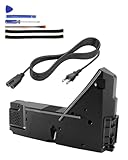
- Wide Compatibility: Internal power supply replacement compatible with PS5, supporting ADP-400DR, ADP-400ER and PA-1401-JT20 power supply models, compatible with CFI-1015A, CFI-1015B, CFI-1115A, CFI-1115B, CFI-1016A/B, CFI-1116A/B, CFI-1002A/B, CFI-1102A/B, CFI-1018A/B and CFI-1118A/B, suitable for PS5 Digital Edition and Ultra HD Console
- Power Adapter Voltage: Game console internal power supply, input voltage is 100-127V, 4.5A 50/60Hz, 200-240V, 2.3A 50/60Hz, output voltage is +12V, 31A, please confirm power supply specifications required by your console before purchasing to ensure perfect compatibility and optimal performance
- Stable Power Support: Replacement internal power supply AC adapter brick can provide stable power support for game console, enhance gaming experience, solve problems such as game lag, shutdown caused by unstable power supply, and improve gaming experience
- High Quality ABS Material: Made of high quality ABS material, has excellent wear resistance and anti-aging properties, is not easy to crack or rust, and can remain stable and reliable even after long term use, providing safer, more durable and longer-lasting power support for equipment
- Easy Installation: Internal power source replacement comes with necessary power cord and screwdriver, allowing direct replacement of original adapter, do not forcefully disassemble during installation to avoid damaging internal components of game console, can search for relevant installation videos for disassembly and installation guidance
Once the indicator is off, unplug the console, wait three minutes, reconnect it, and turn it on. If it still stays blue, continue to Safe Mode.
2. Open Safe Mode
- Turn the console off by holding the power button for three seconds.
- After it is off, press and hold the power button again. Release it after the second beep, which comes about seven seconds after the first.
- Connect the controller to the console with a USB cable, then press the PS button.
Safe Mode requires a USB-connected controller. Use a USB data cable compatible with the DualSense controller; the cable is for connecting the controller, not a repair for the blue-light problem.
Rank #2

- ps5 power supply for: CFI-1015A/B、CFI-1115A/B、CFI-1016A/B、CFI-1116A/B、CFC-1002A/B、CFI1018A/B (PS5 Digital Edition & Ultra HD game console)
- Attention! To avoid purchasing the wrong model and not being able to use it, please carefully check the model of your PS5 host!
- Power supply model: ADP 400DR&ADP 400ER&PA-1401-JT20 Both can be used
- Voltage: Game machine power supply unit adapter with input voltage of 100‑127V, 4.5A 50/60Hz, 200‑240V, 2.3A 50/60Hz, output voltage of +12V, 31A
- Easy To Install: The console power supply unit is easy to install and use, no drivers or other special settings are required.
3. Choose a non-destructive Safe Mode option first
Safe Mode offers several troubleshooting choices. Pick the one that matches what is happening:
- Restart PS5: Try a normal restart from Safe Mode.
- Change Video Output: Try this if the console appears to start but the display is blank.
- Repair Console Storage: PlayStation suggests this for startup or storage problems and says it does not erase data.
- Update System Software: Use this to update the console software through Safe Mode.
- Clear Cache and Rebuild Database: Try this as a troubleshooting option before resetting the console.
- Restore Default Settings: This restores settings without deleting content stored on the console, according to PlayStation.
4. Use reset or reinstallation only as a last resort
Reset PS5 deletes user data. Reset PS5 (Reinstall System Software) deletes user data and removes the system software. PlayStation says software reinstallation deletes all data and should be the last troubleshooting step. Back up any accessible data before choosing either option. PlayStation Support says, “If the issue keeps happening, reinstall the console software using Safe Mode.”
Rank #3

- Compatible with PS5: Please MUST confirm your model before place the order, our photo and video could help to confirm the model!!!!!Other wise it can't work!!!! The power supply replacement compatible with PlayStation 5 PS5 ADP-400DR / ADP-400ER /PA-1401-JT20. For : CFI-1015A/B、CFI-1115A/B、CFI-1016A/B、CFI-1116A/B、CFC-1002A/B、CFI1018A/B (for PS5 Digital Edition & Ultra HD Console).Input voltage of 100‑127V, 4.5A 50/60Hz, 200‑240V, 2.3A 50/60Hz, output voltage of +12V, 31A.
- Replacement Application: When your console meet with the problem of can’t turn on/suddenly shuts down/power indicator light is abnormal/unable to charge or provide power,etc. Replace the new power supply for PS5 400DR, which will help to solve these problem and make the console normal to use.
- Quality Guarantee: For PS5 ADP-400ER internal power Source replacement was test before shipment,and the 400ER power supply are made of good quality, ABS plastic material make it use more accurately and has longer working life,resistant to wear and tear,. The controller will use as a new one after replacing for PA-1401-JT20 console power supply replacement and bring a new life.
- Convenient Installation: Comes with new power cable and set tools. The power cable could help to replace the damaged or loosed power cable, more stable to charge. And the repair tools, help to disassemble the console and install the power supply, save time and convenient to install the new one.
- Suggestion Tips: If do not have any installation experience, we suggest to find the professional to replace for PS5 ADP-400DR / ADP-400ER internal power supply. If you have any problem or need installation guide, please leave a message.
If Safe Mode will not open
PlayStation says a USB, HDMI, or power cable can prevent Safe Mode from launching. Check that the cables are properly connected; if needed, try another cable and attempt Safe Mode again. A replacement cable is a troubleshooting check, not a confirmed fix for the blinking light.
If Safe Mode still will not appear, turn the console off, unplug it for 20 minutes, reconnect it, and retry Safe Mode. If you cannot start Safe Mode or the console remains faulty, contact PlayStation Repairs. Repair options can vary by location.
Rank #4

- FOR 2-PRONG DEVICES: Works with most TVs, monitors, printers, and other devices that require a 2-pin power connector
- COMPATIBILITY: compatible with PS3, PS3 Slim, PS4, PS4 Slim, PS5, Xbox One S, Xbox One X, Xbox Series S, Xbox Series X, Apple TV, many printer, consumer electronics, and power brick models
- FEATURES: High Quality 2 Prong 10ft AC Power Cord, universal power cable is perfect for bedroom, living room office and home use.
- PACKAGE INCLUDE: 1 x High Quality 10ft AC 2 Prong Power Cord
Which step should you try next?
| Situation | Next step | Data impact |
|---|---|---|
| Light changes from blue to solid white | Startup is proceeding normally. | No troubleshooting change. |
| Light stays blue; console is otherwise responsive to Safe Mode | Try non-destructive Safe Mode options that match the symptom. | Repair Console Storage and Restore Default Settings do not delete console content, according to PlayStation. |
| Safe Mode does not appear | Check USB, HDMI, and power cables; try another cable, then unplug for 20 minutes and retry. | No reset is involved. |
| Problem persists after other steps | Back up accessible data, then consider reset or software reinstallation; otherwise contact PlayStation Repairs. | Reset deletes user data; reinstallation deletes user data and system software. |
When to stop troubleshooting
Do not infer a motherboard, power-supply, or other component failure from the blue light alone. If the console stays faulty after the power-cycle and Safe Mode checks, or Safe Mode will not start, use PlayStation Repairs rather than repeatedly disconnecting the power while the indicator is active.
Quick Recap
Product prices and availability are accurate as of the date/time indicated and are subject to change. Any price and availability information displayed on Amazon at the time of purchase will apply.




