Recommended Free Tools
Nestopia is an open-source emulator for Nintendo Entertainment System (NES) and Famicom software. Its Libretro core supports several common game and music file formats and offers gamepad remapping, save states, and other frontend features. Famicom Disk System games have an extra requirement: a BIOS file in the frontend’s system directory.
What is Nestopia?
Nestopia is an emulator written in C++ with a stated focus on accurate NES/Famicom emulation. The project documentation says development began in mid-2002 and its first Windows release followed in 2003. The Libretro core is a port based on the Nestopia JG fork, described in its documentation as cycle accurate. Libretro Nestopia core documentation and the project documentation describe the project and core.
Nestopia is software for running compatible game data; it does not include games. The details below about formats, controls, and BIOS requirements apply specifically to the Libretro core, not necessarily every standalone or community build.
Which files does the Libretro core support?
The core documents support for these content extensions:
#1 Best Overall
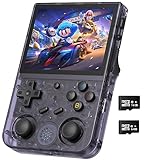
- 【Anbernic RG353V latest Dual System】The open source linux and the Android 11 dual system . Built-in 64G SD Card 4452 games , it can support Android games and 20 kinds of games format . When you use the Android system , it is not only a game console , but also a multi-function entertainment device. You can listen to the music,watch TV and go shopping,socialize and so on.
- 【5G WIFI &4.2 Bluetooth & TV Output & Moonlight streaming】Built-in 2.4/5G WIFI 802.11a/b/g/n/ac , New generation of 5G WIFI technology , support 2 hosts to play online at the same time . Bluetooth 4.2 can connect gamepad , headset . Support Moonlight streaming that can play PC games smoothly . Dual 360-degree operation is really cool let the market Most portable game consoles on the market are prohibitive. Wow, this is crazy, this is a must-have item for kids, a wonderful retro game console.
- 【Upgrade RK3566 Chip】RG353V game console use the RK3566 Quad-Core 64 bit Cortex-A55, Main frequency up to 1.8GHz , LPDDR4 2GB , 32GB high-speed eMMC 5.1 + 16GB TF , which can solve the problem of frame dropping in the game, run the game perfectly, and make your game screen smoother.
- 【3.5 INCH IPS SCREEN】3.5-inch IPS full viewing angle, zero distance OCA full fit/ 640*480 , very clear display. Tempered glass, double protection with scratchproof and anti-fall, brings exciting gaming experience and better eye protection.
- 【3200MAH HIGH CAPACITY BATTERY】Built-in 3200mAh high capacity lithium battery for ultra-long standby time and battery life. Support up to 6 hours game playing. Support fast charging with USB Type-C cable. Brings lots of joy and happiness to you during a trip or a long journey.
.nes— NES game content.fds— Famicom Disk System content.unfand.unif— additional NES-family content formats.nsf— Nintendo Sound Format music files
File extensions alone do not guarantee that a particular file will work: compatibility can depend on the dump, the game, and the core’s emulation support.
What is needed for Famicom Disk System games?
Famicom Disk System emulation in the Libretro core requires a BIOS file named disksys.rom. Place it in the system directory used by your frontend. That directory’s location depends on the frontend and platform, so check the frontend’s own documentation or settings to find it. The core documentation provides an MD5 value for verifying the expected file; use a legitimate source for any BIOS file and do not rely on unverified download sites. The core documentation and repository README cover the requirement.
Rank #2

- 【Game Console with Linux Stylem】Comes with 64G TF Card Preloaded 5570 Classic Games,Support users to download games in relevant 15 kinds of games formats.
- 【supports 5G WIFI Bluetooth 2.4G Wireless Gamepad and Wired Gamepad Connection】 HDMI and TV output function makes the small screen become big screen in seconds, and the joystick connection supports multiplayer games, so you and your friends can enjoy the game together.
- 【3200 mAh Li-polymer battery and 3.5 INCHES OCA IPS screen】you can use for 6-7 hours, support fast charging with USB Type-C cable, With 3.5-inch IPS full viewing angle, zero distance OCA full-fit screen,the screen resolution is 640*480,Sharper picture quality and more saturated colours.
- 【Chip upgrade】with quad-core ARM Cortex-A53, Quad-core PowerVR SGX544MP GPU,makes have the characteristics of low power consumption and high performance. the Ram of the is LPDDR4 1GB, the larger the RAM running memory, the faster the system response time will be.
- 【Ideal gifts】Dimensions of Handled game :12.8cm*8.1cm *2.2cm,is a good size in the hand and is suitable for carrying aroundis a great gift for boyfriend, husband, brother, son, father and friends for birthday, Father's Day, Christmas, Valentines Day, Thanksgiving Day etc. Get lots of compliments on how it’s interesting or practical.
Some games use ADPCM samples that are not included in the game data. The repository README identifies sample sets and their placement under nestopia/samples; most ordinary NES games do not need them.
Controls, saves, and core features
The Libretro core documents gamepad input and remapping. A compatible computer gamepad is optional, not a prerequisite: choose one only if you prefer playing with a controller, and map its buttons in your frontend. No particular controller model is endorsed here.
Outdated Drivers Are Slowing You Down
One free scan finds every outdated or missing driver and matches the right update for your exact hardware.Free scan · exact hardware matchPC Slower Than It Used to Be?
A free scan shows the junk files, broken settings and background clutter dragging Windows down - then fixes them in one click.Free scan · Windows 10 & 11Rank #3

- 【2026Newly Classic Retro Game Console】 The XF40V retro handheld game console features a powerful Linux operating system and a 1.5GHz quad-core processor, allowing it to smoothly run over 20,000 pre-installed classic games across 20+ emulators. Fast loading and stable performance ensure a smooth gaming experience! Note: This product is not suitable for people under 12 year old.
- 【Innovative Dual 3D Detachable Joystick Design】 Our protable retro game console features a revolutionary detachable joystick system. Unlike traditional handheld game consoles with fixed handles, our specially designed joysticks can be easily swapped out to suit your gaming preferences. Enjoy smooth, precise control with stylish, responsive controls. Integrated 9-color LED lighting adds visual impact and enhances the gaming atmosphere, ensuring an immersive gaming experience at all times.
- 【64GB Large Storage, Powerful Performance】 The 64GB of built-in storage accommodates your extensive game library, allowing you to play classic games anytime without worrying about running out of memory, giving you a reliable, uninterrupted gaming experience.
- 【4.0-inch IPS Tempered Glass Screen】 The 4.0-inch IPS screen boasts a resolution of 720*720, delivering crystal-clear visuals. The scratch-resistant tempered glass protector ensures durability while displaying vibrant colors and crisp, sharp details. Whether you're playing fast-paced action games or exploring a detailed RPG world, the high-quality display provides an immersive viewing experience and reduces eye strain during extended gaming sessions.
- 【Portable Pocket Retro Game Console】 This compact retro game console is designed for mobile gaming and features a powerful 4000mAh rechargeable battery for up to 6 hours of continuous gaming. The lightweight design fits easily into a pocket or bag, and the built-in stereo speakers and 3.5mm headphone jack provide flexible audio options for both private and shared gaming experiences.
- Save files and save states
- Rewind and screenshots
- Cheats through RetroArch
- Softpatching
- Special port-2 devices, including an Arkanoid paddle and Zapper emulation
The documentation does not list rumble support or support for a frontend’s disk-control interface. For Famicom Disk System content, use the core’s FDS eject and side-change controls to switch disk sides.
Installing Nestopia and checking package status
There is no single installation path for every Nestopia-related build. The Libretro core is used through a compatible frontend; standalone and community distributions can differ in version, platform support, configuration, and update method.
Rank #4

- FOR THE RETRO GAMER WHO JUST WANTS TO PLAY. Slip it in your pocket, pull it out anywhere, and dive straight into the classics. Pre-loaded and ready from the moment you turn it on — no accounts, no downloads, no configuration required.
- 9 CLASSIC SYSTEMS BUILT FOR THIS STYLE OF PLAY. Designed for D-pad gaming: NES, SNES, GBA, GBC, Sega Genesis, MAME Arcade, NEOGEO, CPS1, and CPS2 — the golden era of 2D gaming, all on a bright 3.5" IPS screen. Real-time saves, and AV-out included. Additional systems (PS, N64, PSP) supported with limitations.
- ADD YOUR OWN ROMS IN SECONDS. Pop out the SD card, plug into any computer, and drop your ROM files into the games folder. Done. No complicated file structure, no reformatting. One folder. 64GB SD card included and supports up to 128GB SD card expansion — enough for your entire classic library.
- INTENTIONALLY DESIGNED FOR POCKET GAMING. The Nerdy Boy features low-profile controls with no protruding joysticks — so it slides effortlessly in and out of your jeans pocket without a case. At just 0.47 lbs, it's the portable gaming system that goes wherever you go. Available in Atomic Purple, Classic Sand, and Onyx.
- SIMPLE BY DESIGN, BUILT TO LAST. No firmware flashing. No OS customization. No steep learning curve. Just charge via USB-C, turn it on, and play. The 2000mAh battery keeps you going, the built-in speaker delivers clear audio, and the 3.5mm headphone jack is there when you need it. A D-pad that feels right from the moment you pick it up.
At the time Homebrew’s formula was checked on October 8, 2026, it listed Nestopia UE stable version 1.53.2 and package support for specified recent macOS versions on Apple Silicon and Intel, plus Linux on ARM64 and x86_64. Homebrew also marked that formula deprecated, with a disable date of September 15, 2027. Those are facts about Homebrew’s package channel, not proof that all Nestopia distributions are deprecated or support the same systems. Check the Homebrew formula page for current status before relying on it.
Licensing also depends on which component you use: Homebrew lists Nestopia UE as GPL-2.0-or-later, while the Libretro core documentation lists GPLv2. The core documentation and Homebrew’s formula identify their respective licenses.
Free tools Windows power users keep installed
One-click scans. No signup required.
Best Value

- 【400 Preloaded Retro Classic Games】Built-in 400 classic retro games, covering puzzle, casual, shooting, action, sports and logic multiple genres. 100% offline playable with zero ads and no downloads. Diverse game libraries meet different play needs, bringing lasting fun and delivering safe and pure gaming experience for all players.
- 【3.0-inch Eye-Friendly IPS HD Screen】Adopts 3.0-inch high-definition IPS screen with vivid colors and ultra-clear picture quality. Upgraded eye-protection panel reduces eye fatigue effectively, bringing immersive and comfortable gaming vision. Compact screen size fits portable scenarios perfectly, suitable for home use and outdoor travel.
- 【Lightweight Ergonomic Portable Design】Mini lightweight body with ergonomic molding, fits small hands perfectly for long-time comfortable grip. Pocket-sized design is easy to store in bags or pockets. It combines retro style with modern comfort, ideal as a travel companion for handheld gaming anytime, anywhere.
- 【1020mAh Large-Capacity Rechargeable Battery】Built-in 1020mAh high-capacity battery supports long-lasting uninterrupted gaming. Adopts universal USB fast charging, portable for outdoor power supplement. Comes with adjustable volume function, enabling quiet private gaming in public without disturbing others.
- 【Easy Operation & Premium Festival Gift】Simple one-key operation with clear game guide, all-age friendly for all players. Safe, durable and fun, it is an ideal gift for birthday, Christmas, Easter and various holidays. A cost-effective entertainment gadget that brings full surprises and joy to game lovers.
Troubleshooting a game that will not run correctly
A failed launch or unexpected behavior does not point to one certain cause. The project documentation identifies several possibilities, including a bad dump, missing or incorrect emulation information, region mismatch, controller configuration, a database issue, unsupported content, or a game that also fails on original hardware. Use these as checks rather than assuming one setting will fix every problem. Nestopia project and core documentation discuss compatibility considerations.
Quick Recap
- Confirm the file is in a format supported by the Libretro core and that the dump is valid.
- Check that the selected controller and button mapping match the game or peripheral you are trying to use.
- For FDS titles, verify the required BIOS is available in the frontend’s system directory and use the core’s disk-side controls.
- Check the game’s region and whether the content is supported by the build in use.
- For Libretro core version 1.50 and later, the internal game database is included in the core. If an external
NstDatabase.xmlfile is present, it overrides that built-in database.
Product prices and availability are accurate as of the date/time indicated and are subject to change. Any price and availability information displayed on Amazon at the time of purchase will apply.




