Six Nintendo Switch games have documented support for Nintendo Labo Toy-Con VR Goggles: four Nintendo-listed games and two additional Spice and Wolf titles. Their VR features vary sharply—from viewing Breath of the Wild through the goggles to a handful of bonus courses or a VR battle-viewing mode—so “VR-supported” does not mean each game is a full VR adventure.
Nintendo Switch VR game list
Nintendo’s Labo compatibility page names the first four games below. Nintendo’s US store separately identifies Spice and Wolf VR and Spice and Wolf VR2 as Toy-Con-compatible. This is a list of documented titles, not a claim that Nintendo’s page covers every third-party release.

| Game | What the VR feature does | Feature scope |
|---|---|---|
| Captain Toad: Treasure Tracker | Play a mini VR adventure, including a mine-cart ride. | Four courses |
| Super Smash Bros. Ultimate | Watch battles in VR; when every fighter is CPU-controlled, view the battle from different angles. Nintendo also describes VR mode play. | Battle viewing and VR mode play |
| Super Mario Odyssey | Collect music notes, coins, and instruments in VR areas in the Cap, Seaside, and Luncheon Kingdoms. | Bonus experience, not the whole game |
| The Legend of Zelda: Breath of the Wild | View the game through the goggles and change the display method during an adventure. | Whole-game viewing; requires software version 1.6.0 or higher |
| Spice and Wolf VR | Nintendo’s store lists it as Toy-Con compatible; its content can also be enjoyed without the goggles. | Separate third-party title; goggles are not required |
| Spice and Wolf VR2 | Nintendo’s US store lists it as Toy-Con compatible. | Separate third-party title |
Sources: Nintendo’s Labo compatible-games page, Nintendo’s Spice and Wolf VR listing, and Nintendo’s Spice and Wolf VR2 listing.
What kind of VR experience does each game offer?
Four courses: Captain Toad: Treasure Tracker
Nintendo describes a compact mini-adventure covering four courses, one of which includes a mine-cart ride. It is a limited set of VR content rather than the complete game rendered as a VR adventure.
Quick wins for a faster PC:
Repair Windows errors before they cause bigger problemsFix Now →Fix the driver behind crashes, sound loss and screen glitchesFind Drivers →#1 Best Overall
Battle viewing and play: Super Smash Bros. Ultimate
The goggles let you watch battles from a VR perspective. With all fighters controlled by the CPU, you can look at the fight from different angles. Nintendo also describes VR mode play, but its compatibility page does not characterize this as converting the entire game into a conventional headset experience.
Bonus collection: Super Mario Odyssey
The VR feature is a bonus activity: collect music notes, coins, and instruments in selected areas of the Cap, Seaside, and Luncheon Kingdoms. It is not full-game VR.
Whole-game display: The Legend of Zelda: Breath of the Wild
Breath of the Wild is the broadest documented implementation: Nintendo says you can view the whole game through the goggles and change the display method while adventuring. That describes how the game is viewed; it does not establish a purpose-built VR control system or a separately authored VR campaign. The game must be updated to version 1.6.0 or later to access VR Mode.
Rank #2

- Experience a Nintendo Labo twist on VR: social, family-friendly games; creative, enriching DIY activities; tactile play experiences; and immersion without isolation
- The Nintendo Labo: VR Kit includes more games and creations than any other Nintendo Labo kit to date, and this Starter Set + Blaster is a great place to get started that you can then build upon by purchasing Expansion Sets (sold separately)!
- With Toy-Con Garage and Toy-Con Garage VR—the intuitive and interactive programming tools included in this kit’s packed-in software—the possibilities of Nintendo Labo become almost limitless
- This is a Starter Set for the newest kit in the Nintendo Labo line, which also includes the Nintendo Labo: Robot Kit, Nintendo Labo: Variety Kit, and Nintendo Labo: Vehicle Kit
- Each creation’s main building component is specially engineered, pre-cut cardboard that’s designed to be durable, versatile, and easily customizable. All other parts needed to complete each creation are included—no glue, tape, or scissors required
Additional compatible games: Spice and Wolf VR and Spice and Wolf VR2
These are distinct from the four games on Nintendo’s Labo compatibility page. Nintendo’s US store lists both as Toy-Con-compatible. Its Spice and Wolf VR listing says the content can be enjoyed without Toy-Con goggles and gives a Switch release date of September 5, 2019. That date is the game’s US Switch listing date, not a statement about current availability.
What you need to use Switch VR
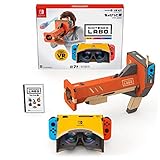
The relevant accessory is the Nintendo Labo: VR Kit, which includes Toy-Con VR Goggles and cardboard Toy-Con creations, along with software containing build instructions and quick-play VR games. For Nintendo’s Labo modes, the goggles are the viewing accessory; check local retailers for current availability, since Nintendo’s product page does not establish present stock or pricing.
The Australian product page gives April 4, 2019, as the Labo: VR Kit release date. It is a historical product date, not an indication that the kit is currently available in every market. See Nintendo Australia’s Labo: VR Kit page.
Rank #3
- Original Nintendo Switch: The Labo goggles are intended for the Nintendo Switch system.
- Nintendo Switch Lite: Not compatible with the Labo VR Kit or Toy-Con VR Goggles.
- Nintendo Switch 2: Nintendo says the Toy-Con VR Goggles are not compatible.
- Nintendo Switch OLED: The larger screen may affect the VR effect. In the Labo VR software, turn off “VR Mode Auto-Switch,” following Nintendo’s guidance.
See Nintendo Support’s VR Kit compatibility and safety information. For other supported games, software updates may be required; the specific version requirement established here is for Breath of the Wild.
How to turn on VR Mode in Breath of the Wild
- Update the game to version 1.6.0 or higher.
- Start the game and open the System Menu.
- Select Options, then choose VR Goggles.
- Insert the Switch in the Toy-Con VR Goggles and follow the game’s on-screen instructions.
Nintendo’s support instructions specify the update requirement and the in-game path. See Nintendo Support’s Breath of the Wild VR Mode instructions.
Comfort and safety
Nintendo recommends VR mode for ages seven and up, with supervision for children aged seven and older, and advises taking frequent breaks. Some players may experience motion sickness, fatigue, or discomfort; stop playing and take a break if you feel unwell.
Rank #4
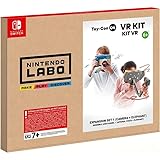
- Cardboard sheet x 7
- Retroreflective material x 1
- Support Sheet x 1
- Rubber Bands (small) x 5
- Rubber Band (large) x 1
“The Toy-Con VR Goggles are handheld goggles and should not be secured to the head.”
— Nintendo Support, “Information About the VR Mode of Nintendo Labo Toy-Con 04: VR Kit.” Nintendo Support
Why Mario Kart 8 Deluxe is not on this VR list
Nintendo’s Labo page mentions Mario Kart 8 Deluxe in connection with the Toy-Con vehicle kit’s steering-control feature. That is not evidence of a VR mode, so it does not belong on a list of games with documented Toy-Con VR support.
The Tool Desk
Outbyte PC Repair FREEClear out junk files and repair common Windows errorsFree Scan →Outbyte Driver Updater FREEScan for outdated or missing drivers - takes under a minuteDriver Scan →Quick Recap
Product prices and availability are accurate as of the date/time indicated and are subject to change. Any price and availability information displayed on Amazon at the time of purchase will apply.




