Quick wins for a faster PC:
Fix the driver behind crashes, sound loss and screen glitchesFind Drivers →Clear out junk files and repair common Windows errorsFree Scan →Planet Coaster 2 crashes on launch, while loading a park, or after several minutes of play? Start with Steam file verification, then check your graphics driver, Windows updates, overlays, antivirus permissions, graphics load, temperatures, and save folders. Frontier’s current PC troubleshooting guidance was updated on June 1, 2026, and the fixes below are ordered from safest and quickest to more advanced checks. They address common causes, but no troubleshooting step can guarantee a cure for every PC.
Frontier’s official troubleshooting article lists these checks for launch, crashing, and performance problems.
As an Amazon Associate I earn from qualifying purchases.
Before you troubleshoot: check the real PC requirements
Meeting the minimum specification means the game is expected to run, not that every large, detailed park will remain smooth or crash-free. Planet Coaster 2 uses DirectX 12; do not force DirectX 11 unless Frontier confirms a current supported launch option.
#1 Best Overall

- CONTACT FRAME FOR INTEL LGA1851 | LGA1700: Optimized contact pressure distribution for longer CPU life and better heat dissipation
- ARCTIC's P12 PRO FAN: More power at any speed - more powerful and quieter than the P12, especially at low speeds. Higher maximum speed for optimal cooling performance under high load
- NATIVE OFFSET MOUNTING FOR INTEL AND AMD: Shifting the cold plate center towards the CPU hotspot ensures more efficient heat transfer
- INTEGRATED VRM FAN: PWM-controlled fan that lowers the temperature of the voltage converters and thus ensures reliable performance
- INTEGRATED CABLE MANAGEMENT: The PWM cables of the radiator fans are integrated in the sheathing of the hoses so that only a single visible cable is connected to the motherboard
| Requirement | Minimum | Recommended |
|---|---|---|
| Operating system | Windows 10 64-bit, version 22H2 | Windows 10 or 11 64-bit |
| CPU | Intel Core i5-6600K or AMD Ryzen 5 2600 | Intel Core i7-10700K or AMD Ryzen 7 5800 |
| RAM | 16 GB | 16 GB |
| GPU | NVIDIA GTX 1060 6 GB, AMD RX 5600 XT 6 GB, or Intel Arc A750 8 GB | NVIDIA RTX 2070 Super 8 GB, AMD RX 6700 XT 12 GB, or Intel Arc A770 16 GB |
| DirectX | Version 12 | Version 12 |
| Storage | 25 GB available; SSD recommended | 25 GB; SSD required |
These specifications are also shown on the Steam listing. Before advanced changes, copy your saves somewhere safe.
Fix 1: Verify the Planet Coaster 2 files
What it fixes: Missing or damaged installation files can prevent the game from launching or cause crashes during loading.
- Open Steam and go to Library.
- Right-click Planet Coaster 2 and choose Properties.
- Open Installed Files.
- Select Verify integrity of game files.
- Wait for Steam to finish, restart Steam, and launch the game again.
Verification may reacquire damaged files, but it will not repair a broken GPU driver, incompatible overlay, overheating, or a damaged save. Epic users should use the launcher’s own Verify option rather than following Steam-specific menus; Frontier’s earlier PC guidance discusses verification through both launchers.
Fix 2: Update, clean-install, or roll back the graphics driver
What it fixes: Driver conflicts are a frequent suspect when a game crashes at launch, after a graphics-setting change, or immediately after a driver update.
Download drivers only from the manufacturer:
Try a normal update first if the driver is old. If the crashes began after an update, a clean installation or a return to the last known stable version may be more sensible than repeatedly installing the newest release. Frontier explicitly notes that a newer NVIDIA or AMD driver can introduce problems.
NVIDIA clean installation
Run the NVIDIA driver installer, choose Custom installation, and select Perform clean install. NVIDIA documents this process in its official installation guidance.
Rank #2

- CONTACT FRAME FOR INTEL LGA1851 | LGA1700: Optimized contact pressure distribution for longer CPU life and better heat dissipation
- ARCTIC's P12 PRO FAN: More power at any speed - more powerful and quieter than the P12, especially at low speeds. Higher maximum speed for optimal cooling performance under high load
- NATIVE OFFSET MOUNTING FOR INTEL AND AMD: Shifting the cold plate center towards the CPU hotspot ensures more efficient heat transfer
- INTEGRATED VRM FAN: PWM-controlled fan that lowers the temperature of the voltage converters and thus ensures reliable performance
- INTEGRATED CABLE MANAGEMENT: The PWM cables of the radiator fans are integrated in the sheathing of the hoses so that only a single visible cable is connected to the motherboard
AMD clean reinstall
Uninstall the existing AMD driver package, then install the desired version using AMD’s documented removal and installation guidance referenced by Frontier. Avoid unofficial driver-updater websites.
If it fails: Record the current driver version, test the previous stable version if the timing points to a regression, and retest with overlays disabled before changing anything else.
Fix 3: Install pending Windows updates and restart
What it fixes: Missing Windows updates can contribute to compatibility and graphics problems.
Open Settings → Windows Update, install available updates, and restart the PC even if Windows does not immediately insist on a reboot. Do not assume that one particular Windows build will fix the crash; the useful test is whether the fully updated system behaves differently.
Fix 4: Disable overlays, recording, and monitoring tools
What it fixes: Overlays and capture utilities hook into the game’s rendering process and can conflict with it. Disable them temporarily, then retest.
What’s actually slowing this PC down?
Pick the symptom - the matching free tool is one click away.
- Steam Overlay
- Discord overlay
- NVIDIA in-game overlay and ShadowPlay
- Xbox Game Bar and background recording
- OBS, FRAPS, XSplit, Overwolf, and Mumble
- MSI Afterburner and similar monitoring tools
Use these current paths where applicable:
- Steam:
Steam → Settings → In-Game → Enable the Steam Overlay while in-game → Off - Discord:
User Settings → Games → overlay → Off - NVIDIA:
Settings → General → In-game overlay → Off - Xbox Game Bar:
Windows Settings → Gaming → Xbox Game Bar → Off - Xbox recording:
Xbox Game Bar → Settings → Capturing → Record in the background while I’m playing a game → Off
Where possible, disable one category at a time. That identifies the culprit instead of leaving you unsure which change helped. Close unnecessary background programs as part of the same test.
Rank #3

- Simple, High-Performance All-in-One CPU Cooling: Renowned CORSAIR engineering delivers strong, low-noise cooling that helps your CPU reach its full potential
- Efficient, Low-Noise Pump: Keeps your coolant circulating at a high flow rate while generating a whisper-quiet 20 dBA
- Convex Cold Plate with Pre-Applied Thermal Paste: The slightly convex shape ensures maximum contact with your CPU’s integrated heat spreader, with thermal paste applied in an optimised pattern to speed up installation
- RS120 ARGB Fans: RS ARGB fans create strong airflow and high static pressure, with easy ARGB control via a compatible motherboard. CORSAIR AirGuide technology and Magnetic Dome bearings ensure great cooling performance and low noise
- Easy Daisy-Chained Connections: Reduce the wiring in your system by daisy-chaining your RS ARGB fans and connecting them to just one 4-pin PWM fan header and one +5V ARGB header
Fix 5: Add the game to your antivirus allow list
What it fixes: Antivirus software can incorrectly flag a legitimate game component and interfere with launch or file access.
- Open your antivirus program or Windows Security.
- Find Exclusions, Allow list, or Exceptions.
- Add the official Planet Coaster 2 executable or installation folder.
- Retest the game.
- Remove the exclusion if it makes no difference or creates a security concern.
Do not permanently disable antivirus protection. Keep the exclusion as narrow as possible and use only files installed through Steam or Epic.
Fix 6: Use fullscreen and lower the graphics load
What it fixes: A lower rendering load can help when the crash appears in a demanding park, after several minutes, or while changing visual settings.
- Launch the game and open its graphics or display settings.
- Choose Fullscreen rather than an altered windowed mode.
- Lower the overall graphics preset.
- Temporarily reduce the resolution if instability continues.
- Restart the game and test the same situation again.
- Once stable, raise settings gradually rather than restoring everything at once.
Frontier also suggests temporarily lowering the Windows display resolution and changing it back, which may refresh display settings. A crash limited to one very large park may reflect simulation or save complexity rather than a basic launch failure.
Fix 7: Check temperatures, airflow, and overclocking
What it fixes: Crashes that occur after several minutes can be related to heat, unstable overclocks, undervolts, dust, or restricted airflow.
- Confirm that the CPU and GPU fans spin under load.
- Clean dust from filters and heatsinks.
- Check CPU and GPU temperatures while playing.
- Temporarily remove CPU/GPU overclocks and undervolts.
- Make sure the case has unobstructed airflow.
- Test again after the system has cooled.
There is no single temperature number that guarantees safety for every processor and graphics card. If you are not comfortable opening the case or checking cooling hardware, ask a qualified technician.
Rank #4

- Simple, High-Performance All-in-One CPU Cooling: Renowned CORSAIR engineering delivers strong, low-noise cooling that helps your CPU reach its full potential
- Efficient, Low-Noise Pump: Keeps your coolant circulating at a high flow rate while generating a whisper-quiet 20 dBA
- Convex Cold Plate with Pre-Applied Thermal Paste: The slightly convex shape ensures maximum contact with your CPU’s integrated heat spreader, with thermal paste applied in an optimised pattern to speed up installation
- RS120 ARGB Fans: RS ARGB fans create strong airflow and high static pressure, with easy ARGB control via a compatible motherboard. CORSAIR AirGuide technology and Magnetic Dome bearings ensure great cooling performance and low noise
- Easy Daisy-Chained Connections: Reduce the wiring in your system by daisy-chaining your RS ARGB fans and connecting them to just one 4-pin PWM fan header and one +5V ARGB header
Fix 8: Check PCIe placement, save folders, and submit crash data
Confirm the graphics card’s PCIe slot
Frontier includes PCIe configuration in its current guidance, particularly for high-end graphics cards. The card may perform best in the motherboard’s full-speed slot, often the top slot closest to the CPU, but the motherboard manual is authoritative. GPU-Z can show the bus interface. This is a lower-probability fix for an ordinary launch crash, so treat it as an advanced hardware check rather than moving the card immediately.
Free tools Windows power users keep installed
One-click scans. No signup required.
Repair the Saved Games location if saving reports “Operation Failed”
“Operation Failed” is not necessarily a crash. Frontier says it can occur when the game cannot locate Windows’ default Saved Games folder.
In File Explorer, enter:
shell:SavedGamesThe expected location is:
C:Users%username%Saved GamesIf it does not appear, restore the default Saved Games location using Frontier’s Restore_Saved_Games_Default_Location.bat file on its support page. Back up the saves folder before changing locations. Park saves are expected under:
C:Users%Username%Saved GamesFrontier DevelopmentsPlanet Coaster 2SavesDo not delete saves as a first-line fix. If only one park crashes, test another save or a new sandbox park. That can indicate a problem with the individual park, but it does not prove the save is corrupted.
Send Frontier useful crash information
Submit the in-game crash report when prompted. If the issue continues, contact Frontier with:
Recommended Free Tools
- DxDiag output
- GPU model and driver version
- Windows version
- Whether the copy is installed through Steam or Epic
- Exactly when the crash occurs and whether it repeats
- What you were doing immediately beforehand
- Screenshots or video
- The affected save, where relevant
- Whether other games or programs also crash
This information helps separate a game-specific failure from a wider driver, temperature, memory, or hardware problem. Frontier’s current support guidance is the best starting point for the submission process.
Best Value
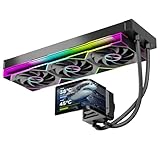
- 【6.67" 2K AMOLED Rotatable Screen】Industry-leading curved AMOLED display with 360-degree rotation adjustment and 2K resolution for system monitoring, dynamic wallpapers, or custom images. 3D anamorphic visual effects make your PC case stand out with unique personalization.
- 【Powerful 320W TDP Cooling Performance】High-efficiency liquid cooling system easily handles high-end processors like Intel Core i9-14900K and AMD Ryzen 9 7950X. Three 120mm ARGB fans deliver strong airflow to keep your CPU cool and stable under heavy loads.
- 【Universal Platform Compatibility】Perfect support for Intel's latest LGA1851 and LGA1700/1200/115X platforms, as well as AMD AM5/AM4 sockets. Includes complete installation kit and detailed manual for easy setup, suitable for DIY enthusiasts and PC building beginners.
- 【Programmable ARGB Lighting System】Three 120mm fans feature addressable RGB LEDs with motherboard sync support (compatible with ASUS Aura Sync, MSI Mystic Light, Gigabyte RGB Fusion, etc.). 16.8 million colors for immersive lighting effects.
- 【Premium Quality & Reliable Warranty】Copper base cold plate ensures efficient heat transfer, durable FEP tubing prevents leaks. Rigorously tested with comprehensive after-sales support. Jungle Leopard is committed to providing high-performance cooling solutions for gamers and professionals.
Choose the right fix for your symptom
It crashes before the main menu
- Clean-install or roll back the GPU driver.
- Install Windows updates and restart.
- Disable overlays and background utilities.
- Test a narrow antivirus exclusion.
- Verify the game files.
- Check the requirements.
A park-save problem is less likely if the game never reaches the main menu.
It crashes while loading one park
- Back up the Saves folder.
- Test another park or a new sandbox.
- Check available storage.
- Lower graphics settings and disable overlays.
- Preserve the affected save and include it in a Frontier support report if appropriate.
It crashes after several minutes
- Check temperatures, fans, and airflow.
- Remove overclocks and undervolts.
- Test GPU-driver stability.
- Disable monitoring and capture utilities.
- Lower graphics settings and consider the size and complexity of the park.
Optional advanced community workaround: reset local graphics configuration
Some Steam Community users report deleting Graphics.config.xml from:
C:Users<username>AppDataLocalFrontier DevelopmentsPlanet Coaster 2Config_LocalThis is an unofficial, unverified community workaround, not one of the current Frontier fixes. Back up the file first. Removing it may reset local graphics settings, and it may not address a driver, hardware, overlay, or save problem. Use it only after the official steps above.
The Tool Desk
Outbyte Driver Updater FREEScan for outdated or missing drivers - takes under a minuteDriver Scan →Outbyte PC Repair FREEClear out junk files and repair common Windows errorsFree Scan →What not to do first
- Do not force DirectX 11; the listed requirement is DirectX 12.
- Do not assume the newest GPU driver is automatically best.
- Do not permanently disable antivirus protection.
- Do not delete saves or configuration files without a backup.
- Do not treat minimum specifications as a guarantee for large parks.
- Do not move a GPU between PCIe slots without checking the motherboard manual.
- Do not reinstall Windows or the game before protecting saves and testing the lower-risk fixes.
Frequently Asked Questions
Does Planet Coaster 2 support DirectX 11?
Frontier lists DirectX 12 for both minimum and recommended PC specifications. Do not force DirectX 11 unless a current official source confirms that launch option.
Why does Planet Coaster 2 crash only when loading one park?
That pattern can point to park complexity or a problem with the individual save, but it does not prove the save is corrupted. Back up your Saves folder, test another park or a new sandbox, and send Frontier the affected save and crash details if the problem repeats.
Can a new graphics driver make the crashes worse?
Yes. Frontier notes that a newer NVIDIA or AMD driver can introduce regressions. If the timing matches an update, try a clean installation and, if necessary, the last known stable driver.
The Bottom Line
Retest after each change rather than applying everything at once. Once Planet Coaster 2 is stable, restore graphics settings gradually and keep your save backup. If none of the eight paths helps, send Frontier a crash report with your system details and an exact description of the repeatable behavior.




