What’s actually slowing this PC down?
Pick the symptom - the matching free tool is one click away.
This guide is about Pokémon Legends: Arceus, the Nintendo Switch game, and shader caching in Ryujinx. A shader cache lets the emulator reuse graphics shaders it has already compiled, which can reduce repeat stutters; it does not guarantee stutter-free play. Ryujinx’s documentation covers the emulator generally, not current compatibility or optimal settings for this game on a particular PC.
What a shader cache does
When a game first uses a graphics effect, the emulator may need to compile its shader for the GPU. That work can interrupt play. Ryujinx stores compiled shaders so it can reuse them when they are encountered again, reducing repeated compilation and potentially reducing those stutters. The cache builds as you play; it is not a promise that every first encounter, other performance issue, or game will run without interruption. See the Ryujinx Graphics Enhancements Guide.
A shader cache is distinct from Ryujinx’s Profiled Persistent Translation Cache (PPTC). PPTC caches translated CPU functions to help reduce load times, while the shader cache concerns graphics-shader compilation. Ryujinx’s setup guide says PPTC is enabled by default and its benefit appears over multiple launches; changing PPTC is not the same as purging a shader cache. Ryujinx Setup & Configuration Guide.
Should you enable shader caching?
Ryujinx says shader caching is enabled by default and discourages disabling it. Leave it on for normal play: disabling it can make the emulator compile shaders repeatedly instead of reusing previously compiled ones. The setting and menu labels can vary between builds, so follow the labels in your installed version if they differ from the documentation.
Free tools Windows power users keep installed
One-click scans. No signup required.
#1 Best Overall

- Platform Compatibility: This PC controller is designed for Windows PC, Steam, Switch, Android, and iOS. Xbox-style asymmetric stick layout for PC gamers. Three modes cover all your devices. Please check your device compatibility before purchase
- Three Connection Modes: 2.4G wireless, Bluetooth, wired USB-C. PC gets native XInput/DirectInput. Switch pairs via Bluetooth, no adapter. This gaming PC controller switches devices seamlessly. Stable wireless minimizes random disconnects during gaming
- Hall Effect Precision: Hall effect joysticks and triggers eliminate stick drift. This gaming controller for PC delivers smooth, responsive input with no dead zones. Built for FPS, racing, and action games. Long-term precision for competitive PC gaming
- Back Buttons & Battery: Two programmable back buttons map combos and shortcuts. Textured grips with dual vibration. 1000mAh battery delivers up to 20H playtime. RGB can be turned off. A solid PC controller for gaming with custom back buttons
- ABXY Layout Switch: Press B + Minus + Plus to swap between PC and Switch modes. Features: 1000Hz polling rate, RGB lighting, turbo. Note: designed without mic jack or gyro sensor
How to clear and rebuild a shader cache
Purge the cache only if you suspect it is damaged—for example, if the game crashes while compiling shaders. Ryujinx describes corruption as a rare possible cause of a crash during startup. Purging removes the stored shaders for that game; the emulator then has to compile them again as gameplay encounters them.
- In Ryujinx’s game list, right-click Pokémon Legends: Arceus.
- Choose Cache Management > Purge Shader Cache.
- Start the game and play through the areas or effects that previously caused trouble so the cache can be rebuilt.
Ryujinx also documents Cache Management > Open Shader Cache Directory for opening that game’s cache folder. Use the installed build’s corresponding menu labels if they have changed. Purging a shader cache is separate from managing game updates or PPTC; do not remove those as a substitute for the shader-cache command.
Rank #2

- Universal Multi-Platform Compatibility: Works seamlessly with Windows PC, Switch/Switch 2, Android, and iOS via USB-C, 2.4G wireless (1000Hz), or Bluetooth (125Hz). Note: Not compatible with X-box, Play-Station, Luna, or GeForce
- Ultra-Quiet Silent Gaming: Silicone-damped buttons for whisper-quiet operation. Perfect for late-night gaming without disturbing family or roommates. All buttons redesigned for silent play—ABXY, D-pad, triggers, and function keys
- Hall Effect Precision Technology: Drift-free 11-bit Hall Effect joysticks with 1000Hz polling rate in wired/2.4G modes for ultra-fast competitive response. Bluetooth mode offers 125Hz for mobile gaming. Long-lasting durability guaranteed
- Advanced Trigger & Programmability: Dual-stage adjustable triggers with 2+2 rumble motors for realistic feedback. Two top-mounted programmable buttons avoid accidental presses—solving common back-paddle issues for competitive advantage
- Ergonomic Comfort & Endurance: Sweat-resistant silicone grip for marathon sessions. 1000mAh rechargeable battery for extended play. Upgraded 8-way D-pad with dome switches delivers precise diagonal control for fighting and retro games
Where Ryujinx stores the cache
Ryujinx stores persistent data, including shader caches, in its application-data folder. The setup guide gives %appdata%/Ryujinx as the default on Windows and the equivalent application-data location on Linux and macOS. In portable mode, system files such as caches are kept with the portable installation instead. Opening the cache directory from the game’s Cache Management menu is the direct way to locate that game’s cache.
Should you download a shared cache?
There is no authoritative prebuilt Legends: Arceus cache established by the sources cited here. A cache made by another user is unverified and may depend on the emulator version or setup; a community-maintained Ryujinx guide warns that emulator updates can break shared caches. Prefer Ryujinx’s own cache-management controls and let your installation build its cache. Community-maintained Switch-Emulators-Guide: Ryujinx.
PC Slower Than It Used to Be?
A free scan shows the junk files, broken settings and background clutter dragging Windows down - then fixes them in one click.Free scan · Windows 10 & 11Crashes, No Sound, or Screen Glitches?
Random freezes, missing sound and display glitches usually trace back to one bad driver. Find and replace yours safely.Free scan · under a minuteRank #3

- Supported Multi-Platform:Switch/Switch 2 (NO support wake-up function)/iOS/Android/Windows PC (Notice:Not compatible with Xbox, PlayStation or GeForce Now, For game platforms not mentioned, please consult customer service before buying)
- Connection modes:Wired/Bluetooth/Wireless Dongle(Connect to PC via Bluetooth : Select iOS (phone) mode, but it's not recommended; Dongle is more stable)
- 【Innovative Intelligent Interactive Screen】Manba One V2 wireless game controllers create a new era of controller screens; Equipped with a 2-inch display, no App & software needed, you can set the pc controller directly through the screen visualization, More convenient operation
- 【Micro Switch Button】Manba One wireless controller has Micro Switch Button and ALPS Bumper; The 6-axis gyroscope function makes switch games more immersive
- 【Customize Your Own Controller】The intelligent interactive screen allows you to easily set vibrations, buttons, joysticks,lights, etc., without the need for complex key combinations; 4 configurations can be saved to unlock your own gameplay for different games; The 4 back keys support macro definition settings, and you can activate the set character's ultimate move with one click
What this guide cannot establish about game performance
The cited Ryujinx guides explain cache behavior and general controls, but they do not establish current Legends: Arceus compatibility, a best graphics backend, or measured performance gains for a named PC. An archived yuzu report describes technical issues from January 2022; it is historical context, not reliable evidence for current settings or behavior. Archived yuzu Progress Report, January 2022.
Ryujinx documentation also says that using the emulator requires keys, firmware, and game files or homebrew dumped from a Switch. The official Pokémon site identifies Pokémon Legends: Arceus as a Nintendo Switch game and lists its physical and digital formats; owning the retail game does not supply an emulator shader cache. Ryujinx Setup & Configuration Guide; The Pokémon Company International: Pokémon Legends: Arceus.
Quick Recap
Best Value

- Featuring a bright, bold, unmistakable blue design
- Dual Rumble Motors - Take your gaming experience to the next level, providing tactile feedback and sensations that bring your virtual worlds to life.
- Immersive Impulse Triggers – provides haptic feedback sensations using built-in motors so you can feel the action of the game.*
- Extra Long USB-C Cable - Provides you with 10 ft. of distance for more comfort and flexibility than shorter cables.
- Ergonomic Design – Lightweight and comfortable for long gaming sessions.
Rank #4
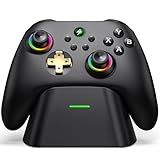
- 【Hall Effect & 1000Hz Polling】Permanently eliminate joystick drift with Hall Effect sensors in both sticks and triggers, delivering pinpoint accuracy for shooters and racers. With 1000Hz polling rate in 2.4GHz and wired modes, this PC controller registers every input instantly — zero lag, true competitive edge.
- 【Wide Compatibility】Perfectly designed for Windows PC and fully compatible with Switch/Switch 2, Android, and iOS systems. Works flawlessly with HID games, MFi titles, Luna, Stadia, Steam, and more.( –💔 Not compatible with Xbox)
- 【 Power Up & Declutter】 Just place the controller on the included dock for hassle-free charging. It auto-reconnects to your last device when picked up. LED lights show charge status. The controller sleeps after 5 minutes of inactivity to save power and wakes instantly when lifted off the dock.
- 【Dual Back Buttons with Macro Programming】 Two customizable back buttons support mapping for up to 16 functions (A/B/X/Y, triggers, D-pad, etc.), giving you a competitive edge with complex command execution.
- 【Dual-Mode Hall Triggers 】Fast Trigger mode delivers instant shots. Linear Trigger mode gives you precise throttle control. Both are drift-free and built to last.
Product prices and availability are accurate as of the date/time indicated and are subject to change. Any price and availability information displayed on Amazon at the time of purchase will apply.




