Quick wins for a faster PC:
Clear out junk files and repair common Windows errorsFree Scan →Fix the driver behind crashes, sound loss and screen glitchesFind Drivers →An oscilloscope can help diagnose a PlayStation 2 optical drive by displaying its RF signal, often described as an “eye pattern.” But there is no safe, universal voltage target or pot-turning recipe for every PS2: measurement points and adjustments depend on the console and drive revision. Identify the exact SCPH model and board, then use its matching service manual before probing or changing anything.
What PS2 laser calibration with an oscilloscope measures
The cited calibration guide describes observing the drive’s RF/eye-pattern signal at measurement points appropriate to the console setup. The trace gives a visual indication of the signal produced while the drive reads a disc. The qualitative goal in the repair material is a clear, stable pattern without distortion—not simply a particular number displayed on the scope.
The available guide is an archived PSXCARE/NetCare AB document, not an official Sony service manual. Its test-point locations and depicted pickup layout should not be applied to an unidentified console. Sony service documents cover different SCPH families and board revisions, so first match the manual to the actual hardware. The archived calibration document was uploaded October 10, 2004 and carries a ©2002 NetCare AB notice. A catalog of PS2 service manuals lists multiple model families and revisions; its coverage is a reason to identify the board, not evidence that every manual uses the same adjustment procedure.
CD and DVD adjustments are separate
The archived guide describes separate CD and DVD controls and calls for evaluating each format with its corresponding media. A disc-reading problem with one format does not establish that the other format needs adjustment. Compare like with like: use the relevant procedure and control for the disc type, and assess whether the resulting pattern is stable and undistorted.
Windows Errors? Fix Them Before They Spread
Repair common Windows errors and clear accumulated junk for a smoother, more stable PC - no reinstall needed.Free scan · no reinstallCrashes, No Sound, or Screen Glitches?
Random freezes, missing sound and display glitches usually trace back to one bad driver. Find and replace yours safely.Free scan · under a minute#1 Best Overall
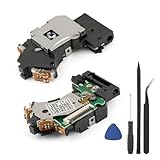
- Compatible Model: The PVR-802W Laser Lens only for PlayStation PS2 Slim 70000Series/90000Series/77000Series/79000Series/ KHS-430,not for PS2 Slim 75000 Series & PS2 Fat. Please make sure that the model is correct before place the order.
- Application: When the laser lens for PS2 slim was damaged, the disc will cannot be recognized, the screen displays "NO DISC", and compatibility is reduced. The reading speed is slowed down, and even freezing occurs. And our new PVR-802W laser lens for PlayStation PS2 slim will solve that problem.
- High Quality : The laser lens replacement for PS2 slim are test before shipment. The product for PS2 slim laser lens are made of good quality and accurate design.
- Professional Tools: Comes with set tools for PS2 slim PVR-802W laser lens to replace, professional repair tools helps to disassemble and replace for PS2 slim laser lens more convenient.
- Suggestion Tips:Please disassemble the anti-static solder point before installation.If you do not have any installation experience, we suggest find the professional. If you need the installation guide for PS2 slim PVR-802W laser lens replacement or have problem, please leave a message.
The guide says each console may need individual adjustment rather than relying on one resistance value. That is the archive document’s guidance, not a universal Sony specification. Do not compare readings from different console or board revisions as though they shared a common target.
Example scope settings and amplitudes are model-limited
A separate PS2 Laserunit Manual gives example scope settings of 20 mV per division and 0.2 μs per division. It also lists 800 mV peak-to-peak for DVD and 640 mV peak-to-peak for CD, explicitly labeling those amplitudes “Safe values (tested on Jap model only!).” The manual’s surfaced listing does not provide a reliable publication date.
Rank #2
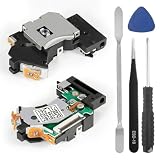
- 1. Perfect Compatibility & Wide Application: Fully compatible with 70000, 77000, 79000, and 90000 series (7W/9W) and KHS-430. Note: This laser lens is NOT compatible with the PS2 Slim 75000 series or PS2 Fat models. Please verify your console model before purchasing.
- 2. Solve Disc Reading Issues: Is your console struggling to load games? This PVR-802W replacement lens is the ideal solution for "Disc Read Error," "No Disc," slow loading times, screen freezing, or skipping during gameplay. Restore your PS2 Slim to its original performance.
- 3. Premium Quality & Strictly Tested: Each laser lens is manufactured with high-quality optical components for long-lasting durability and precision. Our parts undergo rigorous testing before shipment to ensure they meet strict quality standards and provide a stable gaming experience.
- 4. Complete Repair Tool Kit Included: To make your DIY repair easier, we include a set of professional opening and installation tools. No need to purchase extra screwdrivers; you’ll have the essential tools required to disassemble your console and complete the replacement efficiently.
- 5. IMPORTANT: Anti-Static Solder Point: For safety during transport, every new laser has an anti-static solder point (protection bridge). You MUST desolder this point with a soldering iron before installation, or the laser will not function. We recommend professional installation or watching tutorial videos if you are a beginner.
| Manual example | What the source says | How to interpret it |
|---|---|---|
| Scope scale | 20 mV/div and 0.2 μs/div in the adjustment instructions | Example setup from the undated Laserunit Manual; not established as suitable for every PS2 revision. |
| DVD amplitude | 800 mV peak-to-peak | That manual labels it tested on a Japanese model only; not a universal target. |
| CD amplitude | 640 mV peak-to-peak | That manual labels it tested on a Japanese model only; not a universal target. |
These figures do not establish an official Sony-wide calibration standard. Use a value only if the service documentation for the exact model and board specifies it.
Why a universal pot-turning procedure is unsafe
The archived guide warns against turning potentiometers blindly: excessive adjustment may damage the laser, and losing the original setting can make recovery difficult. Although that guide describes clockwise rotation as increasing power on the pickup it depicts, pickup layouts can vary. Do not assume that direction, a particular test point, or a number of turns applies to another revision.
Rank #3

- EFFICIENT WORK: Experience remarkable efficiency with our visible light band laser lens, designed with a continuous operation mode that significantly enhances the reading speed of optical discs. This innovative technology ensures rapid data access and performance, making it an indispensable tool for both gaming and multimedia needs.
- APPLICABLE FOR: Our laser deck optical drive assembly is expertly engineered to fit the SCPH 77001 and 7700X models, ensuring compatibility and superior performance. With its high operating speed, this assembly allows for quick disc recognition and reliable data retrieval, enhancing your gaming or media experience.
- STABLE PERFORMANCE: Achieve unparalleled stability with our laser head, expertly crafted to deliver exceptional operational performance in your game console system. It guarantees minimal disruptions during use, ensuring smooth gameplay and uninterrupted media experiences.
- PREMIUM MATERIAL: Constructed from high-quality aluminum alloy, our optical laser head is designed for durability and longevity. The premium material used effectively prevents corrosion and cracking, offering a sturdy and reliable solution for your optical drive needs.
- IDEAL SUBSTITUTE: Transform your gaming experience with our laser lens, the perfect substitute for worn or broken original parts. Designed with user-friendliness in mind, it boasts an easy installation process that lets you quickly get back to your favorite games.
Before any adjustment, record the console’s SCPH model and board revision, identify its optical pickup and documented test points, and consult the corresponding service manual. For example, Sony Computer Entertainment Inc.’s Level-1 Service & Procedures Manual Version 4.0 is dated September 2003 and applies only to the model families named in its listing; it is not a blanket reference for all PS2 hardware. View the hosted manual text and applicability listing.
Independent reader supportYour contribution helps us test, update, and keep practical guides available for everyone.Before deciding to calibrate
- Confirm which disc format fails and whether the symptom is repeatable with known-good media.
- Consider cleaning as a separate maintenance possibility; the archived guide mentions it, but cleaning is not a substitute for model-matched diagnosis.
- Use an ESD-protected workspace and appropriate repair experience. This is internal electronics servicing, not a safe beginner procedure.
- Do not probe or adjust until the exact board test points and service instructions are known.
- Keep the original adjustment state documented so that a change can be reversed if the trace or reading behavior worsens.
The historical guide frames servicing as the reader’s responsibility and does not establish a one-size-fits-all procedure. Where the matching service manual does not give an applicable test point or target, the available evidence does not justify guessing one.
Quick Recap
Best Value

- It's a Replacement Laser Lens Connection Ribbon Cable is Original parts.
- The Replacement Laser Lens Connection Ribbon Cable is compatible with PS2 / Playstation 2 only.
- Professional repairment skills requried.
- The Replacement Laser Lens Connection Ribbon Cable is only for repairing your broken, damaged or defective laser lens of Playstation 2 repair parts.
- Package: 1 pcs * Laser Lens KHS-400R
Rank #4

- COMPATIBLE REPLACEMENT LASER HEAD: PVR-802W KHM430G laser lens head is designed for PS2/PS3 consoles, offering precise DVD drive repair and component replacement. Maintains original performance with optimized laser beam focusing mechanism
- ADVANCED OPTICAL MECHANISM: Features semi-reflective prism and photoelectric diode for stable optical signal conversion. Internal component structure analysis ensures reliable laser head movement during disc reading
- REPAIR SOLUTION FOR CONSOLES: Restores data reading functionality for damaged CD drives. Direct replacement part with identical dimensions (4.8cm/1.88in length) and lightweight design
- PS2 CONSOLE MAINTENANCE ESSENTIAL: Ideal for drive internal cleaning operations and disc reading optimization. Includes protective guidelines for handling reflective material detection components
- DURABLE COMPONENT SPECIFICATIONS: Laser generator operates at visible light wavelength (650nm) with continuous operation capability. Compact 20g weight ensures minimal impact on console balance
Product prices and availability are accurate as of the date/time indicated and are subject to change. Any price and availability information displayed on Amazon at the time of purchase will apply.




