Windows Errors? Fix Them Before They Spread
Repair common Windows errors and clear accumulated junk for a smoother, more stable PC - no reinstall needed.Free scan · no reinstallOutdated Drivers Are Slowing You Down
One free scan finds every outdated or missing driver and matches the right update for your exact hardware.Free scan · exact hardware matchA full PS3 format takes several hours, according to Sony’s current guidance. Sony does not publish a single exact completion time for every console. A quick format is faster, but it is a different choice if you want to make erased data harder to recover.
What does “factory reset” mean on a PS3?
The phrase can refer to different operations. Sony distinguishes restoring default settings from initializing the PS3 or using its format utility. Restoring default settings resets configuration; it is not the same as deleting all data from the hard drive. PS3 initialization deletes hard-drive data and system settings. The format utility deletes hard-drive data, but Sony cautions that formatting alone does not return the console to precisely the condition it was in when purchased. Sony’s PS3 initialization guidance
On older model manuals, the data-erasing option is labeled Settings → System Settings → Restore PS3 System. That is different from Restore Default Settings. Labels or menu placement can vary by system software and region, so choose the option whose on-screen description matches what you intend to do. Sony CECH-2501B manual
How long does each option take?
| Operation | What it does | Time and data considerations |
|---|---|---|
| Restore Default Settings | Returns settings to their defaults; it is not a full hard-drive data wipe. | Sony’s guidance cited here does not state a completion time. Sony |
| Quick format during initialization | Deletes hard-drive data using the minimum processing needed. | Faster than a full format, but Sony does not publish an exact duration. Special tools may be able to restore erased data. Sony |
| Full format during initialization | Deletes hard-drive data more thoroughly. | Takes several hours, according to Sony; no universal exact time is given. Sony recommends it for sensitive data and when disposing of or transferring a console. Sony |
| Format utility | Deletes hard-drive data; formatting alone does not restore the console to its exact original purchased state. | A full format takes several hours according to Sony. Sony |
Sony’s “several hours” estimate comes from Japanese-language guidance and is a translation of its published description, not a timed result for a particular PS3 model or drive. Sony does not specify a fixed time by console model, hard-drive capacity, or drive condition.
What’s actually slowing this PC down?
Pick the symptom - the matching free tool is one click away.
#1 Best Overall

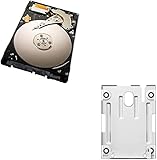
- 1TB Capacity, 9.5mm High, Rotation Speed of 5400RPM
- 8MB Buffer, SATA 3.0Gb/s Interface, 2.5inch Hard Drive
- Works for PS3 / PS4 Game Console HDD replacement / upgrade
- PS3 / PS4 Hard Drive installation & Playstation firmware download instruction included
- Backed by a 3-year warranty from Reseller
Which option should you choose?
If you only want to reset settings
Use Restore Default Settings. It resets settings without being the same operation as wiping all hard-drive data. Do not choose it expecting a complete data erase.
If you are troubleshooting or clearing the console for personal use
Choose the initialization option that matches your goal. A quick format is the faster data-deletion choice, but it is not intended to make recovery with special tools difficult. Sony does not publish an exact quick-format duration.
If you are selling, transferring, or disposing of the console
Sony recommends a full format when transferring or disposing of a PS3, particularly when the hard drive contains important or sensitive data. A format is not a guarantee that erased data can never be recovered; Sony specifically warns about possible recovery after quick format. Sony initialization guidance and Sony disposal guidance
What to do while the reset is running
- Keep the PS3 powered on and do not cancel the operation. Sony warns that switching off or interrupting it before completion may damage system software and could require servicing or exchange. Sony CECH-2101A/CECH-2101B manual
- Allow several hours for a full format rather than relying on an exact countdown Sony does not provide.
- Be certain before starting: Sony warns that initialization changes cannot be undone and that users are responsible for resulting data loss or corruption. Sony CECH-2501B manual
Does a reset require a new hard drive?
No. Replacing the drive is a troubleshooting step only if the existing drive has failed or is unsuitable; a new drive is not needed for an ordinary reset. Sony manuals specify a 2.5-inch internal Serial ATA replacement hard drive, while warning that operation is not guaranteed for every model or drive. Check the manual for your exact PS3 model before buying or installing a replacement. Sony CECH-2501B manual
Quick Recap
Rank #4

- Size 2.5" Speed: 5400 RPM, Capacity 320GB , Type Internal, Interface S-ATA, Warranty 1 year with Bipra Limited
- MDT Recertfiied Brand New 320gb Hard Drive MDT Means WD Recertified Hard Drive with Brand Name MDT Recertified Brand New 0 Hours Hard Drives Reliable and Sealed Unit Factory Recertified
- Warranty 1 year with Bipra Limited
Rank #3

- 2.5inch Notebook HDD, 7mm Height (Slim)
- 1TB Capacity, 5400RPM, 64MB Cache, SATA 6.0Gb/s
- Works for PlayStation gaming systems (PS3 / PS4 Original, PS4 Slim, PS4 Pro)
- Massive 1TB capacity can store up to 80 × 25GB games.
- 2 Years Warranty from Reseller
Product prices and availability are accurate as of the date/time indicated and are subject to change. Any price and availability information displayed on Amazon at the time of purchase will apply.




