If your PS4 appears to show a “yellow light of death,” first check whether it is simply in Rest Mode. Sony’s PS4 quick-start guide identifies an orange indicator as “System is in rest mode”—not, by itself, a hardware-failure warning. The well-known Yellow Light of Death repair guide from iFixit is for PlayStation 3, so its repair steps do not diagnose or fix a PS4. Start by identifying what the console actually does: stays in Rest Mode, freezes, fails to start, or turns on without displaying a picture.
What does an orange PS4 light mean?
Sony’s PS4 quick-start guide lists the orange indicator as: “Orange | System is in rest mode.” If the light is steady orange and the console otherwise seems normal, press the PS button on a connected controller to resume it.
Do not unplug the console while its indicator is lit or blinking. Sony warns that disconnecting the AC power cord before the indicator is off could cause data loss or corruption, or damage the system. If the light changes during startup, the console will not resume, or it does not reach the home screen, troubleshoot that symptom rather than assuming the color identifies a failed component.
Is this the same as the PS3 Yellow Light of Death?
No. The iFixit Yellow Light of Death guide covers PlayStation 3. It describes YLOD as a generic hardware error with multiple possible causes. That does not establish a PS4 diagnosis, and PS3 repair procedures should not be applied to a PS4 based on an orange-looking light alone.
Outdated Drivers Are Slowing You Down
One free scan finds every outdated or missing driver and matches the right update for your exact hardware.Free scan · exact hardware matchPC Slower Than It Used to Be?
A free scan shows the junk files, broken settings and background clutter dragging Windows down - then fixes them in one click.Free scan · Windows 10 & 11#1 Best Overall
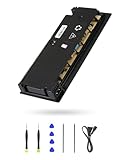
- 【Perfectly Fitment】:ADP-160ER/N16-160P1A Power Supply Unit Replacement Part CUH-2115A CUH-21xx Series Console(Please check your device model before your purchase)
- 【Technical parameters】:ADP-160ER/N16-160P1A Game Console Power Adapter, input voltage 100-240V, 2.1A 50/60Hz, output voltage 4.8V--1.5A,12V--13A
- 【Easy Installation】: Our power supply is user-friendly with a detailed manual and video guide. Plus, we provide professional support for any questions.
- 【Excellent products】:Adopting high quality materials, strict factory quality inspection, optimizing the heat dissipation performance, just to provide better products to you!
- 【What’s in box】:A power board, an adapted power cord, a manual, a tool kit (screwdriver, crowbar, tweezers). These professional tools will help you complete the replacement more easily.
Choose troubleshooting based on what the PS4 does
| What you observe | What to try |
|---|---|
| Steady orange; console appears otherwise normal | Treat it as Rest Mode and press the PS button to resume. Wait until the indicator is off before disconnecting power. |
| Console is on, but the screen is blank or has picture or sound problems | Check the display and HDMI connections using Sony’s PS4 picture and sound troubleshooting. These checks address display symptoms, not a Rest Mode light. |
| Console is frozen or has a software problem | Consider Safe Mode and use an option suited to the symptom. Back up data where possible before any option that initializes the system. |
| Console still cannot start or operate after relevant checks | Use Sony’s PlayStation Repairs and hardware support route for diagnosis. |
Use Safe Mode for supported software or display troubleshooting
Safe Mode provides PS4 options that include restarting, changing resolution, updating system software, restoring default settings, rebuilding the database, initializing the console, and initializing it with a system-software reinstall. Options that initialize the PS4 erase user data. Sony cautions: “Some Safe Mode options will result in the loss of data.” Read the option descriptions and back up data first if the console allows it.
- Turn the PS4 off by holding the power button.
- Once it is off, hold the power button again and release it after the second beep. Sony says the second beep sounds seven seconds after the first.
- Connect the controller to the console with a USB cable, then press the PS button.
- Choose only the Safe Mode option that fits the problem. For example, Change Resolution may help investigate a display issue; Update System Software is for a software update. Do not select an initialization or reinstall option unless you understand that it deletes console data.
See Sony’s Safe Mode instructions for the current option descriptions and guidance.
Rank #2

- This model for ps4 has 3 version, they are not compatiable!!! The photo and could help to confirm the model, please make sure that have confirmed before place the order!!!The power supply replacement compatible with PlayStation 4 PS4 ADP-200ER and ADP-200PIA. For CUH-1215A CUH-12XX. Not for PS4 1000 ADP-240AR and 1100 ADP-240CR!!!
- The replacement will help to solve the problem of can’t turn on/suddenly shuts down/power indicator light is abnormal/unable to charge or provide power,etc. Replace the new power supply for PS4 ADP-200ER, which will help to make the console normal to use. .Input voltage of 120 Volts, output voltage of 100 Volts.
- For PS4 ADP-200PIA internal power Source replacement was test before shipment,and the ADP-200PIA power supply are made of good quality, ABS plastic material make it use more accurately and has longer working life,resistant to wear and tear,. The controller will use as a new one after replacing for ADP-ER console power supply replacement.
- Comes with new power cable and set tools. The power cable could help to replace the damaged or loosed power cable, more stable to charge. And the repair tools, help to disassemble the console and install the power supply, save time and convenient to install the new one.
- Please power off the console before install the new power supply. If do not have any installation experience, we suggest to find the professional to replace for PS4 ADP-200ER /ADP-200PIA internal power supply. If you have any problem or need installation guide, please leave a message.
Update PS4 system software from a USB drive
If an update is indicated and you can use a computer and USB storage, Sony documents a manual update route. Use Sony’s current official update file and instructions; do not substitute an unofficial download.
- Format a USB drive as FAT32 or exFAT.
- Create folders named
PS4and, inside it,UPDATE. - Save the official update file in the
UPDATEfolder with the filenamePS4UPDATE.PUP. - Connect the drive to the PS4, start Safe Mode, and select Update System Software.
Sony’s Safe Mode system-software update instructions explain the current process. A system-software reinstallation is different from a routine update: it is a factory-reset process that deletes console data.
Rank #3
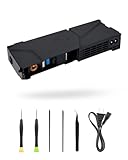
- 【Perfectly Fitment】:LHM For PS4 Power Supply Replacement ADP-240CR with Power Cord, for CUH-11xx Series Host Source Replacement(4 pin)
- 【Technical parameters】:ADP-240CR Game Console Power Adapter, input voltage 100-240V, 2.5A 50/60Hz, output voltage +12V&4.8V:4.8V--1.5A,12V--17.5A。12V only:4.8V--0A,12V--18.3A
- 【Easy Installation】: Our power supply is user-friendly with a detailed manual and video guide. Plus, we provide professional support for any questions
- 【Excellent products】:Adopting high quality materials, strict factory quality inspection, optimizing the heat dissipation performance, just to provide better products to you!
- 【What’s in box】:A power board, an adapted power cord, a manual, a tool kit (screwdriver, crowbar, tweezers). These professional tools will help you complete the replacement more easily
When to stop troubleshooting and seek repair
If the PS4 remains unable to start or operate after the checks that match its symptoms, use Sony’s PlayStation Repairs diagnostic route. A color description does not confirm which component has failed, so avoid replacing parts or attempting board-level repair or reflow without a confirmed diagnosis for the console’s model.
Quick Recap
Best Value

- 【Perfectly Fitment】:ADP-300ER Power Supply Unit Replacement Part N15-300P1A CUH-71xx Series Console(Please check your device model before your purchase)
- 【Technical parameters】:ADP-300ER Game Console Power Adapter, input voltage 100-240V ~ 50/60Hz, output voltage +12VSB, +12V, +5VSTB
- 【Easy Installation】: Our power supply is user-friendly with a detailed manual and video guide. Plus, we provide professional support for any questions
- 【Excellent products】:Adopting high quality materials, strict factory quality inspection, optimizing the heat dissipation performance, just to provide better products to you
- 【What’s in box】:A power board, an adapted power cord, a manual, a tool kit (screwdriver, crowbar, tweezers). These professional tools will help you complete the replacement more easily
Rank #4

- Quality Materials: The power housing is made of wear proof abs material, with a small body and a fully sealed design
- Portable Design: The product adopts a portable design, and the compact body adopts a streamlined fully sealed design, making it easy to carry
- Good Compatibility: The power module is only compatible with PS4 CUH-1215A CUH-12XX (4 pins). Please check the model carefully before purchasing
- 4-pin Power Supply unit: This power replacement component has a 4-pin connection, which is an alternative power supply for the adp-200er power supply unit
- Easy To Replace: It is used to replace old or damaged power adapters, with simple operation and convenient portability
Product prices and availability are accurate as of the date/time indicated and are subject to change. Any price and availability information displayed on Amazon at the time of purchase will apply.




