There is no single confirmed fix for every Return to Castle Wolfenstein crash. The right next step depends on whether the game exits at launch, fails while starting OpenGL, crashes after a resolution change, or fails during play. Start by noting the exact error and when it occurs; then try only the fix that matches.
First, identify where the crash happens
Return to Castle Wolfenstein was released on November 20, 2001. Steam lists Windows 2000 and Windows XP among the game’s original system requirements. That legacy context can matter on a modern PC, but it does not identify the cause of an individual crash. Steam’s separate notice that its client has supported Windows 10 and later since January 1, 2024 concerns the Steam client, not a guarantee that this game will run without problems on those systems. See the Steam game listing and Steam’s Windows support information.
| # | Preview | Product | Price | |
|---|---|---|---|---|
| 1 |

|
Return to Castle Wolfenstein - PC | $42.99 | Buy on Amazon |
| 2 |
|
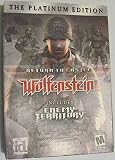
Return to Castle Wolfenstein Platinum Edition - PC | $84.99 | Buy on Amazon |
| 3 |

|
Return to Castle Wolfenstein (Game of the Year Edition) | $96.55 | Buy on Amazon |
| 4 |

|
Fireside Games Castle Panic: The Wizard's Tower Strategy Expansion | $29.95 | Buy on Amazon |
Before changing files, write down your Windows version, where you own the game (Steam or another edition), the exact error message, and what you were doing when it failed. If you use ioRTCW, save its crash log. “Crashes” can describe unrelated problems, so these details help distinguish a startup failure from a broken video setting or a later gameplay issue.
- Exits before a window appears: record whether any error appears and whether the game has worked on this PC before.
- Fails during OpenGL initialization: record the complete message, such as “Could not load OpenGL subsystem.”
- Crashes after changing resolution: try the configuration-file step below.
- Reports a missing file or
q_strncpyz null src: preserve the exact text and investigate the relevant file or configuration rather than applying an unrelated video fix. - Fails during a level or gameplay: note the level and action that preceded it; the available reports do not establish one common cause for these crashes.
If it crashes after a resolution change
A Steam Community reply suggests deleting Main/wolfconfig.cfg so the game can recreate its settings. This is an anecdotal workaround for a resolution-change problem, not a general crash fix. Back up the file before trying it; resetting it may also remove video and control preferences. The suggestion appears in a Steam Community discussion.
#1 Best Overall
- Windows 98 / XP / 2000 / Me
- CD-ROM
- Close the game.
- Find
wolfconfig.cfgin the game’sMainfolder. - Copy the file somewhere safe as a backup.
- Delete the original file, then start the game and check whether it recreates the configuration and launches.
If the game still crashes, restore the backup and move on to diagnosis based on the actual error rather than repeating the reset.
If startup fails while loading OpenGL
One community poster reported removing files from the game’s gl folder as a workaround. The poster’s explanation of faulty OpenGL libraries and how the game chooses OpenGL was speculative, so this report does not establish that the folder is generally responsible for crashes. Removing files can also make the installation harder to restore.
Prefer validating the game files through the storefront or reinstalling cleanly before considering any DLL removal. If you do test the reported workaround, back up the folder first and change nothing unless the error specifically occurs during startup and involves OpenGL. The report is in a Steam Community discussion; it is not an official fix.
If the error mentions a missing file or q_strncpyz null src
An older, user-maintained troubleshooting guide records reports of missing-file errors and q_strncpyz null src. Those messages point to a different investigation than a resolution reset or an OpenGL-folder workaround. Check the exact filename or error text, whether the relevant game data is present, and whether configuration changes preceded the failure. The guide is community-maintained, not official support, and does not prove a single cause for every report: Return to Castle Wolfenstein troubleshooting guide.
The Tool Desk
Outbyte PC Repair FREERepair Windows errors before they cause bigger problemsFix Now →Outbyte Driver Updater FREEFix the driver behind crashes, sound loss and screen glitchesFind Drivers →Rank #3
- Remastered game to version 1.33
- 7 new multiplayer maps that were not in the original version: Trenchtoast, Tram Siege, Ice, Chateau, Keep, The Damned, and Rocket
- Full version of Wolfenstein 3D
- Making of movie
- Demos/movies/concept art: Soldier of Fortune II: Double Helix and Star Wars: Jedi Knight II - Jedi Outcast
Consider ioRTCW if the original executable remains unreliable
ioRTCW is a project-maintained alternative engine path, not a standalone copy of the game. Its README describes an installation that uses files from an existing original game installation. The project documents improvements and fixes, but does not guarantee that it will solve every crash.
- Install the original game and keep that installation intact.
- Download the ioRTCW release for your operating system from the project releases page. The project lists a Windows x64 release; verify the current release and filenames before proceeding.
- Copy the required original game-data files from the original
Maindirectory as specified in the ioRTCW README. - Apply the patch data as described in the README, then launch the ioWolf executable.
- If it fails, retain the crash log and use it when reporting or investigating the problem.
This route involves more setup and depends on data from a legitimate existing game installation. Follow the project’s current instructions rather than relying on older file lists, which may no longer match its release.
Rank #4
- EXPANSION TO CASTLE PANIC FAMILY STRATEGY BOARD GAME BASE: To play this expansion, you will need a Castle Panic base game. The Wizard's Tower adds a deck of spells to play against the Monsters, but now there are flying Monsters, Mega Boss Monsters, and fire to deal with. Can be played with 1 to 6 players, ages 10 and up. Average playtime is 60 minutes.
- COMMUNITY/SOCIAL EXPERIENCE: The Wizard's Tower extends the social experience of Castle Panic and helps families and board game groups bond. As you explore the unique magic spells and talk through the best ways to defeat the new Monsters, you will enjoy getting to know the other players.
- FUN GAME WITH HIGH REPLAY VALUE: With new Castle cards, a whole new Wizard's deck of spells, 49 new Monsters, flame tokens, a new Tower, and Monster draw bag, players will have new fun experiences every game.
- MINUTES TO LEARN AND A LIFETIME TO EXPLORE: The Wizard's Tower builds on the players' knowledge of Castle Panic. The spells and new Monsters can be learned in just minutes, but the expansion offers depth to remain exciting for years to come. Other expansions provide enhanced experiences as well.
- GIFT FOR ADULTS AND FAMILIES: Castle Panic and The Wizard's Tower are the perfect gift for birthdays, holidays, and weekly game nights. Playing together is a great way to create warm memories and bring friends and family together.
Choose the least invasive relevant step
| Situation | Reasonable next step | Evidence and trade-off |
|---|---|---|
| Crash immediately after changing resolution | Back up and reset Main/wolfconfig.cfg. |
Community suggestion; may reset video and control settings. |
| OpenGL startup error | Record the full error and validate files or reinstall before any DLL changes. | One community folder-removal report is unverified; its explanation is speculation. |
Missing-file or q_strncpyz null src error |
Investigate the named file and game-data/configuration state. | Symptoms appear in a user-maintained guide; no universal cause is established. |
| Original executable remains unreliable | Consider ioRTCW and follow its current README. | Project-documented alternative requiring original game data; not a guaranteed fix. |
What the available evidence does not establish
- There is no confirmed universal Windows 10 or Windows 11 patch requirement for this game.
- There is no established universal fix for OpenGL startup failures.
- No particular graphics card is identified as the cause of these crashes.
- The available reports do not justify buying new hardware to address this problem.
Community discussions can suggest a symptom-specific workaround, but they do not show how common a failure is or guarantee that a fix will work on another installation.
Quick Recap
Product prices and availability are accurate as of the date/time indicated and are subject to change. Any price and availability information displayed on Amazon at the time of purchase will apply.




