Do these 3 things before closing this tab:
1Repair Windows errors before they cause bigger problems2Fix the driver behind crashes, sound loss and screen glitches3Clear out junk files and repair common Windows errorsThe Ducky One X is a distinctive first-generation analog gaming keyboard that combines excellent latency, smooth linear switches, and wired, 2.4GHz wireless, and Bluetooth connectivity. Its inductive switches deliver the adjustable actuation, Rapid Trigger, and multi-point input associated with Hall-effect keyboards, but they do not make the board automatically faster or more accurate than the best alternatives.
The One X’s strongest case is its typing experience: a stable, well-damped, refined full-size keyboard that also works for competitive gaming. Its weaknesses are less impressive software, short battery life, limited profile support, and proprietary switches that are easy to dislodge and cannot be replaced with ordinary mechanical or Hall-effect parts.
As an Amazon Associate I earn from qualifying purchases.
Verdict
Buy the Ducky One X if you want a wireless analog keyboard with a traditional layout, unusually good linear typing feel, and genuinely low latency. It is a particularly interesting choice for players who want Rapid Trigger without giving up Bluetooth, 2.4GHz wireless, or a full-size number pad.
Do not buy it simply because “inductive” sounds more advanced than Hall effect. Independent testing found performance comparable to leading Hall-effect keyboards, while the software and battery life are weaker than the best competition.
#1 Best Overall

- Next-Gen Analog Switch: Ducky inductive switches offer greater accuracy, consistency and power efficiency over traditional analog switches.
- Sublime Typing Experience: Ducky QUACK Mechanics+ utilizes seven-layer dampening design, together with gasket-mount design to give you unprecedented typing feel and acoustics.
- Versatile Connection: Tri-mode connection allows USB wired, 2.4 GHz RF wireless and BT connection.
- High Shine-Resistance PBT: Higher-than-industry-standard 85% high-purity PBT double shot keycaps offer unrivalled high resistance to shine.
- Intuitive Settings: Web-based software takes up no space nor resource on your computer for easy and intuitive setting adjustments, and can be accessed on different platforms.
- Best for: wireless analog gaming, smooth linear typing, full-size layouts, and buyers who value acoustics.
- Less suitable for: profile-heavy setups, frequent switch swapping, long battery life, tactile or clicky switch fans, and users who want a mature software ecosystem.
Overall: the One X is technically capable and pleasant to use, but its first-generation software and ownership compromises stop it from being the default recommendation for competitive analog gaming.
What is the Ducky One X?
The One X family consists of the full-size One X Wireless and the compact One X Mini Wireless. The former uses a 100% layout with a number pad and dedicated media controls; the latter uses a 60% layout intended for smaller desks and gaming setups. Both are available in black and white versions, depending on the market and configuration listed by Ducky.
Ducky markets the board as a tri-mode wireless mechanical keyboard using next-generation inductive linear switches. Calling it “the world’s first” needs qualification: PC Gamer describes it as the first modern gaming keyboard of its type, while RTINGS uses more cautious language. Inductive sensing is not a new physical principle, so the safest description is that Ducky markets the One X as the first modern gaming keyboard built around its particular inductive switch design.
The Tool Desk
Outbyte PC Repair FREERepair Windows errors before they cause bigger problemsFix Now →Outbyte Driver Updater FREEFix the driver behind crashes, sound loss and screen glitchesFind Drivers →How inductive switches work
In a conventional mechanical switch, a physical contact tells the keyboard that a key has been pressed. The One X instead uses coils embedded in the PCB to detect changes in an electromagnetic field as the switch moves. That lets the keyboard estimate a key’s position throughout its travel rather than treating input as simply on or off.
This enables adjustable actuation, adjustable reset behavior, Rapid Trigger, and multi-point triggering. In practical terms, it occupies the same product category as a Hall-effect keyboard, although the sensing method is different. Hall-effect switches generally use a magnet and sensor; Ducky’s design uses inductive sensing.
Ducky claims inductive switches can offer consistent sensing, lower power consumption, and no reliance on a permanent magnet whose strength could theoretically diminish over time. Those are manufacturer claims, not proof that every inductive keyboard will outperform Hall-effect designs. RTINGS found the One X’s actuation accuracy comparable to the best Hall-effect keyboards it had tested.
Rank #2

- Kailh yellow hotswap sockets on stabilizer keys (ESC, Back Space, Enter, left Shift, right Shift, Space Bar, Numeric 0, +, and Enter)
- Detachable braided USB-C cable
- Bonus enter key in a random color
- OEM profile Double Shot PBT keycaps
- South-facing switches
Design, layouts, and build
The One X uses an ABS case, a gasket-mounted construction, an SPCC steel plate, and a seven-layer dampening system. Those choices help explain why the board feels more substantial and acoustically controlled than many gaming keyboards. The switches are linear, with 3.5mm of total travel and a listed initial force of 40g.
The full-size model measures 452 × 150 × 41mm according to PC Gamer and includes dedicated media controls. The Mini is listed by Ducky at 308 × 124 × 39mm and 918g. It offers three typing angles—8°, 11°, and 14°—but its 60% layout removes the function row, navigation cluster, and number pad. Those functions are accessed through layers and shortcuts.
The One X is tall and fairly bulky. Its dampening makes it feel stable and reduces hollow resonance, but users who prefer low-profile boards or do not use a wrist rest may find the height less comfortable over long sessions.
Typing experience
Typing is the One X’s strongest differentiator. The linear switches are smooth, lightly sprung, and generally well lubricated. The gasket mount and internal dampening produce a controlled sound rather than the sharp, metallic character associated with less-treated gaming boards. Reviews praised the board’s smoothness, stability, and refined acoustics.
The space bar, Enter, Shift, and Backspace keys are important on a board this large, and the stabilizers are generally good enough for normal office and gaming use. The larger full-size case may sound slightly different from the Mini because its broader shell has different acoustic behavior, but both versions share the same basic design approach.
The switches have no tactile bump or click. If you prefer Browns, Clears, or clicky switches, adjustable actuation will not change that fundamental feel. It changes when a key registers; it does not turn a linear switch into a tactile one.
Rank #3
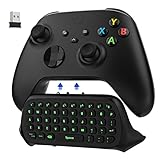
- COMPATIBILITY - Specifically designed for Windows 11 / Windows 10 / Xbox One controller, Xbox one S / Xbox one Elite / Xbox one Elite 2 / Xbox Series X/S controller. Noted: NOT fit for Xbox One X (Please note: you can open or close the backlight through press the "Shift+Space" key).
- GREEN BACKLIGHT - The keyboard draw power from the Xbox One''s wireless controller directly. Just push this product into Xbox One controller and press the "Xbox" key, the keyboard backlight will light up. If the keyboard does not operate within 10 seconds, the backlight will automatically go into power saving state.
- CHAT WHILE PLAY - With firm buttons to type, text, email, enter codes. Ideal for group chat while playing games. 2.4G wireless protocol(receiver) to transfer data. Suitable for 4-stage 3.5mm earphones.
- ENJOY THE SOUND - Audio jack port which fits any kind of 3.5mm audio devices. Connects your headphones, earphones or headset to be wired for sound.
- ULTRA COMPACT - It feels good on your hand, and all the same makes a superior accessory for your game-time.
For normal typing, a very shallow actuation point can be counterproductive. Brushing a key may register an unwanted character, particularly if you are used to a deeper mechanical actuation point. A deeper setting is more forgiving for documents, email, and code. The One X can therefore work well as a typing keyboard, but it is best treated as having separate gaming and typing needs—even though its limited profile support makes switching between those configurations inconvenient.
Gaming performance
RTINGS measured very low, consistent latency and a genuine 1,000Hz update rate over wired and 2.4GHz wireless connections. That makes the One X suitable for both casual and competitive gaming. The important point is consistency: its wireless mode is not merely a convenience mode with an obviously compromised polling rate.
Adjustable actuation lets you choose how far a key must travel before registering. Rapid Trigger changes the point at which a key releases or retriggers, which can make repeated movement inputs more immediate in competitive shooters and other movement-heavy games. Multi-point triggering can assign different actions at different points in a key’s travel.
These features are useful, but not universal advantages. Many games and players will not benefit noticeably from them. A shallow actuation setting can also increase accidental inputs, especially while typing or resting fingers on movement keys.
The bigger problem is software. Reviewers criticized the limited profile functionality and lack of clear explanations. If you want one configuration for a shooter, another for a racing game, and a deeper setting for office work, the lack of convenient per-game profiles undermines much of the flexibility that makes analog keyboards attractive. The hardware is competitive; the control layer is less mature.
Software and configuration
The One X uses browser-based configuration software rather than a conventional desktop application. That avoids a permanent installation and can be convenient across compatible systems, but it does not mean the software is as capable as the established tools from leading gaming-keyboard brands.
Rank #4

- Next-Gen Analog Switch: Ducky inductive switches offer greater accuracy, consistency and power efficiency over traditional analog switches.
- Sublime Typing Experience: Ducky QUACK Mechanics+ utilizes seven-layer dampening design, together with gasket-mount design to give you unprecedented typing feel and acoustics.
- Versatile Connection: Tri-mode connection allows USB wired, 2.4 GHz RF wireless and BT connection.
- High Shine-Resistance PBT: Higher-than-industry-standard 85% high-purity PBT double shot keycaps offer unrivalled high resistance to shine.
- Intuitive Settings: Web-based software takes up no space nor resource on your computer for easy and intuitive setting adjustments, and can be accessed on different platforms.
Ducky specifies that configuration requires a wired USB connection. A safe setup process is:
Recommended Free Tools
- Connect the keyboard by USB.
- Open Ducky’s web configuration tool.
- Adjust actuation and reset behavior.
- Configure Rapid Trigger or multi-point functions if the current firmware exposes them.
- Apply or save the changes.
- Test the settings in a text editor before using a shallow actuation point in a game.
- Reconnect wirelessly and confirm that the settings persist.
Exact controls and menu labels may change with firmware and software revisions, so buyers should not assume that every setting is available in every current interface. The cited reviews consistently identify limited profiles and sparse guidance as weaknesses. QMK and VIA are not supported.
Connectivity, battery life, and rollover
The One X supports three connection methods:
- USB wired: the configuration mode and the option with NKRO support.
- 2.4GHz wireless: the wireless mode that retains the tested 1,000Hz behavior.
- Bluetooth: useful for general devices, but not equivalent to wired or 2.4GHz gaming performance.
Battery endurance is the clearest hardware weakness. Ducky’s guidance cited by PC Gamer suggests approximately 11 hours with RGB enabled and 37 hours with RGB disabled. RTINGS reported a roughly 11-to-38-hour range depending on conditions. These are estimates, not guaranteed runtimes: RGB brightness, connection mode, sleep behavior, polling, firmware, and battery condition all matter.
If the keyboard will remain at a desk, wired use removes most of the battery concern. If you expect a wireless board to last weeks between charges, the One X is a poor fit.
Ducky lists NKRO in wired mode and 6KRO in wireless modes. Most users will never encounter a problem, but the distinction can matter for complex shortcuts, rhythm games, or unusually heavy simultaneous input.
Quick wins for a faster PC:
Repair Windows errors before they cause bigger problemsFix Now →Scan for outdated or missing drivers - takes under a minuteDriver Scan →Specifications
| Feature | Ducky One X details |
|---|---|
| Layouts | 100% One X Wireless; 60% One X Mini Wireless |
| Connections | USB wired, 2.4GHz wireless, Bluetooth |
| Switches | Ducky inductive linear switches |
| Travel and force | 3.5mm total travel; 40g initial force |
| Polling rate | 1,000Hz listed and independently measured in wired and 2.4GHz modes |
| Mount and plate | Gasket mount; SPCC steel plate |
| Keycaps | 85% high-purity PBT doubleshot, with regional variation |
| Rollover | NKRO wired; 6KRO wireless |
| Hot-swappable | Yes, but only for compatible Ducky inductive switches |
| Software | Browser-based; wired connection required for configuration |
| Compatibility | PC, Linux, and Intel-chip Mac systems listed by Ducky |
| Mini dimensions and weight | 308 × 124 × 39mm; 918g |
| Typing angles | 8°, 11°, and 14° |
Do not transfer the Mini’s dimensions or weight to the full-size model. Also, “hot-swappable” should not be read as compatibility with standard MX mechanical switches or arbitrary Hall-effect switches.
Best Value

- Next-Gen Analog Switch: Ducky inductive switches offer greater accuracy, consistency and power efficiency over traditional analog switches.
- Sublime Typing Experience: Ducky QUACK Mechanics+ utilizes seven-layer dampening design, together with gasket-mount design to give you unprecedented typing feel and acoustics.
- Versatile Connection: Tri-mode connection allows USB wired, 2.4 GHz RF wireless and BT connection.
- High Shine-Resistance PBT: Higher-than-industry-standard 85% high-purity PBT double shot keycaps offer unrivalled high resistance to shine.
- Intuitive Settings: Web-based software takes up no space nor resource on your computer for easy and intuitive setting adjustments, and can be accessed on different platforms.
Ownership concerns
Be careful when removing keycaps
PC Gamer reported that switches can come out of the PCB during keycap removal. This is particularly inconvenient because the One X uses a proprietary inductive switch system and does not include spare switches in the cited review. Pull keycaps straight upward, avoid twisting the puller, and check that the switch is still seated if a key stops working.
Before buying, ask the retailer or Ducky about replacement-switch availability. Do not assume that future third-party replacements will exist.
Platform limitations
Ducky’s cited specifications list PC, Linux, and Intel-chip Mac compatibility. Apple Silicon Mac support should be treated as unverified unless the retailer or manufacturer confirms it for the current firmware and software.
Price uncertainty
PC Gamer’s approximately $179 full-size and $139 Mini figures were launch-era prices from February 2025, not guaranteed current prices. During the cited August 18, 2026 check, Ducky’s global collection displayed an implausible $9,999 USD figure for both models. That is clearly not a reliable retail price. Check a reputable regional retailer for the actual price, stock, warranty, and return policy before purchasing.
How it compares with alternatives
| Priority | Better direction | Why |
|---|---|---|
| Wireless analog keyboard with strong typing feel | Ducky One X | Tri-mode connectivity, stable construction, smooth switches, and a full-size option. |
| More software customization and profiles | Keychron Q1 HE and related HE models | Hall-effect sensing with a more customization-oriented software experience according to RTINGS. |
| Competitive gaming software and onboard profiles | Razer Huntsman V3 Pro | Adjustable actuation, Rapid Trigger, and mature gaming software, but wired analog optical switches rather than wireless inductive hardware. |
| Established analog enthusiast ecosystem | Wooting | A useful benchmark for software and analog-keyboard maturity; verify the exact current model, layout, price, and availability. |
| Tactile or clicky typing feel | Conventional mechanical keyboard | The One X’s linear switches cannot reproduce tactile bumps or click feedback. |
The practical differences matter more than the sensing label. A Hall-effect keyboard with better profiles may be a better competitive tool, while the One X may be the more attractive everyday keyboard for someone who values wireless flexibility and acoustic tuning.
Who should buy the Ducky One X?
- Competitive gamers: Buy if you specifically want adjustable actuation and Rapid Trigger with 2.4GHz wireless. Look elsewhere if profile management is essential.
- Office users: Buy if you like light linear switches and a controlled sound. Use a deeper actuation setting and consider a wrist rest.
- Full-size buyers: The One X Wireless is one of the more unusual ways to get a number pad, media controls, wireless connectivity, and analog input together.
- 60% buyers: The Mini suits compact setups, but make sure you are comfortable with Fn-layer shortcuts.
- Wireless users: Buy only if you can accept frequent charging or are happy to use USB much of the time.
- Switch enthusiasts: Avoid it if changing switches is a major part of the appeal of a hot-swap board.
- Fixed-budget buyers: Compare the verified regional street price against mature Hall-effect and wired analog boards. The One X is not automatically good value if it costs more than a better-supported alternative.
Final recommendation
The Ducky One X proves that an inductive keyboard can deliver the same broad gaming capabilities as a Hall-effect board while also offering a very good typing experience and genuine wireless flexibility. Its sensing technology is interesting, but it is not by itself a reason to pay more.
Choose it for the combination of smooth linear switches, heavy acoustic treatment, low and consistent latency, and a full-size wireless format. Choose a Keychron or another mature Hall-effect board for stronger customization, a Razer Huntsman V3 Pro for more focused competitive-gaming software, or Wooting for an established analog ecosystem. The One X is a compelling specialist keyboard—not the universal best gaming keyboard.
What’s actually slowing this PC down?
Pick the symptom - the matching free tool is one click away.
Quick Recap
Product prices and availability are accurate as of the date/time indicated and are subject to change. Any price and availability information displayed on Amazon at the time of purchase will apply.




