Quick wins for a faster PC:
Fix the driver behind crashes, sound loss and screen glitchesFind Drivers →Repair Windows errors before they cause bigger problemsFix Now →rsmhook.dll is a Citrix component, not a normal Windows system file. If Windows says rsmhook.dll is missing, was not found, or could not be loaded, repair or reinstall the Citrix client that the affected application expects instead of downloading the DLL separately.
The file is historically identified as the Citrix Reverse Seamless Manager Application Hook DLL. It is associated with older Citrix ICA Client software and some older Citrix Workspace installations. A commonly documented installation path is:
C:Program Files (x86)CitrixICA ClientRSMHook.dll
The exact path depends on the Citrix package and the application using it. Do not assume that every current Citrix Workspace release includes this historical component.
Fix 1: Repair or reinstall the approved Citrix client
Time needed: 10–20 minutes
This is the most likely fix. A Citrix upgrade, removal, interrupted installation, or failed application deployment can leave a shortcut or published application pointing to a component that is no longer present.
The Tool Desk
Outbyte Driver Updater FREEScan for outdated or missing drivers - takes under a minuteDriver Scan →Outbyte PC Repair FREEClear out junk files and repair common Windows errorsFree Scan →#1 Best Overall

- Versatile headset: Great for Internet calls and listening to music from your Mac or Windows computer
- Plug-and-play USB connection: Simply plug the headset into your PC for quick and easy stereo audio
- Clear digital sound: Pure USB digital audio for crystal clear music and calls
- Rotating boom microphone: Reduces background noise for clear chats, rotates up and hides away when you’re listening to music
- Comfortable design: Lightweight adjustable headband and foam ear cups for a feel-good fit
First, identify what is failing
- Note the name of the application that displays the error.
- Check whether the error appears when opening Citrix Workspace itself, a published application, or an older ICA shortcut.
- Open Settings with Windows key + I.
- Select Apps.
- Select Installed apps on Windows 11, or Apps & features on Windows 10.
- Search for Citrix Workspace or Citrix Receiver.
- Select the three-dot menu beside the entry on Windows 11, or select the entry on Windows 10.
If a Modify, Repair, or similar option is available, run it and restart Windows afterward. If no repair option exists, uninstall the Citrix client, restart the computer, and install the approved package again.
Install the correct package
Use the Citrix Workspace app download page or your company’s Citrix portal. Managed computers may require a particular current-release, LTSR, earlier Workspace, or legacy ICA Client package. If your organization provides its own installer, use that package instead of choosing a random version.
During installation:
- Close Citrix Workspace and any published applications.
- Run the installer.
- Approve the User Account Control prompt.
- Follow the setup wizard.
- Restart Windows when installation finishes.
- Launch Citrix Workspace and sign in again if required.
- Open the application that previously failed.
The repair worked if the application starts without the loader message and the Citrix session opens normally. If the installer refuses to run, fails partway through, or the same error returns immediately, continue with the quarantine and architecture checks below.
Do not copy an old RSMHook.dll into the Citrix folder from another computer. A matching filename is not enough: the file must belong to the correct Citrix release, architecture, dependency set, and installation layout.
Free tools Windows power users keep installed
One-click scans. No signup required.
Fix 2: Check Windows Security quarantine
Time needed: 5–10 minutes
Endpoint security may have quarantined the file after Citrix was installed or updated. A quarantine event is especially plausible when the error began suddenly, even though Citrix had been working previously.
- Open the Start menu.
- Type Windows Security.
- Open Windows Security.
- Select Virus & threat protection.
- Select Protection history.
- Review recent entries for Citrix,
RSMHook.dll, or the executable that launches the affected application. - Expand a relevant entry and record the detection name, original path, and action taken.
Do not restore an item solely because an error names the file. Confirm that the original location belongs to the Citrix installation, that the Citrix package came from your organization or Citrix, and that your IT or security team approves the restoration.
In most cases, the safer process is to have IT review the detection and then reinstall Citrix from a trusted package. This restores the complete client and lets security verify the installer instead of placing one isolated DLL back on the system.
Rank #2
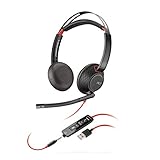
- Connects To: For a professional needing to connect to a PC/Mac using USB-A and/or mobile phone. Compatible with Microsoft Teams and other leading collaboration platforms.
- Ideal For: Users with extensive PC communication and collaboration use.
- Audio Performance: Superb Audio Quality - Noise canceling microphone ensures your voice is heard. Audio automatically switches between wideband for telephony & hi-fi stereo for music. SoundGuard DIGITAL protects against sound levels over 118dBA, sudden loud sounds & long-term exposure.
- Intelligent Features: Enhanced All Day Comfort & Portability - Ultra-soft leatherette ear cushions wrapped around pillow-soft memory foam provide all-day comfort. A lightweight cushioned metal headband offers durability and a comfortable custom fit.
- Global Warranty & Wearing Style: 2 years global warranty; over the head wearing style with two earpieces.
If Protection history shows no relevant event, continue. The file may have been removed during cleanup, excluded from a failed installation, or left behind as a dependency problem.
Fix 3: Check the application path and architecture
Time needed: 10 minutes
A 64-bit version of Windows can run 32-bit software. It does not automatically convert 32-bit Citrix components into 64-bit components.
Historical public metadata identifies the commonly indexed RSMHook.dll as a Win32, or 32-bit, file. That is historical evidence rather than a specification for every Citrix release. Public indexes also list a related RSMHook64.dll, but do not establish that it is a drop-in replacement or that it belongs to the same installation branch.
Check the installation without modifying anything:
- Right-click the shortcut for the failing application.
- Select Properties.
- Open the Shortcut tab.
- Note the Target path.
- Select Open File Location if available.
- Look for the application’s own Citrix folder and for the expected
RSMHook.dllfile.
You can also check the documented older Citrix location in File Explorer:
C:Program Files (x86)CitrixICA Client
If the file is present but the error says “The specified module could not be found,” the missing item may be a dependency rather than RSMHook.dll itself. Reinstall the complete Citrix package rather than replacing individual files.
Outdated Drivers Are Slowing You Down
One free scan finds every outdated or missing driver and matches the right update for your exact hardware.Free scan · exact hardware matchWindows Errors? Fix Them Before They Spread
Repair common Windows errors and clear accumulated junk for a smoother, more stable PC - no reinstall needed.Free scan · no reinstallAsk your administrator these questions:
- Is the application 32-bit or 64-bit?
- Does it require a legacy ICA Client or a specific Workspace LTSR release?
- Is Citrix installed locally, or is the application launched through a remote session?
- Does the company deploy a custom Citrix package?
Never rename RSMHook64.dll to RSMHook.dll, and do not move either file into C:WindowsSystem32 or C:WindowsSysWOW64. Those folders are not general-purpose storage for application DLLs.
Fix 4: Use Windows repair commands for system corruption
Time needed: 15–30 minutes
Windows repair tools are useful when several Windows components are malfunctioning, updates fail, or unrelated applications also report system-file errors. They normally cannot recreate rsmhook.dll, because the file is associated with Citrix rather than Windows.
Rank #3

- [Wide Compatibility] This professional gaming headset for PC gamers is compatible with PC (Windows 7/8/10), PS4/PS5 console, laptops, and other devices with a USB audio port.(Note: EKSA E1000 is not compatible with game controllers.)
- [Driver-free 7.1 Surround Sound] Enjoy an instant immersive gaming experience with its 7.1 surround sound. EKSA PC gaming headset has a built-in USB audio sound chip and 50mm magnetic neodymium driver that gives you a vivid surrounding sound field. No extra downloads or hassle to get the best experience, just plug and play.
- [Noise Cancelling Microphone] The EKSA gaming headset for PS5 reduces distracting background noise and guarantees loud and crystal-clear communication with its 120° adjustable high-sensitive microphone. The headset’s omnidirectional noise reduction tech allows you to enjoy quality sound when gaming or in-game chats.
- [Comfortable Ergonomic Design] Premium soft memory protein earmuffs ensure ultimate comfort even for a prolonged period. In addition, there’s absolute comfort during lengthy gaming sessions with an adjustable headband designed for balanced weight distribution and reduced clamping force. Short cables are also not your problem anymore as its 2.2m extremely durable cable allows you to enjoy your game with no boundary.
- [2 Years Warranty] EKSA gaming headsets are under strict quality inspection on each production line. We offer 24-hour customer support and a 2-year warranty. We will make our most incredible effort to take responsibility for your shopping experience.
Microsoft’s recommended order is DISM first, followed by SFC.
- Open Start.
- Type Command Prompt.
- Right-click Command Prompt.
- Select Run as administrator.
- Approve the User Account Control prompt.
- Run:
DISM.exe /Online /Cleanup-image /Restorehealth
- Wait for DISM to complete.
- Run:
sfc /scannow
- Wait until the verification reaches 100 percent.
- Restart Windows.
- Test Citrix again.
DISM repairs the Windows component source. SFC checks protected Windows files against that repaired source. If SFC reports that it repaired files, test the application after restarting. If the Citrix error remains, reinstall the approved Citrix client because these commands do not normally supply third-party application files.
Do these 3 things before closing this tab:
1Repair Windows errors before they cause bigger problems2Fix the driver behind crashes, sound loss and screen glitches3Clear out junk files and repair common Windows errorsRepeatedly running SFC and DISM without checking what changed usually adds little value. If you want a guided scan that identifies repair issues without manually interpreting each result, Outbyte PC Repair can show what it finds; repairs are handled by the full version, and reinstalling the Citrix package remains the definitive fix for this file.
Fix 5: Update related drivers only when evidence points there
Time needed: 10–30 minutes
A graphics, display, or remote-session driver is not the usual cause of a missing Citrix DLL. Do not install drivers merely because rsmhook.dll appears in an error. Consider this step only if Citrix also shows display problems, session redirection failures, crashes, or Device Manager warnings.
- Right-click the Start button.
- Select Device Manager.
- Expand Display adapters.
- Expand Network adapters if the Citrix session has connection problems.
- Look for a yellow warning icon.
- Right-click the affected device.
- Select Update driver.
- Choose Search automatically for drivers.
- Restart Windows if a driver is installed.
- Test Citrix again.
For a managed computer, obtain drivers through the hardware manufacturer or your organization’s deployment system. If Windows cannot find a suitable driver, visit the manufacturer’s official support page using the exact computer or motherboard model.
If manually identifying hardware models and matching driver packages is the difficult part, Outbyte Driver Updater can scan for outdated drivers; installation of drivers is handled by the full version. A driver update is not a substitute for reinstalling Citrix when the missing file belongs to the Citrix client.
Recommended Free Tools
Fix 6: Check Windows Features only for a broader application problem
Time needed: 5–10 minutes
rsmhook.dll is not established as a Visual C++ Redistributable, DirectX, .NET, or built-in Windows Features file. Enabling random features is therefore unlikely to restore it.
If the failing application separately reports a missing .NET component or an unavailable legacy feature:
- Press Windows key + R.
- Type:
optionalfeatures
- Press Enter.
- Review the feature named by the application or your administrator.
- Enable only the required feature.
- Select OK.
- Restart Windows if prompted.
Do not enable features as a guess for rsmhook.dll. Return to the Citrix repair process if the DLL error remains.
Rank #4
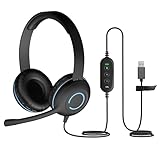
- USB Stereo Headset with Microphone for PC: The Cyber Acoustics AC-5008A USB headset with microphone delivers clear stereo sound for calls, lessons, and everyday computer use. A unidirectional noise-canceling microphone reduces background distractions, making this computer headset with microphone for PC ideal for K-12 classrooms, remote learning, and home use.
- Adjustable Headset with Mic for Universal Fit: The Cyber Acoustics AC-5008A headset with mic features an adjustable headband, flexible microphone boom, and soft leatherette earpads for a comfortable fit. Designed for versatility, this wired USB headset can be worn with the microphone boom on either the left or right side.Adjustable Headset with Mic for Universal Fit: The Cyber Acoustics AC-5008A headset with mic features an adjustable headband, flexible microphone boom, and soft leatherette earpads for a comfortable fit. Designed for versatility, this wired USB headset can be worn with the microphone boom on either the left or right side.
- Durable Wired Headphones Built to Last: Designed for daily use, the Cyber Acoustics AC-5008A wired headset includes easy-to-clean leatherette ear cushions and a durable braided TuffCord cable that resists tangling and wear. These wired headphones with microphone are perfect for classroomsand home workspaces.
- Plug-and-Play USB Headset for PC and Mac: The Cyber Acoustics AC-5008A computer headset with microphone connects instantly with a simple USB plug-and-play connection, requiring no drivers or software installation. This USB headset with mic works easily with PCs, Macs, and Chromebooks for quick and reliable setup.
- Complete Cyber Acoustics Headset Package: Includes the Cyber Acoustics AC-5008A USB Stereo Headset and User Guide, backed by a 1-year warranty. Designed for classrooms, offices, and home learning, this Cyber Acoustics computer headset delivers dependable audio and long-lasting performance.
Why regsvr32 usually does not help
Time needed: Not recommended for this file
regsvr32 is designed for DLLs that provide the registration entry points expected by the tool, commonly COM or ActiveX components. There is no reliable evidence that RSMHook.dll is a self-registering component.
What’s actually slowing this PC down?
Pick the symptom - the matching free tool is one click away.
Running this command:
regsvr32 RSMHook.dll
may produce an error stating that DllRegisterServer was not found. Even if registration succeeds for another DLL, it would not restore a missing Citrix installation, repair a dependency, or make an incompatible 32-bit file work in a 64-bit process.
Use the Citrix installer to place and configure its files. Do not register RSMHook.dll routinely.
Common causes of the error
| What changed | Likely explanation | Correct response |
|---|---|---|
| Citrix was removed or upgraded | The old application still expects the component | Install the approved Citrix package |
| Installation stopped unexpectedly | Files or dependencies were never copied | Repair or reinstall, then restart |
| The error appeared suddenly | Security software may have quarantined the file | Review Protection history and contact IT |
| A legacy ICA shortcut fails | It may require an older client layout | Ask for the required ICA Client or Workspace release |
| The file exists but will not load | A dependency may be missing or incompatible | Reinstall the complete client |
| Only one managed application fails | The deployment or user profile may be damaged | Have the administrator inspect the deployment |
| Several unrelated Windows features fail | Windows component corruption is possible | Run DISM, then SFC |
Historical metadata has associated the file with version 14.1.0.0, a size of approximately 29 KB, and 32-bit architecture. Treat those as historical identifiers, not universal requirements for every Citrix installation.
What not to do
- Do not download
rsmhook.dllfrom a random DLL repository. - Do not place it in
System32orSysWOW64by default. - Do not substitute a similarly named 64-bit file.
- Do not disable antivirus protection to force an unknown DLL into the system.
- Do not assume that Visual C++, DirectX, or .NET caused the problem.
- Do not use System Restore before checking for an approved Citrix installer.
A separately downloaded DLL can have the wrong version, architecture, dependencies, or a malicious payload. The safe sources are your organization’s Citrix portal, its approved software deployment system, or Citrix’s official Workspace download and installation pages.
When to escalate to IT
Contact your administrator if reinstalling does not work, the computer is company-managed, or the application uses a legacy ICA environment. Provide:
- The exact error text.
- The affected application and shortcut target.
- Whether Citrix Workspace or Receiver was recently changed.
- The result of Protection history.
- Whether
RSMHook.dllexists in the expected Citrix folder. - The Windows version and system architecture.
- Any Citrix installer log or installation failure message.
An administrator should also inspect Event Viewer:
- Press Windows key + R.
- Type
eventvwr.msc. - Press Enter.
- Open Windows Logs.
- Select Application.
- Look for errors matching the application, Citrix, or the failure time.
They should compare those events with Citrix installation logs, endpoint-security history, the organization’s package requirements, and the user profile or remote-session configuration. This is more useful than repeatedly copying DLLs or registering them manually.
Best Value

- DuKabel USB to 3.5mm audio adapter easily adds a 3.5mm TRRS aux port to your devices. Playback recorded files through your headphones or speakers in CD-quality stereo sound on computers without audio ports or sound cards. Enable you to bypass a broken sound card or audio jack of your computer to regain audio function. Supporting listening + speaking, dual functions. For your USB audio-enabled devices, such as PS4, PC, PS5, Laptop, Desktop, and more.
- The DuKabel Audio Adapter is a super easy setup. Simply plug and play. The USB to 3.5mm port will be automatically recognized by the system in seconds. No driver download required, USB bus-powered, no external power required. The USB external sound card with TRRS 3.5-mm jack, provides input and output of audio signals. Simply plug into a PC, PS4 or PS5, and connect any headset or speakers to instantly boost your listening and gaming experience.
- One for All Compatibility: No standard restrictions. Support CTIA standards jack. No system restrictions. Support Android earphones. Support Windows 10/8.1/8/7/Vista/XP, Mac OS X, Linux, Google Chromebook, Windows Surface 3 pro, Raspberry Pi and PS4, etc. Note: The USB interface on PS3 does not carry an audio signal, so this USB audio adapter does not compatible with PS3, or other data USB ports.
- Smart Chip: Built-in with DUKABEL's exclusive advanced chip for a better listening experience. Efficiently Decoding the signal of sound, and optimizing amplifying the analog signal to make a much clear sound. For an optimized experience, we recommend using with DuKabel cables.
- Compact, yet Durable: Premium metal casing and durable braided cable ensure a much longer-lasting life. Much more durable than other plastic casings and PVC cable USB adapters. Also, add more taste of stylish to your lifestyle.
FAQ
Is rsmhook.dll part of Windows?
No reliable evidence indicates that it ships as a native Windows system DLL. It is associated with Citrix software.
Which program installs it?
Older Citrix ICA Client software and some older Citrix Workspace installations are the identifiable sources. Current Workspace packages can differ, so do not assume every release contains it.
Can I download only rsmhook.dll?
You generally should not. Reinstall the Citrix client that the application requires so the complete, matching file set is restored.
Does SFC fix rsmhook.dll?
Usually not. SFC repairs protected Windows files, while rsmhook.dll is a third-party Citrix component. Run SFC when broader Windows corruption is suspected, then repair Citrix separately.
Should I run regsvr32?
Normally no. The file is not established as a self-registering COM or ActiveX DLL, and registration will not repair a missing Citrix installation.
Why does the message say “specified module could not be found” when the file is present?
The Windows loader may be unable to find a dependency required by RSMHook.dll. Reinstalling the complete, correct Citrix package is safer than replacing the visible file alone.
Quick Recap
Product prices and availability are accurate as of the date/time indicated and are subject to change. Any price and availability information displayed on Amazon at the time of purchase will apply.




