Windows Errors? Fix Them Before They Spread
Repair common Windows errors and clear accumulated junk for a smoother, more stable PC - no reinstall needed.Free scan · no reinstallCrashes, No Sound, or Screen Glitches?
Random freezes, missing sound and display glitches usually trace back to one bad driver. Find and replace yours safely.Free scan · under a minuteThe RTX 5090 wins almost every specification category over the RTX 4090: it has more CUDA, Tensor and RT cores, 32GB of faster GDDR7 memory, 77.8% more memory bandwidth, newer media engines and support for DLSS 4 Multi Frame Generation. But those advantages do not translate into a universal 2× gaming-performance increase. In conventional 4K rasterized games, independent testing generally places the RTX 5090 around 25–30% ahead, while its power rating and current price are substantially higher.
Quick verdict
| Category | RTX 5090 | RTX 4090 | Winner |
|---|---|---|---|
| Architecture | Blackwell | Ada Lovelace | RTX 5090 |
| CUDA cores | 21,760 | 16,384 | RTX 5090 |
| VRAM | 32GB GDDR7 | 24GB GDDR6X | RTX 5090 |
| Memory bandwidth | 1,792GB/s | 1,008GB/s | RTX 5090 |
| Ray tracing hardware | 4th-generation RT Cores | 3rd-generation RT Cores | RTX 5090 |
| AI hardware | 5th-generation Tensor Cores | 4th-generation Tensor Cores | RTX 5090 |
| Total graphics power | 575W | 450W | RTX 4090 |
| Launch MSRP | $1,999 | $1,599 | RTX 4090 |
The RTX 5090 is the technically superior card and the better choice for demanding ray tracing, local AI, GPU rendering, high-resolution textures and DLSS 4-supported games. The RTX 4090 remains a very capable 4K GPU, however, and is often the more sensible upgrade target when its price is substantially lower.
As an Amazon Associate I earn from qualifying purchases.
RTX 5090 vs RTX 4090 specifications
The figures below use NVIDIA’s reference specifications. Add-in-board models can differ in dimensions, cooling, clock speeds, power limits, connectors and warranty terms, so check the exact card before buying. See NVIDIA’s official comparison table for current product details.
| Specification | GeForce RTX 5090 | GeForce RTX 4090 |
|---|---|---|
| Architecture | Blackwell | Ada Lovelace |
| CUDA cores | 21,760 | 16,384 |
| FP32 performance | 104.8 TFLOPS | Approximately 82.6–83 TFLOPS |
| Tensor Cores | 680, 5th generation | 512, 4th generation |
| Advertised AI performance | 3,352 AI TOPS | 1,321 AI TOPS |
| RT Cores | 170, 4th generation | 128, 3rd generation |
| Advertised ray-tracing performance | 318 RT TFLOPS | 191 RT TFLOPS |
| Memory | 32GB GDDR7 | 24GB GDDR6X |
| Memory bus | 512-bit | 384-bit |
| Memory bandwidth | 1,792GB/s | 1,008GB/s |
| Boost clock | 2.41GHz | 2.52GHz |
| Base clock | 2.01GHz | 2.23GHz |
| PCI Express | PCIe 5.0 | PCIe 4.0 |
| Video encoding | 3× 9th-generation NVENC | 2× 8th-generation NVENC |
| Video decoding | 2× 6th-generation NVDEC | 1× 5th-generation NVDEC |
| DLSS support | DLSS 4, including Multi Frame Generation | DLSS 3/3.5-era features |
| Total graphics power | 575W | 450W |
| Launch MSRP | $1,999 | $1,599 |
These percentage comparisons are calculated from NVIDIA’s published specifications, not measured gaming results. The RTX 5090 has 32.8% more CUDA cores, 33.3% more VRAM, 77.8% more memory bandwidth, 66.5% higher advertised RT throughput and approximately 2.5 times the advertised AI throughput. Its rated board power is 125W higher, or 27.8% above the RTX 4090.
#1 Best Overall

- All-aluminum metal material - Provides strong and long-lasting support. This is made of all-aluminum metal instead of plastic, can avoid the aging of plastic materials and can be used as a long-term replacement.
- Screw adjustment design - The graphics card bracket design can be compatible with various chassis configurations of traditional and long power supply bays to meet various user hosts.
- Bottom hidden mag.net design - The mag.net hidden in the base is designed for easy installation and more stable standing in the chassis.
- The workmanship of the detail process - The small graphics card support frame is made of three complex processes: polished anode, sandblasted anode and CNC high-speed edge-washing high-gloss process. The full anode process can maintain the durability.
- Tool-free fixing module - The support module is equipped with a cushioning anti-scratch pad and a base high-gloss process.
Blackwell versus Ada Lovelace
The RTX 4090 is built on NVIDIA’s Ada Lovelace architecture, while the RTX 5090 uses Blackwell. This is more than a core-count increase. Blackwell brings newer Tensor and RT hardware, neural-rendering features, faster memory, a newer media engine and PCIe 5.0 support. NVIDIA outlines the architectural differences in its Blackwell architecture overview.
The RTX 5090’s nominal clocks are actually lower than the RTX 4090’s listed base and boost clocks. Its advantage therefore comes from having more processing hardware, newer architectural units and much greater memory throughput rather than simply running at a higher frequency.
CUDA cores and shader performance
The RTX 5090 has 21,760 CUDA cores compared with 16,384 in the RTX 4090. Its theoretical FP32 figure is approximately 104.8 TFLOPS versus roughly 83 TFLOPS. More shader hardware helps with traditional rendering, but game performance also depends on the engine, drivers, cache behavior, clock speeds and CPU limitations.
Quick wins for a faster PC:
Clear out junk files and repair common Windows errorsFree Scan →Scan for outdated or missing drivers - takes under a minuteDriver Scan →At 4K, where the GPU is more likely to be the bottleneck, the difference is easier to see. At 1080p and some 1440p settings, a fast CPU or game engine can limit both cards and reduce the practical gap.
Memory: capacity and bandwidth
The RTX 5090 combines 32GB of GDDR7 with a 512-bit memory bus. The RTX 4090 has 24GB of GDDR6X on a 384-bit bus. The resulting bandwidth is 1,792GB/s for the 5090 versus 1,008GB/s for the 4090.
Rank #2

- [Esports-grade Materials] Constructed from high-quality aluminum alloy, the acer GPU support bracket features an anodized finish that ensures durability and resistance to rust. It provides lasting support for your graphics card, stable and durable for long-lasting use.
- [Ajustment Freely] The detachable design features precise 0.5mm increments for easy height adjustment, allowing for a perfect fit in various cases and simpler installation. With a large diameter of 14.7mm, it surpasses the thickness of other GPU supports. acer GPU sag bracket offers maximum load capacity, providing reliable support for your graphics car.
- [Powerful Magnetic Design] The top and bottom are equipped with thoughtful silicone pads to prevent damage to the graphics card. The strong magnet at the bottom ensures that the support is firmly 'welded' to the chassis, serving as a double safety guard for the graphics card.
- [Easy installation] Tool-free hand-tightening design allows for height calibration in just 30 seconds, making it easy to get started. The spiral support rod, combined with the fixing ring, helps you find the perfect height, allowing your graphics card to achieve the optimal angle.
- [Confident Purchase] Your purchase is backed by an 18+18-month warranty. For a truly seamless experience, our support team is ready to assist and will answer any inquiry within 18 hours.
Those are two separate advantages. Capacity determines whether a workload fits in VRAM at all; bandwidth affects how quickly the GPU can move data. The additional 8GB can help with 4K and 8K textures, demanding path tracing, heavily modded games, large 3D scenes, GPU rendering and local AI models. It will not automatically increase frame rates when a game already fits comfortably within 24GB.
For most current gaming workloads, 24GB remains substantial. The 5090’s memory advantage becomes more valuable when a user’s workload is unusually large or bandwidth-sensitive.
What’s actually slowing this PC down?
Pick the symptom - the matching free tool is one click away.
Gaming performance: separate the different workloads
Native rasterization
Native rasterization is the clearest way to compare conventional GPU rendering without ray tracing or generated frames. Tom’s Hardware measured the RTX 5090 at approximately 25% faster than the RTX 4090 in its 4K Ultra rasterization suite. Across independent reviews, a high-20-percent lead is a reasonable general expectation, but it is not a fixed result for every game.
Game-specific results vary with resolution, settings, CPU, drivers and the test suite. Tom’s Guide reported, for example, an approximately 18% lead in DiRT 5 and approximately 28% in Cyberpunk 2077 using 4K Ultra ray tracing. These individual results should not be treated as a universal average. Read the Tom’s Hardware rasterization testing alongside the wider review methodology.
Ray tracing and path tracing
The RTX 5090 has 170 fourth-generation RT Cores rated at 318 RT TFLOPS, compared with 128 third-generation units rated at 191 RT TFLOPS in the RTX 4090. That makes the 5090 better suited to demanding ray-traced and path-traced games, particularly at 4K.
Rank #3

- ✅ Package Includes: 1 PCS White large GPU Support Bracket, securely packed in an ESD bag for long-term storage.
- ✅Prevents GPU Sag and Damage – Provides strong support to prevent graphics card sagging, protecting your GPU and motherboard from long-term damage due to weight.
- ✅Durable All-Aluminum Build – Made from high-quality aluminum alloy, ensuring superior strength, durability, and resistance to wear compared to plastic alternatives.
- ✅Height Adjustable for Universal Fit – Easily adjustable to accommodate different GPU sizes and case configurations, making it compatible with most ATX, M-ATX, and ITX cases.
- ✅Stable and Easy to Install – Features a secure base for stability, offering a simple tool-free setup to keep your graphics card supported without hassle.
However, RT TFLOPS is a hardware throughput indicator, not a guaranteed frame-rate increase. The actual result depends on the game’s ray-tracing implementation, denoising, shaders, resolution and whether DLSS is enabled.
DLSS 4 and Multi Frame Generation
The RTX 5090 supports DLSS 4, including Multi Frame Generation, while the RTX 4090 supports earlier DLSS 3/3.5-era features. NVIDIA’s “up to 2× faster” positioning refers to selected games and configurations using DLSS 4 and Multi Frame Generation, not ordinary native rasterization. See NVIDIA’s RTX 50 Series announcement for the company’s claim.
Multi Frame Generation inserts multiple AI-generated frames between traditionally rendered frames. That can produce a much higher displayed-FPS number, but displayed frames are not equivalent to the same increase in native rendering throughput. Game support is required, the underlying rendered frame rate still matters, and latency and image quality must be judged separately from the FPS counter.
A fair comparison should therefore report four results separately:
- Native raster performance.
- Native ray tracing or path tracing.
- DLSS Super Resolution performance.
- Frame Generation or Multi Frame Generation performance.
AI, creator and media workloads
The RTX 5090’s fifth-generation Tensor Cores and NVIDIA-rated 3,352 AI TOPS give it a large theoretical advantage over the RTX 4090’s 1,321 AI TOPS and fourth-generation Tensor Cores. AI TOPS are NVIDIA’s advertised metric, however, and cannot be converted directly into gaming FPS or assumed to predict every application’s performance.
Free tools Windows power users keep installed
One-click scans. No signup required.
Rank #4

- 01.Simple and Convenient adjustment method,has a slide type support structure.
- 02.Use sturdy iron as the main structure to provide strong support.Prevents GPUs from bending and sagging after long period of use.
- 03.Adaptable to a wide range of motherboards and cases,provides 2-way adjustment,which can be adjusted for different lengths of Graphic cards and support positions.
- 04.Synchronizable ARGB lighting via motherboard: Built with the advanced ARGB lighting system,support 5V 3PIN ARGB motherboard synchronization, multiple rgb modes can be switched,makes your computer case colorful.* *Please never connect it to 4pin 12V RGB_HEADER.Otherwise you will destroy the entire led strip.
- 05.What You Get: G276WTARGB GPU Holder,our worry-free 12-month warranty and friendly customer service.
The 32GB framebuffer can be more important than the headline AI number for local generative-AI applications, large image-generation workflows, AI video enhancement and GPU rendering. Software support, model size, precision and memory behavior determine whether the theoretical advantage is realized.
The media-engine upgrade is clearer for some creators. The RTX 5090 has three ninth-generation NVENC encoders and two sixth-generation NVDEC decoders, compared with two eighth-generation NVENC encoders and one fifth-generation NVDEC decoder in the RTX 4090. Both support AV1 encoding and decoding. Multi-stream recording, simultaneous exports, broadcast workloads and high-resolution video workflows can benefit; ordinary gaming generally will not.
Power, cooling and physical installation
The RTX 5090 is rated at 575W total graphics power, compared with 450W for the RTX 4090. Total graphics power is not the same as whole-system consumption, so the CPU, storage, fans, pumps and other components must be included when planning a system.
- Use a high-quality PSU with suitable transient-response capability.
- Prefer the appropriate native high-power GPU cable rather than relying on unsuitable adapters.
- Seat the RTX 5090’s 12V-2×6-style connector fully and preserve the manufacturer’s recommended bending clearance.
- Check case length, thickness, slot clearance and airflow for the exact partner card.
- Account for additional heat and confirm that the case and cooling layout can exhaust it.
The RTX 4090’s earlier 12VHPWR connector history is relevant installation context, but it does not mean every RTX 4090 experienced a connector failure. Partner cards can also vary significantly in cooler size, power limit, factory clock, connector placement, noise, temperature and warranty.
Recommended Free Tools
PCIe and display support
PCIe 5.0 is newer than the RTX 4090’s PCIe 4.0 interface, but a PCIe 5.0 motherboard does not automatically deliver a large gaming uplift. Rendering performance is usually much more important in a desktop gaming system. The newer interface may matter more for platform longevity or specialized data-transfer workloads.
Best Value
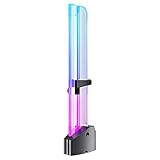
- 【Function Overview】Can support the weight of the GPU, eliminate the drooping pressure of the graphics card, and protect your components.
- 【5V ARGB SYNC】Controlled by the main board, matched with bright and saturated LED,combined with a transparent acrylic shell, presents a more dazzling lighting effect mode (monochrome, rainbow, dynamic, static, etc.), highlighting individuality.
- 【DIY Adjustable Single Slot】Segmented sliding design can better adapt to different types of graphics cards, sliding up and down, freely adjusting applicable scenarios.
- 【High-quality materials】The base is made of high-quality anodized aviation aluminum, and the acrylic transparent material support frame better reflects the ARGB lighting effect, which is full of coolness.
- 【Tool-free Installation】Hidden magnet design at the bottom, it can be installed stably inside the case without tools. The support module is equipped with silicone cushioning anti-scratch pad and base high-gloss technology.
NVIDIA lists the RTX 5090 for up to 4K at 480Hz or 8K at 165Hz with DSC. The RTX 4090 is listed for up to 4K at 240Hz or 8K at 60Hz with DSC. These are maximum display-output specifications, not promises that games will render at those frame rates. The monitor, cable, DSC support and in-game settings must also be compatible.
Price and value: the date matters
The RTX 5090 launched at $1,999, compared with a $1,599 launch MSRP for the RTX 4090—a $400, or 25%, increase. But launch MSRP is not the same as what buyers may actually pay.
U.S. snapshot dated August 16, 2026: reported RTX 5090 street prices were approximately $4,288–$4,381, with a median figure around $4,299 in Tom’s Hardware’s market coverage. Those figures describe an unusually inflated and volatile market, not a permanent value for the card. The discontinued RTX 4090 can also be scarce and irrationally priced, so compare actual listings, condition, seller reputation and warranty rather than relying on MSRP alone.
Do these 3 things before closing this tab:
1Fix the driver behind crashes, sound loss and screen glitches2Clear out junk files and repair common Windows errors3Scan for outdated or missing drivers - takes under a minuteAt more than $4,300, the RTX 5090’s performance leadership does not make it automatically good value. A buyer should compare the performance premium with the price premium, add any PSU or cooling costs, and distinguish a new-build purchase from replacing an already capable 4090.
Who should buy the RTX 5090?
- Buy the RTX 5090 if you want the fastest dated consumer GeForce GPU, play demanding 4K ray-traced or path-traced games, use a high-refresh 4K or 8K display, need more than 24GB of VRAM, run local AI or GPU-rendering workloads, or specifically want DLSS 4 Multi Frame Generation.
- Build around the RTX 5090 only if your PSU, case, cooling and CPU can support its 575W power envelope and your purchase price is defensible.
- Keep an RTX 4090 if you mainly play rasterized games, already have one, play at 1440p or lower, have no need for DLSS 4 or 32GB of VRAM, or would need an expensive system rebuild.
- Buy an RTX 4090 when it is substantially cheaper than a 5090 and comes from a trustworthy seller with acceptable warranty coverage. Do not pay near-5090 money for a scarce or refurbished card without carefully checking its condition.
- Consider a lower-tier Blackwell card such as the RTX 5080 if you want DLSS 4, newer media features and the Blackwell platform but do not require the 5090’s 32GB memory and maximum performance.
Final verdict
On paper, the RTX 5090 is a substantial generational upgrade: it has 32.8% more CUDA cores, 33.3% more VRAM, 77.8% more bandwidth, newer AI and ray-tracing hardware, a stronger media engine and DLSS 4 features. Its native 4K gaming advantage is usually closer to 25–30% than NVIDIA’s headline “up to 2×,” with the largest displayed-FPS gains coming from supported Multi Frame Generation scenarios.
For a new high-end system, the RTX 5090 is the clear technical winner. For an existing RTX 4090 owner—or anyone facing the reported August 2026 prices above $4,000—the 5090 is much harder to justify unless its extra VRAM, AI capability, ray tracing, encoding or DLSS 4 support directly solves a real need.
Quick Recap
Product prices and availability are accurate as of the date/time indicated and are subject to change. Any price and availability information displayed on Amazon at the time of purchase will apply.




