Free tools Windows power users keep installed
One-click scans. No signup required.
This S.T.A.L.K.E.R. 2 guide covers the practical systems players most often look up: preparing for trips into the Zone, surviving combat and emissions, navigating anomalies, finding artifacts, and understanding major updates. It is grounded in GSC Game World’s official guides and patch notes; it is not a complete mission-by-mission or faction wiki. Update details below are current through Update 2.0, published September 1, 2026.
What kind of game is S.T.A.L.K.E.R. 2?
S.T.A.L.K.E.R. 2: Heart of Chornobyl is an open-world survival game set in the Zone. You choose where to go and which tasks to pursue, while managing health, stamina, radiation, hunger, bleeding, ammunition, equipment, and supplies. The official Beginner’s Guide & FAQs describes a world containing hostile and neutral groups, mutants, anomalous fields, and emissions.
GSC describes A-Life 2.0 as a system in which inhabitants move, hunt, fight, and affect the Zone independently of the player. That is the developer’s description of the system, not a promise that every encounter follows a particular simulation pattern.
How to prepare before leaving a hub
Preparation is part of surviving an expedition. Pick a quest or destination, then check your supplies and equipment before setting out. Carry weight matters: an overloaded character has a harder time escaping danger.
The Tool Desk
Outbyte Driver Updater FREEScan for outdated or missing drivers - takes under a minuteDriver Scan →Outbyte PC Repair FREERepair Windows errors before they cause bigger problemsFix Now →#1 Best Overall

- Choose between iron-on and hook-and-loop backing.
- We use professional grade iron-on adhesive material for a super strong bond. No sewing required.
- Iron-on instructions and a properly sized piece of Teflon sheet are included.
- Hook-and-loop patches are made with the "hook" side (the scratchy side) on the patch.
- Review your route and inventory. Decide what you need for the trip and avoid carrying unnecessary weight.
- Pack for common threats. The official beginner guide lists medicine, bandages, ammunition, anti-radiation supplies, energy drinks, and food as supplies to consider.
- Repair and upgrade equipment. Visit a technician at a hub when your gear needs maintenance or an upgrade.
- Check artifact effects. Review both the benefits and harmful effects of equipped artifacts before heading out.
- Rest when useful. The official guide includes rest among the preparations to make at a hub.
How to survive combat and manage supplies
Use cover and choose a weapon suited to the distance of the engagement. Keep an eye on health and bleeding, conserve ammunition and medical supplies, and retreat when a fight is too dangerous. The goal is to survive the trip, not to win every encounter.
- Low health: a first aid kit or food can restore health.
- Bleeding: use a bandage.
- Radiation: use anti-radiation supplies or vodka.
Exact control bindings can vary by platform and game version. For current input details, consult GSC’s beginner guide and check the game’s control settings.
How to approach anomalies safely
Fire, gravitational, acid, and electric anomalies can all be dangerous. An anomalous field is a cluster of hazards, and artifacts may be found within one. Watch and listen for signs of danger, and use bolts to probe suspicious areas rather than walking blindly into them. GSC’s anomalies guide covers the hazards and exploration basics.
Rank #2

- Brand New in box. The product ships with all relevant accessories
Emissions are another serious threat. Seek shelter when one begins; do not assume that an exposed route is safe simply because it was clear moments earlier.
How to find and evaluate artifacts
Artifacts can offer useful effects such as radiation protection, stamina, or healing, but they may also carry harmful effects. Many are radioactive, so finding one is not automatically a benefit without cost. Detectors help locate them, and the two devices described in GSC’s artifact and detector guide provide different levels of information:
- Echo detector: gives a directional and distance signal to help you home in on an artifact.
- Veles detector: indicates an artifact’s location more exactly.
Use the detector as a search aid, but stay alert to the hazards around the field. After collecting an artifact, consider its drawbacks alongside its benefits and review its installed effects before your next outing.
Rank #3

- stalker, video, game, anomaly, t-shirt, mods, seriess, talker, chernobyl, call, pripyat, sky, modding, people, horrorstalker, radiation, zones, real-life, locations, games, exclusion, zone, present, family, friends
- Long-Tail Keywords:stalker video game radiation stalker anomaly t-shirt, stalker game, chernobyl stalker call
- Lightweight, Classic fit, Double-needle sleeve and bottom hem
Saving, difficulty, and campaign rules
GSC’s beginner FAQ says manual saving is available in most situations, except during combat or story-restricted moments. It also says difficulty is selected at the start of a campaign. Since later updates add modes and mechanics, these instructions should be read in the context of the version you are playing rather than as a complete description of every current option.
Update 1.7, published November 18, 2025, introduced or described Master Difficulty and Expedition Mode, along with A-Life improvements, combat and stamina changes, new anomalies, and official mod support. Update 2.0 later introduced Custom Rules difficulty; see the official Update 2.0 notes for its current patch context.
What changed in Update 2.0?
GSC Game World published Update 2.0 on September 1, 2026. The developer says the update includes over 500 bug fixes; that is GSC’s patch-note figure, not an independent count. The notes describe these headline changes:
Rank #4
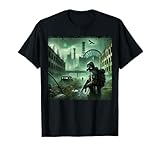
- STALKER video game design. STALKER game STALKER 2 STALKER STALKER mods STALKER seriesS TALKER of Chernobyl STALKER Call of Pripyat STALKER Sky STALKER mods STALKER modding people
- STALKER horrorSTALKER radiation zones STALKER real-life locations STALKER games Chernobyl Exclusion Zone, present for your family or for your friends .
- Lightweight, Classic fit, Double-needle sleeve and bottom hem
- An upgrade to Unreal Engine 5.5.4, plus changes to lighting and the landscape.
- Changes to A-Life.
- Binoculars, new weapons and scopes, and a fog mechanic.
- A PDA statistics page.
- Custom Rules difficulty.
GSC called it “our biggest overhaul to how the Zone looks, feels, and lives since launch.” That is promotional language from the developer’s update article, not an independent assessment. For details, see GSC’s Update 2.0: Back to the Zone — Major Content and Technical Update.
Where to look for official gameplay information
GSC’s Beginner’s Guide & FAQs is the starting point for open-world play, survival, controls, saving, and beginner questions. Its anomalies page and artifact and detector page address those specific hazards and systems. The broader Gameplay support index links additional official reference topics. Update notes are useful when an older guide’s advice may have changed.
This guide does not establish a complete mission walkthrough, exhaustive faction reference, current platform-specific system requirements, or every platform and regional storefront detail. For platform availability, GSC announced a PlayStation 5 release in its PlayStation 5 announcement; check the relevant regional storefront for current editions and availability.
Quick wins for a faster PC:
Scan for outdated or missing drivers - takes under a minuteDriver Scan →Repair Windows errors before they cause bigger problemsFix Now →Fix the driver behind crashes, sound loss and screen glitchesFind Drivers →Quick Recap
Product prices and availability are accurate as of the date/time indicated and are subject to change. Any price and availability information displayed on Amazon at the time of purchase will apply.




