“s3savmx.dll” missing or not found: the quick answer
You may see messages such as:
- “The program can’t start because s3savmx.dll is missing from your computer.”
- “s3savmx.dll was not found.”
- “s3savmx.dll could not be loaded.”
- “The file is not designed to run on Windows.”
Outdated Drivers Are Slowing You Down
One free scan finds every outdated or missing driver and matches the right update for your exact hardware.Free scan · exact hardware matchWindows Errors? Fix Them Before They Spread
Repair common Windows errors and clear accumulated junk for a smoother, more stable PC - no reinstall needed.Free scan · no reinstalls3savmx.dll is the S3 Savage/MX, Savage/IX Display Driver component from S3 Graphics, Inc. It belongs to an old graphics-driver package, not to Microsoft Visual C++, DirectX, .NET, or the normal Windows runtime.
The safest fix is to identify the S3 adapter, remove the damaged or incomplete display-driver installation, and reinstall the complete matching S3 or computer-manufacturer package. Do not download s3savmx.dll by itself and copy it into System32, SysWOW64, or a game folder. The DLL must match the driver’s INF file, catalog, kernel driver, registry settings, and companion files.
As an Amazon Associate I earn from qualifying purchases.
The documented packages are primarily 32-bit Windows 2000 and Windows XP drivers, with older packages also covering Windows 95, 98, and ME. That matters on Windows 10 and Windows 11: the archived S3 driver may not install or operate correctly on a modern 64-bit system.
What causes the error
The most likely causes are:
- An S3 display driver was partially removed or damaged.
- The wrong Savage model or driver architecture was installed.
- An operating-system upgrade left behind an old S3 startup entry.
- Antivirus software quarantined a legitimate driver component.
- A disk cleanup, backup restoration, or failed uninstall removed driver files.
- The S3 adapter was replaced, disabled, or removed while old software remained.
- Windows system corruption is affecting driver installation.
- An old application or game is trying to use a driver that no longer matches the hardware.
A missing s3savmx.dll message does not prove that the DLL itself is the only problem. It often means that the entire display-driver installation is incomplete.
#1 Best Overall

- Adapts a single 8-pin PCIe power connection to dual 8-pin (6+2) slots, compatible with GPUs requiring multiple connectors
- Durable, high-performance design provides additional power to GPUs with a single 8-pin PSU connection
- Ideal for custom PC builds, offering a sleek look that keeps your setup clean and organized
- Efficiently splits one 8-pin connection into two 8-pin (6+2) connectors, ensuring stable power for high-demand GPUs
- Includes two adapters, offering flexibility for multi-connector GPUs or future upgrades, making it a cost-effective choice
Identify the S3 hardware before repairing it
Do not install a Savage/MX driver simply because the filename looks similar to your graphics hardware. First check whether the computer still contains the relevant S3 adapter.
Check Device Manager
- Press Windows key + X.
- Select Device Manager.
- Expand Display adapters.
- Look for an S3 Savage, Savage/MX, Savage/IX, or an unknown display device.
- Right-click it and select Properties.
- Open the Details tab.
- In the Property list, select Hardware Ids.
- Record the displayed values.
Relevant S3 records include PCI identifiers such as:
VEN_5333&DEV_8C10
VEN_5333&DEV_8C12
The VEN_5333 portion identifies S3 hardware. The device identifier helps distinguish the model. Match the complete hardware ID against the driver package or the original computer manufacturer’s support material.
The Tool Desk
Outbyte PC Repair FREEClear out junk files and repair common Windows errorsFree Scan →Outbyte Driver Updater FREEFix the driver behind crashes, sound loss and screen glitchesFind Drivers →If the adapter does not appear under Display adapters, select View > Show hidden devices in Device Manager. Also check Other devices for an unknown video controller.
Confirm whether the hardware is still present
If the computer has been upgraded, repaired, or fitted with a replacement graphics card, the old S3 adapter may no longer exist. In that situation, restoring s3savmx.dll may be the wrong objective.
An old S3 utility or startup entry can continue requesting the DLL after the hardware has been removed. Only remove that leftover software after confirming that the S3 adapter is no longer needed.
Fix 1: reinstall the complete S3 or OEM display driver
This is the most appropriate repair when the adapter is still present.
The original S3 archive documents Savage/MX and Savage/IX packages for older Windows releases. One Windows XP 32-bit package is identified as driver version 6.13.10.7036, with package release 7.90.36. The archive also lists separate PCI and AGP-oriented packages, so choosing the correct variant matters.
Prefer, in this order:
- The original computer manufacturer’s driver package.
- The original motherboard or graphics-card driver media.
- S3’s discontinued legacy software archive.
- A reputable vintage-driver archive that preserves the complete package.
Use the OEM package when the graphics chip is integrated into a laptop or motherboard. OEM packages can contain hardware-specific INF files and configuration settings that a generic package does not.
Remove the damaged display device
- Press Windows key + X.
- Select Device Manager.
- Expand Display adapters.
- Right-click the S3 adapter.
- Select Uninstall device.
- If Windows offers Attempt to remove the driver for this device, select it only when you have already obtained the correct replacement package.
- Select Uninstall.
- Restart the computer.
Windows may display a basic video driver after the restart. That is expected. The screen may temporarily use a low resolution or reduced color depth.
Rank #2
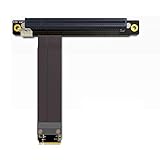
- 1. Wire advantages: using the German patent imported wire, using the Lotes connectors which imported from Taiwan, high frequency support PCIe 3.0 X16 8G/bps stable transfer.
- 2.Cable length: from 10?cm to 100 cm can be customized, our wire has a low impedance, the cable below 60cm can be stable at PCIe3.0 full speed reading and writing.
- 3.Differential signal without hole design, there is no problem of signal attenuation interference in a parasitic capacitance and parasitic inductance, there will be no more CAF micro short circuit, cable is durability.
- 4.PCB use high frequency low resistance of materials with high quality, PCB using high TG board, copper thickness thicken to 1oz, gold finger plating enough gold, Good conductive performance, can reduce oxidize higher impedance caused by the crash blue screen.
- 5.Suitable graphics card:?GTX1080ti High-end graphics CARDS, fireprow7100, radeon RX580, VEGA64, prowx5100, quadroK1200 professional graphics card, support for all the PCIe CARDS after 2015 years.Note: This product does not support external notebook graphics!
Install the matching package
- Extract the complete driver archive to a local folder.
- Run its installer if it has one.
- If there is no installer, return to Device Manager.
- Right-click the S3 or unknown video device.
- Select Update driver.
- Choose Browse my computer for drivers.
- Select the folder containing the driver’s INF file.
- Enable Include subfolders.
- Select Next.
- Follow any compatibility prompts.
- Restart Windows when installation finishes.
Do not mix files from separate driver packages. For example, do not copy S3SAVMX.DLL from one archive while using S3SAVMXM.SYS or an INF file from another. Older packages can contain different builds of the same-named files.
Quick wins for a faster PC:
Clear out junk files and repair common Windows errorsFree Scan →Scan for outdated or missing drivers - takes under a minuteDriver Scan →Repair Windows errors before they cause bigger problemsFix Now →How to tell whether this worked
After restarting:
- Open Device Manager.
- Expand Display adapters.
- Confirm that the S3 adapter appears without a yellow warning icon.
- Open its Properties and check the Device status message.
- Start the program that originally displayed the error.
If the program starts and Device Manager reports that the device is working properly, the driver installation is complete.
If Windows rejects the package, reports that the driver is incompatible, or shows a warning about signing, stop rather than forcing the installation. The documented S3 packages are legacy 32-bit drivers, and modern 64-bit Windows may reject them because of architecture, signing, or compatibility limitations.
When manually hunting through old archives, matching the exact hardware ID and Windows architecture can take longer than expected. Outbyte Driver Updater can scan for outdated or missing drivers and show what it identifies; its full version performs the driver installation, while reinstalling the original OEM package remains the definitive choice for this particular S3 adapter.
Fix 2: check whether antivirus quarantined the file
A security product may quarantine an old driver component because legacy drivers can look unusual to modern protection software. That does not automatically mean s3savmx.dll is malware, and its age does not prove that it is safe.
Do these 3 things before closing this tab:
1Clear out junk files and repair common Windows errors2Fix the driver behind crashes, sound loss and screen glitches3Repair Windows errors before they cause bigger problemsCheck the quarantine record before restoring anything.
Windows Security steps
- Open the Start menu.
- Type Windows Security.
- Open it.
- Select Virus & threat protection.
- Select Protection history.
- Review entries mentioning the S3 driver folder or
s3savmx.dll. - Expand an entry to see its path and action.
- Restore or allow the file only if it came from a legitimate, complete driver package that matches the hardware.
Do not restore a copy downloaded from an unknown DLL site. If the file came from an untrusted source, remove it and obtain the complete driver package from the OEM or documented S3 archive instead.
After restoring a verified package, reinstall the driver rather than merely placing the quarantined DLL back into a folder. The INF and companion files still need to be installed correctly.
Fix 3: roll back a recent driver or Windows change
If the error began immediately after a driver update, Windows upgrade, hardware replacement, or failed uninstall, undoing that change may be more effective than installing another package.
Recommended Free Tools
Roll back the display driver
- Press Windows key + X.
- Select Device Manager.
- Expand Display adapters.
- Right-click the S3 device.
- Select Properties.
- Open the Driver tab.
- Select Roll Back Driver if the button is available.
- Choose a reason and confirm.
- Restart Windows.
The rollback button may be unavailable when Windows has no previous driver package stored. In that case, use the original OEM or S3 package through the reinstall procedure.
Use System Restore
Use System Restore when the error appeared after a recent system change and a restore point is available.
Rank #3

- M.2 to PCI-E x16 conversion card, allowing PCI-e 16X graphics card to be installed in the M2 M-Key slot.
- The M.2 to PCI-E x16 conversion card is divided into left and right models. You can purchase it according to the actual situation of the M.2 card slot on the chassis motherboard.
- Support PCI-e 3.0 X16 8G/bps stable transmission, using high-quality high-frequency low-resistance materials, high TG board, gold-plated gold fingers, good conductivity, can reduce oxidation of high impedance caused by the crash blue screen
- Supported graphics cards: GTX1080ti graphics cards, fireprow7100, radeon RX580, VEGA64, prowx5100, quadroK1200 graphics cards, support for all post-2015 PCI-e cards
- Package Content: 1x M.2 NVMe to PCI-e 16X Cable,1x 4Pin to SATA Power Cable,1x Screwdriver,2x M2 Screws
- Press Windows key + R.
- Type
rstrui.exe. - Press Enter.
- Select Next.
- Choose a restore point created before the error began.
- Select Scan for affected programs if available.
- Review the changes.
- Select Next, then Finish.
- Allow Windows to restart.
System Restore can reverse drivers, settings, system files, and installed programs. It does not guarantee that an old S3 driver will work on a newer Windows release.
Fix 4: repair Windows components with DISM and SFC
s3savmx.dll is generally not a protected Windows component. Therefore, System File Checker is not the primary repair and should not be expected to manufacture a missing S3 driver file.
Use DISM and SFC as a secondary check when Windows itself is behaving abnormally, driver installation fails unexpectedly, or other protected system files also report errors.
Run DISM first
- Open Start.
- Type
Command Prompt. - Right-click Command Prompt.
- Select Run as administrator.
- Approve the User Account Control prompt.
- Run:
DISM.exe /Online /Cleanup-Image /RestoreHealth
- Wait for the operation to finish.
- Restart the computer if Windows requests it.
Then run SFC
Open an elevated Command Prompt again if necessary and run:
sfc /scannow
Wait until verification reaches 100 percent. Restart Windows afterward, then retry the complete display-driver installation.
Success here means DISM or SFC repaired Windows components and the driver installer now runs normally. It does not mean SFC restored s3savmx.dll. If the file is still missing, return to the hardware-matched driver package.
Free tools Windows power users keep installed
One-click scans. No signup required.
Repeating DISM and SFC without knowing whether Windows components are actually damaged can waste time. Outbyte PC Repair can scan for broader Windows problems and identify what needs attention; its full version performs repairs, while the complete S3 driver reinstall remains necessary for a missing third-party display component.
Fix 5: repair or reinstall the affected old application
If the message appears only when launching one old game or program, the application may have an incomplete installation or a stale configuration.
Try these steps:
- Open Settings.
- Select Apps.
- Select Installed apps or Apps & features.
- Find the affected program.
- Select its menu button.
- Choose Repair if available.
- If repair is unavailable or fails, uninstall the program.
- Restart Windows.
- Reinstall it from its original, trusted installation media.
If the application has a built-in verify-files function, use that before reinstalling. However, s3savmx.dll is identified as a display-driver component, so a system-wide S3 driver problem is more plausible than a normal application runtime problem.
Do not install Visual C++, DirectX, or .NET solely to replace this file. Those packages do not provide the S3 display-driver DLL.
Do not use regsvr32 for this driver DLL
regsvr32 is not the normal fix for s3savmx.dll.
The command registers DLLs that expose registration entry points such as DllRegisterServer. A display-driver DLL installed through an INF does not become a working graphics driver merely because it was registered.
Rank #4

- 『8 Pin PCIe Splitter Cable』Turns one PCIe power port into two extra outputs for added graphics card power. Offers a safe, cost-effective upgrade path without having to replace your existing power supply.
- 『PCIe 8P Female to Dual 8P(6+2) Male』 Features one PCIe 8-pin female connector splitting into two 8-pin (6+2) male ends for wide compatibility and ultra-easy, plug-and-play installation.
- 『Power Supply Compatibility』Works with most standard non-modular and semi-modular PSUs equipped with a PCIe 8-pin male output cable. Note: This splitter does NOT connect directly to the PSU. It must plug into the existing VGA/PCIe cable from your power supply.
- 『Wide GPU Compatibility』Fully compatible with major brand graphics cards including ASUS, EVGA, GIGABYTE, Sapphire, Zotac, MAXSUN, GALAXY and more. The 6+2 pin design can be used as 6-pin or 8-pin by adjusting the removable 2-pin section.
- 『Specifications』Total length (including connectors): 9 inches (23cm). Wire gauge: 18AWG tin-coated copper wire for stable power delivery. Package includes: 1x splitter cable + 1x self-adhesive cable tie.
Running a command such as this is therefore unlikely to help:
regsvr32 s3savmx.dll
It may produce an error about a missing entry point or an invalid module. That result does not identify the underlying driver problem.
Install the driver through its setup program or INF instead.
What’s actually slowing this PC down?
Pick the symptom - the matching free tool is one click away.
Why copying the DLL is unsafe
Manually copying s3savmx.dll can fail for several reasons:
- The file may be the wrong build.
- It may be the wrong architecture.
- The INF may not reference it correctly.
- The catalog and driver files may not match.
- Required registry settings may be absent.
- The kernel-mode companion driver may be missing.
- Windows may load a conflicting file from another location.
- A random download may contain malware.
Do not place the file in System32, SysWOW64, an application folder, or a game directory unless the original installer explicitly requires that location. A standalone copy does not recreate the S3 display-driver installation.
Windows 10 and Windows 11 compatibility
There is no reliable basis for promising that the archived S3 driver works on Windows 10 or Windows 11.
The documented packages target older 32-bit Windows releases, especially Windows 2000 and Windows XP. S3’s legacy archive identifies the products as discontinued and says they no longer receive drivers or technical support for new operating systems.
If you are using a modern 64-bit edition of Windows, the system may reject the driver because it is 32-bit, unsigned, incompatible with the display-driver model, or unsuitable for the current hardware. There is no reliable evidence for a native 64-bit s3savmx.dll.
Do not force an unsigned legacy driver onto a modern production system. If the S3 adapter is essential, the safer choices are:
- Use the original supported Windows release on compatible vintage hardware.
- Keep the old system isolated from sensitive networks.
- Use a compatible virtualized or vintage environment where practical.
- Replace the obsolete graphics hardware with hardware supported by the current Windows version.
- Remove stale S3 software if the adapter has already been replaced.
FAQ
Is s3savmx.dll a Windows file?
No. It is associated with the S3 Savage/MX and Savage/IX display-driver package. Windows does not normally supply it as a standard runtime component.
Best Value

- Support PCIe 1X card and 1X,4X,8X,16X card( only provide 1X speed). Don't support PCI port.
- Can work for Graphics Card, Not for PCI-E 16X disk raid card.
- PCI-E Express 1x to 16x Extender Converter Riser Card Adapter Male to Female Extension
- layer PCB bard designing.
- No Driver necessary and not support hot swap.
Is s3savmx.dll malware?
Not merely because it is old or appears outside a familiar driver folder. It is an identifiable S3 graphics-driver component. Still, verify its source and check Windows Security before restoring a quarantined copy.
Is it a 32-bit or 64-bit file?
The documented packages are 32-bit Windows 2000/XP-era drivers. No reliable evidence establishes a native 64-bit s3savmx.dll.
Should I download the DLL from a DLL website?
No. Random DLL downloads can contain malware, use the wrong version or architecture, and leave the actual driver installation broken. Obtain the complete package from the original computer manufacturer, original installation media, or S3’s legacy archive.
Will Visual C++, DirectX, or .NET fix it?
No evidence supports using those runtime packages to repair this file. s3savmx.dll is a graphics-driver component.
Can I put it in System32?
Normally no. Copying it there does not install the INF, catalog, registry settings, kernel driver, or companion files and may create version conflicts.
PC Slower Than It Used to Be?
A free scan shows the junk files, broken settings and background clutter dragging Windows down - then fixes them in one click.Free scan · Windows 10 & 11Outdated Drivers Are Slowing You Down
One free scan finds every outdated or missing driver and matches the right update for your exact hardware.Free scan · exact hardware matchShould I run regsvr32?
Normally no. Install the complete display driver through its installer or INF.
Will SFC restore s3savmx.dll?
Usually not. SFC repairs protected Windows components. This DLL belongs to a third-party S3 display-driver package, so reinstall that package instead.
What if the S3 adapter is no longer installed?
Remove the obsolete S3 utility or startup reference after confirming that the hardware is gone. If an old application still requires the adapter, use its original supported environment rather than forcing the legacy driver into modern Windows.
What is the final fix if nothing works?
If the adapter is present, use the exact OEM or S3 package for its hardware ID and supported Windows release. If modern Windows will not accept that package, use compatible vintage hardware and software or replace the obsolete adapter. A standalone s3savmx.dll copy is not a dependable solution.
The Tool Desk
Outbyte Driver Updater FREEFix the driver behind crashes, sound loss and screen glitchesFind Drivers →Outbyte PC Repair FREERepair Windows errors before they cause bigger problemsFix Now →Quick Recap
Product prices and availability are accurate as of the date/time indicated and are subject to change. Any price and availability information displayed on Amazon at the time of purchase will apply.




