Free tools Windows power users keep installed
One-click scans. No signup required.
Sega’s 1990 Mega Modem connected a Japanese Mega Drive to services over a telephone line, including Game Toshokan, a flat-rate software-download service. It was an early form of console connectivity, but the documented record does not show that every compatible game—or the whole service—was online multiplayer.
What was Sega Meganet?
“Sega Meganet” is often used as a broad name for Sega’s early networked gaming effort. The hardware at its center was the Mega Modem, model HAA-2951, which Sega’s official Mega Drive archive dates to November 3, 1990, in Japan. Connected to a Mega Drive, it used a telephone line to access online services at a listed communication speed of 1,200 bps.

The best-documented service was Game Toshokan: Sega describes it as a flat-rate service that delivered software over a communication line for use on the Mega Drive. The archive also lists a professional baseball information service and compatible games. These facts establish telephone-line connectivity and downloadable software; they do not establish that all listed games were played online against other people.
How the Mega Modem and Game Toshokan worked
The modem attached to the Mega Drive and connected through a telephone line. Game Toshokan let subscribers download software to the console. At 1,200 bps, this was a very different experience from modern broadband downloads, and the telephone connection itself could carry practical costs.
The Tool Desk
Outbyte Driver Updater FREEScan for outdated or missing drivers - takes under a minuteDriver Scan →Outbyte PC Repair FREEClear out junk files and repair common Windows errorsFree Scan →#1 Best Overall
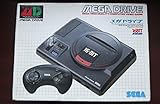
- Sega Megadrive 1 Console from Japan!
- The "original" Genesis!
In a February 1990 interview originally published in Beep! MD, Sega R&D director Hideki Sato estimated that accessing a 256K game by modem would take “about three to four minutes.” That was Sato’s contemporary estimate, not a modern test result. In the same interview, Sega executives discussed the delay in releasing the modem: Shigeo Kamata described postponement after consumer feedback, while Sato said Sega wanted a sufficient number of downloadable titles ready. The interview predates the November release recorded in Sega’s archive, so it reflects planning rather than final launch specifications.
What games and services did Sega list?
Sega’s Mega Drive peripheral archive lists Game Toshokan, the Nikkan Sports professional baseball VAN service, and these compatible games:
Rank #2
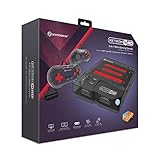
- 3-in-1 Retro Console: Compatible with NES, Super NES, Super Famicom, and Genesis/Mega Drive cartridges—play thousands of original classics on one system.
- HD Ready: Enjoy your favorite retro games in crisp 720p via HDMI; toggle between 4:3 and 16:9 aspect ratios for the perfect nostalgic feel.
- EverDrive Support: Fully compatible with most EverDrive and reproduction cartridges—expand your library and keep your originals safe.
- Includes 2 Controllers: Comes with two premium Hyperkin controllers for instant multiplayer action; console also supports original NES, SNES, and Genesis controllers.
- Classic Meets Modern: AV-compatible for CRT setups and HDMI-ready for modern TVs—perfect for collectors, streamers, and retro enthusiasts alike.
- Cyberball
- Advanced Daisenryaku
- TEL・TEL Mahjong
- TEL・TEL Stadium
- Shikinjo
This is Sega’s documented list, not a confirmed complete final catalog. The archive does not label every title as multiplayer, so the list should not be read as a roster of online head-to-head games. The available official material also does not establish a definitive shutdown date or total number of games.
How much did the Mega Modem cost?
Sega lists these historical Japanese prices for the 1990 hardware:
Rank #3

- Brilliant 16-bit graphics and 500+ games available
| Configuration | Sega-listed price |
|---|---|
| Mega Modem with Game Toshokan cartridge | 12,800 yen |
| Mega Modem by itself | 9,800 yen |
These are launch-era prices listed by Sega, not current market values. They do not indicate the present availability, condition, or authenticity of any vintage unit.
Could you play online on a Sega Genesis in 1990?
The Mega Drive was sold as the Genesis in North America, but the cited Mega Modem release and service details concern Japan. The evidence supports an early Japanese Mega Drive telephone-line service with downloadable software and other networked offerings. It does not justify a blanket claim that Genesis owners generally had online multiplayer in 1990, or that every Mega Modem-compatible title supported live online play.
Rank #4

- Experience the classic era of 16-bit gaming in a streamlined, compact console design MK-1631.
- Console unit, one Sega Brand controller, AC power adapter, and A/V cable for TV connection
- The perfect choice for retro enthusiasts, offering a robust and reliable platform for SEGA's legendary catalog of games.
For the clearest answer: Sega had console services using a modem and phone line in 1990, but “online gaming” here should not be taken to mean a modern-style multiplayer network. Sega’s official list names compatible games without identifying all of them as multiplayer.
Independent reader supportYour contribution helps us test, update, and keep practical guides available for everyone.How was this different from Sega Channel?
Sega Channel was a separate service, not another name for Game Toshokan. Sega describes Game Toshokan as telephone-line software delivery through the Mega Modem, while Sega Channel used cable television and a receiver cartridge to provide access to around 30 games.
| Service | Connection | Documented offering | Hardware described by Sega |
|---|---|---|---|
| Game Toshokan | Telephone line | Flat-rate software downloads to the Mega Drive | Mega Drive and Mega Modem |
| Sega Channel | Cable television | Access to around 30 games | Receiver cartridge |
The services used different delivery networks and hardware arrangements; Sega Channel was not the cable version of the Mega Modem connection.
Quick Recap
Product prices and availability are accurate as of the date/time indicated and are subject to change. Any price and availability information displayed on Amazon at the time of purchase will apply.




