
Yes, Sony really did update the PlayStation 3 in 2025. PS3 system software 4.92 was released on March 5, 2025, but it was a maintenance update—not a PS3 revival or a major feature expansion. Sony described it as improving system performance and connected the latest software with renewing the console’s Blu-ray player encryption key.
What Sony’s 2025 PS3 update changed
Sony’s public description of version 4.92 was brief: “This system software update improves system performance.” The company did not publish a detailed list of interface changes, game improvements, new apps, or other headline features.
| # | Preview | Product | Price | |
|---|---|---|---|---|
| 1 |

|
Sony Playstation 3 160GB System (Renewed) | $184.24 | Buy on Amazon |
| 2 |

|
Sony PlayStation 3 Slim 320 GB Charcoal Black Console (Renewed) | $219.59 | Buy on Amazon |
| 3 |

|
PlayStation 3 500 GB Super Slim System (Renewed) | $228.22 | Buy on Amazon |
| 4 |
|
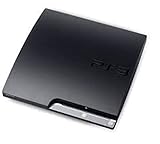
Sony Playstation 3 160GB CECH-3001A, Console Only (Renewed) | $176.22 | Buy on Amazon |
| 5 |

|
Sony PlayStation 3 - 80GB System (Renewed) | $217.22 | Buy on Amazon |
As an Amazon Associate I earn from qualifying purchases.
The clearest practical reason to install current software is Blu-ray playback. Sony says PS3 owners need the latest system software to renew the Blu-ray player encryption key. In other words, the update helps preserve compatibility with the security infrastructure used by Blu-ray discs.
Do these 3 things before closing this tab:
1Fix the driver behind crashes, sound loss and screen glitches2Repair Windows errors before they cause bigger problems3Scan for outdated or missing drivers - takes under a minuteThat does not mean every owner will see an obvious difference after installing it. Sony did not promise faster loading, higher resolutions, improved frame rates, a redesigned dashboard, or new media features. “Improves system performance” is not a quantified claim about how individual games run.
#1 Best Overall
- Internet Ready With Built-in Wi-Fi with a Cell Broadband Engine Advanced Microprocessor
- When starting up the system for the first time, hold the power button until a "screen display" message shows up on screen. Select the desired output, and the system will startup normally.
- 160GB system
- Blu-ray player to give you pristine picture quality
- The best high-definition viewing experience available
Why update a nearly 20-year-old console?
The PS3 is both a game console and a Blu-ray player. Older hardware can still require occasional firmware maintenance when encryption, licensing, security, or online-service requirements change. A small system update can therefore keep an aging device functional without representing renewed development of the platform.
The surprise came largely from the console’s age. The update’s existence does not establish a new PS3 product roadmap, a return of first-party development, or support comparable to Sony’s current PlayStation hardware.
Do you need to install it?
| How you use your PS3 | What to do |
|---|---|
| Blu-ray playback | Updating is advisable because Sony specifically links current software with renewal of the Blu-ray encryption key. |
| PlayStation Network or online features | Keep the console current, since some online functions or games may require newer system software. |
| Offline disc-only gaming | You may not notice an immediate benefit, but using Sony’s latest official software remains the normal maintenance choice. |
| Custom firmware, HEN, homebrew, or other modifications | Do not update casually. Sony warns that altered systems may malfunction or fail to install official update data. |
As with any system update, back up important data and make sure the console has stable power before starting. Sony lists at least 200 MB of free space as necessary for the update.
Rank #2
- New slimmer, lighter PS3 system, Wireless controller
- 320GB HDD for storing games, music, videos, and photos
- Streams thousands of movies and TV shows instantly from Netflix
- Built-in Blu-ray player with 3D capabilities. HDMI output for 1080p resolution.
How to update the PS3 over the internet
- Turn on the PS3.
- Open Settings.
- Select System Update.
- Choose Update via Internet.
- Follow the on-screen instructions.
Sony’s PS3 user guide warns against turning off the console while the update is being installed. An interruption can damage the system software and may require servicing or replacing the console.
How to update from a USB drive
Sony’s computer-based method requires a USB drive formatted as FAT32. Create the following folders at the drive’s root level:
USB drive/
└── PS3/
    └── UPDATE/
└── PS3UPDAT.PUP- Format the USB drive as FAT32.
- Create a folder named
PS3in the drive’s root directory. - Inside it, create a folder named
UPDATE. - Download the official Sony update file into that folder.
- Make sure the filename is exactly
PS3UPDAT.PUP. - Connect the drive to the PS3.
- Open Settings > System Update > Update via Storage Media.
Use only the official Sony file. Check the folder names, capitalization, nesting, and filename if the console cannot find the update. The file must be inside PS3/UPDATE, not simply copied to the top level of the drive.
Rank #3
- Your Favorite Franchises Live Here: Dig into a huge catalog of exclusive games, including generation defining titles like The Last of Us and entries in popular franchises like LittleBigPlanet, God of War, Gran Turismo, and UNCHARTED.
- High-Definition Blu-ray player for the best movie experience. Plays DVDs and CDs
- 500GB HDD for storing games, music, videos, and photos
- Internet ready with built-in Wi-Fi
- Blu-ray player
Do not remove the USB drive or switch off the PS3 during installation. Sony also warns that unofficial update data and unauthorized system modifications can prevent proper operation or installation.
What the update did not announce
Version 4.92 did not come with an official announcement of:
- New PS3 games or a revived first-party release pipeline
- PS5 compatibility
- A redesigned user interface
- New streaming services
- A restored or substantially expanded PlayStation Store
- Measured improvements to game frame rates, resolution, or loading times
Some outside observers may speculate that maintenance firmware also addresses piracy or homebrew-related issues. Sony’s public description does not state that as the purpose of version 4.92, so it should not be treated as confirmed.
Rank #4
- Console only; does not come with the controller or cables
- Supported Media-BD-ROM, CD-ROM, DVD-ROM
- Internet Connectivity-Wireless
- Region Code-NTSC-North America
- Ram Technology-RDRAM (RAMBUS)
PSN and account-management details
The firmware update should not be confused with a promise of renewed investment in the PS3’s storefront or online ecosystem. Sony’s support information says PS3 sign-in requires a device password. It also notes that account creation and some account-management functions are no longer available directly on the console; those tasks must be completed through a PC or mobile browser.
Those account rules are separate from what firmware 4.92 changed. Installing the update does not turn the PS3 into a modern PlayStation platform.
Quick wins for a faster PC:
Clear out junk files and repair common Windows errorsFree Scan →Scan for outdated or missing drivers - takes under a minuteDriver Scan →What version should you install now?
Firmware 4.92 was the update released on March 5, 2025. However, Sony’s support page lists version 4.93 as the latest PS3 system software as of August 18, 2026. The page gives 4.93 the same broad “improves system performance” description but does not provide a release date or a more detailed changelog in the cited material.
Best Value
- Built-in Wi-Fi access for easy connection to gaming services and the Internet
- Built-in Blu-ray player to give you the best high-definition viewing experience and pristine picture quality
- 80 GB of hard disk storage for all your games, music, videos, and photos
- This product is NOT backwards compatible
So, if you are updating today, use the latest official version Sony offers rather than deliberately searching for the older 4.92 package. The 2025 story is about 4.92; it is not the current-version claim.
Is Sony supporting the PS3 again?
Not in the way headlines about a “comeback” might suggest. Sony has continued issuing occasional maintenance firmware for the legacy console, including software that helps preserve Blu-ray functionality and general system operation. That is meaningful for owners, but it is not evidence of a renewed PS3 development program or modern feature support.
The accurate takeaway is simple: Sony maintained the PS3 because old consoles can still need compatibility and security-related upkeep. The update was real, useful for some owners, and much smaller than a platform revival.
The Tool Desk
Outbyte Driver Updater FREEFix the driver behind crashes, sound loss and screen glitchesFind Drivers →Outbyte PC Repair FREEClear out junk files and repair common Windows errorsFree Scan →Quick Recap
Product prices and availability are accurate as of the date/time indicated and are subject to change. Any price and availability information displayed on Amazon at the time of purchase will apply.

