
Start with this diagnostic checklist
If speechuxps.dll is missing, note the exact program that reports the error, when the failure began, and the complete wording of the message. Also record whether Windows is 32-bit or 64-bit and whether the message names SpeechUXPS.DLL, SpeechUX.DLL, or another file.
If the program still opens and only later crashes, do not assume speechuxps.dll is missing. Windows modules often appear in crash stacks even when another component caused the failure.
As an Amazon Associate I earn from qualifying purchases.
What speechuxps.dll is
The file is a genuine Microsoft Windows component. Its embedded description is Speech Desktop Proxy, and its original filename is reported as SpeechDesktopPS.dll. It belongs to Windows speech-related user-experience and COM proxy infrastructure, not to Visual C++, DirectX, .NET, a printer driver, or a particular game.
PC Slower Than It Used to Be?
A free scan shows the junk files, broken settings and background clutter dragging Windows down - then fixes them in one click.Free scan · Windows 10 & 11Outdated Drivers Are Slowing You Down
One free scan finds every outdated or missing driver and matches the right update for your exact hardware.Free scan · exact hardware matchPublic file metadata identifies Microsoft’s Windows signature and shows a 32-bit copy under:
#1 Best Overall

- Versatile headset: Great for Internet calls and listening to music from your Mac or Windows computer
- Plug-and-play USB connection: Simply plug the headset into your PC for quick and easy stereo audio
- Clear digital sound: Pure USB digital audio for crystal clear music and calls
- Rotating boom microphone: Reduces background noise for clear chats, rotates up and hides away when you’re listening to music
- Comfortable design: Lightweight adjustable headband and foam ear cups for a feel-good fit
C:WindowsSysWOW64SpeechSpeechUXSpeechUXPS.DLL
A corresponding native copy may appear under:
C:WindowsSystem32SpeechSpeechUXSpeechUXPS.DLL
The exact files depend on your Windows release, architecture, language, and servicing state. Do not treat an old version number or a file found on another computer as a universal replacement. Microsoft explains the distinction between 32-bit and 64-bit Windows components in its documentation on 32-bit and 64-bit application data.
On 64-bit Windows, System32 normally contains native 64-bit system components, while SysWOW64 contains 32-bit components. The names are confusing, but copying a file between those folders is not a repair.
Fix 1: Install Windows updates and restart
A damaged or incomplete Windows update can leave protected system files unavailable. Start with the least invasive repair.
Do these 3 things before closing this tab:
1Clear out junk files and repair common Windows errors2Fix the driver behind crashes, sound loss and screen glitches3Repair Windows errors before they cause bigger problems- Open Start > Settings.
- Select Windows Update.
- Click Check for updates.
- Install everything offered.
- Restart Windows, even if it does not immediately require a restart.
- Launch the affected program again.
If the error started immediately after an update, first try the repair steps below. On Windows 11, supported systems may also show Settings > System > Recovery > Fix problems using Windows Update > Reinstall now. This reinstalls the current Windows version while preserving apps, files, and settings. Microsoft documents this option on its page about reinstalling the current version of Windows.
Fix 2: Repair Windows with DISM and SFC
This is the primary fix for a genuine missing, corrupted, or incorrectly replaced speech component. DISM repairs the Windows component store first, and SFC then uses that repaired source to restore protected files.
- Open Start and type
Command Prompt. - Right-click Command Prompt.
- Select Run as administrator.
- Approve the User Account Control prompt.
- Run this command:
DISM.exe /Online /Cleanup-Image /RestoreHealth
- Wait for DISM to finish. Do not close the window if progress appears to pause.
- Run:
sfc /scannow
- Wait until SFC reaches 100 percent.
- Restart Windows.
- Test the program again.
A successful repair may report that corrupted files were found and repaired. If SFC says it found no integrity violations, the file may not be the real cause, or the application may only be naming it in a crash stack.
If DISM cannot obtain repair files through Windows Update, use a genuine, matching Windows installation source:
Rank #2
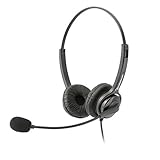
- Binaural Design covers both ears in total comfort allowing you to immerse yourself completely to your call, Skype, Webinar.
- USB Plug and play ready for Mac and PC with in line volume control and mute
- Flexible Noise Canceling Boom microphone stays put when you adjust it. Ear Cushion swivels 360 degrees to ensure maximum comfort
- Tru Comfort leatherette ear piece keeps your ears cool and comfortable for all day use.
- Perfect for a busy call center or office. Comes with a 2-Year full replacement warranty from Leitner Headsets.
DISM.exe /Online /Cleanup-Image /RestoreHealth ^
  /Source:C:RepairSourceWindows /LimitAccess
Replace C:RepairSourceWindows with the correct path to the matching repair source. Microsoft provides the supported procedure in its DISM repair-source documentation. Its System File Checker instructions also explain how to interpret results.
Repeating SFC and DISM without knowing what changed can be tedious, especially when Windows has many protected components. Outbyte PC Repair can scan for problems and show what it finds; repairs are performed by the full version. It is optional, and Windows servicing remains the correct first-line repair.
Fix 3: Check Windows Security quarantine
Antivirus software can quarantine a system file after a false positive or after malware-removal activity.
- Open Start > Settings.
- Select Privacy & security.
- Open Windows Security.
- Select Virus & threat protection.
- Click Protection history.
- Look for an event involving
SpeechUXPS.DLLor theSpeechSpeechUXfolder. - Expand the event and inspect its path and action.
Restore a quarantined file only when the path is a normal Windows system location, the file has a trustworthy Microsoft signature, and the detection clearly appears to be a false positive. Do not broadly disable antivirus protection to make an application launch.
Free tools Windows power users keep installed
One-click scans. No signup required.
If the path is unusual, the signature is missing, or the file came from an unofficial installer, leave it quarantined. Run a full Windows Security scan, then repair Windows with DISM and SFC. A clean scan by itself does not prove that an individual DLL is authentic.
Fix 4: Remove a manually copied replacement
If someone copied speechuxps.dll into System32, SysWOW64, or WinSxS, that replacement may have the wrong architecture, Windows build, language, or servicing level. It can produce messages such as:
- “The procedure entry point could not be located”
- “The specified module could not be found”
- “The file is either not designed to run on Windows or it contains an error”
Do not copy a 32-bit file into the native 64-bit location, or a 64-bit file into the 32-bit location. Do not manually alter WinSxS. Restore the component through DISM and SFC, or use a Windows repair installation.
Fix 5: Understand what the error message means
“SpeechUXPS.DLL is missing” or “was not found”
Windows or an application requested the file and could not find it at the expected location. The file may be missing, quarantined, damaged, or inaccessible because a related component is broken.
Rank #3

- High-quality, premium headset brings your PC calls and music to life
- Easy plug-and-play USB Connection
- Laser-tuned drivers and a built-in EQ deliver superior, unrivaled Audio quality and rich bass
- Volume and bass level control as well as the ability to instantly mute the mic
- Soft, padded leatherette headband and earcups feel good even after hours of listening
“Failed to load” or “The specified module could not be found”
This does not always mean speechuxps.dll itself is absent. A dependency required by the DLL may be missing, or the path may contain an incompatible file.
“Not designed to run on Windows”
This usually points to corruption, an architecture mismatch, or a file from a different Windows build. It is a reason to stop copying DLLs manually and use Windows repair.
An entry-point error
An entry-point error indicates that the loaded file or one of its dependencies does not match what the application expects. Version and architecture mismatches are common causes.
If the message names SpeechUX.DLL rather than SpeechUXPS.DLL, do not automatically treat the two errors as identical. Capture the exact filename before troubleshooting.
What’s actually slowing this PC down?
Pick the symptom - the matching free tool is one click away.
Fix 6: Do not start with regsvr32
SpeechUXPS.DLL exposes COM proxy registration functions, including DllRegisterServer, so regsvr32 can technically apply in a specific registration problem. It is not the normal solution for a missing or corrupted Windows component.
Do not download a DLL merely to run:
regsvr32 speechuxps.dll
If DISM or a legitimate repair restores the file and a separate application reports a COM-registration error, use the correct version of regsvr32 for the DLL’s architecture. On 64-bit Windows, the 64-bit tool is normally:
C:WindowsSystem32regsvr32.exe
The 32-bit tool is normally:
C:WindowsSysWOW64regsvr32.exe
Do not move the DLL between those directories. Microsoft documents proxy DLL registration and regsvr32 syntax.
Rank #4

- Connectivity Technology: Wired
- High Fidelity Monaural USB Computer Headset with Andrea's noise canceling microphone technology and Volume/Mute Controls.
- Pro-flex wire microphone boom for accurate microphone placement.
- Windsock for minimal breath popping.
- Stainless steel adjustable headband.
Fix 7: Repair the affected application
If only one game or application fails, repair that application before changing Windows files.
Recommended Free Tools
- Open Settings > Apps > Installed apps.
- Select the affected program.
- Choose Advanced options, if available.
- Click Repair.
- Retest the program.
- If Repair does not help, choose Reset only if you understand that it may remove the program’s local settings.
- For a game launcher, use its built-in Verify, Repair, or Verify files function.
- If necessary, uninstall and reinstall the application using its official installer.
Do not reinstall Visual C++ Redistributable, DirectX, or .NET unless the error separately names one of those components. speechuxps.dll is a Windows speech proxy, not proof that one of those runtimes is damaged.
Fix 8: Update drivers only when the evidence points there
A speech-related crash can involve an audio device or its driver, but a missing speechuxps.dll message alone does not justify a driver replacement.
If Device Manager shows an audio or microphone problem:
- Right-click Start.
- Select Device Manager.
- Expand Sound, video and game controllers and Audio inputs and outputs.
- Right-click the affected device.
- Choose Update driver.
- Select Search automatically for drivers.
- Restart Windows and test again.
Do not use Device Manager to replace speechuxps.dll. It manages hardware drivers, not protected Windows DLLs.
Hunting through many driver versions can be difficult when the actual fault is unclear. Outbyte Driver Updater can scan and identify outdated drivers; driver installation is performed by the full version. It is optional, and it will not replace the need to repair Windows when speechuxps.dll itself is damaged.
Independent reader supportYour contribution helps us test, update, and keep practical guides available for everyone.Fix 9: Use System Restore or an in-place repair
Use System Restore when the problem began after a driver, cleanup utility, update, or other system change and a suitable restore point exists.
- Press Windows key + R.
- Type
rstrui.exe. - Press Enter.
- Select a restore point created before the problem.
- Review the affected programs.
- Click Next > Finish.
- Allow Windows to restart.
If no restore point exists, this option cannot help. Microsoft describes this and other recovery options in Windows.
Best Value

- Proprietary noise-canceling microphone with windsock to minimize breath popping
- Pro-flex wire microphone boom for perfect placement
- 40mm Mono (monaural) speaker with deep bass sound delivers crystal clear audio
- Convenient in-line volume and mute controls
- Comfortable foam ear cushion
If DISM and SFC cannot repair Windows, perform an in-place repair using official Windows installation media. Back up important files first, start Setup from within Windows, and choose Keep personal files and apps. Microsoft documents reinstalling Windows with installation media.
The Tool Desk
Outbyte PC Repair FREEClear out junk files and repair common Windows errorsFree Scan →Outbyte Driver Updater FREEScan for outdated or missing drivers - takes under a minuteDriver Scan →Never download speechuxps.dll from a DLL archive
There is no verified official Microsoft standalone download page for speechuxps.dll. Random DLL download sites can provide malware, the wrong architecture, an outdated build, or a file that does not match your Windows servicing state. Even a file with a plausible name or hash may be unsuitable.
Use Windows Update, DISM, SFC, Windows Security, System Restore, or official Microsoft installation media instead. These methods restore the component in the context of the Windows installation that needs it.
What to collect if the repair fails
Record the following before asking for further help:
- The exact error message and filename
- The program that shows it
- Your Windows edition, version, and build
- Whether Windows is 32-bit or 64-bit
- The full path named in the error
- Whether the file exists in
System32orSysWOW64 - The result reported by DISM
- The result reported by SFC
- Any Windows Security quarantine event
- The faulting module shown in Event Viewer
To inspect the SFC details, review:
%windir%LogsCBSCBS.log
If the application launches and later crashes, include the complete Event Viewer faulting-module entry rather than treating the first DLL in a stack trace as proof of a missing file.
Quick wins for a faster PC:
Clear out junk files and repair common Windows errorsFree Scan →Fix the driver behind crashes, sound loss and screen glitchesFind Drivers →Repair Windows errors before they cause bigger problemsFix Now →FAQ
Is speechuxps.dll malware?
The file is a legitimate Microsoft Windows component when it is in the expected Windows speech path and carries a valid Microsoft signature. An unexpected copy elsewhere needs separate investigation.
Should I install a speech pack or enable a Windows Feature?
Not as the first fix. The error concerns a Windows speech proxy component, and DISM followed by SFC is the appropriate repair path. Windows Features or language settings are relevant only when the error separately identifies a missing language or speech feature.
Will reinstalling the application fix it?
Only if that application damaged or depends on the component in a way its installer can repair. Because speechuxps.dll is a Windows component, repairing Windows is usually more appropriate than copying a file into the application folder.
Does every Windows computer have two copies?
No. The exact files depend on Windows architecture, release, servicing level, and language. Do not assume both locations must contain identical files.
Why does the program work but still mention speechuxps.dll?
The DLL may simply appear in a crash stack. Inspect the complete faulting-module information and update or repair the affected application before replacing Windows components.
Quick Recap
Product prices and availability are accurate as of the date/time indicated and are subject to change. Any price and availability information displayed on Amazon at the time of purchase will apply.

