Roberts Space Industries (RSI) does not define error code 30011 or document a confirmed fix for it in the official support material available here. Treat it as a disconnect to investigate, not a diagnosis: RSI says disconnect codes describe symptoms, and the same code can have different causes in different situations.
What Star Citizen error 30011 means
RSI’s disconnect-code explainer states: “Disconnection codes are symptomatic of something going wrong; they are not true diagnostics that you can use to resolve an issue.” In other words, the code alone does not establish whether the cause is your connection, your computer, the game, or something elsewhere.

RSI’s technical-support index lists guidance for various technical and connection problems, but the official sources cited here do not provide a 30011-specific definition or remedy. A player report describes “error 30011: data socket lost, unable to send data (or something like that),” but this is anecdotal wording, not an official error message or a confirmed explanation of the code. Read the player report.
What to try when you see 30011
-
Record the circumstances
Write down the exact displayed text, when the disconnect occurs, what you were doing immediately beforehand, and whether it repeats. This context can help distinguish a one-off event from a reproducible problem and gives support something more useful than the code alone.
Quick wins for a faster PC:
Fix the driver behind crashes, sound loss and screen glitchesFind Drivers →Repair Windows errors before they cause bigger problemsFix Now →Special offer. See more information about Outbyte and uninstall instructions. Please review EULA and Privacy policy.#1 Best Overall
Sale Starfield | Standard Edition | PlayStation 5
- JOIN CONSTELLATION — Become part of the last group of space explorers seeking rare artifacts throughout the galaxy as you pursue humanity’s greatest mystery.
- CREATE YOUR EXPLORER — Customize your appearance and choose a Background and Traits as you shape your character in this role-playing game.
- EXPLORE THE SETTLED SYSTEMS — Visit more than 1,000 planets, from bustling cities and dangerous bases to wild landscapes, and meet characters, join factions, and take on quests.
- CAPTAIN YOUR SHIP — Personalize your ship, modify its weapons and shields, and assign crew members for unique bonuses. Take part in space dogfights, dock at star stations, and board or commandeer enemy ships.
- CRAFT AND FIGHT — Gather resources to craft supplies, equipment, and weapons, build outposts, and research crafting recipes. Modify weapons to suit your playstyle and use boost packs to maneuver in zero gravity.
-
Check the game log if the game stops unexpectedly
RSI’s RSI Launcher troubleshooting guide says the current session’s
game.logis in the game installation’sLIVEfolder and recommends checking it promptly, because a later session can replace the relevant details. This is general advice for unexpected stops; RSI does not present the log as a decoder or guaranteed fix for code 30011. -
Review connection and security settings cautiously
RSI’s guidance for the separate error 30003 discusses checking connectivity and firewall or antivirus rules. That is adjacent-code guidance, not a 30011 instruction, so use it only as a general troubleshooting prompt—not as proof that your firewall or network caused this disconnect. If you test a setting, change one thing at a time and restore it if it does not help.
-
Report persistent problems through RSI
If the problem continues, use RSI’s network troubleshooting and support guidance to identify the information to provide and contact support when appropriate. RSI’s launcher guide also recommends the Issue Council for errors not covered by its troubleshooting guide. Include the circumstances you recorded and relevant log details.
What not to assume
- The code does not establish a single cause or tell you whether the problem is local or server-side.
- The player-reported “data socket lost” wording is not an official RSI definition.
- The available official guidance does not establish that buying a router or cable, replacing hardware, uninstalling security software, or reinstalling the game will fix 30011.
RSI’s Star Citizen Alpha 4.10.1 Known Issues page is not a code-specific explanation for 30011; do not treat it as one.
Recommended Free Tools
Quick Recap
Best Value
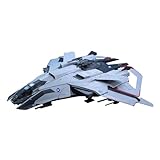
- A Kotobukiya Japanese import
- From the sci-fi game Star Citizen
- PLANET-RING has meticulously recreated the F8C Lightning at 1/100 scale
- Snap-fit construction requires no glue
- Includes a dedicated LED stand
Rank #4

- CLASSIC QUICK-WIT CATEGORIES GAME: Try to outwit other players by coming up with unique answers in this version of the fast-paced Scattergories party game for adults and teens
- THINK FAST AND BE CREATIVE TO SCORE: In the classic Scattergories game, write down things in each category that start with the letter rolled -- from appetizers to movie stars. Your answer only counts if no one else has it. After 4 rounds, the player with the most points wins!
- STURDY FOLDERS FOR LOTS OF FUN: This family board game for 2 players or more includes folders that are easy to write on and hold both lists and answer sheets
- ENHANCE CLASSIC BOARD GAME WITH ONLINE TOOLS: Scan the QR code -- or go to the web link -- to use the virtual timer and letter die on your smartphone
- FUN PARTY GAME FOR 6 PEOPLE: It’s an exciting group game for family and friends -- break it out for weekend fun, get-togethers, and holidays!
Rank #3

- READY, SET, WARP! Race across 24 tracks and warp to 15 CrossWorlds with Travel Rings, a unique gameplay mechanic that transports the iconic characters from the Sonic and SEGA universes into new dimensions. Use unpredictability to your advantage as you change the landscape of each race!
- RACE WITH THE BEST! Choose from 23 iconic Sonic characters, the largest roster of any Sonic racing game!
- MAKE IT YOURS: Mix and match between 45 unique original vehicles and 70 different gadgets to trick out your ride, level up your kart, and create the ultimate machine to match your racing style.
- GAIN THE ADVANTAGE WITH POWERFUL ITEMS! Dominate your opponents with 23 different items including returning favorites and all-new items like the Monster Truck!
- MULTIPLE WAYS TO PLAY: Gather with friends and play local split-screen in Grand Prix and the new party mode Race Park, compete against a community of players from around the world with up to 12 players online in World Match, or test your driving skills in Time Trials.
Product prices and availability are accurate as of the date/time indicated and are subject to change. Any price and availability information displayed on Amazon at the time of purchase will apply.




