What’s actually slowing this PC down?
Pick the symptom - the matching free tool is one click away.
To refuel or repair in Star Citizen, land at a location with Vehicle Maintenance Services, stay in the pilot seat, press F1 to open mobiGlas, choose Landing Services, select the service you need, and press Confirm. RSI says these services are available at most landing sites and many outposts.
How to refuel or repair at a landing site
- Go somewhere with Vehicle Maintenance Services. RSI says most landing sites and many outposts offer repair, restock, and refuel. Some outposts do not have Landing Services, so check for the service option after landing.
- Request permission to land at a major location. Contact ATC/Landing Services through ship communications, the mobiGlas commlink, or the default Left Alt + N shortcut. RSI says Landing Services typically appears in the Comms list within 5–7 km. ATC assigns a pad, docking port, or hangar based on your ship and location.
- Land in the assigned area. Lower your landing gear with the default N key and land where directed. At an outpost without Landing Services, land on an available pad. Some cities have no-fly zones; continuing to fly inside one may result in impoundment.
- Open the service menu. Once landed, remain in the pilot seat, press F1, and choose Landing Services.
- Select what you need and confirm. Choose repair, restock, refuel, or a combination, then press Confirm. RSI says the ship is restored after a short while but does not specify a fixed service time or price.
For the current official workflow and fuel details, see RSI’s Vehicle Maintenance Services guide. Landing authorization and safety details are in RSI’s How to Land Your Ship guide.
Which fuel does your ship need?
Ships have separate fuel pools for different functions: hydrogen fuel powers maneuvering thrusters, while quantum fuel is used for Quantum Travel. Refueling through Landing Services replenishes the relevant fuel; it does not mean the two types are interchangeable.
What to do if Landing Services has no repair or refuel options
RSI’s Alpha 4.10.1 Known Issues article, updated September 16, 2026, lists cases where repair, refuel, or restock options fail to appear after reaching a station, or the mobiGlas app does not register that the ship has landed. For that patch-specific issue, RSI suggests:
Free tools Windows power users keep installed
One-click scans. No signup required.
#1 Best Overall

- Up to 15m wireless range: Removing the boundaries of wires, the 2.4 GHz wireless signal provides a range of up to 15m
- Cross-platform connectivity: With our new USB transmitter, you can easily connect cross-platform between console and PC; separately sold console-specific USB transmitters allow for cross-console compatibility using the same headset
- 15+ hours battery life: Enjoy anxiety-free marathon gaming sessions with more than 15 hours of battery life; recharge the headset using the included USB-C to USB-A cable
- Flip-to-mute microphone: Be in charge of your full audio experience with the flip-to-mute uni-directional microphone which delivers clear and accurate communication with easy mute functionality
- EQ presets: Choose between 3 different audio presets to make sure you have the best equalizer settings for the game you’re playing
- Wait a little after landing; the app may need several minutes to update.
- If you are in a hangar, wait for the doors to close.
- Close and reopen the Landing Services app.
These steps are a workaround for the issue listed in RSI’s Vehicle Maintenance Services guide and the Alpha 4.10.1 Known Issues article, not a guaranteed fix for every missing service menu. The behavior is tied to that patch’s known issues.
Can another ship refuel or repair you?
Ship-to-ship support is a separate route from station services and depends on another player or a support ship being available. RSI’s Alpha 3.17 announcement described an initial implementation of ship-to-ship refueling in which MISC Starfarer owners could offer fuel services. It also said station prices for hydrogen, quantum fuel, and repairs could fluctuate as the Quantum economy began rolling out. That release announcement is historical context, not confirmation of current prices or live service reliability: RSI’s Alpha 3.17 announcement.
Rank #2

- WORKS IN ALL LIGHT CONDITIONS - Our eye and head tracking technology makes your favorite games more immersive whether you are in a pitch black room or in bright daylight.
- HEAD AND EYE TRACKING IN ONE DEVICE - Tobii Eye Tracker 5 tracks both head and eye movements for more immersive PC gaming experiences. Compatible with Windows 10 and Windows 11
- 170+ ENHANCED GAMES - Celebrated by players for bringing game changing features to Star Citizen, Microsoft Flight Simulator, War Thunder, Euro Truck Simulator, and 170+ other game titles.
- NO WEARABLES NEEDED - Say goodbye to devices that require you to wear trackers on a hat and enjoy the freedom in game and outside of it.
- WINDOWS HELLO - Tobii Eye Tracker 5 is compatible with Windows Hello and uses biometric data to make your device safer.
RSI describes the Aegis Vulcan as a support ship designed for remote refueling, repair, and rearming using BARD drones, with external hydrogen and quantum fuel tanks. That is a feature description, not evidence that the Vulcan is required for routine refueling or that every advertised capability is available in the current live build: RSI’s Aegis Vulcan page.
Quick Recap
Best Value
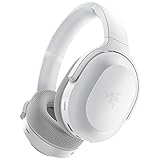
- RAZER SMARTSWITCH DUAL WIRELESS — The headset can instantly switch between high-speed 2.4GHz or Bluetooth mode for seamless audio as you hop between using your PC/console and phone respectively
- INTEGRATED BEAMFORMING NOISE-CANCELING MIC — The dual hidden microphones feature powerful levels of noise suppression ensuring you’re clearly heard in loud indoor and outdoor areas
- RAZER TRIFORCE 40MM DRIVERS — Patented 3-part driver design pushes out exceptional highs, mids, and lows that don’t muddy audio quality, providing deeper gaming immersion and a more dynamic listening experience for music and videos
- ULTRA-SOFT FLOWKNIT MEMORY FOAM EAR CUSHIONS — The breathable weave surface minimizes heat build-up, while the ultra-soft memory foam provides plush, comfortable cushioning for all-day use
- 40-HOUR BATTERY LIFE WITH USB-C CHARGING — Designed with enough juice to power you through more than a full day of gaming and work
Rank #4

- 【MULTI-PLATFORM GAMING HEADSET】Mpower is a multi-platform gaming headset, which can connect to PS4 / XBOX ONE ( 2015 Version ) / Laptop / VR/ Mobile Devices via the 3.5mm audio+mic combined jack. The conversion cable with dual 3.5mm audio and mic jacks is for connecting to PC.
- 【EXCELLENT STEREO AUDIO】Mpower is equipped with 50mm speakers and makes the stereo sound powerful. The retractable and flexible microphone picks up your voice clearly and the big leather earmuffs provide an extreme noise-cancellation function.
- 【SUPERIOR USING EXPERIENCES ON MOBILES AND CONSOLES】Convenient in-line control is easy to adjust while gaming. The compatible L-shape jack at the end of cable makes it easy to put the hands in the right position with comfortable posture while playing mobile games.
- 【COMFORTABLE TO WEAR】The ear muffs are padded with skin-friendly leather, which feels extremely soft.This comfortable earmuffs and headband are breathable and skin-friendly to wear for a long while.
- 【Perfect After-sales Service】 Please kindly know that all the products would be checked or tested before shipping out to ensure a good shopping experience. We promised to bring the best quality gaming headset to our customers. We offer 18 months after-sale service to our customer.
Rank #3
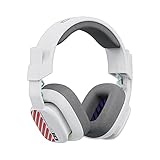
- Enhanced sound quality: ASTRO Gaming A10 Gen 2 Headset for PlayStation 5, PlayStation 4, Nintendo Switch, PC, Mac features custom-tuned 32mm dynamic drivers so you can always hear your game and teammates with clarity and precision
- Flip-to-mute mic: Integrated boom microphone that can be flipped up to mute for privacy and down for crystal-clear comms via a 6.0 mm unidirectional mic
- In-line volume control: This PlayStation headset features a removable headphone cable with in-line volume control, letting you adjust audio without pausing the game
- Built to last: An ultra durable headband and sturdy construction offers reliable performance that transcends the standard gaming headset for PlayStation PS5/PS4
- Comfortable over-ear headset: Ergonomical and robust circumaural construction with a closed back design; optimal for long sessions
Product prices and availability are accurate as of the date/time indicated and are subject to change. Any price and availability information displayed on Amazon at the time of purchase will apply.




