Free tools Windows power users keep installed
One-click scans. No signup required.
February 2026 was a major event month in Steal a Brainrot, with recurring Taco Tuesdays, the Valentine’s Part 1 and Part 2 updates, the Trade Machine and Divine Mutation, and the launch of the Divine Admin Machine. The month also featured three distinct weather events—Rain, Snow, and Starfall—that changed the map and could give Brainrots special traits.
This is a historical recap of February 2026, not a current event schedule. The game’s Roblox page confirms the core loop of buying, stealing, and earning from Brainrots, while the detailed calendar below is reconstructed from the community event chronology, update records, and specialist event guides.
As an Amazon Associate I earn from qualifying purchases.
February 2026 event calendar
Here is the practical date-by-date summary. Taco Tuesday was an admin event, not a standard weather rotation. The other entries were update-linked admin interventions or limited-time systems.
| Date | Event or update | What it added or changed |
|---|---|---|
| February 3 | Taco Tuesday | Recurring Tuesday admin event. |
| February 7 | Main Update / Update 37 | Valentine’s Part 1, including Cupid’s Machine and the Heart Lucky Block. |
| February 10 | Taco Tuesday | Recurring Tuesday admin event. |
| February 14 | Valentine’s Part 2 / Update 38 | Valentine’s Admin Machine, special weather activation, rare Brainrot and Lucky Block spawns, Valentine’s shop features, Cupid’s Wings Gear, a Valentine’s Base Skin, and a new fuse recipe. |
| February 17 | Taco Tuesday | Recurring Tuesday admin event. |
| February 21 | Update 39 | Trade Machine, new Brainrots, and Divine Mutation. The Divine event window was listed as February 21 through April 18, 2026. |
| February 24 | Taco Tuesday | Recurring Tuesday admin event. |
| February 28 | Update 40 / Divine Admin Machine | Divine Admin Machine, a new overpowered Brainrot in the Secret Lucky Block, and a Headless Horseman buff into OG rarity. |
The February 14 and February 28 launches were reported by specialist guides as taking place at 3:00 p.m. Eastern Time. Treat that as guide-reported timing rather than a permanent official schedule: the public Roblox game page does not provide a historical event archive or guarantee that future events will use the same time.
#1 Best Overall

- Smart Digital Calendar & Wi-Fi Sync: This Wi-Fi connected smart calendar automatically synchronizes local weather, real-time temperature, and humidity. Stay updated with instant holiday reminders and precise timekeeping without manual settings.
- 7-Inch Eye-Care E-Paper Display: Featuring a premium 7-inch E-Ink screen, this desk calendar mimics real paper with zero blue light and no flicker for a comfortable reading experience. The 180° ultra-wide viewing angle ensures clarity from any corner of your office.
- Global Time Zone & Multi-City Clock: Designed for global professionals, it supports multi-time zone displays and pre-loaded global holiday data. A perfect electronic calendar for tracking international deadlines and festive events.
- Minimalist Desk Decor & Productivity Tool: The ultra-slim, sleek design fits perfectly as a modern desk accessory or bedside weather station. Its compact profile provides essential daily information at a glance to boost your productivity.
- Professional Executive Black Finish: The Classic Black matte finish offers a sophisticated, professional look, making it the ideal high-tech gift for corporate leaders, executives, and modern home offices.
Weather versus Admin Abuse
The two categories overlap in presentation but are not the same system.
Weather events
Weather is a map-wide environmental state that can occur during ordinary play. Its main gameplay value is trait farming: rain, snow, or falling objects can affect Brainrots moving through the map or spawning during the event. Weather may also add temporary player-interaction mechanics, such as Snowballs.
Admin Abuse
Admin Abuse—also called an admin event—is a developer- or host-controlled intervention. Authorized hosts reported by the community include Steak, Sammy, and Caylus. Admins can do more than change the weather: they may spawn unusual Brainrots or Admin Lucky Blocks, activate special events, alter server-wide luck, and introduce content connected to a major update or celebration.
Do these 3 things before closing this tab:
1Repair Windows errors before they cause bigger problems2Scan for outdated or missing drivers - takes under a minute3Clear out junk files and repair common Windows errorsIn short:
- Weather: primarily an automatic or random map state used to create traits and temporary environmental effects.
- Admin Abuse: a controlled event with the ability to spawn limited content, manipulate luck, force weather, and activate special machines.
That distinction matters when searching for an event. Valentine’s Admin Machine, Divine Admin Machine, Taco Tuesday, and update launches should not be described as ordinary weather rotations.
Rank #2

- Be Organized & Stay On Top Of Things 2026-2027: With the gorgeous desk calendar running from 2026/06 to 2027/12 planning ahead & boosting your productivity is super easy! See all appointments, deadlines, birthdays, US holidays & other dates (Valentine’s Day, lovebirds!) at a glance
- Your Unique Academic Wall Calendar 2026 and 2027: Use the family calendar (16x12”) as an extension of your brain & transform it into your organizational masterpiece - each day offers a spacious box for notes and there is an additional section for monthly to do’s & more
- Clean Minimalistic Design: Besides being a premium planning tool, the desk calendars are great decoration for your desk or wall; the modern minimalistic black & white designs add a relaxed atmosphere to your office, home or classroom
- Flexible Use: Your choice! Use the daily planner as a desk calendar or with the two hanging holes as wall calendar; tear off the page of each month or keep it - the ZICOTO daily calendar is here to streamline your life just the way you need to
- Superior Material: A durable birthday calendar so you can plan easily thanks to the high-quality materials. 4 clear plastic protectors for safe transport are incl. (Stickers are not incl.)
Rain, Snow, and Starfall explained
| Weather | What players see | Potential Brainrot effect | Useful player action |
|---|---|---|---|
| Rain | Rain falls across the map. | Wet or Rain trait, depending on the label used by the source or game version. | Watch Brainrots moving through the affected area and check their resulting traits. |
| Snow | The lobby becomes snowy. | Snowy trait. | Collect snow and make Snowballs, which can freeze other players temporarily. |
| Starfall | Shooting stars or meteors fall toward the map. | Starfall or Cometstruck trait when a falling object hits a Brainrot. | Monitor Brainrots exposed to the falling objects and verify the exact in-game trait name. |
Community guides use slightly different names for some effects. Rain may be called Wet or Rain, while Starfall’s Brainrot effect may be called Starfall or Cometstruck. If you are documenting a live event with a screenshot or video, use the label shown in that current game build rather than assuming the community terminology is identical.
How to approach weather events
- Keep an eye on the conveyor and map. Weather is valuable because it can affect Brainrots, not simply because it changes the scenery.
- Do not leave immediately after the visual effect begins. A Brainrot may need to pass through the affected area or be struck by the event effect.
- Check the resulting trait. Names and terminology can vary between guides, so confirm what appeared on the Brainrot itself.
- During Snow, use Snowballs carefully. They create a temporary player-versus-player interaction and can freeze other players, but they do not replace the event’s Brainrot-farming purpose.
- During Starfall, watch for impacts. The special trait depends on a falling star or meteor hitting a Brainrot, according to the available event guides.
February 7: Valentine’s Part 1 and Update 37
Update 37 launched on February 7 during the Valentine’s Part 1 period. Its headline additions were Cupid’s Machine and a Heart Lucky Block.
Because these were update-linked additions rather than ordinary weather effects, players should have treated the event as a limited-content opportunity: inspect the new machine, look for the Heart Lucky Block, and avoid assuming that normal weather rules explained every Valentine’s feature. The available chronology identifies the date and additions, but it does not establish a universal reward multiplier for the update.
February 14: Valentine’s Part 2
Update 38 launched on February 14 and was the month’s most feature-heavy seasonal update. Specialist coverage described the following additions:
Rank #3

- ⏰ [𝗔𝗟𝗟-𝗜𝗡-𝗢𝗡𝗘 𝗗𝗘𝗦𝗜𝗚𝗡]Color LCD screen, can be used as an alarm clock, showing time, date, day of the week, temperature, humidity trends, weather display, perpetual calendar.
- ⏰ [𝗟𝗔𝗥𝗚𝗘 𝗟𝗘𝗗] This alarm clocks for bedrooms is characterized by large LED color screen and backlight design, which enables it to make you easily read the data clearly even at night.
- ⏰ [𝗙𝗘𝗔𝗧𝗨𝗥𝗘𝗦] This digital clock including 12/24 hours switching, alarm clock function, high clarity screen, humidity/temperature measurement, time/week display, voice-controlled backlight, weather forecast and so on.6
- ⏰ [𝗤𝗨𝗔𝗟𝗜𝗧𝗬] Made of high quality ABS material, this bedroom clock is lightweight and durable to use. The length of the clocks for living room decor is 14.5cm, the width is 11cm, and the height is 5.5cm.
- ⏰ [𝗪𝗜𝗗𝗘 𝗨𝗦𝗘𝗦] It is suitable for home, office, dormitory, school, etc. Press the LIGHT button to turn on or off the backlight, or turn on the backlight by clapping your hands or tapping the table within one meter, the backlight will be automatically turned off after 5 seconds,
- A heart-shaped Valentine’s Admin Machine.
- Activation of special weather events.
- Rare Brainrot and Lucky Block spawns.
- A Valentine’s Gift Shop with discounted gifts for friends.
- Cupid’s Wings Gear.
- A Valentine’s Base Skin connected to collecting Valentine-themed Brainrots.
- A new fuse recipe.
The Valentine’s Admin Machine was described as running on an hourly countdown and producing one of several outcomes, including a random weather event or a rare Brainrot spawn. Since that detail comes from specialist guides rather than a complete public Roblox patch note, it is safest to describe it as the reported behavior of the event rather than as a permanently documented machine rule.
What to prioritize in Valentine’s Part 2
- Check the Valentine’s Admin Machine whenever its countdown is relevant to your server.
- Stay alert for a forced weather event; it may create a trait-farming opportunity separate from the machine’s other outcomes.
- Look for rare Brainrot and Lucky Block spawns instead of focusing only on the visual seasonal decorations.
- Compare the Valentine’s shop’s friend-gift pricing before spending resources.
- Track Valentine-themed Brainrots if you are pursuing the Valentine’s Base Skin.
- Do not treat an event machine as a guarantee of a particular Brainrot, mutation, or reward unless the current game explicitly states that guarantee.
February 21: Trade Machine and Divine Mutation
Update 39 launched on February 21 with the Trade Machine, new Brainrots, and Divine Mutation. The community Events page listed the Divine event window as running from February 21 through April 18, 2026.
The event’s reported visual changes included a light yellow-and-white map, clouds, and a gate near the beginning of the path. Those environmental details help distinguish the Divine event from Rain, Snow, or Starfall: the map transformation was associated with the Divine event and its update content, not simply one of the three principal weather states.
For players, the Trade Machine was the practical systems addition, while Divine Mutation was the major collection and rarity-related milestone. The available dossier does not verify a single official multiplier or a universal Divine reward rate, so claims about exact boosts should not be treated as settled facts.
Rank #4
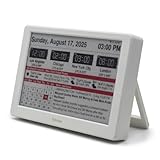
- Smart Digital Calendar & Wi-Fi Sync: This Wi-Fi connected smart calendar automatically synchronizes local weather, real-time temperature, and humidity. Stay updated with instant holiday reminders and precise timekeeping without manual settings.
- 7-Inch Eye-Care E-Paper Display: Featuring a premium 7-inch E-Ink screen, this desk calendar mimics real paper with zero blue light and no flicker for a comfortable reading experience. The 180° ultra-wide viewing angle ensures clarity from any corner of your office.
- Global Time Zone & Multi-City Clock: Designed for global professionals, it supports multi-time zone displays and pre-loaded global holiday data. A perfect electronic calendar for tracking international deadlines and festive events.
- Minimalist Desk Decor & Productivity Tool: The ultra-slim, sleek design fits perfectly as a modern desk accessory or bedside weather station. Its compact profile provides essential daily information at a glance to boost your productivity.
- Clean Modern White Aesthetic: The Pure White finish provides a clean, Zen-like aesthetic that brightens any workspace. A stylish smart home gadget for those who love minimalist and organized environments.
February 28: Divine Admin Machine and Update 40
Update 40 launched on February 28 and closed the month with the Divine Admin Machine. The update log also listed a new overpowered Brainrot in the Secret Lucky Block and a buff that moved the Headless Horseman into OG rarity.
A specialist guide reported that the Divine Admin Machine was available in servers from February 28 through March 4, 2026. Its reported capabilities included:
- Triggering random events.
- Spawning Lucky Blocks.
- Raising luck multipliers.
- Activating Sammy’s Base.
This is a good example of why “admin event” is a more useful description than “weather.” The machine could influence luck and spawns and could activate additional content; it was not merely a visual change to the lobby.
Best response when an admin machine appears
- Stay in the server if you can. Admin machines may have limited windows and random outcomes.
- Watch for server-wide effects. Luck changes, forced weather, and special spawns may benefit everyone in the server.
- Check unusual spawn locations and Lucky Blocks. Do not rely only on the normal conveyor pattern.
- Record the event name and result. This helps separate a one-off admin action from a repeatable mechanic.
- Avoid unverified multiplier claims. Community guides disagree on some exact numbers, so use the value displayed in the current server if one is shown.
What February players should—and should not—assume
Reasonable conclusions
- February had recurring Taco Tuesday admin events on February 3, 10, 17, and 24.
- February 7, 14, 21, and 28 were important update or admin-event dates.
- Rain, Snow, and Starfall were the principal weather events discussed in the February guides.
- Weather could create Brainrot traits, while admin events could also alter spawns, luck, and available content.
- Valentine’s Part 2 and the Divine updates were more than cosmetic events: they introduced machines, collection goals, and new systems.
Claims that need caution
- Exact multipliers: available guides disagree, and no complete official public archive was located.
- Exact durations: use the relevant guide’s reported window, not a general assumption about how long Admin Abuse lasts.
- Trait names: Rain/Wet and Starfall/Cometstruck terminology varies.
- Future schedules: February’s dates do not establish a recurring schedule for later months.
- Rewards: a gift card, machine, Lucky Block, or weather event should not be presented as guaranteeing a specific Brainrot or mutation unless the game explicitly says so.
Quick checklist for an event server
- Identify whether the event is weather, Taco Tuesday, an update launch, or an admin-machine activation.
- Look for the machine, Lucky Block, or special spawn associated with the event.
- Watch the conveyor during Rain, Snow, and Starfall.
- Check Brainrot traits after exposure rather than relying on a guide’s terminology.
- Use Snowballs during Snow if the player-interaction mechanic is active.
- Save resources for limited seasonal machines and recipes only after checking their current requirements.
- Do not trust code generators, fake event links, or claims of guaranteed rare drops.
Source and date note
The Roblox game page is the primary source for the game’s identity and core loop. The February calendar and event mechanics in this retrospective are reconstructed from the Steal a Brainrot community wiki, update records, and specialist weather and event guides. The game continued receiving updates after February 2026, so event names, labels, availability, and mechanics should be checked in the current Roblox experience before being used as a live guide.
Best Value

- ALL-IN-ONE FAMILY COORDINATION CENTER: 10.1-inch FHD 800*1280IPS touchscreen with 10-point touch lets you effortlessly organize and track school schedules, family plans, chore tasks and meal plans; different color tags help you distinguish different arrangements, making family coordination simpler and more intuitive
- EASY SETUP & SEAMLESS AUTO SYNC: Just plug in, connect to WiFi and activate the device to start; the smart calendar automatically fills in and displays all your time and events after sync, you can add and edit updates on both the device and mobile phone anytime; seamless multi-device integration brings you ultimate convenience
- INTERACTIVE CHORE & MEAL PLANNING TOOL: Powered by Android 11, our digital calendar features interactive household charts that turn planned meals and to-do lists into clear visual blocks; it helps family members especially kids develop healthy living habits, keeping all your daily tasks organized and easy to track
- MULTI-FUNCTIONAL SMART DISPLAY: Equipped with a 5-megapixel HD camera for smooth remote video calls via smartphone connection, paired with 4*2W stereo speakers for clear sound and video playback; when not in use, it transforms into a digital photo frame to display family photos and videos, supporting both auto carousel and manual one-click sliding control
- FLEXIBLE PLACEMENT & WORRY-FREE WARRANTY: With auto-rotate display, this smart calendar supports both portrait and landscape mode, you can place it on desktop or mount it on wall for home or office use; the package includes desktop stand, wall-mount kit, 5V/2A power adapter and installation guide
Frequently Asked Questions
Were Rain, Snow, and Starfall Admin Abuse events?
No. They are generally treated as weather events: map-wide states that can affect Brainrots and apply traits. Admin Abuse is a broader authorized event system that can spawn content, change luck, force weather, or activate special machines.
What were the February 2026 Taco Tuesday dates?
The community event chronology lists Taco Tuesday on February 3, 10, 17, and 24, 2026.
Recommended Free Tools
When did the Divine Admin Machine appear?
Update 40 launched on February 28, 2026. A specialist guide reported the Divine Admin Machine as available from February 28 through March 4, 2026.
What trait does Starfall give?
Community sources use both Starfall and Cometstruck for the effect. The event guides describe a Brainrot being hit by a falling star or meteor and receiving the related trait; use the label shown in the current game version.
Can a Roblox gift card guarantee a rare Brainrot or event reward?
No. A Roblox gift card is a way to fund Robux spending, not a guarantee of a Brainrot, Lucky Block, mutation, or limited event reward.
The Bottom Line
February 2026’s key distinction is simple: Rain, Snow, and Starfall were weather opportunities for traits and temporary map effects, while Taco Tuesday, the Valentine’s machines, the Divine updates, and Admin Abuse were controlled or update-linked events with broader spawning and luck effects. The most important dates were February 14 for Valentine’s Part 2, February 21 for the Trade Machine and Divine Mutation, and February 28 for the Divine Admin Machine.
The Tool Desk
Outbyte PC Repair FREEClear out junk files and repair common Windows errorsFree Scan →Outbyte Driver Updater FREEFix the driver behind crashes, sound loss and screen glitchesFind Drivers →Quick Recap
Product prices and availability are accurate as of the date/time indicated and are subject to change. Any price and availability information displayed on Amazon at the time of purchase will apply.




