Do these 3 things before closing this tab:
1Fix the driver behind crashes, sound loss and screen glitches2Clear out junk files and repair common Windows errors3Scan for outdated or missing drivers - takes under a minuteStrinova rewards more than accurate aim: switching between 3D and 2D forms, using the map’s alternate routes, and coordinating with teammates all shape a fight. These eight habits give new players practical things to work on without relying on a particular agent or current balance patch.
1. Use Stringify with a purpose
Stringification lets your character switch between 3D and 2D forms. The 2D form can briefly make you harder to hit by reducing your hitbox, but it is not invincibility. Choose a reason before switching: evade incoming fire, cross an exposed gap, or use a route the 3D form cannot take. The official Strinova site presents the form as a tactical tool for movement, dodging, and reloading; treat it as part of a decision, not a button to press at random.
2. Practice wall-sticking and gliding
Some surfaces let you stick to a wall, and gliding while airborne can extend a jump or help you reach another route. Try these mechanics in safe moments and note which surfaces and gaps actually support them. They can open alternate approaches or vantage points, but a route is only useful if it leads somewhere safer or gives your team an advantage.
Controls and bindings may change, and the available beginner guide was updated on December 2, 2024. Check the current in-game controls rather than relying on an old button mapping.
Recommended Free Tools
#1 Best Overall

- Platform Compatibility: This PC controller is designed for Windows PC, Steam, Switch, Android, and iOS. Xbox-style asymmetric stick layout for PC gamers. Three modes cover all your devices. Please check your device compatibility before purchase
- Three Connection Modes: 2.4G wireless, Bluetooth, wired USB-C. PC gets native XInput/DirectInput. Switch pairs via Bluetooth, no adapter. This gaming PC controller switches devices seamlessly. Stable wireless minimizes random disconnects during gaming
- Hall Effect Precision: Hall effect joysticks and triggers eliminate stick drift. This gaming controller for PC delivers smooth, responsive input with no dead zones. Built for FPS, racing, and action games. Long-term precision for competitive PC gaming
- Back Buttons & Battery: Two programmable back buttons map combos and shortcuts. Textured grips with dual vibration. 1000mAh battery delivers up to 20H playtime. RGB can be turned off. A solid PC controller for gaming with custom back buttons
- ABXY Layout Switch: Press B + Minus + Plus to swap between PC and Switch modes. Features: 1000Hz polling rate, RGB lighting, turbo. Note: designed without mic jack or gyro sensor
3. Match your aiming mode to the distance
Hipfire, shoulder aim, and aiming down sights (ADS) offer different trade-offs. As a starting point, the beginner guide suggests hipfire up close, shoulder aim at close-to-mid range, and ADS farther away. These are not universal rules: weapon behavior, the angle of an engagement, and game updates can change what works. Try each mode with the weapons you use and notice when you can track a moving target while keeping your aim controlled.
4. Learn the recoil of your own weapon
Recoil differs between weapons, so practice with the one you plan to carry instead of assuming a single pattern applies everywhere. The beginner guide recommends compensating with mouse movement and using tap firing at longer range. In practice, fire a short burst, watch how the weapon moves, then make small corrections. If shots are wandering at distance, pause between bursts rather than holding fire.
Rank #2

- Comfort & Convenience: Ergonomic design with rubberized grips and silent buttons for long gaming sessions. Smart charging dock with 1000mAh battery for effortless charging.
- Hall Effect Sticks & Triggers: Anti-drift Hall Effect sticks with 5 million cycles durability for precise control. Hall Effect triggers with trigger stops and hair trigger mode for smooth, responsive input.
- Tri-Mode Connectivity: Works with PC, Switch, Android, and iOS via Bluetooth, wired, and wireless dongle. Easily switch between modes for seamless multi-platform gaming.
- 1000Hz Polling Rate: Ultra-low latency with 1000Hz polling rate for instant input response, ideal for competitive gaming. (Supports Wired and 2.4Ghz Connections)
- Full Customization: Programmable back buttons, customizable RGB lighting, detachable faceplate, and swappable ABXY layout for personalized gaming.
5. Check the buy phase in round-based modes
In modes that have a round-based economy, points earned during play can be spent on weapons, ability upgrades, and armor, according to the beginner guide. Review what you can afford before the round begins and choose purchases that support your plan. The economy is mode-dependent; confirm the current mode’s purchasing options in game instead of assuming every mode uses the same system.
6. Give each tactical item a job
Grenades and other tactical items have different functions. Before using one, ask what problem it should solve: block a sightline, disrupt an enemy position, or help your team gather information. A smoke paired with a reveal effect is one possible combination, not a default play for every situation. Coordinate the timing when possible, so the item creates an opening your team can use.
Rank #3
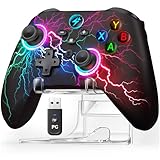
- 【Hall Effect Triggers for Pro-Level Precision】Dominate racing & shooting games on PC! Magnetic sensor-equipped Hall Effect linear triggers deliver flawless, smooth actuation—100% drift-free, with pinpoint accuracy that outperforms standard controllers. Perfect for Forza, PUBG, and all competitive titles.
- 【All-Device Compatibility: PC/Steam/Switch 2/iOS/Android】Plug-and-play for Windows & Steam (instantly recognized!), works seamlessly with Nintendo Switch/Switch 2, Android phones/tablets, and iOS devices. Covers 5+ major platforms—more versatile than most wireless pc gaming controllers (Not for Xbox/PlayStation).
- 【4-in-1 Customization for Competitive Edge】Program 2 back buttons (M1/M2) for combos, set Turbo fire on ANY button, adjust 4-level vibration feedback, and swap A/B/X/Y layouts with shortcuts. Tailor every action to your playstyle—more flexible than basic programmable controllers.
- 【1000mAh Long-Life Battery + 8-Color RGB】1000mAh rechargeable battery supports 16+ hours of continuous play (tested with medium RGB brightness). 8 dynamic colors + 3 lighting modes (Steady/Breath/Off) let you match your gaming setup—vibrant yet power-saving.
- 【Ergonomic Design + Exclusive Display Stand】Ergonomic lightweight design fits all hand sizes—comfortable for marathon gaming sessions, easy to carry for family game nights or travel. Package includes wireless controller, USB-C charging cable, 2.4GHz USB receiver, and a sleek display stand—NO extra purchases needed! The stand keeps your controller organized, protecting it from scratches
7. Stay close enough to work with a teammate
In attackers-versus-defenders rounds, try to play near at least one teammate rather than taking every fight alone. A partner can help trade a lost engagement, cover a route, or act on information you provide. Strinova’s Steam description emphasizes team combat and agent skills, so communicating what you see and where you are moving is useful even if you are still learning the roster.
8. Learn cover, choke points, and routes
Pay attention to the parts of each map that shape engagements:
Rank #4

- Support PC and Android
- Support for Wireless
- Dual Vibration Motors Inside
- Durable Switches with Excellent Feel
- Cover: Identify places where you can break line of sight or retreat when pressured.
- Choke points: Notice narrow passages where opponents may concentrate fire or where your team can coordinate a push.
- Alternate routes: Look for flanks and movement paths that let you avoid a watched approach.
The official game description highlights multilayered maps and varied movement routes. As you play, remember where you were exposed, where a route led, and which positions gave you a useful view. That map knowledge makes decisions about Stringify, tactical items, and teammate positioning more deliberate.
Independent reader supportYour contribution helps us test, update, and keep practical guides available for everyone.What to focus on in your next match
Pick one or two habits rather than trying to perfect all eight at once. For example, practice switching forms only when it helps you evade or move, then spend the next match tracking which routes offer cover. Strinova is free to play on Steam; its Steam listing describes its PC release, team-focused modes, and system requirements. The tips above concern PC play and do not assume mobile-specific aim assist or auto-fire features.
The Tool Desk
Outbyte Driver Updater FREEFix the driver behind crashes, sound loss and screen glitchesFind Drivers →Outbyte PC Repair FREERepair Windows errors before they cause bigger problemsFix Now →Quick Recap
Best Value

- PC Controller for Gaming: The EasySMX X15 wireless gamepad is built for Windows PC and Steam gaming, with full support for Switch and Android. Versatile control across your favorite platforms. Note: Not compatible with X-box, Luna, PS-4, PS-5
- Three Connection Modes: 2.4G wireless, Bluetooth, and wired Type-C. Switch pairs directly via Bluetooth with no adapter, while PC gets native XInput/ DirectInput support. Phones and tablets connect instantly for mobile play. Seamless switching between devices for any setup
- Up to 20H Battery Life for Extended Gaming: A 1000mAh rechargeable battery delivers up to 20 hours of wireless play. Low-latency 2.4G keeps competitive gaming responsive, and RGB lighting turns off to extend playtime
- Back Buttons & Ergonomic Grip: Programmable back buttons map combos and shortcuts for faster control. Textured anti-slip grips with dual vibration feedback ensure comfortable, secure handling during long sessions
- ABXY Layout Switch (PC / Switch): Press B + Minus + Plus simultaneously to swap button layout between PC and Switch modes, matching your gaming habits instantly
Product prices and availability are accurate as of the date/time indicated and are subject to change. Any price and availability information displayed on Amazon at the time of purchase will apply.




