ufmatcher.dll is a native fingerprint-matching component used by Suprema’s UniFinger Engine SDK and BioMini application integrations. If ufmatcher.dll is missing or cannot load, identify the application that calls it before changing Windows system folders.
Start with this diagnostic checklist
Check these details before reinstalling anything:
- Which program shows the error? Look at the window title, shortcut name, or the application named in the message.
- When does it happen? Note whether it appears when Windows starts, when opening attendance software, or when connecting to a BioMini scanner.
- Is the program 32-bit or 64-bit? The commonly documented UniFinger SDK matcher library is a Win32 component, so a 32-bit application may need x86 libraries even on 64-bit Windows.
- Does the message name another file?
VCRUNTIME140.dll,MSVCP*.dll, or another dependency points to a different repair step. - Was the file quarantined? Check Windows Security’s protection history before downloading anything.
The safest solution is usually to repair or reinstall the original biometric application, BioMini SDK, or vendor integration that supplied ufmatcher.dll.
As an Amazon Associate I earn from qualifying purchases.
What ufmatcher.dll does
UFMatcher.dll is the native Win32 matcher module from the UniFinger Engine 3.0 SDK. It performs fingerprint matching for software built around Suprema biometric hardware and SDK components.
Recommended Free Tools
A BioMini deployment may also contain:
UFScanner.dllUFDatabase.dll- A managed .NET wrapper such as
Suprema.UFMatcher.dll - Other SDK assemblies
UFLicense.dator another license file
The native DLL and the .NET wrapper are different things. UFMatcher.dll is loaded directly by native code or through a managed wrapper. Suprema.UFMatcher.dll is a .NET assembly that commonly calls the native library. Replacing one with the other will not solve the problem.
#1 Best Overall

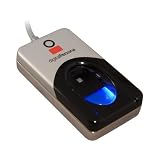
- New replacement old Red Logo Digital persona URU4500, HID , USB reader. Original HID Brand
- Small form factor
- Metal Casing resists unintentional movement.
- SuperiorRed "Flash" indicates that a fingerprint image has been captured, 512 dpi / 8-bit grayscale (256 gray levels) ESD resistance
- Encrypted fingerprint data
This is not normally a Windows system file. It generally belongs in the application or SDK directory, sometimes under a Suprema BioMini program folder, rather than in C:WindowsSystem32 or C:WindowsSysWOW64.
Fix 1: Repair the application from Windows
Use this first if the affected program is still installed.
- Press Windows + I to open Settings.
- Select Apps.
- Select Installed apps on Windows 11, or Apps & features on Windows 10.
- Find the attendance, access-control, fingerprint, BioMini, or Suprema-related application.
- Select the three-dot menu beside it.
- Choose Advanced options if available.
- Select Repair.
- Restart Windows and open the application again.
A successful repair restores the application’s private DLLs and configuration without requiring you to place files manually. If the application has no Repair option, open its installer from the original vendor and look for Repair, Modify, or Reinstall.
The Tool Desk
Outbyte Driver Updater FREEScan for outdated or missing drivers - takes under a minuteDriver Scan →Outbyte PC Repair FREEClear out junk files and repair common Windows errorsFree Scan →If the error remains, continue with a complete reinstall rather than copying a replacement DLL.
Fix 2: Reinstall the original BioMini or biometric software
A missing matcher DLL most often indicates an incomplete, damaged, removed, or mismatched SDK installation.
Before uninstalling, record the application name and any license information supplied by your organization. Then:
- Open Settings with Windows + I.
- Select Apps and then Installed apps.
- Uninstall the application that displays the error.
- If listed separately, uninstall the related BioMini, UniFinger, or Suprema SDK component only when the application vendor’s instructions call for it.
- Restart Windows.
- Install the software supplied by the fingerprint-system vendor, your employer’s IT department, Suprema, or the current BioMini hardware owner, Xperix.
- Restart again before testing the scanner.
Use the installer intended for the exact application and hardware. The SDK may be licensed or tied to a particular integration, so obtaining only a standalone DLL is not an equivalent repair.
Rank #2

- Certified to Microsoft’s highest fingerprint security standards (ESS & SDCP) for robust, hardware-isolated authentication. Supports next-gen Windows features, including Copilot Recall and Windows Hello with ESS support.
- Windows Hello ready for fast, password free fingerprint login to Windows and Microsoft 365 accounts
- On device fingerprint storage keeps biometric data securely within the key. Supports privacy regulations (GDPR, BIPA, CCPA) through on device biometric processing; TAA compliant.
- Reliable wired USB fingerprint authentication with USB C and USB A compatibility for desktop PCs.
- Consistent, all condition 360° fingerprint recognition.
After installation, check the program’s own directory for the native library and its companion files. Suprema deployments commonly place these files beside the application executable. Do not move them to a Windows system directory unless the vendor’s documented installer specifically requires that arrangement.
If reinstalling works, the application should start without the loader message and the fingerprint device should appear inside the program. If the application starts but cannot access the scanner, investigate the driver separately.
Fix 3: Check x86 versus x64 compatibility
A 32-bit program cannot use a 64-bit version of ufmatcher.dll, and copying a 32-bit DLL into System32 does not convert it into a 64-bit library.
Check the application architecture using its vendor documentation or by asking the software supplier. Then confirm that the installation contains the matching SDK:
Free tools Windows power users keep installed
One-click scans. No signup required.
- A 32-bit application needs the x86 native matcher and x86 dependencies.
- A 64-bit application needs a vendor-supplied 64-bit build if that application supports one.
- A .NET application may need both
Suprema.UFMatcher.dlland the correct native library. - Do not mix files from different BioMini or UniFinger SDK releases.
On 64-bit Windows, the x86 Microsoft Visual C++ runtime may still be correct for a 32-bit biometric application. Install it only when the error identifies a missing Microsoft runtime, or when the vendor requires it. Microsoft provides the supported packages on its Visual C++ Redistributable downloads page.
Installing Visual C++ does not supply ufmatcher.dll. It can only restore a separate runtime dependency.
Fix 4: Distinguish a missing DLL from a missing dependency
Windows may show “The specified module could not be found” even when ufmatcher.dll is present. In that situation, one of the DLL’s dependencies may be absent, incompatible, or blocked.
Rank #3

- MFS110 L1 USB Fingerprint Scanner
- Support Window, Android and Lenux
- 1 Year RD Service Registration included from mantra
- USB with Type C connector available for using in Type C supporting devices
- Scratch free Sensor Surface,Auto Finger Detection
Look for these clues:
- The error names
VCRUNTIME140.dllorMSVCP*.dll. - The file exists beside the executable, but the program still fails.
- The program was copied from another computer instead of installed.
- A recent update replaced only part of the SDK.
- Different versions of the BioMini software exist in separate folders.
The safest dependency repair is to run the original application or SDK installer again. It can restore the complete set of native libraries, managed assemblies, licensing files, and prerequisites.
What’s actually slowing this PC down?
Pick the symptom - the matching free tool is one click away.
Do not install multiple random runtime packages or DLL versions to see which one works. That can leave the application loading a different file from an unexpected directory. Windows normally searches the application directory early in its DLL search process, so a stale copy beside the executable can take precedence over another copy elsewhere. Details are documented in Microsoft’s DLL search order reference.
Fix 5: Check antivirus quarantine
Security software may remove or quarantine a DLL after an update, cleanup operation, or false detection.
In Windows Security:
- Open Start and search for Windows Security.
- Select Virus & threat protection.
- Select Protection history.
- Look for an event involving the biometric application or
ufmatcher.dll. - Confirm that the file belongs to the verified application installation before taking action.
Do not disable antivirus protection to run an unknown DLL. If the file was quarantined, the safer approach is to repair or reinstall the application from its trusted installer. Restore a quarantined file only under your organization’s security policy and only when the installation source is known.
If an unexpected copy exists in a temporary folder, a download folder, or an unrelated program directory, scan it and investigate rather than adding an antivirus exclusion.
Fix 6: Check the license and companion files
Some Suprema integrations require UFLicense.dat or other vendor-provided files. A replacement ufmatcher.dll cannot repair a licensing failure.
Check that the application’s installation directory contains the files supplied by its installer. Do not copy license files from another computer or another customer installation. If the program reports licensing, enrollment, or SDK initialization errors after the DLL issue is resolved, contact the biometric-system supplier.
Rank #4

- Designed for Windows 10: Supports Windows Hello Authentication
- Fast Fingerprint Authentication
- Documents/Folder Encryption
- 360° Fingerprint Recognition | Multi-Fingerprint Registration
- [24/7 Customer Support] Please send a message directly to our store to assist you if you are encountering any difficulty with using this item. Our team is always here happy to assist you. Kindly see the product description below for the troubleshooting instruction with installing the driver for this device.
A driver problem can also prevent the scanner from working, but it does not normally explain a missing matcher DLL. Treat the SDK deployment and device driver as separate checks.
Fix 7: Update or reinstall the scanner driver
Use Device Manager when the program opens but the BioMini scanner is absent, shows an error symbol, or stops responding.
- Disconnect the scanner.
- Right-click Start and select Device Manager.
- Expand Biometric devices, Universal Serial Bus controllers, and any category containing the scanner.
- Right-click the relevant device and select Uninstall device.
- Select the option to remove the driver package only if your hardware vendor instructs you to do so.
- Restart Windows.
- Install the driver supplied with the correct BioMini application or SDK.
- Reconnect the scanner and check Device Manager for warning icons.
Do not assume that a generic Windows driver includes the BioMini SDK or ufmatcher.dll.
When manually comparing device drivers, hunting through hardware pages and guessing which package matches the scanner can be time-consuming. Outbyte Driver Updater can scan for outdated drivers; its free scan identifies issues, while driver installation is handled by the full version. Reinstalling the original BioMini application remains the definitive fix for a missing SDK DLL.
Fix 8: Check Windows components only if other programs are failing
ufmatcher.dll is a third-party application file, so System File Checker usually cannot restore it. Use Windows repair commands only when other Windows components are also failing or the system has broader corruption.
Open an elevated Command Prompt:
- Open Start.
- Type
Command Prompt. - Right-click Command Prompt.
- Select Run as administrator.
- Run this command:
DISM.exe /Online /Cleanup-Image /RestoreHealth
Wait for it to finish, then run:
sfc /scannow
Restart Windows and test the application. Microsoft documents DISM repair in its Windows image repair guidance and SFC in its System File Checker documentation.
Repeatedly hunting through Windows components and rerunning SFC or DISM without knowing what changed can waste time. Outbyte PC Repair can scan for system issues; its free scan shows detected problems, while repair is performed by the full version. It is optional, and reinstalling the biometric application remains the correct fix when only ufmatcher.dll is missing.
Do not run regsvr32 for this DLL
regsvr32 is intended for DLLs that expose COM registration functions such as DllRegisterServer. A fingerprint matcher library is normally loaded by the application and is not registered globally.
Running this command is therefore not a normal repair:
Best Value
- Excellent image quality
- Encrypted fingerprint data
- Latent print rejection
- Superior ESD resistance
- Works well with dry, moist, or rough fingerprints
regsvr32 ufmatcher.dll
It may produce an error such as a missing entry point or an architecture mismatch. It will not install the SDK, restore UFLicense.dat, add dependencies, or make a 32-bit application compatible with a 64-bit DLL. Microsoft explains the command’s purpose in its regsvr32 documentation.
Windows Errors? Fix Them Before They Spread
Repair common Windows errors and clear accumulated junk for a smoother, more stable PC - no reinstall needed.Free scan · no reinstallOutdated Drivers Are Slowing You Down
One free scan finds every outdated or missing driver and matches the right update for your exact hardware.Free scan · exact hardware matchWhy random DLL downloads are unsafe
Do not download ufmatcher.dll from an arbitrary DLL repository and copy it into System32, SysWOW64, or the application folder.
That approach can provide:
- Malware or a tampered file
- The wrong SDK revision
- The wrong x86 or x64 architecture
- A file that lacks required companion libraries
- A file that does not match the application’s license
- A misleading fix that leaves the damaged installation unresolved
Use the original application installer, the organization that supplied the biometric system, or the verified Suprema/Xperix support channel instead. The exact application producing the error cannot be identified from the filename alone.
FAQ
Is ufmatcher.dll part of Windows?
Usually no. It is an application or SDK DLL associated with Suprema’s UniFinger Engine and BioMini integrations. Windows does not normally need it in System32 or SysWOW64.
Is ufmatcher.dll malware?
The filename alone does not prove malware. A copy beside a verified BioMini application can be legitimate. An unexpected copy elsewhere should be scanned and investigated.
Quick wins for a faster PC:
Scan for outdated or missing drivers - takes under a minuteDriver Scan →Repair Windows errors before they cause bigger problemsFix Now →Should I install Visual C++?
Only when the error separately names a Microsoft runtime such as VCRUNTIME140.dll or MSVCP*.dll, or when the application vendor requires it. Visual C++ does not replace ufmatcher.dll.
What is the difference between UFMatcher.dll and Suprema.UFMatcher.dll?
UFMatcher.dll is the native Win32 matcher library. Suprema.UFMatcher.dll is a managed .NET wrapper commonly used to call native SDK functions. A .NET application may require both.
Why does the application still fail when the file is present?
The application may be missing a dependency, using the wrong architecture, loading a stale copy, missing a license file, or using incompatible SDK companion files. Repair the complete installation instead of replacing only the DLL.
Can SFC restore it?
Normally no. SFC repairs protected Windows components, while ufmatcher.dll belongs to a third-party application. Use SFC and DISM only when broader Windows corruption is present.
Do these 3 things before closing this tab:
1Scan for outdated or missing drivers - takes under a minute2Clear out junk files and repair common Windows errors3Fix the driver behind crashes, sound loss and screen glitchesWhat information should I give support?
Provide the exact executable name, full error text, Windows version, application and SDK version if shown, x86 or x64 architecture, installation path, antivirus quarantine record, and whether a clean reinstall changed the error.
Quick Recap
Product prices and availability are accurate as of the date/time indicated and are subject to change. Any price and availability information displayed on Amazon at the time of purchase will apply.




