What’s actually slowing this PC down?
Pick the symptom - the matching free tool is one click away.
If you can’t enter a friend’s world in Genshin Impact, first check that you’re on the same game server and that co-op is unlocked on the account trying to join. HoYoverse’s PlayStation FAQ lists Adventure Rank 16 and completion of required quests as baseline conditions; the game’s current co-op prompt should take precedence if its instructions differ.
Check the requirements HoYoverse confirms
Both accounts must be on the same server
Compare the server selected by each player. HoYoverse’s PlayStation®4 FAQ says players must select the same server to play together. Its server-region guidance is framed around PS4 and PSN, so use the server shown in your own game rather than assuming that being friends across platforms means the accounts are in the same game world.

As an Amazon Associate I earn from qualifying purchases.
Unlock co-op and finish required quests
The same FAQ gives Adventure Rank 16 as the co-op unlock threshold and says required quests must be completed. HoYoverse’s Genshin Impact Official Release FAQ also says players can play together across platforms after meeting the required Adventure Rank and related quest conditions. These FAQs date from the game’s original-release period; if a current in-game prompt gives a different requirement, follow that prompt.
Quick wins for a faster PC:
Scan for outdated or missing drivers - takes under a minuteDriver Scan →Clear out junk files and repair common Windows errorsFree Scan →Check whether either player is temporarily blocked
Some quests or activities may prevent co-op while they are active. A version 1.4-era community co-op guide discusses quest restrictions, but it is not an official, current, exhaustive list. Check both players’ screens for a specific co-op restriction and complete or leave the activity if the game instructs you to do so.
Check the host’s world and join settings
Players have reported that world-level differences can affect joining, but reports in 2020 and 2024 do not establish the complete current rule. Look at the eligibility message shown when you try to join, and ask the host to check their world’s access settings. Treat the game’s displayed requirement as more reliable than a general rule inferred from another player’s experience.
Use the error message to decide what to do next
- Compare servers. Confirm both players selected the same game server.
- Check the joining account’s progress. Confirm co-op is unlocked and required quests are complete, using the current in-game prompt if it differs from an older FAQ.
- Check both players’ current activities. Look for a quest or activity restriction that the game explicitly identifies.
- Check host eligibility and access settings. Read the join prompt for any world-level or access condition instead of assuming a universal world-level rule.
- Record the exact error text. If the checks above do not explain it, contact current HoYoverse support with the wording of the message and relevant account/platform details.
A 2020 community bug report describes timeout, declined-request, and inability-to-enter outcomes. It is historical and does not show that the same message today has the same cause or a known universal fix. The sources do not establish restarting, changing network equipment, or waiting for a reset as reliable solutions.
Quick Recap
Best Value

- Wide Compatibility: Get one Megadream iPhone controller to meet your different need on multiple devices; This game controller connect to iOS 13.0+ iPhone, iPhone 17 series, iPhone 16 series, iPhone 15 series, iPad, Android 6.0+ phone, Galaxy S24/S23/S22 series, tablet, PC, NS-Switch 2 (No ‘C’ key function), NS-Switch device by wireless connection directly
- Play Any Game That Supports Controllers: The wireless Android controller can directly play hundreds of controller-enabled games on iPhone/Android/PC/NS-Switch, such as Call of Duty, Roblox, Minecraft, Genshin Impact, Diablo Immortal and more; Supports virtually all cloud-based gaming services including GeForce Now, Netflix, Xbox Cloud Gaming, Luna, MFi A-pple Arcade and Delta Emulator
- Hall Effect Joysticks/Hall Trigger: Megadream PC controller with Hall Effect Sensor joystick, providing seamless 360° precision control, delivering the accuracy and durability mobile gamers demand; Hall-effect analog triggers provide unrivaled smoothness and responsiveness, giving you a competitive edge in any game
- Dual Vibration & 6-Axis Gyro: This Switch game controller features dual haptic feedback with 3 adjustable vibration intensity levels (100% - 70% - 0%), plus a highly responsive 6-axis gyro sensor for an immersive gaming experience
Rank #4

- WIDE SCREEN COMPATIBILITY — PHONE TO TABLET: X5 Lite is a versatile phone controller that stretches up to 213mm to fit iPhone 15/16, most Android phones, iPad mini 6/7, and compatible Android tablets. Secure Type-C connection keeps gameplay stable and responsive.
- MOBILE, CLOUD & REMOTE GAMING: Play supported mobile games like Zenless Zone Zero, or stream console and PC games through Xbox Game Pass, Steam Link, Moonlight, and remote play. Enjoy physical controls wherever you play.
- HALL EFFECT STICKS — PRECISE CONTROL: GameSir Hall Effect sensing sticks deliver smooth 360° control for accurate aiming, movement, and camera adjustments. Built for fast-paced mobile games and streamed console or PC titles.
- LIGHTWEIGHT & ERGONOMIC — 135.4G: At just 135.4g, X5 Lite stays lightweight during extended gaming. Ergonomic, laser-engraved textured grips provide a secure, comfortable hold at home or on the go.
- CUSHIONED MEMBRANE CONTROLS — COMFORTABLE & QUIETER: Cushioned membrane buttons and triggers provide comfortable feedback for repeated inputs while keeping operation quieter. Ideal for extended sessions or gaming in shared spaces.
Rank #3
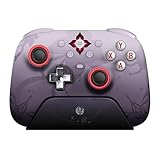
- Officially licensed by Honkai: Star Rail
- Compatible with Windows PC, Apple, Steam, and Android devices – 2.4G and wired connection for Windows, and Bluetooth for SteamOS, Apple and Android.
- TMR Joysticks - Delivers higher sensitivity, precision, and durability, featuring an RGB Fire Ring and wear-resistant joystick rings.
- Integrated charging dock keeps your controller always charged and ready, with auto-reconnection. Features customizable 6-Axis motion control, turbo, and rumble. Supports 8BitDo Ultimate Software V2.
- 1000Hz polling rate (for 2.4G and wired connection) & 8Speed Wireless Technology.
Product prices and availability are accurate as of the date/time indicated and are subject to change. Any price and availability information displayed on Amazon at the time of purchase will apply.




