“The program can’t start because vci11un6.dll is missing from your computer.” If Windows reports that vci11un6.dll was not found or could not be loaded, the failing program is usually an older industrial, CAN-bus, programming, or configuration application that depends on IXXAT VCI software.
Which fix applies to you
Use the first description that matches what happened:
As an Amazon Associate I earn from qualifying purchases.
- The error names an industrial application: repair or reinstall that application first. Its installer may contain the correct IXXAT VCI files and dependencies.
- The error appeared after moving to a new PC: install the application’s supported IXXAT VCI package, then restart Windows.
- An antivirus alert appeared first: inspect Protection history before restoring anything. Reinstall from a verified vendor package if the file was quarantined.
- The application is old but Windows is current: look for the application vendor’s legacy VCI2 or VCI3 package. The current VCI V4 package may not provide the filename that the old application expects.
- The error says “The specified module could not be found”: the named DLL may exist, but another dependency may be missing.
- You found a copy online: do not replace the file from a random DLL download page. The wrong build, architecture, or a malicious replacement can leave the application broken or compromise the computer.
What vci11un6.dll is
vci11un6.dll is an IXXAT Automation VCI library for IXXAT interface boards. It is part of the IXXAT VCI ecosystem, not a Windows system DLL, Microsoft Visual C++ runtime, or DirectX component.
Recommended Free Tools
The filename is associated with legacy IXXAT VCI software, particularly applications built around older VCI2 and VCI3-era components. Older industrial products can install it as part of their own CAN communication layer. Examples include software from industrial equipment vendors and applications such as Woodward LeoPC1. The exact parent program cannot be identified from the filename alone.
#1 Best Overall

- Ixxat CAN converter USB, CAN bus, Sub-D9 not galvanically isolated 1.01.0281.11001. Operating voltage:
- Ixxat
- TOOLS
- High quality
Public file records commonly identify this DLL as 32-bit. Treat that as an architecture clue rather than proof that every copy with this name is identical. A 32-bit application requires a compatible 32-bit DLL and dependency chain, even when it runs on 64-bit Windows.
Identify the program that needs it
Before installing anything, find the application shown in the error dialog. Look for:
- The title bar or text in the error window
- A shortcut in the Start menu or desktop
- The process name in Task Manager
- The folder named in an antivirus detection
- Recently used industrial, CAN, PLC, programming, or configuration software
- A vendor name such as IXXAT, Woodward, Eaton, or another automation supplier
You can also search for the file safely:
- Press Windows key + E.
- Select This PC.
- In the search box, enter
vci11un6.dll. - Wait for the search to finish.
- Right-click any result and select Open file location.
- Right-click the file, select Properties, and inspect Details, Digital Signatures, and Location.
A file inside the affected application’s installation directory or an IXXAT installation folder is more useful than a file found in an unrelated temporary directory. Do not assume that two files with the same name are interchangeable.
Fix 1: Reinstall the matching VCI package
This is the safest and most likely repair.
HMS is the current owner of the IXXAT product line and provides current and legacy Windows VCI drivers. Use the official IXXAT or HMS support area, select the package supported by your interface and application, and avoid third-party file repositories.
- Close the application that reports the error.
- Open the official IXXAT/HMS support or downloads page in your browser.
- Locate the Windows VCI driver area.
- Choose the current or legacy package that matches the application and IXXAT hardware.
- Download the package.
- If it is a ZIP file, right-click it, select Extract All, and extract it to a normal local folder.
- Open the extracted folder.
- Run Ixxat VCI Setup.
- Approve the administrator prompt.
- Follow the installer steps.
- Restart Windows, even if the installer does not insist on it.
- Start the original application again.
The current VCI V4 package supports modern Windows systems, but its availability does not prove that it contains the legacy vci11un6.dll filename. If an older application still reports this exact file, use the VCI package documented by that application’s vendor instead of forcing a current package.
If the installer refuses to run
Right-click the setup program and choose Properties. If an Unblock checkbox appears on the General tab, select it and click Apply. Then right-click the installer and select Run as administrator.
Do not install multiple generations at random. Older software may expect VCI2 or VCI3 components, while newer hardware packages may use a different layout and API. Remove or repair only the package specified by the application vendor unless you know which VCI generation the application uses.
Windows Errors? Fix Them Before They Spread
Repair common Windows errors and clear accumulated junk for a smoother, more stable PC - no reinstall needed.Free scan · no reinstallOutdated Drivers Are Slowing You Down
One free scan finds every outdated or missing driver and matches the right update for your exact hardware.Free scan · exact hardware matchRank #2
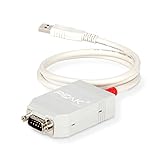
- MPN: IPEH-002021
- USB 1.1 , 2.0 , and 3.0 compatible
- Supports baud rates up to 1M
- 9-pin Male SUB-D. Storage Temperature-( -40°C) to +100°C
- Supports all interrupt and port addresses configurations of the USB interface
Fix 2: Repair or reinstall the parent application
If the error appears when launching a specific program, reinstall that program after installing or repairing VCI.
- Press Windows key + I.
- Select Apps, then Installed apps.
- Find the affected industrial or programming application.
- Select the three-dot menu beside it.
- Choose Advanced options, if available.
- Select Repair and wait for it to finish.
- If Repair is unavailable or unsuccessful, use the application’s original installer and choose Repair.
- If no repair option exists, uninstall the application.
- Restart Windows.
- Install the supported application version again.
- Run the IXXAT VCI setup afterward if the application installer does not install it.
- Restart Windows and test the application.
For very old programs, keep the original installation media or vendor-supplied legacy package. A newly released VCI package may be correct for the hardware but still incompatible with software that expects older files.
Fix 3: Check antivirus quarantine
Security software can remove a legitimate vendor DLL, but a suspicious copy should not be restored automatically.
For Microsoft Defender:
- Open Windows Security from the Start menu.
- Select Virus & threat protection.
- Select Protection history.
- Open the detection related to
vci11un6.dll. - Note the file path, detection name, and action taken.
- Compare the path with the known installation directory.
- Check the file’s digital signature and the source installer.
- If the file came from an official application or VCI installer and the detection is clearly a false positive, use Actions and choose the available restore or allow option.
- If the source is uncertain, leave it quarantined.
- Reinstall the complete application and VCI package from the official vendor instead.
- Run a full scan in Virus & threat protection.
Do not create a broad antivirus exclusion for an entire drive or system directory. If the same DLL is repeatedly replaced or detected, scan the computer and investigate the application installation rather than repeatedly restoring the file.
Free tools Windows power users keep installed
One-click scans. No signup required.
Fix 4: Match 32-bit software with the correct package
The commonly indexed vci11un6.dll is a 32-bit library. Installing 64-bit software does not satisfy a 32-bit application merely because Windows itself is 64-bit.
To check an application process:
- Start the application if it opens far enough to appear in Task Manager.
- Press Ctrl + Shift + Esc.
- Select Details.
- Right-click a column heading and choose Select columns.
- Enable Platform, where that column is available.
- Check whether the process is 32-bit or 64-bit.
You can also inspect the application’s documentation or ask its vendor which VCI generation and architecture it requires. Do not mix individual DLLs from VCI2, VCI3, and VCI4 packages. The application may require additional libraries that must come from the same release.
A 64-bit Windows installation can run a 32-bit industrial application, but all of that application’s required native dependencies still need to be compatible with 32-bit software.
Rank #3

- CAN Bus Analyzer USBCAN-2A USB To CAN Adapter Dual Path Compatible
Fix 5: Investigate a missing dependency
“The specified module could not be found” does not always mean that vci11un6.dll itself is absent. Windows can display that message when a dependency required by the DLL is missing or damaged.
Use this sequence:
- Confirm whether
vci11un6.dllexists in the application or vendor installation folder. - Check its Properties and record its location and architecture.
- Repair or reinstall the complete parent application.
- Repair or reinstall the matching VCI package.
- Restart Windows.
- Test the application again.
Do not download individual runtime files to guess at the missing dependency. If the application vendor documents a required Microsoft runtime, obtain it from Microsoft and install the architecture required by the application.
Fix 6: Repair Windows components only when other Windows features fail
Because vci11un6.dll is a third-party IXXAT file, System File Checker normally does not own or restore it. Use Windows repair commands when other Windows components are also failing, or when the VCI and application installers themselves malfunction.
- Open Start and type Command Prompt.
- Right-click Command Prompt.
- Select Run as administrator.
- Approve the User Account Control prompt.
- Run:
DISM.exe /Online /Cleanup-Image /RestoreHealth
- Wait for it to complete.
- Then run:
sfc /scannow
- Restart Windows.
- Reinstall the affected application and VCI package if the DLL error remains.
Success means DISM completes without an error and SFC reports that it repaired or found no integrity violations. These commands do not normally reconstruct a missing vendor DLL, so a successful scan does not prove that the IXXAT installation is fixed.
If you want a guided scan instead of repeatedly running DISM and SFC while guessing what changed, Outbyte PC Repair can show detected problems in its free scan; repairs are performed by the full version. Reinstalling the application that owns this DLL remains the definitive fix when its package is incomplete.
Quick wins for a faster PC:
Repair Windows errors before they cause bigger problemsFix Now →Fix the driver behind crashes, sound loss and screen glitchesFind Drivers →Clear out junk files and repair common Windows errorsFree Scan →Fix 7: Reinstall or update the interface driver
If the application works without the IXXAT hardware connected but fails when it tries to communicate with the interface, check the device driver.
- Disconnect the IXXAT interface.
- Right-click the Start button.
- Select Device Manager.
- Expand Universal Serial Bus controllers, Network adapters, Other devices, and any IXXAT-specific category.
- Look for a warning icon or an unknown device.
- Right-click the relevant device and select Properties.
- Open the Driver tab and record the provider and version.
- Select Uninstall Device only if the application or hardware vendor instructs you to remove the existing driver.
- Reconnect the interface if appropriate.
- Run the matching official Ixxat VCI Setup program as administrator.
- Restart Windows.
- In Device Manager, confirm that the device appears without a warning icon.
- Launch the application and test its hardware connection.
Updating a hardware driver will not necessarily install a legacy vci11un6.dll; the application’s VCI package still controls that file.
If manually hunting through old driver releases and checking each device is slowing you down, Outbyte Driver Updater can identify driver problems in its free scan; driver installation is handled by the full version. Use the application or hardware vendor’s supported VCI package when it is available.
Does regsvr32 fix this DLL?
Usually, no. regsvr32 is intended for DLLs that expose registration entry points such as DllRegisterServer. There is no verified evidence that vci11un6.dll is a self-registering COM component.
Do these 3 things before closing this tab:
1Repair Windows errors before they cause bigger problems2Fix the driver behind crashes, sound loss and screen glitches3Clear out junk files and repair common Windows errorsRank #4

- 【SUPPORT PERIPHERALS】The iOS OTG adapter supports digital cameras, USB flash drives, keyboards, mice and gamepads, microphones, mixers, sound cards, electronic drums, etc. (the maximum current of peripherals does not exceed 200 mA). SSD is not supported.
- 【 Plug & Play】:Plug and Play & easy to use, no need to download APP, share your photos and videos from your camera to your social network freely, No need to use PC anymore, Fast and easy !Easy to Use, No App needed and no need to take out the camera's memory card.
- 【STUNNING FEATURES】For iOS 9.2-12.4 users, This usb camera adapter supports JPEG & RAW photo format and H.264 & MPEG-4 video format taken from digital camera. You can only import photos/ videos from the digital camera to your iPhone & iPad. For i0S 13 or later users,is two-way Transmission, you can import & export picture,video,MP3 files,MP4 files,Excel,Word,PPT,PDF on ""Files"" or ""Photo"" App.
- 【STRONG COMPATIBILITY】The USB camera adapter supports standard photo formats like JPEG and RAW, along with SD and HD video formats including H.264 and MPEG-4; compatible with iPhone 11/11 Pro/11 Pro Max/Xs/Xs Max/X/8/8 Plus/7/7Plus/6/6 Plus/5/5S/SE and iPad Air /Mini /Pro.(under folder:DCIM. The iPhone 7 and later models can read 4K video.)
- 【WE PROMISE】You will get an OTG adapter. A 60-days guarantee and 1-year Warranty for every our customers to make sure you would be happy about your purchasing from us. If you have any questions about the items you received, please contact us and our team will respond to you within 24 hours and for any quality problems, a 1 will be given."
Running a command such as:
regsvr32 vci11un6.dll
may produce an error about a missing entry point or an invalid module. That does not mean Windows needs a different copy. Do not copy the DLL into System32 and register it as a routine repair.
Manual copying is exceptional. Consider it only when the original vendor installer is unavailable and the file comes from a verified, matching installation package. Put it where the vendor installer or application documentation specifies, not blindly in System32.
Check for security problems
A DLL in an unexpected writable folder, a file with no trustworthy signature, or an application that loads a replacement from its working directory deserves investigation.
- Run a full Microsoft Defender scan.
- Inspect the DLL’s path and digital signature.
- Remove unofficial replacement files.
- Reinstall the affected application and VCI package.
- Keep the application updated where the vendor provides a security release.
Eaton documented a DLL-hijacking issue involving vci11un6.dll in 9000x Programming and Configuration Software version 2.0.38 and earlier, with version 2.0.41 identified as the patched release. If that is the application producing the error, update or reinstall it using Eaton’s supported software distribution rather than copying a DLL into its folder.
If the error remains
Record these details before contacting the application vendor or IXXAT/HMS support:
- The complete error text
- The application name and version
- Windows 10 or Windows 11 edition
- IXXAT interface model
- VCI package name and version
- The DLL’s full path
- Whether the DLL is present
- Its architecture and file properties
- Any antivirus detection name
- Whether the problem began after an update, cleanup, migration, or uninstall
That information distinguishes a missing file from a wrong VCI generation, missing dependency, incompatible architecture, damaged application, or security-related replacement.
FAQ
Is vci11un6.dll a Windows file?
No evidence identifies it as a Windows-owned system DLL. It belongs to the IXXAT VCI software used by applications and IXXAT interface boards.
Best Value

- High-speed USB To CANFD Converter Compatible with CAN2.0A, CAN2.0B, CAN FD;
- CAN FD bit rates from 25 kbit/s up to 12Mbit/s,Timestamp resolution up tp 1μs;
- Compatible with Opensource Software SavvyCAN Windows/Linux/MacOs;
- Compatible with Socket-CAN comes with pibiger CAN-UTILS/C/Python demon and source code;
Should I install the current VCI V4 package?
Only if the application and hardware support it. A legacy program that specifically expects vci11un6.dll may require an older VCI package supplied by the application vendor.
Can I download just vci11un6.dll?
That is unsafe and often ineffective. A downloaded copy may be malicious, the wrong architecture, a different build, or missing its dependencies. Reinstall the official application or matching VCI package.
Will SFC restore the file?
Normally not. SFC repairs Windows-protected components, while vci11un6.dll is a third-party IXXAT file.
Does the file belong to Microsoft Visual C++?
No. It is an IXXAT VCI library and should not be treated as a Microsoft runtime component.
Why does Windows say that a module is missing when the DLL is present?
A dependency of vci11un6.dll may be missing or incompatible. Repair the complete application and VCI installation rather than replacing only the named file.
What’s actually slowing this PC down?
Pick the symptom - the matching free tool is one click away.
Can I use regsvr32?
Generally no. Use it only when the vendor explicitly documents registration for that DLL. It is not a general-purpose repair command for IXXAT VCI libraries.
Quick Recap
Product prices and availability are accurate as of the date/time indicated and are subject to change. Any price and availability information displayed on Amazon at the time of purchase will apply.




