Quick wins for a faster PC:
Clear out junk files and repair common Windows errorsFree Scan →Scan for outdated or missing drivers - takes under a minuteDriver Scan →Vitetris is a free, terminal-based Tetris game for keyboard play, with configurable controls, solo modes, two-player games, and direct network play. You can build it from source on Unix-like systems or install a package if your distribution provides one.
What is Vitetris?
Vitetris is a Tetris clone by Victor Geraldsson, designed to run in a terminal. The project describes its gameplay as similar to early Nintendo Tetris, with rotation, scoring, levels, and speed intended to follow that style, plus a short lock delay. That is the maintainer’s description in the Vitetris project README, not an independent comparison.
The project page lists high scores, configurable keys, two-player play with garbage, network play, and joystick or gamepad support on Linux or when built with Allegro. Vitetris is free software under a two-clause BSD-style license; see the official project page.
How to install Vitetris
Installation depends on your operating system and distribution. If your Linux distribution packages Vitetris, its package manager is the simplest route. Otherwise, the upstream instructions describe building it from source on Linux, *BSD, Mac OS X, and similar Unix-like systems.
What’s actually slowing this PC down?
Pick the symptom - the matching free tool is one click away.
#1 Best Overall

- 🕹️Officialy Licensed: This is an officially licensed Tetris title, ensuring an authentic gaming experience
- 🔋Portable Power: Powered by 4 AA batteries for gaming on-the-go (batteries not included) or by a USB-C cable (not included)
- Addictive Gameplay: The iconic Tetris game challenges your brain with addictive puzzle action, fast-paced block stacking and sharpens your reflexes.
- High Resolution: This pocket-sized game features a high-resolution 2.75-inch full-color vertical display, allowing you to immerse yourself in the classic gameplay.
- Headphone Jack: 3.5mm headphone jack lets you enjoy Tetris on the go on your own privately. Perfect for travel. Take your games anywhere
Build from source on a Unix-like system
- Obtain the Vitetris source code from the upstream project.
- In the source directory, run
./configure && make. - Run the resulting executable, named
tetris. - To install the program and its documentation, run
make install. The upstream installation notes also mention desktop integration files.
These are the project’s documented commands, not a guarantee that every current operating system has identical build dependencies or installation paths. Consult the upstream INSTALL instructions if configuration or compilation fails. The game server can be built separately with make gameserver.
Platform availability
The official page says Vitetris has been tested on Linux, NetBSD, and other Unix-like systems, and was ported to Windows and DOS. Its Windows and DOS binary links are historical, so check their current compatibility and provenance rather than assuming they are maintained downloads.
Rank #2

- PORTABLE RETRO GAMING: Feel the nostalgic thrill of classic puzzle action anywhere you go, with this compact keyring console clipping easily onto keys or bags for instant fun.
- AUTHENTIC LICENSED GAMEPLAY: Experience true nostalgia with officially licensed Tetris sounds, original mechanics, and retro LCD graphics - no Wi-Fi or apps required at all.
- TWO FUN GAME MODES: Choose Sprint Mode to clear 25 lines as fast as possible or Marathon Mode to test endurance across 15 levels, sharpening focus and strategy each time.
- RESPONSIVE CONTROLS & SCORE MEMORY: Smooth arcade-style buttons make stacking blocks satisfying, while built-in score memory saves your best results for ongoing challenges.
- BATTERY POWERED & TRAVEL READY: Runs on 2 AAA batteries (not included) for unplugged fun anytime - perfect for car rides, flights, school breaks, or office downtime.
Controls and game modes
The default controls documented by the project are:
| Key | Action |
|---|---|
| Left arrow | Move left |
| Right arrow | Move right |
| Up arrow | Rotate |
| Down arrow | Soft drop |
| Space | Hard drop |
Bindings can be changed through Input Setup. The README documents separate input configuration for single-player, player one, and player two. It describes A-type as a marathon game and B-type as a mode where the goal is to clear 25 lines. See the README for the project’s controls and configuration details.
Do these 3 things before closing this tab:
1Scan for outdated or missing drivers - takes under a minute2Repair Windows errors before they cause bigger problems3Fix the driver behind crashes, sound loss and screen glitchesRank #3

- Officialy Licensed: This is an officially licensed Tetris title, ensuring an authentic gaming experience
- 🚀 Addictive Gameplay: The iconic Tetris game challenges your brain with addictive puzzle action, fast-paced block stacking and sharpens your reflexes. Includes 300 bonus games. Full color 2.5" screen
- ✅ Portable Power: Powered by 3 AAA batteries for gaming on-the-go (batteries not included). On/Off LED switch for illuminated buttons
- Headphone Jack: 3.5mm headphone jack lets you enjoy Tetris on the go on your own privately. Perfect for travel. Take your games anywhere
- Vibrant Art Style: Enjoy the charming and colorful visuals that have become a hallmark of Tetris
Can you play Vitetris with another person?
Yes. Vitetris documents two-player play, including direct network games. It does not describe a hosted matchmaking service; the documented setup is one player listening and another connecting, or two players using separate terminals locally.
Network game
One player listens on a port. The other connects by entering the listening player’s host and port. You will need to agree on connection details outside the game; the project documentation does not describe matchmaking or a central lobby. Exact menu steps and network requirements can depend on the build, so follow the README for the version you are using.
Rank #4
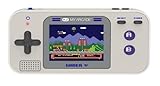
- Kids Friendly Design: No console or controllers required
- Excellent Gaming Experience: Perfect for travel, birthday Parties, gifts and more
- Rich Collection of Classic Games: includes 220 preloaded video games including various types such as entertainment, sports, and adventure
- Convenient: 2.5" color display, suitable for playing portable games outdoors
- Volume control, small and lightweight
Local play in separate terminals
The README also describes local two-player play using separate terminals and Unix domain sockets. This is a local setup rather than an internet connection.
Independent reader supportYour contribution helps us test, update, and keep practical guides available for everyone.Does Vitetris support a gamepad?
Gamepad or joystick input is optional, not required. The project lists support on Linux or with Allegro, so availability depends on platform and how Vitetris was built. Its documentation also describes mapping a controller’s START button to ENTER. Keyboard controls remain the standard documented way to play; check the build’s input setup before expecting a particular controller to work.
The Tool Desk
Outbyte PC Repair FREEClear out junk files and repair common Windows errorsFree Scan →Outbyte Driver Updater FREEFix the driver behind crashes, sound loss and screen glitchesFind Drivers →Best Value

- The large 3.5-inch screen provides better visual effects; ergonomic design, better grip and comfortable operation. One of the best gifts to give is also the best electronic product to pass your boring time.
- Built-in 23 games: 01. Classic Brick game; 02-08. Other Brick game; 09. Tanks war; 10. Racing game; 11. Pinbal; 12. Shooting; 13. Obstacles Pinball; 14-15. Fill Shooting ;16-23.Various Reverse Block game is classic, nostalgic, and puzzle. Each game can bring you happiness.
- Press "ROTATE" to adjust the number at the top of the screen to select a game. The number "01" is a classic brick game. The speed of the game and the number of levels and difficulty can be adjusted. After selecting the game you want to play, press the right arrow key to adjust the speed before the game starts, press the left arrow key to adjust the difficulty level, and press the up/down key to adjust the level.
- The game can be paused and can be played next time without restarting. Operation method: first press the "S/P" button to pause the game, then press the "ON/OFF" button to shut down, next time you play, first press the "ON/OFF" button to turn on, and then press the "S/P" button first Start the game.
- Powered by 2*AA batteries, 2 AA batteries can be used for 1 month (depending on the battery the quality of). Product weight/size: 90g/18*8*2CM; Product with packing box weight/size: 110g/18.7*8.3*2.7CM;
Version and maintenance details
Version numbers can differ between distribution packages and upstream releases. A Debian testing manpage search result identifies package version 0.59.1 (20201226), but that is Debian package metadata and should not be treated as proof of the latest upstream release. The official project page includes historical binary links, which likewise do not establish current release status. Check the project repository and your distribution’s package records for current availability.
Quick Recap
Product prices and availability are accurate as of the date/time indicated and are subject to change. Any price and availability information displayed on Amazon at the time of purchase will apply.




