Quick wins for a faster PC:
Scan for outdated or missing drivers - takes under a minuteDriver Scan →Clear out junk files and repair common Windows errorsFree Scan →“The program can’t start because voodoo2z.dll is missing from your computer.” voodoo2z.dll is not a Windows system file; it is an old Electronic Arts game DLL used by particular 3dfx Voodoo2 and Glide-era games.
The safest fix is to identify the game showing the error and repair that game’s installation. Do not download a replacement DLL and copy it into System32.
As an Amazon Associate I earn from qualifying purchases.
Which fix applies to you
Use the first description that matches what you see:
Free tools Windows power users keep installed
One-click scans. No signup required.
- The file is missing from the game folder: repair or reinstall the affected EA game from its original disc or legitimate installer.
- Windows Security recently reported or removed the file: check Protection history and restore it only if it came from your trusted game installation.
- The file exists, but the game still will not start: confirm that it is in the correct game-specific folder and that the game is not launching a second installation elsewhere.
- The message mentions DirectX, Glide, or a missing entry point: repair the game first, then address the separate graphics compatibility problem.
- The problem began after a patch or mod: remove conflicting unofficial changes and reinstall the correct game-specific patch.
- The error says the module is incompatible or not designed to run on Windows: treat it as an old 32-bit game compatibility issue, not as proof that Windows needs a new copy of the DLL.
- Several unrelated Windows programs are also failing: check Windows component integrity with DISM and SFC. Those commands are not the normal fix for this game-local file.
What voodoo2z.dll belongs to
Historical metadata identifies voodoo2z.dll as:
- Description:
Voodoo2 3rash Module - Internal name:
Voodoo2 - Company: Electronic Arts
- Format: Win32, or 32-bit
- Role: a game-specific 3D rendering module associated with 3dfx Voodoo2 and Glide graphics
The unusual spelling “3rash” appears in the file’s recorded metadata. It is probably a legacy or stylized form of “Thrash.”
#1 Best Overall
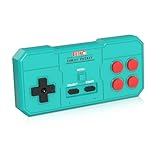
- Plug & Play, Instant Connection Simply install 2 AAA batteries (not included) – no drivers or setup needed. The controller auto-connects to your GV300S console for instant retro gaming.
- 2-Player Fun with Extra Controllers Want to team up with friends? Buy an additional controller for co-op battles! Classic button layout and ultra-responsive controls bring back childhood gaming joy.
- Perfect Replacement for GV300S Designed exclusively for GV300S consoles, this controller matches original specs. Ideal for replacing lost or damaged controllers.
- Retro Buttons, Precise Control Classic D-pad + function buttons deliver lag-free responsiveness, Conquer challenging levels with ease!
- Ready to Use & Complete Package Includes 1 controller and 1 manual – unbox and start gaming instantly!
The filename alone does not identify one exact game. Evidence places it in old EA installations including FIFA 2000, FIFA 2001, FIFA 2002, and Need for Speed: Porsche Unleashed. FIFA installations commonly used a path like:
FIFA 2000THRASHvoodoo2z.dll
FIFA 2001THRASHvoodoo2z.dll
FIFA 2002THRASHvoodoo2z.dll
Need for Speed: Porsche Unleashed used a game-local DRIVERS location in some historical installations.
That folder difference matters. The correct location is determined by the game’s own executable, installer, and patch. There is no universally correct copy of voodoo2z.dll; historical releases can have different builds and metadata.
Recommended Free Tools
Fix 1: Identify the exact game and its real folder
Before replacing anything, find out which executable is requesting the DLL.
Read the complete error
Write down:
- The exact program or game name in the error window.
- The complete wording, including any “specified module,” “entry point,” or DirectX reference.
- The path shown, if Windows displays one.
- Whether the game was installed from an original disc, a legitimate digital installer, a patched copy, a modded installation, or an unofficial repack.
A message saying “voodoo2z.dll is missing” is different from “the specified procedure entry point could not be located.” The first usually indicates a missing or misplaced file. The second often indicates that the DLL and the game are from different builds.
Search the installed game, not Windows folders
- Press Windows key + S.
- Search for
voodoo2z.dll. - If a result appears, right-click it and choose Open file location.
- Check whether it is inside the affected game’s folder.
- Right-click the game shortcut, choose Properties, and inspect Target and Start in.
A legitimate game-local path may include folders named THRASH, DRIVERS, or another directory belonging to that title. A copy found in C:WindowsSystem32 or C:WindowsSysWOW64 is not in the expected location based on the known use of this file.
If the game shortcut launches an old copy from another drive, moving or reinstalling a second copy will not fix the shortcut. Correct the shortcut or repair the installation that it actually opens.
Fix 2: Repair or reinstall the EA game
This is the most likely solution because voodoo2z.dll ships with the program that installed it.
Use an available repair or verify option
If your legitimate game launcher provides repair or file verification:
- Open the launcher.
- Open your game library.
- Select the affected game.
- Open its menu, usually represented by three dots or a gear.
- Choose Repair, Verify, or an equivalent file-checking command.
- Allow the process to finish.
- Start the game from the same launcher or its repaired shortcut.
The EA app’s repair workflow uses Library, the game’s three-dot menu, and Repair. The exact availability depends on how the legacy game was installed.
A successful repair restores the DLL to the directory expected by that game. It should not place the file in a Windows system folder.
What’s actually slowing this PC down?
Pick the symptom - the matching free tool is one click away.
Reinstall from the original source
If repair is unavailable or reports that files cannot be restored:
Rank #2
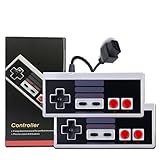
- 1.Classic Design: This Mini Classic Controller features a retro design that takes you back to the 80s gaming charm, perfectly replicating the feel and look of old-school game consoles, making it ideal for two-player games.
- 2.Strong Compatibility: This dual set is compatible with various classic game consoles and PCs, allowing you to easily connect and enjoy nostalgic games, perfect for sharing joyful moments with friends.
- 3.Portable Long Cable: Equipped with a nearly 10 feet (approximately 3 meters) cable, it offers convenience and flexibility, providing ample space for two players to move around comfortably whether sitting on the couch or at a gathering.
- 4.Durable Material: Made with high-quality materials, ensuring the controllers are wear-resistant and durable; they maintain excellent performance for long-term use, allowing you to fully enjoy gaming fun.
- 5.Lightweight Design: The controllers’ lightweight design makes them easy to carry, allowing you to share gaming enjoyment with your friends anytime, anywhere, ensuring the retro gaming experience isn't limited by time or location.
- Back up saved games and configuration files if the title stores them outside its installation directory.
- Uninstall the affected game through Settings → Apps → Installed apps.
- Restart Windows.
- Install the game again from its original disc or legitimate installer.
- Start it once before adding mods or patches.
- Apply only a patch intended for that exact game and release.
- Test the game again.
If the original installer offers graphics choices, select the option appropriate to the game rather than forcing a Voodoo2 mode on modern hardware. Do not copy voodoo2z.dll from another FIFA release or from Need for Speed. Similar filenames do not make historical builds interchangeable.
If the installer cannot copy the file
Try these checks:
- Confirm that the destination drive has free space.
- Install to a simple local folder rather than a removable or network drive.
- Right-click the installer and choose Run as administrator.
- Temporarily close other software that may be locking the installation folder.
- Check whether antivirus removed the file during installation.
- Avoid copying files from a different game’s disc unless the game’s own documentation specifically requires it.
Historical advice about copying files from a disc’s setupthrash folder may apply to one release but not to every edition. Treat it as release-specific, not as a universal repair method.
Fix 3: Check Windows Security quarantine
Antivirus software can remove an old game DLL when its behavior resembles an unwanted or suspicious component. That does not prove every detection is false, and it does not make a random downloaded replacement safe.
The Tool Desk
Outbyte Driver Updater FREEFix the driver behind crashes, sound loss and screen glitchesFind Drivers →Outbyte PC Repair FREEClear out junk files and repair common Windows errorsFree Scan →- Open Start and search for Windows Security.
- Select Virus & threat protection.
- Select Protection history.
- Look for an event involving
voodoo2z.dllor the affected game folder. - Expand the event and inspect its detected path.
- Restore the file only when you recognize the source as your trusted, legitimate game installation.
- Reinstall or repair the game if the event identifies an unofficial repack or unknown source instead.
Microsoft notes that a restored quarantined file may be detected again. Do not disable antivirus broadly just to make the game start. If the detection returns, stop and verify the game media or installer rather than repeatedly allowing the file.
After restoring a trusted file, run the game from its original installation directory. If Windows Security removed the file again, use a clean official installation and check for a game-specific compatibility update.
Fix 4: Put the restored file in the folder the game expects
Do this only when the file came from the exact game installation or its correct patch.
- Open the game’s installation directory.
- Look for
THRASH,DRIVERS, or a folder named in the installer or patch documentation. - Confirm that the game executable is in the same installation tree.
- Restore
voodoo2z.dllto that expected folder. - Do not rename it.
- Do not place it in
System32,SysWOW64, or the Windows directory. - Launch the game using its normal shortcut.
If the game still reports the file as missing while it is visibly present, the loader may be looking in another directory, or the DLL may have a missing dependency. Check the shortcut’s Target and Start in fields, then inspect whether the game has more than one installed copy.
A “specified module could not be found” message can also mean that Windows found voodoo2z.dll but could not load one of the libraries it depends on. That is why copying the same file into several Windows folders is not a reliable diagnostic.
Fix 5: Handle old DirectX or Glide requirements
voodoo2z.dll is not a Microsoft DirectX runtime file. Microsoft’s DirectX End-User Runtime Web Installer can supply optional legacy side-by-side components that an old game may separately require, but it does not install or recreate voodoo2z.dll.
Use it only when the error also mentions DirectX or the game reports a missing legacy DirectX component:
- Download the DirectX End-User Runtime from Microsoft.
- Run the installer.
- Accept the license terms.
- Allow it to install the legacy components.
- Restart Windows if requested.
- Run the game’s own repair or patch afterward.
- Test the game again.
Installing DirectX will not correct a missing EA game file by itself.
Games designed for 3dfx hardware may also need a Glide wrapper to translate their old graphics calls for modern hardware. Install and configure such a wrapper only according to the game-specific instructions and only after restoring the original installation. A wrapper addresses graphics compatibility; it does not replace a missing voodoo2z.dll.
Rank #3

- 【Supported Operating System】The Game Controller is specifically designed for playing classic old school retro snes games on computer or laptop. Compatible with Windows 98 / ME / Vista / 2000/2003 / XP / 7 / 8 / 8.1 / 10/11, Mac OS X/ OS X 10.0 and beyond, Raspberry Pi, Raspberry PI 2 model B,Model A, Raspberry Pi 1 Model B+, Raspberry Pi 2,Raspberry Pi OS, Raspberry Pi 3 Model B+, Raspberry Pi 3, Raspberry Pi Zero.
- 【Simple USB Plug and Play】If your program or application accepts USB controller input, this classic game controller do not need install drivers or patches. 1.5 meter external cable(approx. 5 ft. Long). Notice: Please download the game emulator first before start the games, and then you must manually set the buttons and directionals within the emulator you're using, and the controller not automatically assigns buttons/directional axes. If on the Steam platform, you need to first enable Steam's "Universal Controller Configuration Support" and then restart Steam. After entering the game, you also need to manually bind key positions in the game
- 【High Sensitivity without Delay】Super sensitive buttons for precision control: 6 fire buttons, a 'Start' button and a 'Select' button, motion control cross. Play your favorite old school games with classic retro feel. Fits perfectly in the hand and also perfect for two player action.Note: Not applicable to Switch/PS games. Not Compatible with TV/ TV Box, third Mini Games Box and Tesla Model 3
- 【Supported Game Emulators】The game controller works with most emulators. Download any emulator you wish to download and use from Google and do the same with ROMS. Notice:Third party controller, not original controller. But it works phenomenal with the Raspberry Pi game emulation and so on
- 【Product Service】If you have any problem during use, send message to us and we will help you to solve the problem soon
Fix 6: Use compatibility settings for the 32-bit game
A 32-bit game can run on 64-bit Windows, but its old graphics assumptions, installer behavior, or copy-protection components may still cause problems.
- Open the game’s installation folder.
- Right-click the main game executable.
- Select Properties.
- Open the Compatibility tab.
- Select Run this program in compatibility mode for.
- Test an older Windows mode appropriate to the game’s era.
- Select Run this program as an administrator if the game needs permission to write its own configuration files.
- Select Apply, then OK.
- Launch the executable from its installed directory.
Change one setting at a time. If compatibility mode makes the error worse, return to Properties → Compatibility and clear it.
Do not install a 32-bit DLL into a 64-bit system directory. The relevant question is whether the 32-bit game can load its own 32-bit module from the expected game folder.
Crashes, No Sound, or Screen Glitches?
Random freezes, missing sound and display glitches usually trace back to one bad driver. Find and replace yours safely.Free scan · under a minuteWindows Errors? Fix Them Before They Spread
Repair common Windows errors and clear accumulated junk for a smoother, more stable PC - no reinstall needed.Free scan · no reinstallFix 7: Update or reinstall graphics drivers only for graphics-related failures
A graphics driver will not restore a deleted voodoo2z.dll, but a driver problem can appear after the file is repaired if the game still fails during 3D initialization.
Check the adapter in Device Manager
- Press Windows key + X.
- Select Device Manager.
- Expand Display adapters.
- Right-click the active graphics adapter.
- Choose Update driver.
- Select Search automatically for drivers.
- Restart Windows if a driver is installed.
For a clean reinstall:
- Return to Device Manager → Display adapters.
- Right-click the adapter and choose Uninstall device.
- Select the option to remove the driver package only if Windows presents it and you have a known replacement available.
- Restart Windows.
- Install the driver supplied through Windows Update or your graphics hardware manufacturer.
- Test the repaired game.
Outbyte Driver Updater can reduce the manual work of hunting through hardware models and driver versions: its free scan shows what is outdated, while driver installation is handled by the full version. Reinstalling the affected game remains the definitive fix for a missing voodoo2z.dll.
Do not expect a current graphics driver to provide native Voodoo2 hardware support. Old games may still need a compatible wrapper or game-specific patch.
Independent reader supportYour contribution helps us test, update, and keep practical guides available for everyone.Fix 8: Repair Windows components only when Windows has broader problems
Because voodoo2z.dll is game-local, Windows component repair is low priority. Use it when other built-in Windows programs are also failing, system files are damaged, or updates have repeatedly broken unrelated applications.
Do these 3 things before closing this tab:
1Repair Windows errors before they cause bigger problems2Scan for outdated or missing drivers - takes under a minute3Clear out junk files and repair common Windows errors- Open Start.
- Search for Command Prompt.
- Right-click it and select Run as administrator.
- Run:
DISM.exe /Online /Cleanup-Image /RestoreHealth
- Wait for DISM to complete.
- Then run:
sfc /scannow
- Wait until verification reaches 100 percent.
- Restart Windows.
- Retry the game.
DISM repairs the Windows component store. SFC checks protected Windows system files. Neither command is expected to download or recreate an EA game DLL.
If you repeatedly run these commands without knowing what changed, Outbyte PC Repair can scan for the Windows issues involved; its free scan identifies problems, while repairs are handled by the full version. For this file specifically, repairing or reinstalling the exact EA game is still the authoritative solution.
What not to do
Do not use random DLL download sites
Downloading voodoo2z.dll from an unknown DLL catalog can give you:
- The wrong historical build
- The wrong 32-bit or 64-bit architecture
- A file that does not match your game’s patch
- Malware or a modified binary
- A replacement that hides the damaged installation without fixing it
There is no verified Microsoft package that contains this EA game DLL. Use the original game disc, the legitimate installer, or the game’s own repair and patch process.
Do not copy it into System32
This is not a general Windows dependency. System-wide copying can create conflicts and makes it harder to determine which game is actually loading the file.
Do not register it with regsvr32
regsvr32 is intended for DLLs that expose registration entry points such as DllRegisterServer. A rendering module like this is not normally a COM or ActiveX component. Running:
regsvr32 voodoo2z.dll
will commonly fail because the file is not self-registering. Registration does not repair a missing game installation.
Rank #4

- AUTHENTIC 16-BIT GAMING – Relive the golden era of gaming with the Retro-Bit Legacy16 wired controller, inspired by classic 16-bit consoles. Enjoy a familiar ergonomic design with a responsive D-pad and precision buttons for retro and modern games alike.
- ENHANCED FUNCTIONALITY – Features dedicated Home, Screenshot, and ZL/ZR shoulder buttons, providing expanded functionality for Nintendo Switch while maintaining the nostalgic feel of a classic retro controller.
- PLAY ACROSS MULTIPLE PLATFORMS – Compatible with Nintendo Switch, PC, MacOS, RetroPie, Raspberry Pi, and other USB-enabled devices. Perfect for retro emulation, indie games, arcade classics, and modern platformers.
- USB CONNECTION – Includes a generous 10 ft (3 m) cable for comfortable gameplay.
- DESIGNED FOR RETRO GAMING – Engineered for fighting games, shooters, and arcade classics with comfortable controls, durable construction, and authentic styling that captures the feel of the original 16-bit era.
If the error remains after reinstalling
Work through these checks:
- Confirm the exact executable that starts when you click the shortcut.
- Search for duplicate installations on other drives.
- Check that the DLL is in the game-specific folder, not merely somewhere on the computer.
- Remove unofficial patches and mods temporarily.
- Reinstall the exact patch for that game and edition.
- Test the unmodified game before adding enhancements.
- Check whether the message names another dependency, such as DirectX, Glide, or a missing entry point.
- Try compatibility settings only after the files are complete.
- Consider System Restore only if the failure clearly began after a recent driver, update, or software change.
System Restore can revert system files, registry settings, and installed programs while normally leaving personal files alone. It is not a substitute for restoring the game from its original installer.
Prevention
Keep a backup of the original game installer, patches, and save files. Before applying a graphics patch or mod, copy the game directory or at least the original rendering files. Install one version of the game in one known folder, and avoid mixing files from different FIFA releases or other EA titles.
If antivirus flags a file, record the file path and detection before restoring anything. A clean, traceable installation is safer than repeatedly downloading individual DLLs.
FAQ
Is voodoo2z.dll part of Windows?
No. It is an Electronic Arts game DLL associated with old Voodoo2 and Glide rendering. It is not a Windows component, Visual C++ file, .NET file, or general DirectX DLL.
Which game uses voodoo2z.dll?
Historical evidence associates it with several old EA games, including FIFA releases and Need for Speed: Porsche Unleashed. The filename alone cannot identify the exact game, so use the error’s program name and executable path.
Can I download the DLL separately?
Avoid random DLL download sites. The correct build depends on the specific game and patch. Restore it from that game’s legitimate installer or repair process.
Should I put it in System32 or SysWOW64?
No. The known use is game-local, commonly under THRASH or DRIVERS. The game’s own installation determines the correct folder.
Will installing DirectX fix it?
Only if the game also has a separate missing legacy DirectX dependency. DirectX does not contain or recreate voodoo2z.dll.
Why does Windows say the file exists but cannot load it?
The DLL may be in the wrong folder, incompatible with the game’s build, corrupted, or dependent on another missing library. Check the exact executable path and repair the complete game installation.
The Tool Desk
Outbyte PC Repair FREERepair Windows errors before they cause bigger problemsFix Now →Outbyte Driver Updater FREEScan for outdated or missing drivers - takes under a minuteDriver Scan →Should I run regsvr32?
No, not for this rendering DLL. Registration is for DLLs that provide a registration entry point, and it does not restore a damaged game installation.
Is the file malware?
The filename alone does not establish that. Verify its location and source. A copy supplied by a trusted, legitimate installation is different from an unexplained copy found in a Windows system folder.
Quick Recap
Product prices and availability are accurate as of the date/time indicated and are subject to change. Any price and availability information displayed on Amazon at the time of purchase will apply.




