Free tools Windows power users keep installed
One-click scans. No signup required.
BGMI’s July 2021 version 1.5.0 update added Mission Ignition to Erangel, changed the airdrop weapon lineup, introduced throwable healing items, expanded control and graphics settings, and reset Royale Pass progression around a shorter season cycle. A contemporaneous roundup called its list “50+” features, but the available sources do not establish 50 distinct additions: the number depends on whether individual settings, mode mechanics, season changes and fixes are counted separately.
Mission Ignition transformed Erangel
Mission Ignition was a themed Erangel mode built around futuristic infrastructure, new routes and tactical tools. BGMI’s official July 10, 2021 preview highlighted the mode; the contemporaneous feature roundup described its mechanics in more detail.

New areas and ways to move
- High-tech regions: Erangel gained technologically themed areas associated with the mode.
- Hyperline: This transport system gave players a faster way to travel between locations.
- Air conveyors: These offered another route across the map, lifting and carrying players through the air.
- G-38 gravity-free motorcycle: The two-seat vehicle could travel over land and water, giving squads a way to cross terrain that would otherwise interrupt a ground route.
Loot, scouting and defense
- Tesla Semi trucks: These moving trucks carried loot, creating opportunities to obtain supplies while navigating the mode.
- Patrol dog: The dog could mark rare items, helping players locate valuable loot.
- Tactical Marking Device: This tool added a tactical marking option for players.
- Deployable Riot Shield: Players could place a shield for cover.
Weapons and healing changed how squads managed fights
MG3 replaced the airdrop M249
The MG3 took the M249’s place in airdrops. The M249, in turn, moved to field loot on most classic maps. The roundup reported that the MG3 held up to 75 rounds and offered firing rates of 660 or 990 rounds per minute. These are the figures reported in that 2021 roundup, not a statement about the current game’s balance or availability.
ASM Abakan joined Mission Ignition
The ASM Abakan was a new assault rifle associated with Mission Ignition. The roundup reported a magazine capacity of up to 30 rounds. Its inclusion expanded the mode’s weapon options; the source does not establish that it was available across every mode.
Do these 3 things before closing this tab:
1Clear out junk files and repair common Windows errors2Fix the driver behind crashes, sound loss and screen glitches3Repair Windows errors before they cause bigger problems#1 Best Overall
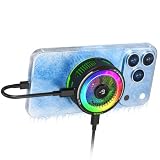
- 20W SEMICONDUCTOR PHONE COOLER: Experience powerful 20W cooling designed to rapidly pull heat away from your smartphone during BGMI, COD Mobile, Free Fire MAX, Genshin Impact, streaming and other intensive tasks. Helps reduce thermal throttling and maintain smoother performance.
- 5 SMART COOLING MODES + OVERCLOCK: Choose AI, Silent, Balanced, Freeze or Overclock Mode according to your usage. AI Mode automatically adjusts cooling, while Overclock Mode delivers maximum cooling performance for demanding gaming sessions.
- PLAY WHILE CHARGING: Pass-through charging lets you power the cooler while simultaneously charging your phone, helping you continue long gaming sessions without interrupting gameplay.
- 45% LARGER COOLING AREA + STRONG MAGNETIC HOLD: The enlarged cooling plate provides greater contact for efficient heat dissipation. Magnetic attachment supports MagSafe-compatible iPhone 12–17 series, while the included magnetic plate and detachable clip expand compatibility with Android and iOS phones.
- REAL-TIME TEMPERATURE DISPLAY + RGB: Monitor cooling performance with the built-in temperature display while dynamic RGB lighting adds a gaming aesthetic. Ideal for BGMI, COD Mobile, Free Fire MAX, Genshin Impact and extended mobile gaming sessions.
Healing items could be thrown to teammates
Players could throw healing consumables to teammates rather than needing to hand them over at close range. That made it possible to support a squadmate from a short distance while staying in position.
Controls, interface and graphics options expanded
The update added several settings and quality-of-life options. Their availability could vary by device; in particular, the reported 90-fps option was for supported high-end devices, not a universal performance guarantee.
- Manual weapon sensitivity: Players could adjust sensitivity for individual weapons.
- Cloud storage for weapon sensitivity: Sensitivity settings could be stored in the cloud.
- Automatic weapon switching: A setting could switch weapons automatically when ammunition ran out.
- Third-person field of view: A slider allowed players to adjust the third-person field of view.
- Lower graphics preset: A new lower setting was reported for low-end devices.
- 90-fps option: A higher frame-rate option was reported for supported high-end devices.
- Gyroscope and camera-tilt sensitivity: Separate sensitivity controls gave players more ways to tune these inputs.
- Glass windows: Some buildings in Erangel and Miramar gained glass windows, changing sightlines and the way players approached those interiors.
Royale Pass and season progression were reworked
KRAFTON’s July 14, 2021 Royale Pass and season announcement set out the launch schedules and rules for the new progression structure. All dates and UC prices below describe the 2021 schedule and terms, not current availability or pricing.
| 2021 progression item | Official schedule or rule |
|---|---|
| Royale Pass M1, “Tek Era” | July 14–August 12, 2021 UTC |
| Royale Pass M2, “Project T” | August 13–September 13, 2021 UTC |
| Maximum attainable Royale Pass rank | 50 |
| Cycle 1 Season 1 schedule | July 14–September 16, 2021 UTC |
| Ordinary Royale Pass price | 360 UC in the 2021 announcement |
| Elite Royale Pass price | 960 UC in the 2021 announcement |
KRAFTON said the Royale Pass duration had been adjusted to one month and that each Cycle included three seasons. The M1 and M2 windows above therefore describe consecutive passes, while Cycle 1 Season 1 had its own schedule.
Recommended Free Tools
A later client patch fixed reported issues
Not every change associated with the July release period was a new feature. In a July 24, 2021 client patch notice, KRAFTON said a patch released July 23 fixed four reported problems:
- Players could get stuck loading while wearing Unicorn-set outfits.
- The C1S1 menu could crash on some devices.
- Players had a shooting problem while in a buggy during Mission Ignition.
- Other players’ Tesla vehicles could have low sound.
These were corrections to reported client issues, rather than additions to the feature list.
Quick Recap
Product prices and availability are accurate as of the date/time indicated and are subject to change. Any price and availability information displayed on Amazon at the time of purchase will apply.



