Free tools Windows power users keep installed
One-click scans. No signup required.
Pokémon Platinum is a Nintendo DS game, so you need a Nintendo DS emulator. Two documented options are melonDS and DeSmuME. Neither source establishes one as universally better. The right choice depends on your computer’s operating system, whether you plan to use firmware boot, and whether you need online features.
Why the platform decides the emulator category
Nintendo’s packaging for the game states: “THIS GAME CARD WILL WORK ONLY WITH THE NINTENDO DS™ VIDEO GAME SYSTEM.” Nintendo UK’s product listing names Nintendo DS as the system and gives a release date of 22 May 2009. That listing is a UK/European regional page, so the date applies to that release listing rather than to every region. Because the game is built for the DS, an emulator for another console family is the wrong category, and a generic multi-system emulator is only useful if it specifically supports the DS.
melonDS or DeSmuME: how the two options compare
The table below uses only what the project pages and FAQs state. Where a project’s documentation is silent on a point, the cell says so rather than guessing.
| Attribute | melonDS | DeSmuME |
|---|---|---|
| Self-description | Nintendo DS emulator. Its GitHub repository description reads “DS emulator, sorta”. | Nintendo DS emulator that targets the Nintendo DS and DS Lite. |
| Desktop platforms listed | Not stated in the passage reviewed. Check the current platform list on the project’s GitHub repository before downloading. | Windows, Linux, and Mac OS X, according to its FAQ. |
| Firmware boot | Requires a BIOS/firmware dump taken from an original DS or DS Lite, according to its README. | Not stated in the FAQ reviewed. |
| Direct game boot | The README distinguishes this from firmware boot and says certain DSi/3DS DS BIOS dumps are suitable for it. | Not stated in the FAQ reviewed. |
| Wi-Fi and online play | Not stated in the README reviewed. | Unsupported, according to its FAQ. |
| Performance or ease of use | No controlled comparison is established in the sources. | No controlled comparison is established in the sources. |
Because the setup steps differ between the two projects, do not assume that the same BIOS files or menu steps apply to both.
What’s actually slowing this PC down?
Pick the symptom - the matching free tool is one click away.
#1 Best Overall

- Controller Adapter for Gamecube - Compatible with Nintendo Switch / Wii U / PC / Switch 2 works for nintendo gamecube controller, up to eight player for wii u or switch(need two adapter). Ideal gamecube controller adapter to play super smash bros ultimate.
- Support 4 NGC Controller - The gamecube adapter come with 4 gamecube controller input ports, and most up to 8 player at same time play with two adapter input. 180CM/5.9FT/70IN wired long USB A cable allows you to play no limit.
- Plug and Play No Driver Need - Just plug and then play your games. No lag and no drive install need on wii u/switch. Change the adapter button on WII U to play on WII U and Switch mode, Change the adapter button on PC to play on PC mode.
- Super Smash Bros Choice - You can play the super smash bros on Wii U and Switch, Plug the two usb into game console and then choice Mario or Luigi or what your want to battle with your friends. NOTE: you need enter ssb game by wii u remote control and only support ssb on wii u.
- 70 inch Long Cable - Play more freedom no more distance limited. Support turbo feature that What turbo actually does is replicates the same button pushed by the user over and over again at an extremely fast rate,Enhance your gaming experience.
Setup: a practical sequence
- Confirm your operating system. If you use Windows, Linux, or Mac OS X, DeSmuME’s FAQ lists all three. For melonDS, check the platform list in the project’s current GitHub repository, because the passage reviewed does not provide one.
- Decide whether you need online features. If you do, see the online section below before choosing, since neither Nintendo’s service nor the emulators’ Wi-Fi support will meet that need.
- Choose a boot method if you use melonDS. For firmware boot, you need a BIOS/firmware dump from your own original DS or DS Lite. For direct boot, the README says certain DSi/3DS DS BIOS dumps are suitable. Check the README for the exact file names and locations, because the sources do not list them.
- Load your own game file. An emulator does not include Pokémon Platinum. Obtaining a copy from an unofficial source can infringe copyright in many jurisdictions, so the legal route is usually to dump a cartridge you own.
Online play after the Nintendo Wi-Fi shutdown
Nintendo says its Nintendo Wi-Fi Connection services for Nintendo DS software were discontinued on 20 May 2014. The sources do not establish the status of every local multiplayer mode, of any specific emulator version, or of third-party services. If a feature you care about depends on the original network, verify it separately before relying on it.
Independent reader supportYour contribution helps us test, update, and keep practical guides available for everyone.Hardware: do you need a DS?
An emulator runs on a computer, so an original Nintendo DS and a Pokémon Platinum game card are only needed if you want the original hardware route. Neither source says that a stylus or controller is required to choose or run an emulator.
Quick Recap
Best Value

- 《NOTICE》This adapter is only compatible with Windows PCs equipped with a USB interface. Use with other models is not guaranteed. Supported OS are Windows 10, Windows 8-8.1, Windows 7 (SP1), Windows Vista (SP2), and Windows XP (SP3). This converter has been verified to be compatible only with the Wii Game Classic Controller / Classic Controller Pro. Other controllers have not been tested and cannot be guaranteed.
- 《CLASSIC CONTROLLER / CLASSIC CONTROLLER PRO TO USB》Wii Game Classic Controller or Classic Controller Pro can be connected to your Windows PCs. With a fast response model that allows you to input up to 60 times per second, you can play comfortably without missing button operations. You can set the continuous shooting mode by pressing each button while pressing the HOME button. Perfect for a fast shooter!!
- 《PLUG AND PLAY - NO SOFTWARE or DRIVER INSTALLATION IS NECESSARY》 No need to install any software or driver. Simply just connect the adapter to the USB port to you desktop or laptop computer and ready to go!! It works for Windows OS PCs.
- 《ADAPTER COMPATIBILITY》 Compatible with Windows 10 / Windows 8 / Windows 7 (SP1) / Windows Vista (SP2) / Windows XP (SP3)
- 《PRODUCT DETAILS》 Size: 2.4" X 1" X 0.6" (62mm X 26mm X 17mm). Cable length: 39" (1m). Weight: 32g. Adapter from Wii Classic Controller (RVL-005) / Wii Classic Controller Pro (RVL-005 / RVL-005-02) to USB port. Compatible with Windows 10 / Windows 8 / Windows 7 (SP1) / Windows Vista (SP2) / Windows XP (SP3). The adapter is for only one player.
Rank #4

- Controller compatibility: Xbox Series X Controller, Xbox Series S Controller, Xbox One Bluetooth Controller, PS5/PS4/PS3 Controller, Switch Pro, Wii Mote, Wii U Pro.
- 8BitDo Controller compatibility: all 8BitDo Bluetooth Controllers and arcade stick.
- System compatibility: Switch, Windows, macOS, Steam Deck & Raspberry Pis and more. USB Wireless Adapter 2 is compatible with Steam Deck now.
- Support 6-axis motion on Switch and Vibration on X-input mode.
- Supports ultimate software - customize button mapping, adjust stick & trigger sensitivity, vibration control and create macros with any button combination.
Rank #3
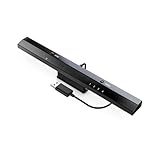
- Wireless sensor dolphin bar can connect your Wii remote plus controller to your PC by Bluetooth.
- Supports cursor anti-shake function, works as a normal keyboard and mouse.
- Allows you to play more quickly and precisely with your GC controllers, Light guns or Racing wheels.
- You can return or skip to the beginning of the current, previous or next chapter and supports Fast reverse, Fast forward, Pause playing, etc.
- Supports the G-sensor function that is the best choice for the Racing Games. Supports the Vibration Feedback.
Rank #2

- Switch to “Wii U” or “PC” mode by using the switch located on the side.
- The GameCube Controller Adapter allows you to connect up to four GameCube controllers (or wireless GameCube controllers) to a Wii U system, PC USB, Switch/Switch 2.
- Supports the built-in Vibration Feedback with no delays by plugging the two USB ports of the adapter into your Wii U system or PC USB connector ports.
- Compatible with Windows XP, Vista, Windows 7,Windows 8, 10, 11 and Mac OS under the PC mode.
- The driver is required if you need the vibration feedback on the PC mode.
Product prices and availability are accurate as of the date/time indicated and are subject to change. Any price and availability information displayed on Amazon at the time of purchase will apply.




