Windows Errors? Fix Them Before They Spread
Repair common Windows errors and clear accumulated junk for a smoother, more stable PC - no reinstall needed.Free scan · no reinstallOutdated Drivers Are Slowing You Down
One free scan finds every outdated or missing driver and matches the right update for your exact hardware.Free scan · exact hardware matchDolphin supports seven formats for GameCube and Wii game dumps: GCM/ISO, GCZ, CISO, WBFS, WIA, NFS, and RVZ. For an uncompressed dump, use GCM/ISO; if you want Dolphin’s recommended space-saving compression, choose RVZ. NFS is a specific case for Wii games purchased from the Wii U eShop.
Which game dump formats does Dolphin support?
Dolphin’s official FAQ lists these formats for playing game dumps:
| Format | What Dolphin says | When it may fit |
|---|---|---|
| GCM/ISO | Uncompressed. The FAQ gives approximate sizes of 1.4 GB for GameCube games and 4.7 GB for Wii games. | When you want an uncompressed dump. |
| GCZ | Supported; Dolphin can compress games to this format. | A compressed format Dolphin recognizes. The FAQ does not compare its trade-offs with other formats. |
| CISO | Supported and described as lossy compression. | Smaller files, with some unused disc information removed. |
| WBFS | Supported and described as lossy compression. | Smaller files, with some unused disc information removed. |
| WIA | Supported; Dolphin can compress games to this format. | Another compressed format Dolphin can create. |
| NFS | Supported for Wii games purchased from the Wii U eShop. | This specific eShop case, rather than a general-purpose recommendation. |
| RVZ | Supported; Dolphin can compress games to this format and recommends it for saving space. | When you want to compress a dump for storage. |
Can Dolphin play ISO files?
Yes. Dolphin lists GCM/ISO as a supported game dump format. “ISO” is the common filename extension; Dolphin refers to the uncompressed format as GCM/ISO. The FAQ’s approximate sizes—1.4 GB for a GameCube game and 4.7 GB for a Wii game—are general estimates, not exact sizes for every title.
Should you use ISO, WBFS, or RVZ?
Choose GCM/ISO for an uncompressed dump
GCM/ISO is the uncompressed option in Dolphin’s FAQ. It is a straightforward choice if you want to keep the dump uncompressed and have space for it.
#1 Best Overall

- Controller Adapter for Gamecube - Compatible with Nintendo Switch / Wii U / PC / Switch 2 works for nintendo gamecube controller, up to eight player for wii u or switch(need two adapter). Ideal gamecube controller adapter to play super smash bros ultimate.
- Support 4 NGC Controller - The gamecube adapter come with 4 gamecube controller input ports, and most up to 8 player at same time play with two adapter input. 180CM/5.9FT/70IN wired long USB A cable allows you to play no limit.
- Plug and Play No Driver Need - Just plug and then play your games. No lag and no drive install need on wii u/switch. Change the adapter button on WII U to play on WII U and Switch mode, Change the adapter button on PC to play on PC mode.
- Super Smash Bros Choice - You can play the super smash bros on Wii U and Switch, Plug the two usb into game console and then choice Mario or Luigi or what your want to battle with your friends. NOTE: you need enter ssb game by wii u remote control and only support ssb on wii u.
- 70 inch Long Cable - Play more freedom no more distance limited. Support turbo feature that What turbo actually does is replicates the same button pushed by the user over and over again at an extremely fast rate,Enhance your gaming experience.
Choose RVZ to save space
Dolphin recommends RVZ when compressing dumps to save space. The FAQ does not give a full comparison of compression ratios, speed, or compatibility among all formats, so it does not establish RVZ as a universal best choice for every use.
Understand the WBFS and CISO trade-off
Dolphin describes both WBFS and CISO as lossy compression formats: they remove some unused information stored on discs to make files smaller. That is the specific trade-off the FAQ identifies; it does not provide a broader quality or performance ranking.
Rank #2

- Switch to “Wii U” or “PC” mode by using the switch located on the side.
- The GameCube Controller Adapter allows you to connect up to four GameCube controllers (or wireless GameCube controllers) to a Wii U system, PC USB, Switch/Switch 2.
- Supports the built-in Vibration Feedback with no delays by plugging the two USB ports of the adapter into your Wii U system or PC USB connector ports.
- Compatible with Windows XP, Vista, Windows 7,Windows 8, 10, 11 and Mac OS under the PC mode.
- The driver is required if you need the vibration feedback on the PC mode.
Are saves and NAND files game formats?
No. The seven formats above are game dump formats, not an exhaustive list of every file Dolphin reads or stores. Dolphin’s guides index treats user data and system data separately. The user directory holds items such as saves, settings, and screenshots; its location can vary by Dolphin version, operating system, and configuration.
Wii NAND is separate console system data, not another disc-dump format. Dolphin’s NAND guide explains that it contains save data, downloaded channels, and the Wii Menu, and that some games may need files available only in a full NAND dump. Dolphin also documents virtual SD cards separately in its guides.
Quick wins for a faster PC:
Repair Windows errors before they cause bigger problemsFix Now →Fix the driver behind crashes, sound loss and screen glitchesFind Drivers →Clear out junk files and repair common Windows errorsFree Scan →Rank #3

- Controller compatibility: Xbox Series X Controller, Xbox Series S Controller, Xbox One Bluetooth Controller, PS5/PS4/PS3 Controller, Switch Pro, Wii Mote, Wii U Pro.
- 8BitDo Controller compatibility: all 8BitDo Bluetooth Controllers and arcade stick.
- System compatibility: Switch, Windows, macOS, Steam Deck & Raspberry Pis and more. USB Wireless Adapter 2 is compatible with Steam Deck now.
- Support 6-axis motion on Switch and Vibration on X-input mode.
- Supports ultimate software - customize button mapping, adjust stick & trigger sensitivity, vibration control and create macros with any button combination.
How do you obtain game files?
Dolphin’s FAQ advises buying games and dumping them rather than downloading commercial game files. It points to using a Wii and an application such as CleanRip to make a dump. This is the project’s guidance, not a complete statement of the law in every location or circumstance.
Quick Recap
Best Value
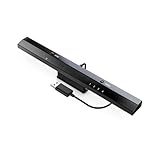
- Wireless sensor dolphin bar can connect your Wii remote plus controller to your PC by Bluetooth.
- Supports cursor anti-shake function, works as a normal keyboard and mouse.
- Allows you to play more quickly and precisely with your GC controllers, Light guns or Racing wheels.
- You can return or skip to the beginning of the current, previous or next chapter and supports Fast reverse, Fast forward, Pause playing, etc.
- Supports the G-sensor function that is the best choice for the Racing Games. Supports the Vibration Feedback.
Rank #4

- 《NOTICE》This adapter is only compatible with Windows PCs equipped with a USB interface. Use with other models is not guaranteed. Supported OS are Windows 10, Windows 8-8.1, Windows 7 (SP1), Windows Vista (SP2), and Windows XP (SP3). This converter has been verified to be compatible only with the Wii Game Classic Controller / Classic Controller Pro. Other controllers have not been tested and cannot be guaranteed.
- 《CLASSIC CONTROLLER / CLASSIC CONTROLLER PRO TO USB》Wii Game Classic Controller or Classic Controller Pro can be connected to your Windows PCs. With a fast response model that allows you to input up to 60 times per second, you can play comfortably without missing button operations. You can set the continuous shooting mode by pressing each button while pressing the HOME button. Perfect for a fast shooter!!
- 《PLUG AND PLAY - NO SOFTWARE or DRIVER INSTALLATION IS NECESSARY》 No need to install any software or driver. Simply just connect the adapter to the USB port to you desktop or laptop computer and ready to go!! It works for Windows OS PCs.
- 《ADAPTER COMPATIBILITY》 Compatible with Windows 10 / Windows 8 / Windows 7 (SP1) / Windows Vista (SP2) / Windows XP (SP3)
- 《PRODUCT DETAILS》 Size: 2.4" X 1" X 0.6" (62mm X 26mm X 17mm). Cable length: 39" (1m). Weight: 32g. Adapter from Wii Classic Controller (RVL-005) / Wii Classic Controller Pro (RVL-005 / RVL-005-02) to USB port. Compatible with Windows 10 / Windows 8 / Windows 7 (SP1) / Windows Vista (SP2) / Windows XP (SP3). The adapter is for only one player.
Product prices and availability are accurate as of the date/time indicated and are subject to change. Any price and availability information displayed on Amazon at the time of purchase will apply.




