Crashes, No Sound, or Screen Glitches?
Random freezes, missing sound and display glitches usually trace back to one bad driver. Find and replace yours safely.Free scan · under a minuteWindows Errors? Fix Them Before They Spread
Repair common Windows errors and clear accumulated junk for a smoother, more stable PC - no reinstall needed.Free scan · no reinstallSteam runs primarily on Windows, macOS, and Linux, including SteamOS. Steam is the gaming storefront and software platform; it is not itself an operating system. Steam Deck uses SteamOS, a Linux-based operating system, and can run many Windows games through Valve’s Proton compatibility layer.
What is Steam?
Steam is Valve’s online game and software-distribution platform. It combines a storefront, game launcher, library manager, update service, cloud features, community tools, and account system. Valve describes Steam as a platform for delivering software and managing digital content, while its public storefront presents Steam as a place to play, discuss, and create games.
As an Amazon Associate I earn from qualifying purchases.
That distinction matters because “What platform does Steam use?” can refer to several different things:
- Steam client: The application installed on a computer.
- Operating system: Windows, macOS, Linux, or SteamOS on which the client runs.
- Hardware: A Windows PC, Mac, Linux computer, Steam Deck, or another compatible device.
- Game compatibility: The operating systems and hardware supported by an individual game.
- Mobile access: Steam’s iOS and Android companion applications.
For Valve’s overview of Steam and its applications, see the official Steam About page and Steam Support’s platform description.
#1 Best Overall
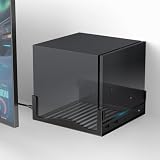
- COMPABILITY- Designed specifically to securely hold your Steam Machine. With precise internal dimensions of 6.30" (W) x 6.46" (D), this bracket offers a snug, stable fit for your console. Please verify your device dimensions prior to purchase to ensure perfect compatibility
- RECLAIM YOUR DESK SPACE- Transform your cluttered gaming station into a clean, professional setup. By mounting your console on the wall near your monitor, you free up valuable desktop real estate for your mouse, keyboard, and other accessories while keeping your rig safely off the ground
- OPTIMIZED AIRFLOW DESIGN- Keep your system cool during intense gaming sessions. The bottom of the bracket features extensive ventilation cutouts that align with your console’s intake/exhaust vents, preventing overheating and ensuring maximum performance compared to solid shelves
- HEAVY-DUTY METAL CONSTRUCTION- Built to protect your expensive hardware. Crafted from high-grade, thickened iron with a durable powder-coated finish, this mount provides rigid support that won't bend or sag, ensuring your gaming console stays securely on the wall
- QUICK & EASY INSTALLATION- Set up in minutes. The bracket comes with pre-drilled mounting holes for a hassle-free installation on wood studs or drywall. The open-frame design allows for full access to all ports, power buttons, and cables without unmounting the device
Which operating systems support Steam?
Valve’s Steamworks documentation identifies three main desktop operating-system families: Windows, macOS, and Linux, with SteamOS included in the Linux platform category.
| Operating system | Steam client status | What to know |
|---|---|---|
| Windows | Officially supported | Usually offers the broadest practical compatibility, but every game still has its own requirements. |
| macOS | Officially supported | Steam works on Mac, but the game catalog is smaller and depends on each title’s Mac build and processor support. |
| Linux | Officially supported | Native Linux games are available, and Proton can run many Windows games. |
| SteamOS | Linux-based Steam-focused operating system | Used by Steam Deck and compatible hardware; games may be native Linux builds or Windows versions running through Proton. |
Valve’s Steamworks platform documentation lists Windows, macOS, and Linux (SteamOS). Its Linux documentation recommends an up-to-date Ubuntu LTS environment for development and testing because it receives substantial testing. That recommendation does not mean Steam can run only on Ubuntu; other distributions may work, with the level of official support and troubleshooting varying by configuration.
Do not rely on outdated minimum-version information
Some older Valve documentation contains historical references to operating systems such as Windows 7 or older macOS releases. Those references should not be treated as current consumer system requirements without checking a current, version-specific Steam support page. The durable answer is the operating-system family: Windows, macOS, and Linux/SteamOS.
Free tools Windows power users keep installed
One-click scans. No signup required.
What operating system does Steam Deck use?
Steam Deck uses SteamOS, Valve’s Linux-based operating system. The device boots into a controller-friendly gaming interface designed around the Steam library, but it also includes a desktop environment.
Steam Deck is not a separate game store. It uses the same Steam account and library as a regular PC. The difference is that the Deck combines Steam’s software with portable hardware and SteamOS.
To enter desktop mode on a Steam Deck, open Steam > Power > Switch to Desktop. Desktop mode remains part of SteamOS and is based on an Arch Linux environment, according to Valve’s Steam Deck support documentation. It allows users to install desktop applications and manage files, though software installed outside Steam can introduce additional compatibility and maintenance issues.
Rank #2

- Valve is entering the gaming console marketplace with the new Steam Deck, a console geared towards PC gamers. The Steam Deck can be docked to a monitor, and used as a PC, or docked to a TV.
- Players can play a huge variety of games at any time with the comfort of a console and the freedom of a PC. Not anti-glare screen.
- Like the name suggests, the Steam Deck will include upgraded 2TB storage, and will include a carrying case. A micro SD slot will also enable expanded storage.
- Valve partnered with AMD to create a specialized APU optimized for handheld gaming, and Valve says the chip will deliver performance to run AAA gaming titles.
- The Steam Deck is outfitted with a 7-inch touchscreen, and two trackpads under the control sticks that allow gamers to operate games never designed outside of mouse and keyboard capabilities.
If a SteamOS-based handheld appeals to you, Valve’s official Steam Deck page is the appropriate place to check current models, availability, storage options, and pricing. Those details can change, so they should be verified on the buying page rather than copied from an older article.
What’s actually slowing this PC down?
Pick the symptom - the matching free tool is one click away.
How does Proton let Steam run Windows games on Linux?
Proton is a Windows-compatibility layer for Linux. It allows many Windows versions of games to run on Linux and SteamOS even when the developer has not supplied a native Linux build. Valve describes Proton as using a modified version of Wine along with implementations for graphics APIs and other Windows-related technologies.
There are three different situations to distinguish:
- Native Linux game: The developer provides a Linux version that runs directly on Linux or SteamOS.
- Windows game through Proton: SteamOS runs the Windows build through the compatibility layer.
- Incompatible or imperfect game: The game may fail to launch or may have problems with performance, controls, video, launchers, multiplayer, or anti-cheat systems.
Proton significantly expands the practical Steam library on Steam Deck and Linux, but it is not a guarantee that every Windows game will work. Valve identifies anti-cheat systems, media codecs, proprietary launchers, Windows functions, DRM, and middleware as factors that can affect compatibility. More detail is available in Valve’s Proton documentation and Steam Deck compatibility guidance.
What do Steam Deck Verified and Playable mean?
Steam Deck compatibility labels describe how a particular game behaves on Steam Deck. They do not describe whether Steam itself supports an operating system, and they do not mean that the game is guaranteed to work on every computer.
Quick wins for a faster PC:
Scan for outdated or missing drivers - takes under a minuteDriver Scan →Clear out junk files and repair common Windows errorsFree Scan →- Verified: Valve considers the game to work well on Steam Deck by default.
- Playable: The game works, but may require configuration or occasional manual interaction.
- Unsupported: The game is not currently considered playable on Steam Deck.
- Unknown: Valve has not completed a compatibility assessment.
“Verified” should not be read as a permanent promise. Game updates, SteamOS changes, drivers, launchers, or online services can alter the experience. Likewise, “Playable” does not necessarily mean that a game behaves like a console title with no setup.
Rank #3

- 【All-in-One Handheld】 The ultimate portable console in your hands. Enjoy retro games, remote play, cloud gaming, and Android titles on a lightweight handheld with responsive controls and a stunning 7” display. More than just a game console — it's a powerful all-in-one entertainment device.
- 【Cloud Gaming + Remote Play】 Cloud Gaming – Instantly play AAA titles over Wi-Fi with subscriptions to Xbox Cloud Gaming (Beta), GeForce NOW, Amazon Luna, PlayStation Plus Premium, and Boosteroid. Remote Play – Stream games locally from your own devices using Moonlight, PlayStation Remote Play, Steam Link or PXPlay.【Need buyer's subscriptions to Xbox or PlayStation.】
- 【Emulator Retro Games + Android Games】 Emulation – Enjoy retro classics with enhanced compatibility and smoother performance on PS2, GameCube, and other popular systems. Android Games – Run most local games with ease, offering more ways to play on a larger screen with console-style controls."
- 【Capacitor Digital Joystick + Switchable Modes】 abxylute One Pro is the first handheld to feature cutting-edge digital joysticks—taller, larger, and more advanced, with an extended input range. Switch between Circle Mode for ultra-precise 0.2% tracking, or Square Mode for broader input—tailored to different play styles."
- 【4K Video Output + Dual Speakers】 Connect to an external display or AR glasses for up to 4K gaming with full controller support, or enjoy immersive gameplay on the built-in 1080P 7” display—perfect for couch play or gaming on the go. Upgraded audio drivers deliver deeper, clearer vocals, and rich, immersive sound in every in-game moment."
Valve explains these categories and the related troubleshooting process in its Steam Deck compatibility FAQ.
Does every game on Steam support every operating system?
No. Steam supports multiple client platforms, but each game has its own operating-system support.
A title may be:
- Windows-only;
- available for Windows and macOS but not Linux;
- available for Windows and Linux but not macOS;
- native on Linux;
- playable on Steam Deck through Proton;
- listed on Steam but unsupported on Steam Deck; or
- launchable but missing features because of anti-cheat, a third-party launcher, DRM, codecs, or other dependencies.
Before buying, open the game’s individual Steam Store page and check its operating-system requirements and Steam Deck compatibility information. A platform tab for one game is evidence about that game, not proof that the Steam client is limited to that platform.
Valve’s documentation explains how developers identify the operating systems supported by an application. Steam Support also provides a SteamOS + Linux game-list help page.
How to check whether a game will work on Steam Deck
- Open the game’s Steam Store page.
- Find the Steam Deck compatibility section.
- Read the label: Verified, Playable, Unsupported, or Unknown.
- If the game is Playable or Unsupported, open the compatibility details and read the stated reason.
For a newly released or frequently updated game, also check recent player reports and developer updates. The badge is the best starting point, but it cannot capture every change in online services, patches, or individual hardware conditions.
How to force a Proton version on Steam Deck
Forcing Proton can help in specific cases, such as a game with a broken native Linux build or a title that works better with another compatibility tool. It is not a universal repair method.
Rank #4

- Play All Your Games – The ROG Ally supports all Windows-compatible games across platforms such as Steam, Xbox Game Pass, Epic, GOG, and more.
- 90-Day Xbox Game Pass Ultimate Included - Play Minecraft Legends and hundreds of PC games on the ROG Ally with 3 months of Game Pass. With games added all the time, there’s always something new to play. *Terms apply.
- Play the Way You Want – Embrace versatility with the ROG Ally. Game on-the-go with handheld mode, or share the fun with friends and family by hooking it up to your TV and connecting multiple controllers.
- Incredible Power – Equipped with AMD’s Z1 APU with RDNA 3 graphics and 2.8 TFLOPs, the Ally makes playing any game on the palm of your hand possible.
- Stunningly Beautiful Visuals – On the Ally, games are crisp and clear thanks to its 7” Full HD touchscreen display with a smooth 120Hz refresh rate and AMD FreeSync Premium technology.
- Highlight the game in your Steam Library.
- Open the game’s menu and select Properties.
- Select Compatibility.
- Enable Force the use of a specific Steam Play compatibility tool.
- Choose an available Proton version.
- Launch the game and test its controls, graphics, audio, video, launcher, and online features.
If the title depends on unsupported anti-cheat or launcher components, changing Proton versions may not solve the problem. Valve’s compatibility troubleshooting guidance also notes that Steam may download a Windows version in relevant situations where only a Linux version is installed.
Can Steam run on macOS?
Yes. Steam has an official macOS client. However, a Steam purchase does not automatically mean that the game has a playable Mac version.
Check the individual Store page for macOS support. Compatibility can depend on whether the developer supplies a Mac build, whether it supports Intel or Apple silicon hardware, the graphics API used, and whether required third-party software is available. The Mac catalog is generally narrower than the Windows catalog, so Windows compatibility should not be assumed from the game’s presence on Steam.
Can Steam run on Linux?
Yes. Steam supports Linux, and SteamOS is a Linux-based distribution focused on Steam gaming. Linux users may run native Linux games or use Proton for many Windows games.
The practical experience differs by distribution, graphics driver, desktop environment, game, launcher, and anti-cheat system. Community-supported configurations can work successfully even when they are outside Valve’s most thoroughly tested recommendations, but community success should not be confused with formal support from Valve.
Can Steam run on phones and tablets?
Steam has mobile apps for iOS and Android. They are useful for browsing the store, managing an account, chatting, authenticating logins, viewing the library, and using remote features. They are not equivalent to the desktop Steam client for installing and running the ordinary PC game library locally on a phone.
Best Value
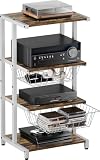
- Large-capacity & Detachable Baskets: The baskets of the DVD rack are incredibly wide and large, measuring 14.76" x 11.81" x 4.72", and can accommodate your TV accessories, audiovisual equipment, optical disc, PS4, etc. The slidable baskets of the corner shelf stand makes it easy to pull out and access. Additionally, you can customize the assembly of the baskets according to your preference.
- 4-Tier Storage & Versatile Holder: This media console cabinet features a 4-tier system with ample shelving to display sound bar, DVD player, game console, Xbox One, record players, and more, while the open design of the gaming holder ensures efficient heat dissipation. Beyond media, the sleek geometric lines of this media console double as a stylish display shelf for decor, plants, blending functionality with aesthetic appeal.
- Exceptional Build & Optimal Design: This small tv stand is expertly constructed from 0.47" thick board and 0.79" - wide steel pipe, guaranteeing unmatched durability and reliability. Featuring a robust powder - coated steel frame and adjustable foot pads, this turntable stand offers a high weight capacity, supporting up to 55 lbs, while delivering superior waterproofing and rust prevention properties.
- Multifunctional Standing Shelf: Measuring 15.75" (L) x 12.99" (W) x 32.68" (H), this game room furniture is a versatile addition to any space. The compact yet spacious design of the stereo cabinet with storage shelves allows it to seamlessly fit into various settings—whether as a multi-functional storage solution in your home theater, a stylish side rack in your office, or a practical end table in your living room or bedroom.
- Space Saver & Easy Assembly: This entertainment device stand offers generous space to accommodate your media accessories effortlessly. Designed with practicality, the gaming TV shelving keeps your stereo components securely organized, eliminating the hassle of tangled wires or clutter. And What sets the AV rack apart is its user - friendly assembly, making it an ideal gift for hassle - free home entertainment setup.
Remote Play is a separate option: a game runs on a host PC and is streamed to another device. That requires a suitable gaming computer, network connection, and compatible client device. Streaming a game is therefore different from native mobile support.
Can Steam run on PlayStation, Xbox, or Nintendo consoles?
Steam is primarily a PC ecosystem and is not the native storefront or desktop client on PlayStation, Xbox, or Nintendo consoles. Those systems may have games that are also sold on Steam, but buying a console version does not install the Steam client on the console.
Valve’s public Steam page mentions support for PlayStation, Xbox, and Nintendo controllers. That means Steam can work with those controllers on compatible devices; it does not mean Steam runs natively as the console’s game store.
The Tool Desk
Outbyte PC Repair FREEClear out junk files and repair common Windows errorsFree Scan →Outbyte Driver Updater FREEScan for outdated or missing drivers - takes under a minuteDriver Scan →Which platform should you choose for Steam?
- Choose Windows if maximum practical access to the Steam catalog is your priority and you want the fewest compatibility layers.
- Choose macOS if you already use a Mac and the specific games you want provide compatible Mac versions.
- Choose Linux if you value Linux and are comfortable checking native support, Proton behavior, drivers, launchers, and anti-cheat requirements.
- Choose Steam Deck if you want portable Steam gaming with SteamOS and are willing to check the compatibility label for each important game.
- Choose remote streaming if you want to access PC games on a phone or tablet without expecting those games to run natively on mobile hardware.
Steam itself is free to install. Game purchases, hardware costs, storage, and performance requirements are separate considerations and depend on the title and device.
Frequently Asked Questions
Is Steam an operating system?
No. Steam is Valve’s gaming storefront, launcher, library, and software platform. SteamOS is the Linux-based operating system used by Steam Deck.
Does Steam work on Linux?
Yes. Steam has a Linux client, and Proton allows many Windows games to run on Linux or SteamOS. Compatibility remains game-specific.
Does Steam Deck run Windows?
Steam Deck’s default operating system is SteamOS, not Windows. Many Windows games run through Proton. Windows can be a separate installation choice, but that is not required for the standard SteamOS experience.
Recommended Free Tools
Can I play Steam games on my phone?
The Steam mobile app mainly provides account, store, chat, authentication, and remote features. PC games generally do not run natively through the mobile app, though Remote Play can stream games from a host PC.
The Bottom Line
Bottom line: Steam’s desktop client supports Windows, macOS, and Linux/SteamOS. Steam Deck uses SteamOS, and Proton lets many Windows games run on that Linux-based system. Always check the individual game’s operating-system requirements and Steam Deck compatibility label before buying.
Quick Recap
Product prices and availability are accurate as of the date/time indicated and are subject to change. Any price and availability information displayed on Amazon at the time of purchase will apply.




