The Sims 4 installation folder depends on the launcher and the location chosen when the game was installed. On Windows, check the EA app’s game properties or Steam’s library location rather than relying on a default path. On Mac, look in Applications for The Sims 4.app. The installation folder contains game files; saves are usually in a separate Documents folder.
Find The Sims 4 installation folder on Windows
EA app
- Open the EA app and go to your game library.
- Select The Sims 4, then choose Manage > View properties.
- Read the install location shown in the game properties.
This lookup is recommended in EA Forum support guidance because it shows the location on your own computer. The commonly cited EA app default is C:Program FilesEA GamesThe Sims 4, but the install location can be changed. EA Forum guidance
Steam
A commonly cited Windows default is C:Program Files (x86)SteamsteamappscommonThe Sims 4. If Steam was configured with another library or drive, the game will be in that library instead. Check the library location configured in Steam; the default path is not universal. EA Forum guidance
Find The Sims 4.app on Mac
In Finder, check Macintosh HD > Applications and Macintosh HD > Users > [your username] > Applications for The Sims 4.app. Placement can vary. To inspect files inside the app bundle, control-click or right-click it and choose Show Package Contents, as described in EA-hosted forum guidance. EA Forum guidance
#1 Best Overall

- Electric Height Adjustment – Sit or Stand Any Time: Quiet motor (under 52 dB) with memory presets. Easily switch between sitting and standing from 28.3" to 46.5" to help reduce sedentary time
- Sturdy & Stable – Stays Solid at Full Height: Strong steel frame remains stable even when fully extended. Performance may vary slightly by floor type and load weight, but reliable for daily work, gaming, or study
- Spacious Desktop with Cable Management: Large surface fits multiple monitors and gear. Built-in cable management keeps cords tidy for a clean, organized workspace
- Quiet & Smooth Height Adjustment: Powerful motor enables seamless height changes and stable transitions, helping create a peaceful workspace that sparks creativity
- Easy Assembly & Great Value: Clear instructions and straightforward setup in 10–30 minutes. Offers electric height adjustment, memory presets, and solid build quality(The desktop is composed of two boards)
Installation folder vs. Sims 4 user folder
The installation folder contains the game’s program files. The user folder is normally DocumentsElectronic ArtsThe Sims 4 on Windows and contains saves and other player data. These folders serve different purposes: use the user folder when handling saves, not the installation folder. EA Forum guidance
For PC-to-Mac save transfers, EA’s FAQ instructs players to copy the saves directory from Documents > Electronic Arts > The Sims 4, for example using a USB drive. That is a save-transfer location, not the game’s install path. EA also notes that The Sims 4 does not support EA app cloud storage for this purpose. EA’s Sims 4 FAQ
Rank #2

- 【AODK Reversible L Shape Desk】This L shaped gaming desk comes with storage shelves, power outlet, light strip, CPU stand, headphone hook and storage bag. The L desk is reversible and the top hutch can be fixed on the left or right side according to your display needs, maximizing your limited space and ideal for corner spaces. A great choice for home office, game, office, studio and living room.
- 【Power Outlets & Charging Ports】 AODK computer desk is equipped with 3 power outlets & 2 USB charging ports for your electronic device. You can easily and conveniently charge smart phone, gaming gear and Bluetooth devices when you are working or playing games. Power cord allows you to place this small computer desk wherever you need.
- 【Gaming Desk with Colorful LED Lights】This gaming desk features LED strip that contains 10 static colors, 8 brightness grades, 10 dynamic modes and memory function with switching controls. Adjusting to the proper lighting can reduce eye strain, improve focus, and create a comfortable workspace or gaming space.
- 【Ample Storage Space】Dimension: 18.9"D x 53"W x 29.8"H. The L-shaped desk provides 2 shelves, CPU stand, headphone hook and storage bag, which gives you super plenty of storage space to store your books, work files and small office stuffs, make your work and study more efficient. There are two installation method of this 2-tier upper storage rack. You can use it as a display shelf or a monitor stand.
- 【Easy Assembly & After-sale Service】The study table comes with detailed instructions and all parts are clearly labeled for easy assembly, what you need to do is following instructions step-by-step. If your AODK desk arrives damaged, missing parts, or scratched, our professional customer support team will help you solve the problem within 24 hours.
Which location should you use?
| Platform and launcher | Where to look | Important qualification |
|---|---|---|
| Windows, EA app | EA app library > The Sims 4 > Manage > View properties | Shows the actual install location; the commonly cited default is C:Program FilesEA GamesThe Sims 4, but it can be changed. EA Forum guidance |
| Windows, Steam | The Steam library containing The Sims 4 | Commonly cited default: C:Program Files (x86)SteamsteamappscommonThe Sims 4; another library or drive changes the path. EA Forum guidance |
| Mac | Applications or the user’s Applications folder; look for The Sims 4.app |
Exact placement may vary; use Finder’s Show Package Contents to browse inside the app. EA Forum guidance |
Before moving or editing game files
Confirm the launcher and operating system first, then use the launcher’s reported location or the relevant library location. EA’s FAQ identifies PC and Mac as supported platforms and says the EA app and an EA Account are needed to install and register the game; it also says an internet connection is not required after installation for play. The FAQ does not specify one universal path for custom EA app or Steam installs. EA’s Sims 4 FAQ
Quick Recap
Best Value

- Electric Height Adjustment – Sit or Stand Any Time: Quiet motor (under 52 dB) with memory presets. Easily switch between sitting and standing from 28.3" to 46.5" to help reduce sedentary time
- Sturdy & Stable – Stays Solid at Full Height: Strong steel frame remains stable even when fully extended. Performance may vary slightly by floor type and load weight, but reliable for daily work, gaming, or study
- Spacious 55" Desktop with Cable Management: Large 55-inch surface fits multiple monitors and gear. Built-in cable management keeps cords tidy for a clean, organized workspace
- Quiet & Smooth Height Adjustment: Powerful motor enables seamless height changes and stable transitions, helping create a peaceful workspace that sparks creativity
- Easy Assembly & Great Value: Clear instructions and straightforward setup in 10–30 minutes. Offers electric height adjustment, memory presets, and solid build quality(The desktop is composed of two boards)
Rank #4

- 【Simple Desk】Enjoy a simple yet spacious work space with this sleek rustic-brown desk. Measuring 54''x19.7''x29.5'', it is the perfect solution for your study, kid's room, or home office. With a wide desktop, it accommodates your computer, calendar, lamp, and other essentials, leaving enough room to enjoy a cup of coffee
- 【Versatile Desk】Whether you need a large office desk, a bedroom desk, a gaming setup, or a desk for your child's room, this versatile desk fits seamlessly into any space, serving multiple purposes with ease
- 【Reinforced Structure】Crafted from durable particleboard and thick steel tubes, this work from home desk offers a stable and sturdy structure. Reinforcement struts beneath the tabletop provide additional stability, ensuring its longevity for working or gaming
- 【Variety of Styles and Colors】Featuring a selection of 5 on-trend hues - sleek grey, black, warm rustic brown, a unique blend of rustic brown and black for a distinctive look, and white - along with multiple sizes, this home desk is designed to effortlessly match any home decor theme and enhance a wide range of design aesthetics
- 【Easy Assembly】Say goodbye to complicated setups. This PC desk has a simple structure, visually demonstrative instruction and provided tools, and it will be finished in less than 40 minutes
Rank #3
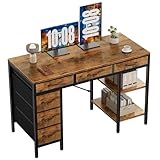
- Spacious Storage & Organization: This writing desk features 6 fabric drawers and two storage shelves, offering ample space. Perfect for organizing office supplies, gaming gear, it helps you maintain a clean and efficient workspace
- Adjustable & Removable Shelf: Customize your storage shelf to fit your needs. The middle shelf on the storage unit can be adjusted to different heights. This flexibility easily accommodates tall items like CPU towers or books
- Robust & Steady: Engineered for stability and durability. The sturdy metal frame is reinforced with triangular brackets at the back, providing exceptional support. Combined with the high-quality desktop, it ensures a rock-solid surface for work
- Versatile Multifunctional Workstation: More than a computer desk, it's a versatile hub for your home. Ideal as a gaming desk, study desk, or craft table, it seamlessly fits into your home office, bedroom, or living room, meeting all your needs
- Easy Assembly: Get set up quickly and easily. With clearly numbered parts, step-by-step instructions, and all necessary tools included, you can assemble your new pc desk easily. Adjustable feet keep it stable on uneven floors
Product prices and availability are accurate as of the date/time indicated and are subject to change. Any price and availability information displayed on Amazon at the time of purchase will apply.




