The Tool Desk
Outbyte PC Repair FREEClear out junk files and repair common Windows errorsFree Scan →Outbyte Driver Updater FREEFix the driver behind crashes, sound loss and screen glitchesFind Drivers →You add a socket to equipment in Path of Exile 2 with an Artificer’s Orb. Right-click the orb, then left-click the eligible item. The new socket holds an augment, such as a rune. Jeweller’s Orbs look similar but work on something else: they change the number of Support Gem sockets on a skill gem, not the sockets on your gear.
How to add an augment socket to gear
- Open your inventory or stash and locate an Artificer’s Orb.
- Right-click the Artificer’s Orb.
- Left-click the equipment item you want to modify.
- Inspect the item. It should now have one additional augment socket, ready to take a rune or another augment.
If the click does nothing, the item is most likely outside the orb’s eligible categories, which are listed below.
Which gear accepts an Artificer’s Orb
The Artificer’s Orb item reference lists these equipment categories as eligible:
- Armour pieces
- Martial weapons
- Wands
- Staves
- Sceptres
This list reflects the item reference as currently available to us. Eligibility can change between patches, so check the item’s description in-game if an item behaves differently.
Free tools Windows power users keep installed
One-click scans. No signup required.
#1 Best Overall
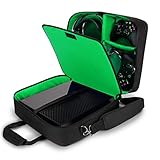
- COMPATIBLE CONSOLES: Compatible with Xbox Series S, Xbox One, Xbox One X, Xbox One S, & Xbox 360 (NOT compatible with Xbox Series X 2020 Console Release) | Exterior Dimensions: 15 x 12.25 x 6.5 inches
- HIGH QUALITY DURABLE EXTERIOR: Tightly Woven RipStop Nylon over a reinforced shell with padded interior gives your Xbox One X the best protection from water damage, scratches, and impacts
- PADDED SHOULDER STRAP & HANDLE: The S13 features 2 convenient carrying options to sling over your shoulder or comfortably carry in hand || Padded dividers provide extra protection for your gear
- EXTERNAL ZIPPERED POCKET: For even more storage and customization, our Xbox One Carrying Case features external pockets for smaller items like HDMI Cables, Power Cables, and more for quick access
- SPACIOUS INTERIOR: The customizable interior provides room for multiple controllers, cables, and headphones
Artificer’s Orb versus Jeweller’s Orb
The two orbs are easy to confuse because both affect sockets, but they operate on different things. Grinding Gear Games’ official 0.2.0 patch notes describe the Jeweller’s Orb change this way: “Jeweller’s Orbs now set a Skill Gem to have the specified number of Support Gem Sockets, rather than adding Support Gem Sockets to a Skill Gem with a specific number of Support Gem Sockets already.”
| Orb | Target | What it changes | What goes in the socket |
|---|---|---|---|
| Artificer’s Orb | Eligible equipment (armour, martial weapons, wands, staves, sceptres) | Adds one augment socket to the item | Augments, including runes |
| Jeweller’s Orb | Skill gem | Sets the skill gem to a specified number of Support Gem sockets | Support gems |
If you wanted more room for a support gem on your main melee skill, the Jeweller’s Orb is the correct tool, and an Artificer’s Orb will not help.
Rank #2

- STORAGE FOR SWITCH & CONTROLLERS: Organize your gamecube controllers, Nintendo Switch 2, Switch Lite, adapters, switch dock set & more. The spacious interior gives you more room than the competition.
- CUSTOMIZABLE INTERIOR: Versatile Hook & Loop dividers allow you to decide how big, how small, and what goes in each compartment. This can be a Switch Pro Controller Case or any other combo you need.
- PORTABILITY: Padded Shoulder Strap makes this carry case for Nintendo Switch 2 even easier to travel around with to Smash tournaments and events. Zippered opening gives easy access to your controller.
- EXTERIOR ACCESSORY POCKET: The Front Exterior Pocket is snug but provides storage for extra HDMI cables, Switch game card case, chargers, power banks, and more smaller accessories
- INTERIOR DIMENSIONS: 11 x 8 x 2.5 inches || CASE ONLY || Compatible with Nintendo Switch 2, Switch OLED, Switch Lite, Gamecube Controller, Adapter, Pro-Controller & More Nintendo Switch 2 Accessories
Replacing and removing augments
Removing an augment is not a clean undo. According to the community wiki, placing a new augment into an occupied socket destroys the augment already there. The wiki also describes the Orb of Extraction as the way to recover augments that are not bound to a socket, but using it destroys the equipment item it is applied to. Before you swap an augment, decide whether the one you are removing is worth losing.
Where to get the orbs and what has changed
The Artificer’s Orb item reference says it can drop anywhere in the world. Its version history also records that patch 0.2.0e placed 12 Artificer’s Orbs at fixed campaign locations and extended rune functionality to wands and staves. Those were version-specific changes, and we have not confirmed that the same campaign locations exist in the current game, so treat that location detail as historical.
Windows Errors? Fix Them Before They Spread
Repair common Windows errors and clear accumulated junk for a smoother, more stable PC - no reinstall needed.Free scan · no reinstallCrashes, No Sound, or Screen Glitches?
Random freezes, missing sound and display glitches usually trace back to one bad driver. Find and replace yours safely.Free scan · under a minuteRank #3
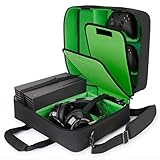
- DURABLE EXTERIOR: Woven RipStop Nylon over a reinforced shell with padded interior gives your Xbox Series X Accessories or Xbox Series S the best protection from water damage, scratches, and impacts
- CUSTOMIZABLE INTERIOR: Xbox Series S Storage spacious & adjustable interior is perfect for Xbox controllers, headphones, cables and more Xbox accessories || Interior Dimensions: 15.5 x 12.5 x 6 in
- EXTERNAL ZIPPERED POCKET: For even more storage and customization, our Xbox Travel Case features external pockets for HDMI cables, power cables, external hard drive hdd and more gaming accessories
- PORTABLE & PRACTICAL: The Xbox Series X Storage carrying case features a padded shoulder strap & handle for easy carrying || The padded dividers & water resistant base provide the ultimate protection
- EXTERIOR DIMENSIONS: 16.5 x 14 x 6.5 inches || All USA Gear products are backed by a 3 Year Manufacturer Warranty **CASE ONLY** || Compatible with Xbox Series X Accessories, Xbox Series X Console
The latest official patch index we could confirm lists version 0.4.0i, dated March 2026. Newer official patches may have changed socket behaviour, so check the current patch notes on the official Path of Exile 2 site before relying on any detail in this guide. The game is in Early Access, which means its systems can change without much notice.
We have not confirmed the maximum number of sockets for each gear type in the current version, so this guide does not list caps. The patch notes are the place to verify them.
Rank #4

- DURABLE EXTERIOR: PS5 Case Woven RipStop Nylon over a reinforced shell with padded, customizable interior gives your PlayStation 5 console the best protection from water damage, scratches, and impacts
- CUSTOMIZABLE INTERIOR: The PS5 Travel Bag spacious & adjustable interior is perfect for storing PS5 controllers, console, headphones, cables, and more || Interior Dimensions: 16 x 12.5 x 7.5 inches
- EXTERNAL ZIPPERED POCKET: For even more storage and customization, our PlayStation Travel Case features external pockets for smaller items like HDMI cables, power cables, and more gaming accessories
- PORTABLE CARRY DESIGN: The PS5 carrying case includes a padded shoulder strap and handle for easier transport, plus padded dividers and a water resistant base to help protect gaming gear on the go
- EXTERIOR DIMENSIONS: 17.0 x 14.0 x 8.0 in | For safe transport, detach all stands, attachments, and accessories from the PS5 console before packing for trips or storage.
Troubleshooting common problems
- The orb won’t apply to my item: Confirm the item is in one of the eligible categories above. Rings and amulets are not on the item reference’s list.
- I used the orb on a skill gem and nothing useful happened: You needed a Jeweller’s Orb, which changes Support Gem sockets on skill gems.
- My augment disappeared after I replaced it: This matches the wiki’s description of how occupied sockets work. Check the augment’s properties before you replace it.
For version-dependent questions, the most reliable source is the official patch notes for your current game build.
Quick Recap
Product prices and availability are accurate as of the date/time indicated and are subject to change. Any price and availability information displayed on Amazon at the time of purchase will apply.




