Look for pale, sandy-white rock outcrops near water around the starting orbital lander. A January 2026 guide places nearby deposits north and east of the lander, but use those directions as a starting point: an ore marker does not prove the node contains Calcium, so check the deposit in-game before setting up mining.
Where to look for Calcium Ore
Use the starting orbital lander as your landmark. Head north across the starting area or search east for the nearby deposits described in PC Gamer’s January 2026 guide. It describes large sandstone ledges, often with puddles. Another community resource guide characterizes Calcium Ore outcrops as pale white rocks with black spots, typically near water: Star Rupture Wiki’s Calcium Ore page.

These are visual clues, not a guarantee that a particular outcrop is Calcium. The map’s ore-deposit markers can point to Titanium, Wolfram, or Calcium. Use a map to narrow your search, then inspect the candidate deposit in the world to confirm its resource. The interactive map advises checking deposits in-game; its October 4, 2026 update notes changes for Update 2 and says item pages show possible deposits.
How to mine Calcium Ore
Use an Ore Excavator for ongoing production
The Ore Excavator is the sustained collection option. The community wiki lists it as a Training Corporation level 2 reward and says it can be placed on Calcium, Titanium, and Wolfram deposits. Its listed Calcium output varies by node purity:
Quick wins for a faster PC:
Clear out junk files and repair common Windows errorsFree Scan →Fix the driver behind crashes, sound loss and screen glitchesFind Drivers →#1 Best Overall
| Deposit purity | Ore Excavator output listed by the community wiki |
|---|---|
| Impure | 60 Calcium Ore per minute |
| Normal | 120 Calcium Ore per minute |
| Pure | 240 Calcium Ore per minute |
These are community-wiki game figures, not guaranteed rates for every current build. Check the rate shown in your game before planning production. See the Ore Excavator page for the listed building details.
Collect meteorites as an occasional alternative
The Calcium Ore page also lists mini and regular meteorites as sources, but their yields are uncertain. Treat meteorites as opportunistic extras rather than a dependable source for bulk production.
Rank #2

- Star Wars meets Five Crowns: play the award-winning rummy-style card game with an epic galactic theme and a fifth suit of stars for endless excitement
- Intergalactic themed decks: two 58-card decks featuring iconic Star Wars characters and imagery
- Strategize like a Jedi: arrange your cards into books and runs to outplay your opponents. Lowest score at the end wins
- Cosmic shifts: the wild card changes every round—adapt your strategy at lightspeed to stay ahead
- Out-of-this-world fun for all: exciting and interactive for the whole family, perfect for 1–7 players ages 8+
How to process Calcium Ore
The listed main processing route is to smelt Calcium Ore into Calcium Blocks at a Smelter. Calcium Blocks can then be processed in a Furnace into Calcium Powder. The community wiki lists Calcium Powder uses including Glass, Shotgun Ammo, and Synthetic Silicon; see its Calcium Powder page.
A separate community database lists Calcium Ore as a material for Calcium Blocks and Refined Oil. Recipe information can vary between databases or game versions, so check the relevant entry in your Recipe Station before committing to a production chain. The database listing is at StarRupture Tools’ Calcium Ore page.
Rank #3

- "Startups" is the updated version of an older Oink Game which came out in 2015 and won the second prize at Game Market Tokyo: "Rights". We upgraded the rules, the design and it is even possible to play with more players now!
- Every player takes the role of an investor and needs to try to invest in at least one of six startup companies to get the biggest shares. Only the player with the most cards of one company can get money in the end, which is why you need to carefully watch the moves of your rival players and thus become the top investor.
- To make the original game even more interesting, we added "the market", the "Anti-Monopoly-Chip" and more. The rules are still as simple as they were, but if you have played "Rights" before you should notice a new depth to it.
- The logos of the six startup companies were designed by Kentaro "ANI" Fujimoto who is a famous typographer in Japan. We recommend talking about the different logos and about what kind of company stands behind it - it's fun!
Choosing a collection method
| Method | Reliability and volume | What to verify |
|---|---|---|
| Ore Excavator on a confirmed deposit | Supports sustained automated mining; listed output depends on deposit purity. | Confirm the deposit is Calcium and check the current in-game rate. |
| Meteorites | Can provide an alternative supply, but the cited item page does not establish yields. | Do not rely on them for predictable bulk output. |
| Community map marker | Useful for finding candidate deposits, but the marker may indicate another ore. | Inspect the candidate in the world to confirm its resource. |
What to keep in mind about locations and rates
The nearby north-and-east directions come from a January 2026 guide, while maps and item databases are community-maintained and may change independently of the game. No official current-build source establishes exact coordinates or universal extraction rates here. Treat the locations and wiki figures as leads, then use the in-game deposit information and displayed rate for your own build.
Quick Recap
Rank #4
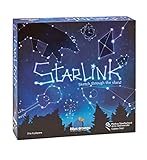
- CREATIVE DRAWING GAME: Starlink is a cosmic themed party game perfect for developing fine motor and drawing skills for both children and adults! This new party game has an amazing table presence with beautiful and high-quality cardboard pieces
- FAMILY OR ADULT GAME: This 3 to 6 players cosmic game can be enjoyed by children, parents, or the whole family! Best recommended for ages 8 & Up
- HOW TO PLAY: Each turn you will be given a new concept that you must represent by drawing lines between the available stars on the board. But watch out! Once a star has been used in one constellation, it can no longer be used for the rest of the game! The player who creates the best constellations is the winner!
- INCLUDES 100 Constellations cards, 1 Dry Erase game board, 2 Dry Erase Markers, 1 Telescope card, 1 Sand timer, Rules
Product prices and availability are accurate as of the date/time indicated and are subject to change. Any price and availability information displayed on Amazon at the time of purchase will apply.




