Crashes, No Sound, or Screen Glitches?
Random freezes, missing sound and display glitches usually trace back to one bad driver. Find and replace yours safely.Free scan · under a minuteWindows Errors? Fix Them Before They Spread
Repair common Windows errors and clear accumulated junk for a smoother, more stable PC - no reinstall needed.Free scan · no reinstallWarzone friend problems usually come down to one of four things: an incorrect Activision ID or invite, privacy or blocking settings, a connection problem, or an explicit account restriction. The right fix depends on whether you cannot find your friend, cannot join their match, or keep disconnecting.
First, identify where the problem happens
- You cannot find or invite your friend: check Activision IDs, friend requests, blocked players, and privacy settings.
- You receive an invite but cannot join: check crossplay and platform permissions, then service status and network access.
- You join but disconnect or lag: focus on service availability and connection quality.
- You see an enforcement notice or matchmaking restriction: review the account status rather than assuming an ordinary invite failure is a ban.
Activision lists “I can’t invite friends” and “I can’t connect online” as separate support issues, and they call for different troubleshooting steps: Activision Support.
If you cannot find or invite a friend
Search by Activision ID
For cross-platform play, use the friend’s full Activision ID in Warzone’s Social menu, not just their platform username. Activision says an Activision account is required for online play and documents friend invitations through the Social menu. The ID includes a hash mark and numbers, so check the complete spelling and digits with your friend before sending a request. See Activision’s account and friend guidance.
Check requests and blocked players
Look for pending incoming or outgoing requests and make sure neither player has blocked the other. Activision says blocking restricts communication and invites, and can remove a blocked player from the Activision Friends List where applicable. If appropriate, unblock the account and try the request again. Details are in Activision’s account guidance.
The Tool Desk
Outbyte Driver Updater FREEScan for outdated or missing drivers - takes under a minuteDriver Scan →Outbyte PC Repair FREERepair Windows errors before they cause bigger problemsFix Now →#1 Best Overall

- Officially licensed Call of Duty Ghost figure: Heavy-duty PVC construction with sturdy black base holds gaming controllers, mobile phones, remotes, and more without tipping over during intense gaming sessions
Review privacy and cross-network permissions
Check both the in-game communication and privacy options and the privacy settings for each player’s platform account. Platform-level controls can override in-game communication settings, and cross-network permissions may prevent players on different platforms from interacting. Activision’s instructions vary by platform and mode; follow the menus that apply to your setup rather than relying on one universal toggle. Its crossplay article covers platform-specific settings for Black Ops 6 and Warzone Ranked.
If you can invite your friend but cannot join
First establish whether the failure affects only one friend or happens whenever you try to join an online match. If it is limited to one friend, revisit the invite, privacy, and crossplay checks above. If joining online fails more broadly, check service availability and your platform’s network connection.
Rank #2

- CHARACTER DEVICE HOLDER: Call of Duty Ghost Warzone in Zombie skin! Great for techies and gamers.
- 8.5" COLLECTIBLE FIGURE: Heavy duty PVC statue and sturdy base that holds your stuff without tipping over. 8.5" tall Zombie Ghost figure.
- VERSATILE: Compatible with most types of smartphones and console controllers, including the next-gen PlayStation 5 DualSense, Xbox Series S/X and all iPhones.
- THE PERFECT COMBINATION OF FUNCTIONALITY & DESIGN: Upgrade your gaming experience today and enjoy a clutter-free setup with this innovative accessory.
- OFFICIALLY LICENSED COLLECTIBLE: Your favorite pop culture characters - With A Purpose! A pefect gift for all those Call of Duty fans.
- Check Warzone service status. Look for an outage or maintenance notice on Activision’s online services status page.
- Check your platform’s network status. Confirm that the relevant platform service is online and that both players are signed in to their platform networks.
- Run the platform’s network test. If it reports a problem, follow the platform’s connection guidance before changing router settings.
- Test the connection quality. If drops or poor connection are the issue, try a wired Ethernet connection and then follow Activision’s staged router troubleshooting in its connection support guidance.
Ethernet and router troubleshooting address connection quality or access; they will not fix a misspelled Activision ID, a blocked player, or a privacy setting that prevents invites.
Check crossplay in the context of your platform and playlist
Crossplay settings are not necessarily one universal switch across all Warzone modes and platforms. Activision’s Black Ops 6 and Warzone article, updated April 3, 2025, gives specific instructions for Warzone Ranked, notes that Xbox console settings take priority over in-game settings, and distinguishes PC storefront settings. Those details are mode- and version-specific, so check the current in-game and platform menus for the playlist you are playing. See Activision’s crossplay instructions.
Free tools Windows power users keep installed
One-click scans. No signup required.
Rank #3
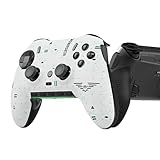
- Four rear, remappable paddles keep your thumbs on the sticks for faster reactions.
- Five fully remappable G-Keys for advanced macros and Corsair iCUE integration.
- Two unique side-mounted SAX buttons are designed to provide additional configurability and fit the natural placement of your fingers.
- OMRON mechanical button switches operate like a mouse click for instant activations.
- Corsair SlipStream ultra-fast wireless-connectivity.
When an account restriction may be involved
Investigate enforcement when Warzone shows an enforcement notice or matchmaking behaves differently while you are grouped—not simply because an invite failed. Activision says players in limited matchmaking may be placed in limited matchmaking lobbies, and party members may experience those lobbies too. Its policy states that only permanent bans may be appealed. Check Activision’s Security and Enforcement Policy and your account status if you have a specific reason to suspect a restriction.
Independent reader supportYour contribution helps us test, update, and keep practical guides available for everyone.When the usual checks do not explain it
Activision’s Warzone support index listed a Known Issues page updated September 25, 2026, when checked on October 8, 2026. That date does not establish that a known issue is causing your particular friend or party problem; check the current page for a notice that matches your symptom: Warzone Support.
Quick Recap
Rank #4

- Controller Holder: A versatile gaming accessory with serious holding power. Holds Xbox, PlayStation and most standard gaming controllers securely while charging, or even your TV remote. Compatible with next-gen PS5 DualSense, Xbox Series X/S, Xbox One
- Phone Stand: Essential gaming room accessories built to hold your phone with style. Fits popular devices including iPhone, Samsung & Google Pixel, even with most phone cases. A must-have companion for any gaming setup, desk, or bedside battle station
- Call of Duty Fans: The ultimate gaming setup accessories for Call of Duty gamers. This collectible brings the hauntingly iconic Ghost Warzone to life while keeping your devices organized, on display and ready to roll out when duty calls
- Official Activision Merchandise: Officially licensed by Activision, this collectible figure is part of the popular Cable Guys range of gaming accessories. Ideal for Call of Duty gifts or as a display piece for true fans. Built to hold, made to show off
- Dimensions: At approximately 8.5 inches tall, these gamer desk accessories fit neatly into any setup, desk space or bedroom. The controller stand's stable circular base and secure arms keep your devices locked and loaded without taking over your space
Product prices and availability are accurate as of the date/time indicated and are subject to change. Any price and availability information displayed on Amazon at the time of purchase will apply.




