If the Xbox 360 picture appears but there is no sound, the fault is most often in the audio route between the console and your TV, monitor, or receiver, not in the console itself. Work through the checks below in order: confirm the display and receiver input, confirm the audio connection for the cable you are using, check the Dashboard audio and display settings, and only then consider replacing a cable.
Start with the display and receiver input
A picture on screen proves only that the video path works. The audio path can be wired or selected separately, so check it on its own.
- Confirm the TV or monitor input. Make sure the TV is showing the input the Xbox 360 is plugged into. If the screen is showing a different input, the picture may come from another device or a stale signal, and the sound will not follow the console’s output.
- Power on and select the receiver or amplifier. If sound goes through a separate receiver or amplifier, switch it on and select the input it is connected to. Microsoft’s VGA cable guide specifically calls out turning on a separate receiver or amplifier for audio.
- Identify the connection type. Look at the cable running from the back of the console. HDMI, component, and VGA cables use different ports and different audio wiring, so the correct checks depend on which one you have. The table below shows where each one sends sound.
Check the audio route for your connection type
| Connection | Where the sound travels | Most common reason for silence |
|---|---|---|
| HDMI | Digital audio can travel in the HDMI signal to the TV, or be routed to a receiver through a separate audio cable | Sound is routed to a receiver that is off, or a second AV cable is plugged in alongside HDMI |
| Component HD AV | Video on the colored plugs; analog audio on the red and white plugs | Audio plugs are in a different input group from the video plugs |
| VGA | Video on the VGA connector; audio on separate left and right connectors or a stereo plug | Audio is not connected to the monitor, receiver, or speakers, or the input group does not match |
HDMI
Determine whether HDMI is carrying sound to the TV or whether audio is going to a receiver. Microsoft’s HDMI AV cable guide tells you not to connect the HDMI AV cable and a second AV cable through the console’s AV port at the same time. When HDMI is used with separate audio, connect only the optional audio adapter cable for audio output. If you are using a receiver, confirm it is powered on and that the Dashboard’s digital audio output is set to suit that receiver.
Component HD AV
Component video uses three colored plugs for the picture, and the red and white plugs carry the analog stereo sound. Microsoft’s component cable guide lists a picture with no sound as a matching-input problem: the audio plugs and the video plugs must go to the same input group on the TV. If the picture is on one input group and the red and white plugs are on another, the TV will show video with no audio.
Recommended Free Tools
#1 Best Overall
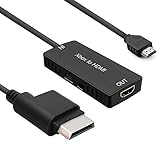
- 🎮 HD Link: Convert the native component signals from Xbox 360 to digital HDMI signals for modern HDTVs/monitors/projectors.
- 🎮Awesome Image: Provide the best signal processing with great precision, colors, resolution and details at this price.
- 🎮HD Ready: maximum possible video quality from our HDMI converter cable. Xbox 360 games that are native 720p will run in their respective resolutions.
- 🎮Compatible with: Microsoft Xbox 360 / XBOX 360 Slim.
- 🎮High Definition Connection; Plug and play; Need External Power Required; Won't affect the sound quality!
VGA
A VGA cable carries only the picture. Sound comes from the separate left and right audio connectors or stereo plug on the cable. Connect those to the monitor, a receiver, or amplified speakers, and check that the audio input matches the monitor’s selected input group. Any separate receiver or amplifier must be powered on.
Verify the Dashboard display and audio settings
Two settings in the Xbox 360 Dashboard can affect whether sound reaches your display or receiver. Menu names differ between Dashboard versions, so look under the System settings for display and audio options.
Rank #2
- Superior Performance: Experience stunning visuals and immersive sound with our premium HDMI cable, designed for flawless connectivity and maximum performance.
- Universal Compatibility: Compatible with X Box 360, PS4, PS3, Roku Box, and other HDMI-enabled devices, ensuring versatile usage for all your entertainment needs.
- Crystal Clear Resolution: Enjoy crisp and clear picture quality with support for high-definition resolutions up to 4K, delivering every detail with unparalleled clarity.
- Gold Plated Connectors: The gold-plated connectors provide corrosion resistance and enhanced conductivity, ensuring a stable signal transmission for a seamless viewing experience.
- Durable Construction: Built to last, our HDMI cable features a sturdy design and reinforced connectors to withstand daily wear and tear, making it ideal for long-term use.
- Display setting: If you are using an HDTV for the first time, make sure the HDTV resolution selected in the Dashboard is one that the television supports. Microsoft’s HDMI and component guides both point to this check. A setting the TV cannot display can leave you with a blank or distorted picture, which makes the problem look like a sound fault when it is really a display setup problem.
- Digital audio output: When sound goes to a receiver over digital audio, confirm the Dashboard’s digital audio output setting matches what the receiver accepts. An incorrect output mode can produce silence even when the cables are correct.
Isolate a cable fault before you buy anything
Reseat every connection at the console end and at the display or receiver end, then test with a known-good cable of the correct type. If sound returns, the original cable was the problem and a replacement is reasonable. If sound does not return, the cable is not the cause.
Before buying a replacement, identify the exact connection type your console and display use. Xbox 360 models use different ports. Models with a built-in HDMI port (the Xbox 360 S and E) and models that rely on a proprietary AV port need different cables. A replacement cable has to match both the console and the display input you are using.
Rank #3
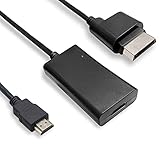
- COMPATIBILITY* Supports all versions of Xbox 360, especially the 1st version. Convert the component signals from Xbox 360 to digital HDMI signals for HDTVs/monitors.
- AWESOME IMAGE * Provide the best signal processing with great precision, colors, resolution and details at this price.
- EASY TO USE* Convert Xbox signal to HDMI signal, connect game console to HDMI TV, let you relive classic games. No power supply needed, plug and play, meet your daily needs.
- PACKAGE INCLUDE* HDMI Adapter for Original Xbox 360*1, HDMI Cable*1, Instruction*1
- 1 Year Warranty
When the signal path checks out
If sound still fails with the correct input selected, the receiver powered and set up, the right cable type connected, the Dashboard settings supported by your display, and a known-good cable in place, the problem is probably not in these accessory checks. The Microsoft cable guides cover connections and settings only and do not diagnose internal console faults.
At that point, check Xbox Support for Xbox 360 audio troubleshooting, including its Xbox 360 audio problems article and its general Troubleshoot sound page, for model-specific steps. If those do not resolve the problem, contact Xbox Support or a qualified repair service for your console model.
Quick Recap
Best Value

- Top Technology--8K@60HZ: This 8K Ultra-High Speed 2.1 HDMI Cable uses the most cutting-edge technology, which is compatible with 8K@60HZ,4K@240HZ and 4K@120HZ clearly displays every particle, and accurately processes every signal source.
- Upgrade Revolution: Highwings Ultra High Speed HDMI Cable 2.1 8K supports 48Gbps (6GB/s) which can will no longer be stuck or dropped frames when watching video. It is also backward compatible with HDMI 2.0b/2.0a/1.4/1.3/1.2/1.1 versions.
- For Game Enthusiasts: This 8K Ultra High Speed HDMI Cable 2.1 can achieve a super smooth picture of 4K@120HZ. Its latest game mode supports variable refresh rate, maximizes the value of the graphics card and CPU to obtain a smoother and more detailed picture.
- Reinforced high-quality materials: This 8K HDMI Cord uses Highwings' most popular classic style. The tail's anti-bending design has been upgraded to make it more durable. The military grade tensile nylon material also greatly extends its life.
- The ultimate perfectionist: Highwings every parts of the cable has been put through rigorous the performance tests in the laboratory. After we've combined every flawless part into a perfect 8K cable and it can be presented to you.
Rank #4

- 【HDMI 2.1 Certification】Only 1% of HDMI cables on the market have passed HDMI 2.1 certification. Scan with the QR code Scanner app for verification
- 【120Hz/144Hz Gaming Excellence】Elevate your gaming experience with smooth 4K@120Hz gameplay for PS5 and Xbox, and ultra-responsive 4K@144Hz for PC. Whether you’re pushing your console or PC to the limit, enjoy unparalleled performance across all platforms(Requires game to support 4K@120Hz)
- 【Exclusive "E-Braid" Technology】Experience unprecedented durability with our unique double-layer fishnet winding and nylon braiding techniques. Copper cores and ferrite magnetic beads ensure uninterrupted signals, eliminating black screens and flickering
- 【HDMI 2.1-48Gbps Bandwidth】Unleash the full potential of your devices with lightning-fast data transfer rates, ensuring seamless connectivity for all your high-definition needs
- 【Next-Level Resolution Support】Dive into the future with support for mind-blowing resolutions, including 10K 8K@60Hz, 12-bit; 5K@120Hz/90Hz, 12-bit; 4K@144Hz/120Hz, 12-bit; and 2K@240Hz/165Hz
Product prices and availability are accurate as of the date/time indicated and are subject to change. Any price and availability information displayed on Amazon at the time of purchase will apply.




