A loud PS4 Pro fan usually means the console is working harder to move heat, but noise alone cannot tell you why. Start by checking placement and clearing dust from the vents. If the fan rattles or wobbles, or the console shows an overheating warning or shuts down, it may need internal inspection or repair.
Why a PS4 Pro gets loud
The fan speeds up to move heat out of the console. Restricted airflow, dust, a hot room, or a faulty fan can contribute to heat and noise, but a loud fan by itself does not prove that the console is overheating. iFixit identifies placement, room temperature, debris in the cooling path, and fan condition as possible factors in its PS4 Pro troubleshooting guide and overheating advice.
Blocked airflow or a hot room
A console on carpet or crowded by objects has less room to draw in and exhaust air. A hot room can also make the system reach high temperatures sooner. Move the PS4 Pro to a firm surface and leave open space around it.
Dust in the vents or inside the cooling path
Dust on the visible vents is one thing; debris deeper in the console is another. Dust can collect in heatsink fins, including areas beneath the motherboard plate. Cleaning the outer vents does not establish that the internal heatsink is clear.
#1 Best Overall

- FIVE FANS WITH SUPER TURBO DESIGN: With 5 Turbo cooling fans, efficiently cool down your PlayStation 4 Pro hardware and make sure it is dustless. Keeping it cool in the hot summer and in long time games.
- TWO COOLING MODES: Normal speed to save energy; Turbo speed for heavy games and hardcore gamers to cool down your ps4 quickly. (not fit PS4 or PS4 Slim)
- TWO WORKING MODES: Switch to “ON”, the fan will work continuously. Switch to “AUTO MODE", the built-in temperature sensor will begin its smart working. The cooling fan will work automatically when your PlayStation 4 Pro gets hot and turns down when it gets cool.
- EASY TO USE: Working voltage DC 5V from console's USB port - No extra power supply needed. Plug and play! It can also be worked with most PlayStation vertical charger stand on the market. It can be used in both the vertical and horizontal orientation
- WHAT YOU GET: 1 x Cooling Fan for PS4 Pro , 1 x USB Power Cable, 12 months warranty, and always friendly customer service.
A fan problem
A fan that rattles, wobbles, makes unusual mechanical noise, or does not spin freely may be faulty. If those signs are present, repeatedly cleaning the outside vents is unlikely to address the underlying problem; the fan may need inspection or replacement.
Thermal paste is not a default diagnosis
Do not assume that old thermal paste is the cause of every noisy PS4 Pro. iFixit says stock paste is “virtually never the cause” of overheating in its repair editorial. Fresh paste is relevant during a repair that removes the motherboard: iFixit instructs applying new paste during reassembly, and warns that failing to do so can lead to overheating.
Rank #2

- 【compatible Models】This cpu fan is only fit for Sony Playstation 4 PS4 CUH-7XXX series! Such as CUH-7000BB01, CUH-7000BB02, CUH-7015B, CUH-7100BB01, CUH-7100BB02, CUH-7100BA50, CUH-7115B, CUH-7200BB01, CUH-7200BB01, CUH-7200CB01, CUH-7215B, CUH-7218BBZQX and more
- 【Premium Quality 】: 100% Brand New cpu gpu fan are all tested before shipping.If it don‘t work after install pls use a dry cloth wipe the metal head then connect few times.
- 【Reminder】: DOES NOT NOT NOT compatible with PS4 CUH-10XX CUH-11XX PS4 Slim CUH-2xxx
- 【Package Contents】: 1PS4 PRO fan + 1 CPU Thermal Compound +1 Screwdriver
What to check before considering repair
- Improve placement. Move the console off carpet, clear nearby obstructions, and give its vents room to move air.
- Disconnect power and clean vent dust. Sony’s CUH-7102B Safety Guide recommends removing dust from the vents with a low-powered vacuum. Follow that guidance for external vent cleaning; do not treat it as a substitute for internal cleaning if dust remains deeper inside. iFixit also suggests trying compressed air through the vents, but that is iFixit’s suggestion, not the procedure Sony specifies.
- Observe when the noise happens. Note whether it occurs only during demanding gameplay or also when the console is idle, and whether the system feels unusually hot. Sound alone is not an overheating diagnosis.
- Watch for a warning or shutdown. iFixit says an actual overheating event should produce an on-screen warning and shut the console down. Treat either symptom as a cooling problem that needs attention, rather than ordinary fan noise.
When the fan may need replacement
If the fan is noisy in a mechanical way, wobbles, or does not turn freely, replacement may be appropriate. Before sourcing a part or following a teardown, identify the console’s CUH model number. The iFixit PS4 Pro fan replacement guide has different steps for 7000-, 7100-, and 7200-series consoles, so a part or procedure should not be assumed to fit every PS4 Pro.
This is advanced internal work, not routine vent cleaning. The guide specifies a T8 Torx Security screwdriver for rear screws, and motherboard removal requires fresh thermal paste during reassembly. If you are not comfortable opening the console, a qualified repair service is a reasonable alternative. No single repair is guaranteed to make every PS4 Pro quiet.
Rank #3
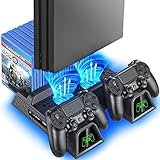
- Multi-functional Design stand for Regular PS4/ PS4 Slim/ PS4 Pro Console: This ps4 stand can cooling & storage your Playstation 4 console, with dual ps4 controller charger station and 12 game slots.
- LED Indicators & Fast Charging Speed: Let you know the charging status at a glance, the red indicator means charging, green light means charging is completed; Say goodbye to USB dongles which take 4 hours when charging, charged through the EXT port would provids just 2-hours.
- Upgraded PS4 Fan Cooler: Turn on the ps4 fan, and Cooling down your Playstation 4 console efficiently, the noise was decreased as low as 50dB, metal bottom helps you to keep your console cool and clam through playing games all the day and night.
- Compatible with PS4/Slim/Pro Console: Put your Playstation 4 Consols on the ps4 cooling stand, more tight design for the PS4 Pro, much reliable to secure your console. (Note: need to use the extra horder included for PS4 slim.)
- Power Supply Devices: PS4 stand comes with a USB cable, support powered by various devices, USB Adapter, USB HUB, Wall adapter, or your ps4 console.
Sony’s safety guidance and opening the console
Sony’s CUH-7102B Safety Guide says, “Never disassemble or modify the system or accessories.” It also states that there are no user-serviceable components inside the system apart from the removable hard disk drive, and warns about electric shock and laser-radiation exposure. This is the safety position in that model-family guide; it is not a statement about the legal effect of repairs in every location. Readers who choose internal repair should understand the risks and use instructions for their exact CUH revision.
Independent reader supportYour contribution helps us test, update, and keep practical guides available for everyone.Is a loud PS4 Pro normal?
There is no established noise threshold here that separates normal from abnormal, and no measured ranking showing that one PS4 Pro revision is universally louder than another. A fan that becomes audible during demanding gameplay is not, by itself, proof of a fault. Mechanical fan symptoms, persistent overheating after placement and vent checks, an overheating warning, or a shutdown are stronger reasons to seek diagnosis.
Quick Recap
Best Value
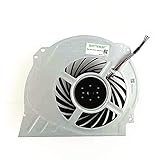
- QUETTERLEE Replacement New Internal Cooling Fan for Sony Playstation 4 Pro Ps4 Pro Fan CUH-7000 CUH-7XXX Cuh-7000Bb01 CUH-7115B CUH-7215B 7000-7500 6X29Frs Series G95C12MS1CJ-56J14 G95C12MS1AJ-56J14 KSB1012H Fan
Rank #4
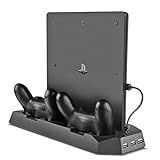
- Multi-functional Dual Charger: Console stand with cooling fan and USB HUB compatible with PS4 Pro as well as PS4 Slim
- All-in-One Design: Dual controller charging dock combined with vertical stand for game console, powerful cooling fans, and USB HUB ports
- Advanced Cooling System: Cooling stand comes with 2 powerful fans to keep your PS4 Pro or PS4 Slim from over-heating even after long play sessions
- Multiple Charging Options: Dual controller charger PLUS additional 3 USB ports to charge or power up to 3 different devices simultaneously
- Space-Saving Design: Compact size that could slip in the gap between home theatre and various devices to maximize your entertainment setup
Product prices and availability are accurate as of the date/time indicated and are subject to change. Any price and availability information displayed on Amazon at the time of purchase will apply.




